Repository navigation
Conversation


|
Thanks for this. The card change is exactly right: driving the sheet's own One change before I merge, in the Wi-Fi and Bluetooth pages' new bottom strip. It's 36 px tall at Two notes, nothing to change here:
On versions: #557 also takes 0.2.108, and git merges two identical version lines without a conflict, so I'll merge this one as 0.2.108 and renumber #557 to 0.2.109 myself. After your fix and your hand check, I'll try it on my 7 Pro and merge. |
|
A correction to my version note above: #542 merged first, as omamobile-shell 0.2.108, so this one will take 0.2.109 when it merges. I'll set that myself, no change needed from you. |

|
A version note: five shell PRs merged today and main is at 0.2.113 now, so this one will take the next free number when it's ready, not 0.2.109 as I said. I'll set it at merge. |

The owner asked that the full-screen pages behind quick settings' tiles
close the same way. The Wi-Fi and Bluetooth pages get a swipe-up strip
at their bottom edge in derekross#553; the Hotspot page now has the same one:
max(28, Style.space(36)) high, a swipe up past 24 px closes it, and the
page's body ends above the strip, so nothing on the page lies under it.

test/all on a PC: 304 ok.

Co-Authored-By: Claude Opus 5.5 <noreply@anthropic.com>
|
A correction to my own follow-up (fa37750). Cutting the strip down to the panel's bottom inset plus f054e06 does it the other way round. The strip is back to
The Hotspot page in #539 gets the same strip (7b0b7a7), so all three pages close the same way. |
|
Thanks for the honest correction, and for finding by hand that the thin What's left before I merge:
Nothing for you to do about this one: your first commit ends with a This one goes in before #539, so the Hotspot page follows the same strip. |
…ed screenshots (public, redacted)

Co-Authored-By: Claude Opus 4.8 <noreply@anthropic.com>
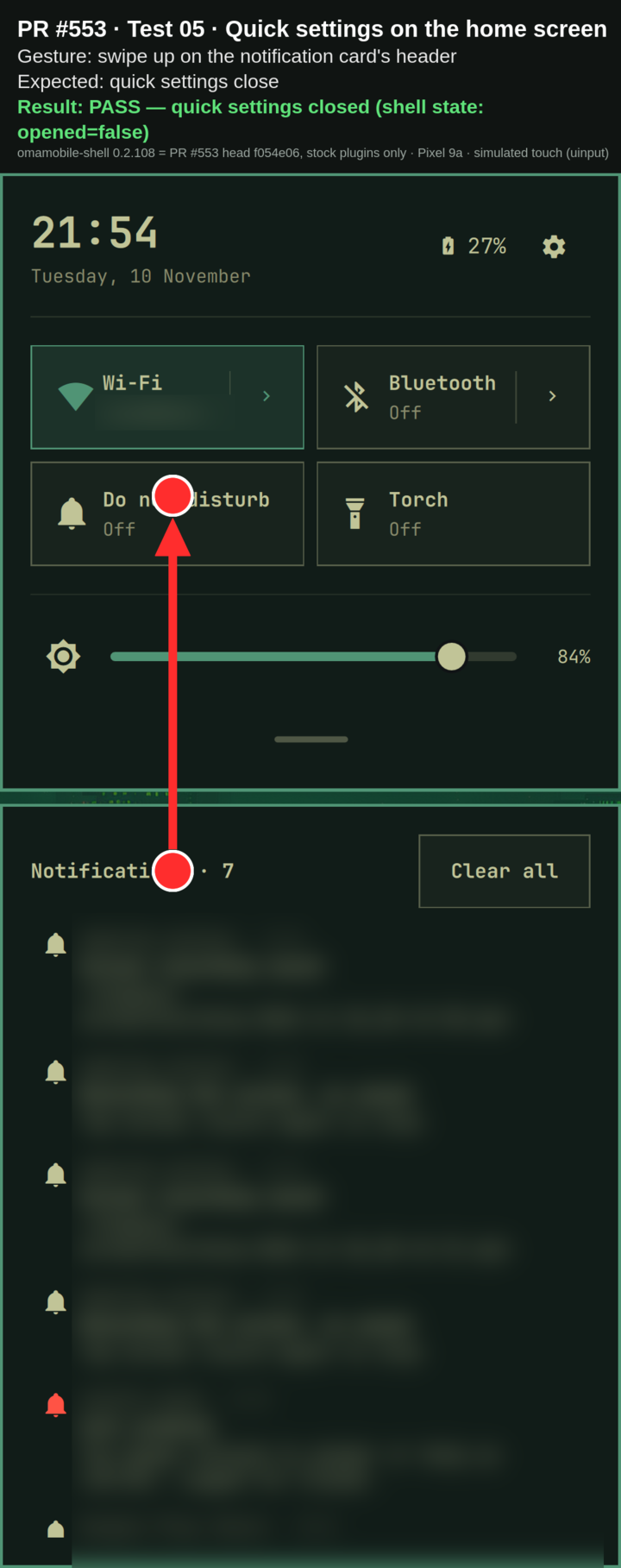
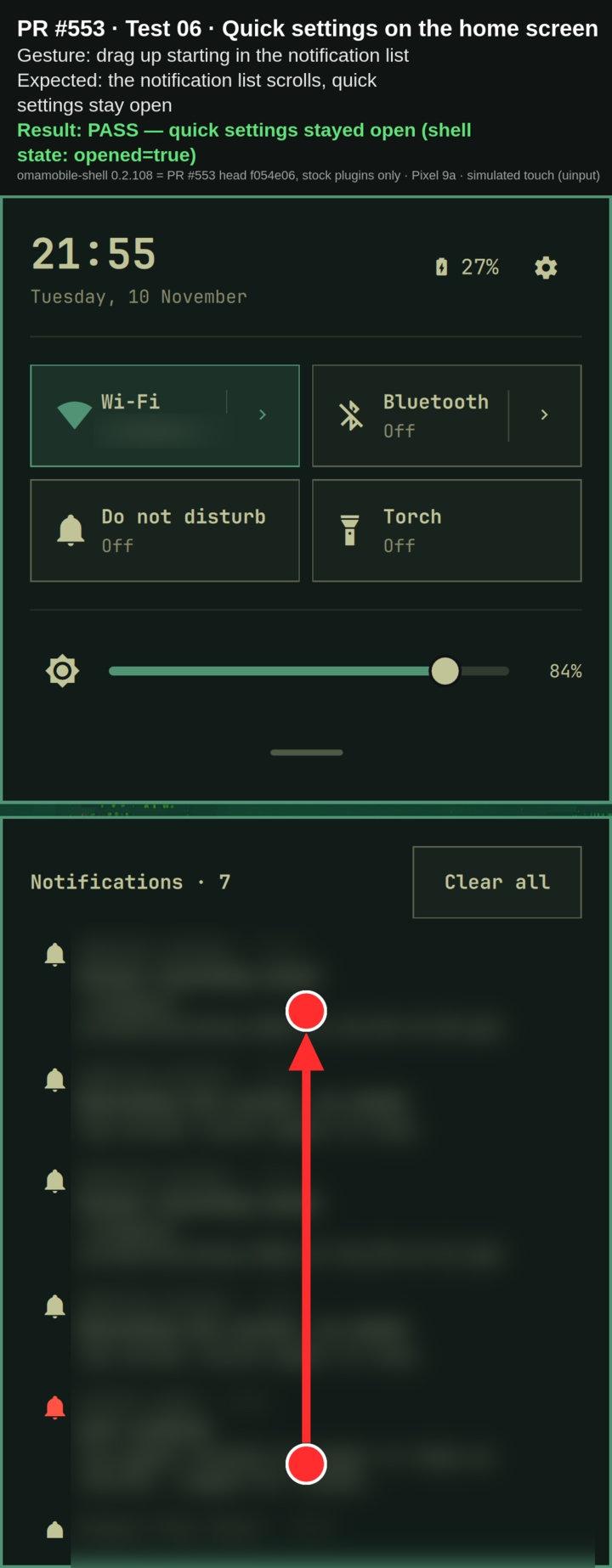
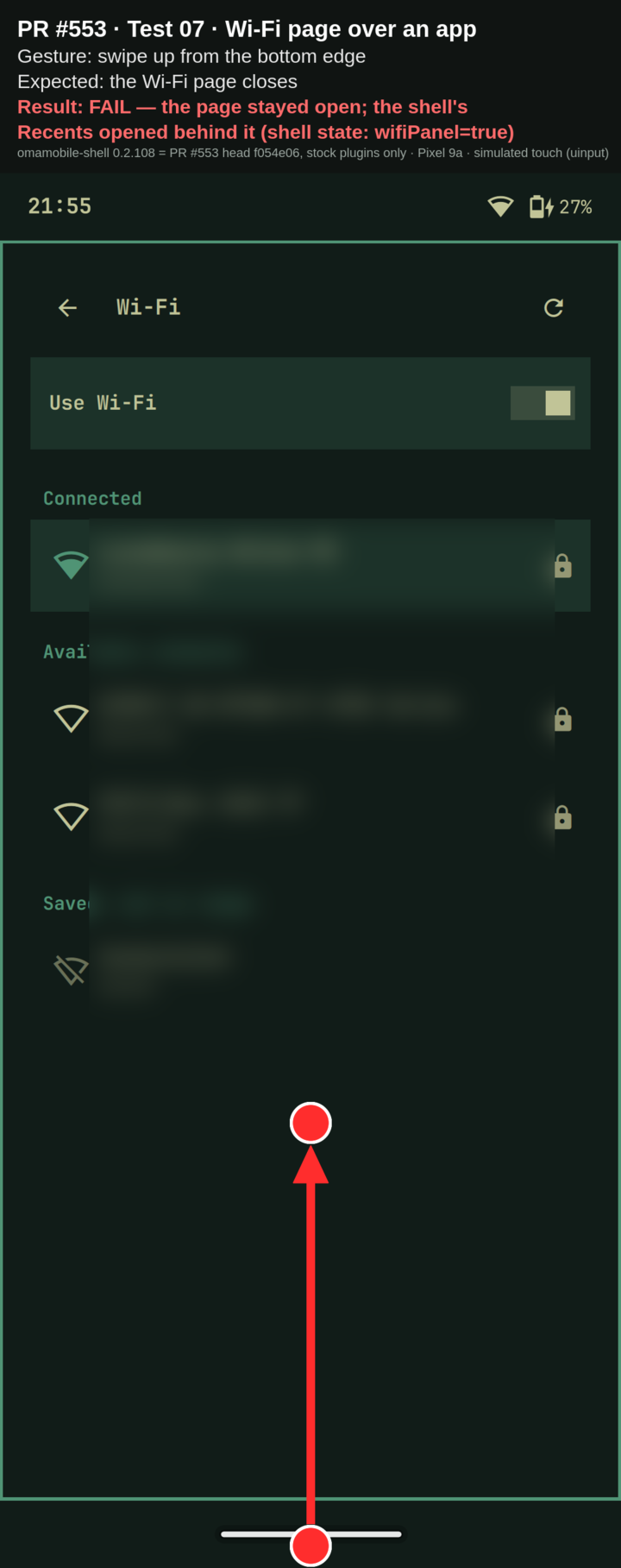
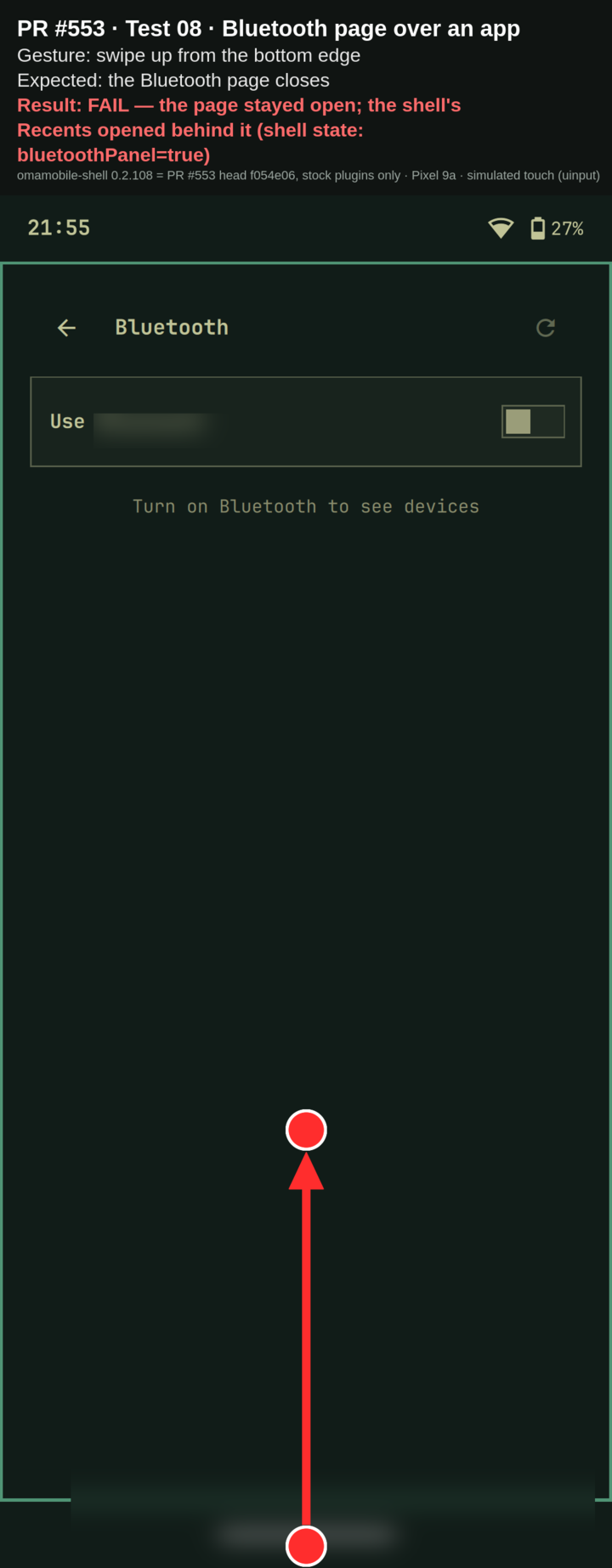
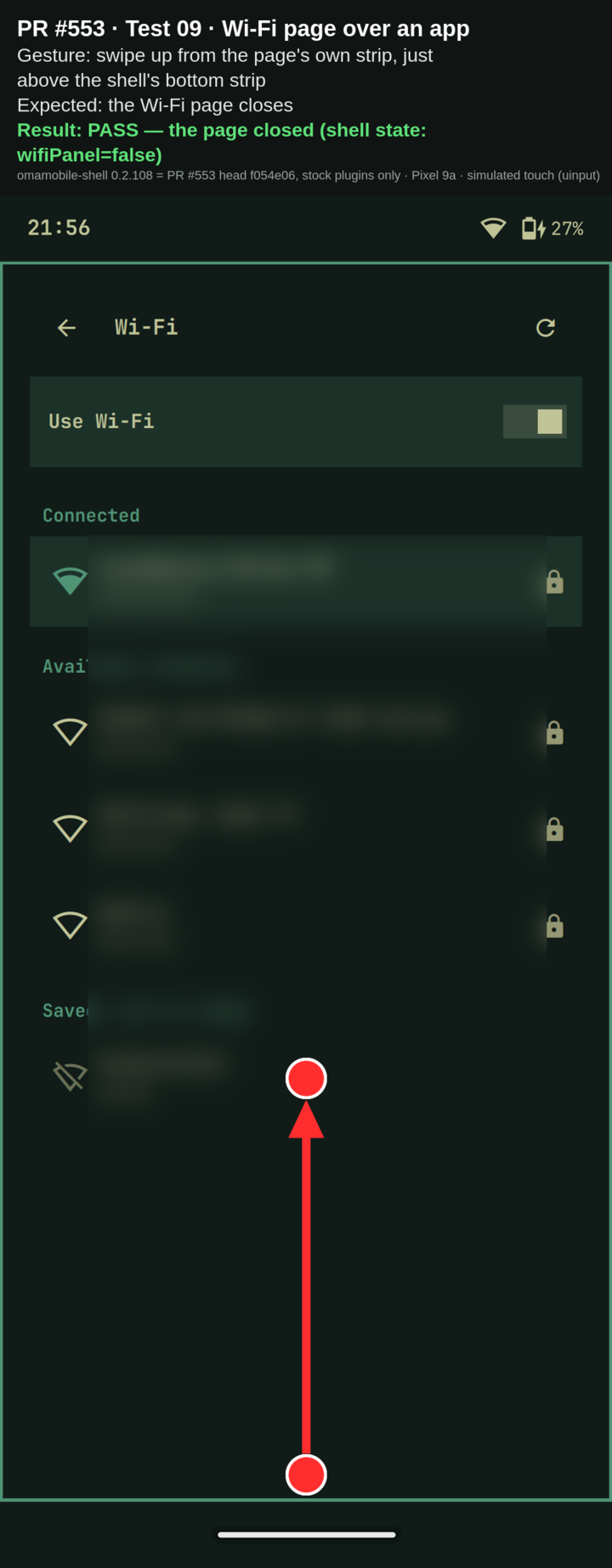
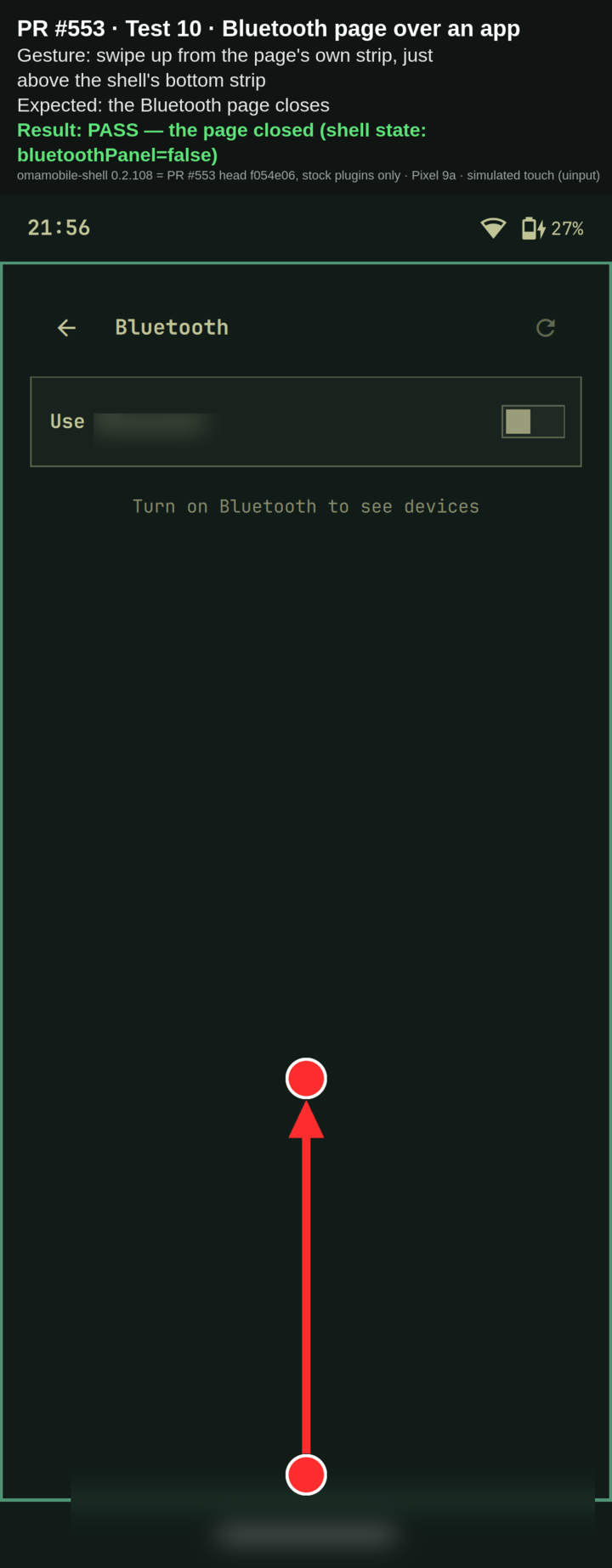
Hardware test — swipe-up to close (Pixel 9a)Tested on a Pixel 9a, Result: 8/10 as expected. On the home screen everything works. The only misses are the two bottom-edge swipes over an app (07, 08): there the page stays open and the shell's Recents opens behind it — the page's own swipe strip still closes it (09, 10).
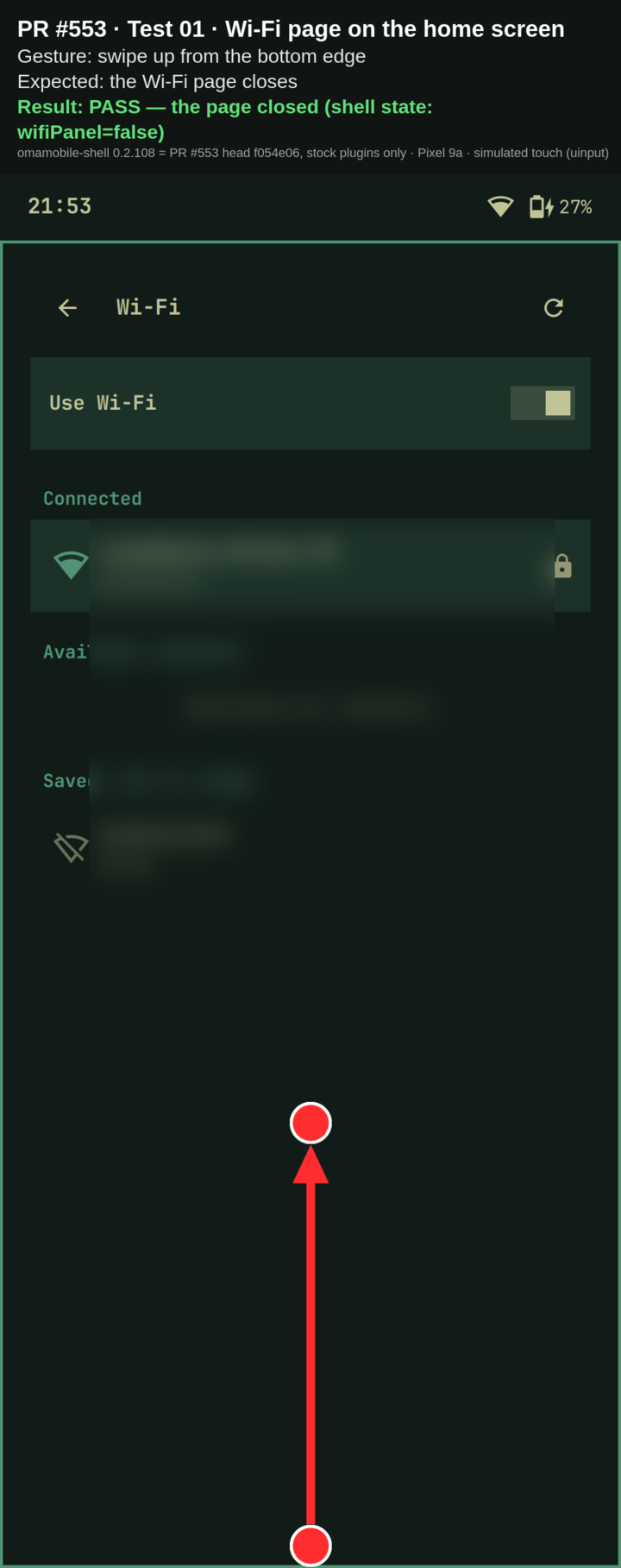
Per-scenario screenshots and recordings01 — Wi‑Fi page (home) — swipe up from the bottom edge ✅Expected: the Wi‑Fi page closes.
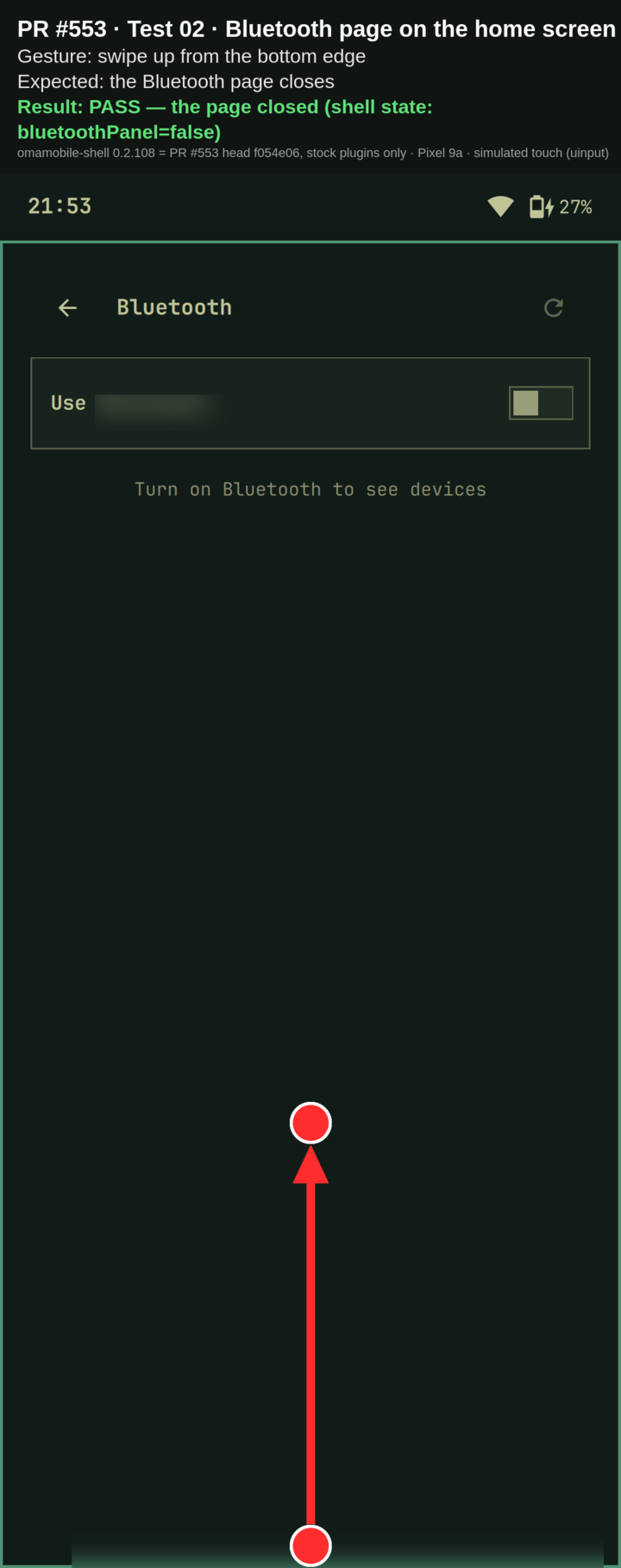
01-wifi-bottom-edge-home.mp402 — Bluetooth page (home) — swipe up from the bottom edge ✅Expected: the Bluetooth page closes.
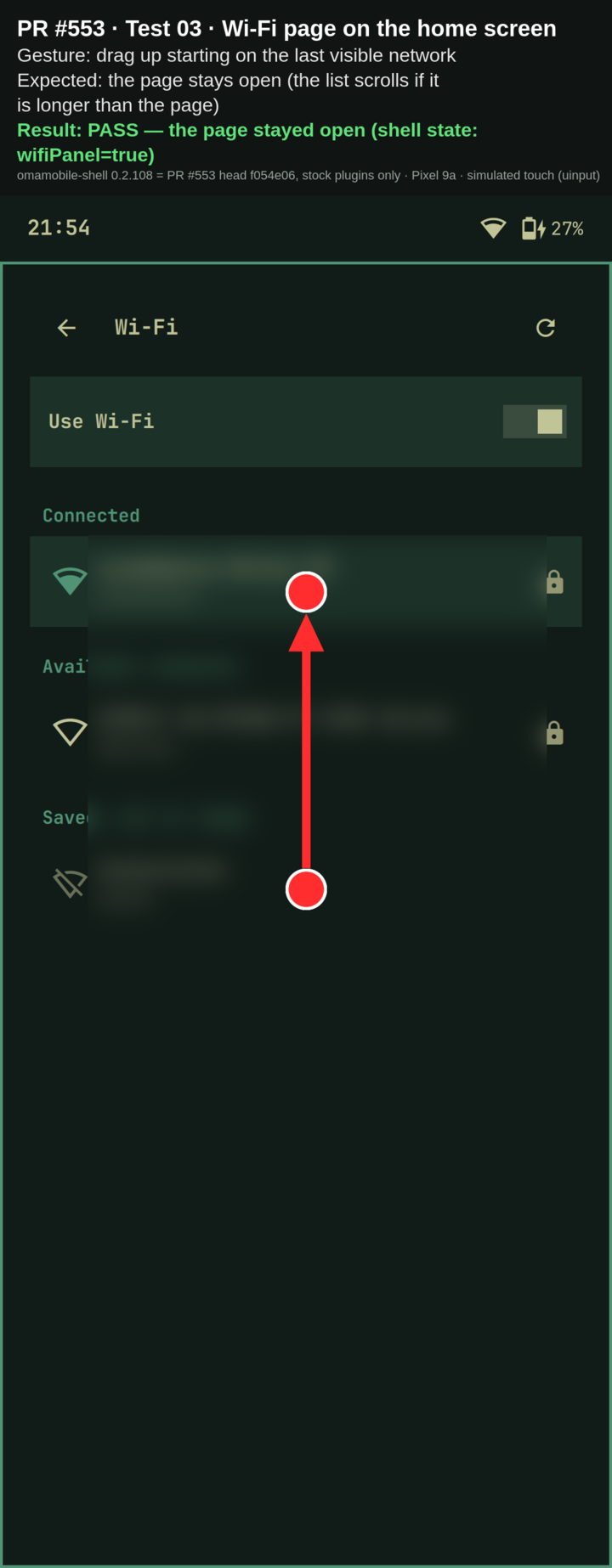
02-bluetooth-bottom-edge-home.mp403 — Wi‑Fi page (home) — drag up starting on the last visible network ✅Expected: the page stays open (the list scrolls).
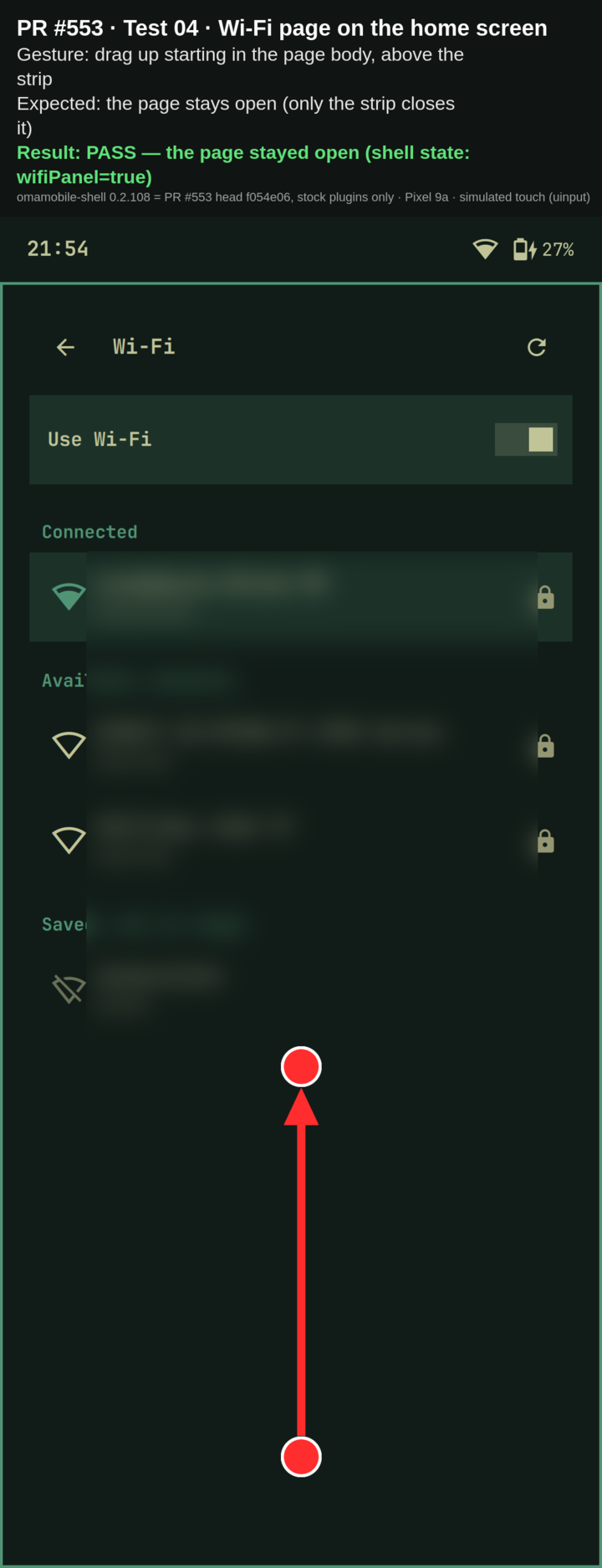
03-wifi-drag-from-last-network-home.mp404 — Wi‑Fi page (home) — drag up in the page body, above the strip ✅Expected: the page stays open (only the strip closes it).
04-wifi-drag-in-body-above-strip-home.mp405 — Quick Settings (home) — swipe up on the notification card header ✅Expected: quick settings close.
05-notification-card-swipe-home.mp406 — Quick Settings (home) — drag up starting in the notification list ✅Expected: the list scrolls, quick settings stay open.
06-notification-list-scroll-home.mp407 — Wi‑Fi page over an app — swipe up from the bottom edge ❌Expected: the Wi‑Fi page closes.
07-wifi-bottom-edge-over-app.mp408 — Bluetooth page over an app — swipe up from the bottom edge ❌Expected: the Bluetooth page closes.
08-bluetooth-bottom-edge-over-app.mp409 — Wi‑Fi page over an app — swipe up from the page's own strip ✅Expected: the Wi‑Fi page closes.
09-wifi-page-strip-over-app.mp410 — Bluetooth page over an app — swipe up from the page's own strip ✅Expected: the Bluetooth page closes.
10-bluetooth-page-strip-over-app.mp4 |
|
Thank you for the test table, the screenshots and the recordings. That 07 and 08 aren't failures of this change. Over an app the page ends What's left:
This still goes in before #539. |

…Fi and Bluetooth panels

Quick settings says "swipe it up to put it away", but only the sheet
took that swipe. The notification card under it had a bare MouseArea that
swallowed every touch, so a swipe up that started on the card (most of
the screen once a few notifications are there) did nothing at all. The
card's MouseArea now moves the sheet's drag.offset, which the card hangs
under, so both cards follow the finger and close past the sheet's own
threshold. The notification list only takes vertical drags when it is
longer than the card; a short list's Flickable took the swipe and could
not scroll anyway.

The Wi-Fi and Bluetooth panels are full screen. On the home screen they
cover the dock, which owns the swipe up there, so only the back arrow got
out of them. A 36 px strip at their bottom edge now closes them on a swipe
up.

test/all checks the three wiring points.

Co-Authored-By: Claude Opus 5.5 <noreply@anthropic.com>
Claude-Session: https://claude.ai/code/session_01176vSdGN6JWgiwDLYXe1ES
The 36 px strip lay over the end of the Wi-Fi and Bluetooth lists, so a
scroll started there closed the page. It now covers only the panel's
bottom inset and the outer gap.

Co-Authored-By: Claude Opus 5.5 <noreply@anthropic.com>
…ith the page ending above it

fa37750 cut the strip to the panel's bottom inset plus the outer gap, so
it no longer lay over the end of the list. On the phone the outer gap is
0 (hypr/phone.lua), which left a strip too thin to hit: a swipe up on the
Wi-Fi page did nothing (the owner, 2026-11-10). The strip is back to
max(28, Style.space(36)), and the page's body now ends above it
(bottomMargin max(the inset, the strip)), so the end of the list is never
under the strip and a scroll there stays a scroll.

test/all on a PC: 301 ok.

Co-Authored-By: Claude Opus 5.5 <noreply@anthropic.com>
…ttom edge over an app

Over an app the launcher's home strip reserves the bottom of the screen
(ExclusionMode.Auto, Launcher.qml's touch: Math.max(44, Style.space(44))),
and the pages' windows fit inside that zone (ExclusionMode.Normal), so the
pages' strip ended above it. A swipe up from the very bottom then started
on the home strip and opened Recents over the page, which stayed open
underneath. On the home screen there is no strip and the page reaches the
bottom, which is why this only showed over an app.

Each page now has a companion window while it is up: anchored to the
bottom, ExclusionMode.Ignore so it reaches the true bottom edge, on the Top
layer above the strip's Bottom layer, and as tall as the page's own strip.
It closes the page on the same swipe, and on a tap, like the scrim. The
page's strip takes the home strip's height (it was Math.max(28,
Style.space(36))), so over an app the companion covers all of the zone the
home strip reserves; with the shorter strip an 8 px band at the top of the
zone still opened Recents. On the home screen the companion lies right
over the page's own strip and the body still ends above it, so it never
reaches the end of the list, the point from the first review. It steps
back while a sheet is up: the password, pairing and rename sheets bring
the on-screen keyboard, and the home strip is the keyboard's strip then.

test/all checks the companion window, its height, and that the page's
strip is the launcher's home strip height.

Co-Authored-By: Claude Opus 5.5 <noreply@anthropic.com>

f054e06 to
7ce4bbf
Compare
den-kloot
changed the title
|
Rebased onto main ( One more change, from testing over an app. A swipe up from the very bottom edge didn't close the Wi-Fi or Bluetooth page while an app was open. The launcher's home strip reserves the bottom 44 px ( Two corrections to my report above. Recents opened over the page, not behind it. And 03 and 04 didn't test what they say: that night only a few networks were in range, the list ended far above the strip, and the "pass" only meant the page stayed open. The test now SKIPs them unless the list reaches the strip, and a page that should stay open needs evidence from the pixels that its content moved up with the drag. Your three points on this head. The touches are scripted (a uinput touchscreen, points from
"–": not run on the phone. "Moved" is how far the list's content moved up for a 263 px drag (03, 04) or 300 px (06); 06 stops at the end of the list.
One thing I saw only in the VM, on the earlier 0.2.117 builds: very fast swipes (20 ms, two motion events) sometimes didn't close the Bluetooth page. That happened from its own strip as well, and also without the companion. The Wi-Fi page and the home strip took every such swipe, and at the suite's 300 ms none missed. I haven't chased it. The test is in #652 ( |
|
Thanks for the rebase and for chasing the over-an-app case down to the exclusive zone. I read I checked the companion's tap and swipe together in a small offscreen probe (the same Nothing more from you is needed for this one. What's left is mine: the run on my 7 Pro (both pages on the home screen and over an app, a long network list, the password sheet with the keyboard up, the card's swipe with a long notification list, and Back next to the swipe). I'll use your suite from #652 alongside my thumb. Two follow-ups, neither for this pull request:
|
…ithout the password on stdin

Review of derekross#652. A run whose SSH session or USB link dropped got SIGHUP
and exited without its cleanup: do-not-disturb stayed on, the tile layout
stayed aside, the terminal (in its own session) stayed open. SIGHUP now
ends a run through the same cleanup as SIGTERM and Ctrl-C, the cleanup
ignores a second signal and has a timeout on every command, and
results.json is written with "interrupted". Each change is recorded in
~/.local/state/phone-gesture-test/run.json before it is made and the file
goes once everything is back, so what a run that couldn't clean up left
(SIGKILL, a power cut) is put back at the next start or by --cleanup:
do-not-disturb, the tile layout, the terminal, the fictional
notifications, the unread mark (only ever moved back), an open page and
the workspace.

GESTURE_TEST_SUDO_PW is read once and removed from the environment, so
the terminal no longer keeps it. The helper is started with sudo -n after
sudo -S -v: with a ticket from a moment ago, sudo -S didn't read the
password and the helper took it for its first swipe.

Also: the lock and a call's screen are checked before every gesture;
Finger.close() never raises (a sudo child can't be signalled by the
user); missing commands are named with their packages at the start; the
CI test no longer leaves tools/__pycache__; the AGENTS row says where it
has run so far instead of "any device".

On a Pixel 9a (omamobile-shell 0.2.119 from derekross#553): a hang-up mid-run (the
pty's master closed, as sshd does) left nothing changed, where f75cba3
left do-not-disturb on, the tiles aside and the terminal open; a SIGKILL
mid-run was put back by --cleanup and by the next run; with a live sudo
ticket f75cba3's 01 ended in ERROR (the helper parsed the password) and
this one passed; the full suite 11/13 twice (03/04 SKIP: few networks in
range at night), as before.

Co-Authored-By: Claude Opus 5.5 <noreply@anthropic.com>


What and why
Quick settings' header says "Tap outside it, swipe it up, or press Escape to put it away", but only the sheet took that swipe:
MouseArea { anchors.fill: parent }that swallowed every touch, so a swipe up that started on the card (most of the screen once a few notifications are there) did nothing at all. The card's MouseArea now moves the sheet'sdrag.offset, which the card already hangs under (shadeTopfollowssheet.y), so both cards follow the finger and close past the sheet's own threshold (Style.space(60)). The notification list only takes vertical drags when it is longer than the card (interactive: contentHeight > height + 1, assheetFlickalready does); before, a short list's Flickable took the swipe and could not scroll anyway.DragHandler, y only), as tall as the launcher's home strip (Math.max(44, Style.space(44))), now closes them on a swipe up past 24 px, the same threshold the home strip uses. Over an app the home strip reserves that band, so while a page is up a companion window takes it at the true bottom edge (see the comments).Nothing else in the sheet changes: tiles, sliders, the pager's sideways swipe and a row's sideways swipe keep their own handlers.
Device and build
uname -r): 7.3.0-rc6-omamobile-push1-gcbb1a7eb0a78 (a local debug build, see below)Checks (no phone needed)
tools/pr-check upstream/mainpassestests/all: two failures, both intests/kernel-pr-check("the kernel config doesn't configure", "a new board with a sibling's message"); they need a kernel tree the phone checkout doesn't have, and this change touches no kernel file. Not re-run onmainto compare.packages/omamobile-shell/test/allpasses (316 ok on the rebased head)versionbumped to 0.2.119, in the commit subject (rebased onto main at 0.2.118)Co-Authored-By:trailer, noSigned-off-by:New static checks in
test/all: the card follows a swipe up throughdrag.offset, a short list leaves the swipe to the card, and both panels close on a swipe up from their bottom edge. The gestures themselves are driven on the phone bytools/phone-gesture-test(#652); its results are in the comments.On the phone
~/.config/omarchy/plugins/omamobile.quicksettings) over omamobile-shell 0.2.100, not a built 0.2.108 package. The shell restarted with no QML errors; quick settings opened and closed from the bar. Since then, the built 0.2.119 package installed as a fresh install, with scripted touches (tools: phone-gesture-test, on-phone gesture tests of the quick-settings pages #652), on the 9a and in an aarch64 VM: see the comments.userdata, weakens the storage guard, or reads registers from userspace (AGENTS.md §1)The phone's kernel is a local build (
gcbb1a7eb0a78: the 9a daily tree plus an ACPM timeout debug print and the CP-link experimentg7423da0736b1); this change doesn't touch anything they affect.🤖 Generated with Claude Code
https://claude.ai/code/session_01176vSdGN6JWgiwDLYXe1ES