docs(readme): add Simplified Chinese translation #257
There are no files selected for viewing
| Original file line number | Diff line number | Diff line change |
|---|---|---|
| @@ -0,0 +1,218 @@ | ||
| <div align="center"> | ||
|
|
||
| <img src="assets/godoxy.png" width="200"> | ||
|
Contributor
There was a problem hiding this comment. 📐 Maintainability & Code Quality | 🟡 Minor | ⚡ Quick win Add alternate text to both HTML images. The logo and WebUI screenshot omit Proposed fix-<img src="assets/godoxy.png" width="200">
+<img src="assets/godoxy.png" width="200" alt="GoDoxy logo">
-<img src="screenshots/webui.jpg" style="max-width: 650">
+<img src="screenshots/webui.jpg" style="max-width: 650" alt="GoDoxy WebUI">Also applies to: 20-20 🧰 Tools🪛 markdownlint-cli2 (0.23.2)[warning] 3-3: Images should have alternate text (alt text) (MD045, no-alt-text) 🤖 Prompt for AI AgentsSource: Linters/SAST tools |
||
|
|
||
| [](https://sonarcloud.io/summary/new_code?id=yusing_go-proxy) | ||
|  | ||
| [](https://sonarcloud.io/summary/new_code?id=go-proxy) | ||
|
Contributor
There was a problem hiding this comment. 🎯 Functional Correctness | 🟡 Minor | ⚡ Quick win Use one SonarCloud project key for the badge and link. The badge URL uses 🤖 Prompt for AI Agents |
||
|
|
||
|  | ||
| [](https://discord.gg/umReR62nRd) | ||
|
|
||
| 轻量、易用、高性能,且带有 WebUI 的反向代理。 | ||
|
|
||
| <h5> | ||
| <a href="https://docs.godoxy.dev">网站</a> | <a href="https://docs.godoxy.dev/Home.html">文档</a> | <a href="https://discord.gg/umReR62nRd">Discord</a> | ||
| </h5> | ||
|
|
||
| <h5><a href="README.md">EN</a> | 简体中文 | <a href="README_CHT.md">繁體中文</a></h5> | ||
|
|
||
| <img src="screenshots/webui.jpg" style="max-width: 650"> | ||
|
|
||
| 有疑问?欢迎询问 [ChatGPT](https://chatgpt.com/g/g-6825390374b481919ad482f2e48936a1-godoxy-assistant)!(感谢 [@ismesid](https://github.com/arevindh)) | ||
|
|
||
| </div> | ||
|
|
||
| ## 在线演示 | ||
|
|
||
| <https://demo.godoxy.dev> | ||
|
|
||
| ## 快速开始 | ||
|
|
||
| 配置通配符 DNS 记录,使其指向运行 `GoDoxy` 的主机,例如: | ||
|
|
||
| - A 记录:`*.domain.com` -> `10.0.10.1` | ||
| - AAAA 记录(如果使用 IPv6):`*.domain.com` -> `::ffff:a00:a01` | ||
|
Comment on lines
+34
to
+35
Contributor
There was a problem hiding this comment. 🎯 Functional Correctness | 🟡 Minor | ⚡ Quick win Do not publish the IPv4-mapped value as an AAAA record.
🤖 Prompt for AI AgentsSource: MCP tools |
||
|
|
||
| > [!NOTE] | ||
| > GoDoxy 应在 `host` 网络模式下运行,请勿更改。 | ||
| > | ||
| > 如需更改监听端口,请修改 `.env`。 | ||
|
|
||
| 1. 新建一个用于存放 Docker Compose 和配置文件的目录。 | ||
|
|
||
| 2. 在该目录中运行安装脚本,或进行[手动安装](#手动安装) | ||
|
|
||
| ```shell | ||
| /bin/sh -c "$(curl -fsSL https://raw.githubusercontent.com/yusing/godoxy/main/scripts/setup.sh)" | ||
| ``` | ||
|
|
||
| 3. 使用生成的 `compose.yml` 启动 Docker Compose 服务: | ||
|
|
||
| ```shell | ||
| docker compose up -d | ||
| ``` | ||
|
|
||
| 4. 现在可以通过 WebUI `https://godoxy.yourdomain.com` 进行其他配置 | ||
|
|
||
| ## 主要功能 | ||
|
|
||
| - **简单部署** | ||
| - 使用 [Docker 标签或路由文件](https://docs.godoxy.dev/Docker-labels-and-Route-Files)配置路由 | ||
| - 通过 WebUI 管理路由、配置、容器、日志、指标和运行时间 | ||
| - 支持[多节点 Docker 配置](https://docs.godoxy.dev/Configurations#multi-docker-nodes-setup) | ||
| - **自动路由** | ||
| - 自动发现 Docker 和 Podman 容器 | ||
| - 在配置或容器状态发生变化时热重载 | ||
| - 通过 [DNS-01 提供商](https://docs.godoxy.dev/DNS-01-Providers)管理 Let's Encrypt 证书 | ||
| - **流量管理** | ||
| - HTTP 反向代理 | ||
| - TCP/UDP 端口转发 | ||
| - OpenID Connect SSO | ||
| - ForwardAuth 集成,例如 TinyAuth | ||
| - [HTTP 中间件](https://docs.godoxy.dev/Middlewares) | ||
| - [自定义错误页面](https://docs.godoxy.dev/Custom-Error-Pages) | ||
| - **访问控制** | ||
| - IP/CIDR 规则 | ||
| - 基于国家/地区和时区的规则(需要 MaxMind 账户) | ||
| - 访问日志 | ||
| - 定期生成访问摘要 | ||
| - **空闲休眠** | ||
| - 根据流量停止和唤醒 Docker 容器 | ||
| - 根据流量停止和唤醒 Proxmox LXC 容器 | ||
| - **Proxmox 集成** | ||
| - 自动将路由绑定到节点或 LXC 容器 | ||
| - 通过 WebUI 启动、停止和重启 LXC 容器 | ||
| - 通过 WebSocket 实时传输节点和 LXC 日志 | ||
| - **平台支持** | ||
| - Linux amd64 | ||
| - Linux arm64 | ||
|
|
||
| ## GoDoxy 的工作原理 | ||
|
|
||
| 1. 列出所有容器 | ||
| 2. 读取每个容器的名称、标签和端口配置 | ||
| 3. 在适用时创建路由(类似于 NPM 中的“Virtual Host”) | ||
| 4. 监控容器和配置变化并自动更新 | ||
|
|
||
| > [!NOTE] | ||
| > GoDoxy 使用 `proxy.aliases` 标签作为子域名;如果未设置,则默认使用 Docker Compose 中的 `container_name` 字段。 | ||
| > | ||
| > 例如,设置标签 `proxy.aliases: qbt` 后,可以通过 `qbt.domain.com` 访问应用。 | ||
|
|
||
| ## 截图 | ||
|
|
||
| ### 空闲休眠 | ||
|
|
||
|  | ||
|
|
||
| ### 指标与日志 | ||
|
|
||
| <div align="center"> | ||
| <table> | ||
| <tr> | ||
| <td align="center"><img src="screenshots/routes.jpg" alt="Routes" width="350"/></td> | ||
| <td align="center"><img src="screenshots/servers.jpg" alt="Servers" width="350"/></td> | ||
| </tr> | ||
| <tr> | ||
| <td align="center"><b>路由</b></td> | ||
| <td align="center"><b>服务器</b></td> | ||
| </tr> | ||
| </table> | ||
| </div> | ||
|
|
||
| ## Proxmox 集成 | ||
|
|
||
| GoDoxy 可以通过已配置的提供商自动发现和管理 Proxmox 节点及 LXC 容器。 | ||
|
|
||
| ### 自动绑定路由 | ||
|
|
||
| 路由会通过反向查询自动关联到 Proxmox 资源: | ||
|
|
||
| 1. **节点级路由** (VMID = 0):主机名、IP 或别名与 Proxmox 节点名称或 IP 匹配时 | ||
| 2. **容器级路由** (VMID > 0):主机名、IP 或别名与 LXC 容器匹配时 | ||
|
|
||
| 这样无需手动绑定即可完成代理配置: | ||
|
|
||
| ```yaml | ||
| routes: | ||
| pve-node-01: | ||
| host: pve-node-01.internal | ||
| port: 8006 | ||
| # 自动关联到 Proxmox 节点 pve-node-01 | ||
| ``` | ||
|
|
||
| ### WebUI 管理 | ||
|
|
||
| 可以通过 WebUI: | ||
|
|
||
| - **LXC 生命周期管理**:启动、停止和重启容器 | ||
| - **节点日志**:实时传输节点的 journalctl 或日志文件输出 | ||
| - **LXC 日志**:实时传输容器的 journalctl 或日志文件输出 | ||
|
|
||
| ## 更新 / 卸载系统代理 (System Agent) | ||
|
|
||
| 安装脚本同时支持 systemd 和 Alpine/OpenRC(`rc-service`)主机。 | ||
|
|
||
| 更新: | ||
|
|
||
| ```bash | ||
| sh -c "$(curl -fsSL https://github.com/yusing/godoxy/raw/refs/heads/main/scripts/install-agent.sh)" -- update | ||
| ``` | ||
|
|
||
| 卸载: | ||
|
|
||
| ```bash | ||
| sh -c "$(curl -fsSL https://github.com/yusing/godoxy/raw/refs/heads/main/scripts/install-agent.sh)" -- uninstall | ||
| ``` | ||
|
|
||
| ## 手动安装 | ||
|
|
||
| 1. 创建 `config` 目录,然后将 `config.example.yml` 下载到 `config/config.yml` | ||
|
|
||
| `mkdir -p config && wget https://raw.githubusercontent.com/yusing/godoxy/main/config.example.yml -O config/config.yml` | ||
|
|
||
| 2. 将 `.env.example` 下载到 `.env` | ||
|
|
||
| `wget https://raw.githubusercontent.com/yusing/godoxy/main/.env.example -O .env` | ||
|
|
||
| 3. 将 `compose.example.yml` 下载到 `compose.yml` | ||
|
|
||
| `wget https://raw.githubusercontent.com/yusing/godoxy/main/compose.example.yml -O compose.yml` | ||
|
|
||
| ### 目录结构 | ||
|
|
||
| ```shell | ||
| ├── certs | ||
| │ ├── cert.crt | ||
| │ └── priv.key | ||
| ├── compose.yml | ||
| ├── config | ||
| │ ├── config.yml | ||
| │ ├── middlewares | ||
| │ │ ├── middleware1.yml | ||
| │ │ ├── middleware2.yml | ||
| │ ├── provider1.yml | ||
| │ └── provider2.yml | ||
| ├── data | ||
| │ ├── metrics # 指标数据 | ||
| │ │ ├── uptime.json | ||
| │ │ └── system_info.json | ||
| └── .env | ||
| ``` | ||
|
|
||
| ## 从源码构建 | ||
|
|
||
| 1. 克隆仓库:`git clone https://github.com/yusing/godoxy --depth=1` | ||
|
|
||
| 2. 如果尚未安装,请安装或升级 [Go (>=1.22)](https://go.dev/doc/install) 和 [`shadowtree`](https://github.com/yusing/shadowtree) | ||
|
|
||
| 3. 如果之前使用 Go 1.22 以下版本构建过,请运行 `go clean -cache` 清除缓存 | ||
|
|
||
| 4. 使用 `shadowtree mod-tidy` 获取依赖项 | ||
|
|
||
| 5. 使用 `shadowtree build` 构建二进制文件 | ||
|
|
||
| ## Star History | ||
|
|
||
| [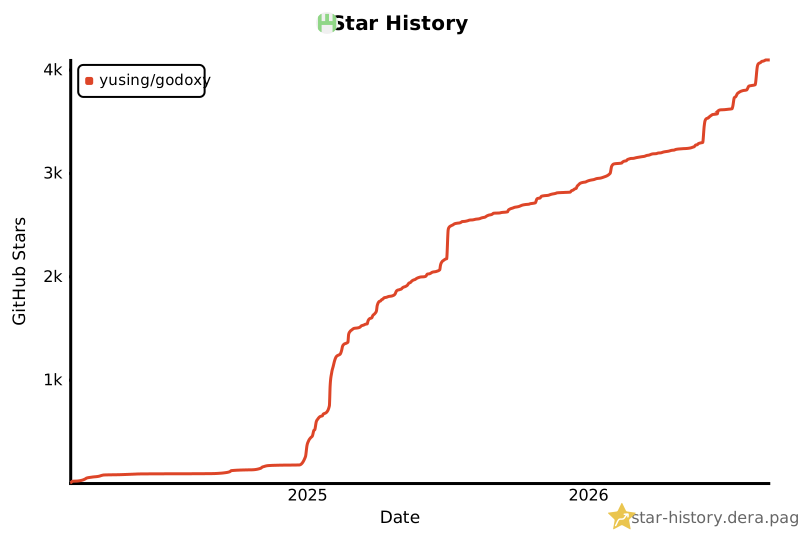](https://star-history.dera.page/#yusing/godoxy&Date) | ||

There was a problem hiding this comment.
Choose a reason for hiding this comment
The reason will be displayed to describe this comment to others. Learn more.
📐 Maintainability & Code Quality | 🟡 Minor | ⚡ Quick win
Add a top-level heading.
README_CHS.mdstarts with a<div>and has no Markdown H1. This triggers MD041 and leaves the document without a top-level heading for document navigation. Add# GoDoxy, or apply the same documented exception to all README variants.Proposed fix
+# GoDoxy
 <div align="center">
📝 Committable suggestion
🧰 Tools
🪛 markdownlint-cli2 (0.23.2)
[warning] 1-1: First line in a file should be a top-level heading
(MD041, first-line-heading, first-line-h1)
🤖 Prompt for AI Agents
Source: Linters/SAST tools