
基于 M5Stack 官方固件扩展:在独立 AGENT TASKS 菜单中,左侧显示 Codex、右侧显示 Claude 的状态、阶段与待办,顶部独立显示完成百分比,支持进行中优先排序、转圈图标和动态省略号。
- 中文安装与使用说明
- 验证记录与已知限制
firmware/:官方 ESP-IDF / Mooncake 固件及看板 App。gateway/:独立 Python MCP 网关与 Agent 适配器,读取本机会话状态,经 MCP 更新快照。scripts/:macOS 常驻服务安装与本机固件默认配置脚本。
设备通过 Wi-Fi HTTP 拉取快照;网关的其它 WebSocket 设备控制功能面向其上游替代固件,本项目官方固件不提供那些设备控制功能。公开源码不含个人令牌。网关源码及第三方许可见 gateway/LICENSE 与 gateway/LICENSE-THIRD-PARTY。

在 macOS 上安装 Python 3.12 和 uv,从仓库根目录运行以下命令,并将 IP 换成电脑当前的局域网 IPv4 地址:
python3 scripts/install-agent-dashboard-macos.py --host-ip 192.168.1.20安装器会启动一个共享 MCP 网关,以及 Codex、Claude 的本机会话监视器。设备连接地址和令牌保存在 ~/.config/stackchan-agent-dashboard/设备连接信息.txt。在 StackChan 上打开 SETUP → Apps → Agent 看板,填写其中的地址和令牌,测试并保存;设备需先连接同一局域网 Wi-Fi。详细的手动启动、网关地址变化和固件配置方法见中文配置说明。
Codex 监视器自动报告桌面主会话的工作状态;桌面目前没有可用的原生计划清单事件,因此 Codex 需要把当前计划显式提交给看板。使用主会话的 CODEX_THREAD_ID,通过仓库的 AGENTS.md 约定调用:
用户可以先对 Codex 说:
请把这项工作拆成不超过 12 条短待办,开始执行前同步计划;每当任务开始、完成或计划变化时,都更新状态并按本仓库 AGENTS.md 的 StackChan 待办同步约定提交完整清单。只同步任务标题和状态。
~/.local/share/stackchan-agent-dashboard/.venv/bin/python \
  -m stackchan_mcp.agent_adapters.runner codex-plan <<'JSON'
{"stage":"实现看板","plan":[{"step":"完成界面","status":"completed"},{"step":"验证设备显示","status":"in_progress"},{"step":"更新使用文档","status":"pending"}]}
JSON
每次提交的是该会话的完整待办清单,最多 12 项;状态使用 pending、in_progress、completed。计划变化时提交更新后的清单。不要使用子 Agent 的会话 ID。
Claude 监视器读取本机 Claude Code 主会话记录。Claude 成功执行 TaskCreate、TaskUpdate 或 TodoWrite 后,监视器会同步任务标题和状态;结束回合后保留最后清单。用户可以对 Claude 说:
请先用任务清单把工作拆成不超过 12 项;执行时使用任务工具创建待办,并在开始、完成或调整任务时及时更新状态,这样我可以在 StackChan 上查看进度。
没有任务工具记录时,右栏仍会显示状态和阶段,但任务区为空。
打开 Launcher 中的 AGENT TASKS:左栏为 Codex,右栏为 Claude。每栏展示 Agent 状态、当前阶段和最多 12 项任务,进行中的任务排在前面;栏标题右侧独立显示该 Agent 的整数完成百分比,计算方式为“已完成数 ÷ 当前清单总数”,无任务时显示 --%。工作时会显示转圈和动态省略号。网关或 Wi-Fi 暂时断开时,设备保留最近一次成功取得的快照。
看板只接收短阶段、任务标题、状态和会话生命周期,不上传提示词、对话正文、文件路径或工具参数。Codex 的原生计划事件与 Claude 新会话任务采集限制,以及设备验证记录,见看板配置与验证文档和验证记录。
以下保留官方项目介绍。
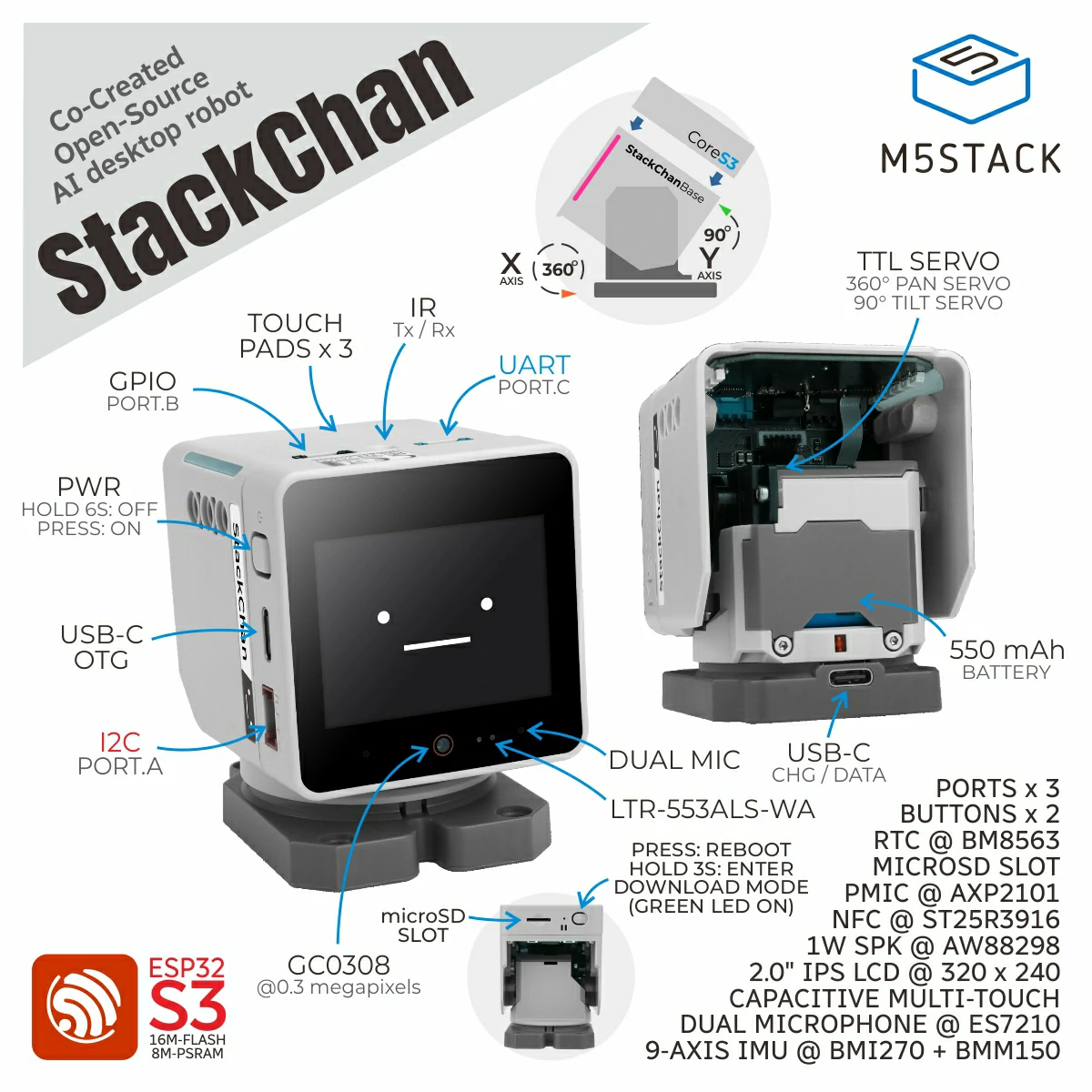
Here are StackChan related open-source resources, including source code of the StackChan firmware, remote controller firmware, mobile app (iOS and Android), and server.
Update of this repo could be a little late than the released firmware and mobile app.

StackChan is a super kawaii AI desktop robot co-created by M5Stack and the user community. It uses the M5Stack flagship IoT development kit CoreS3 as its main controller, powered by an ESP32-S3 SoC featuring a 240 MHz dual-core processor, with 16MB Flash and 8MB PSRAM onboard, and supporting Wi-Fi and BLE. The main unit also integrates a 2.0-inch capacitive touch display with a high-strength glass cover, a 0.3 MP camera, a proximity & ambient light sensor, a 9-axis IMU (accelerometer + gyroscope + magnetometer), a microSD card slot, a 1W speaker, dual microphones, and power/reset buttons.
The robot body, connected to the main unit, includes a USB-C interface for power and data, a 550 mAh battery, two feedback servos (360-degree continuous rotation on the horizontal axis and 90-degree movement on the vertical axis), two rows totaling 12 RGB LEDs, infrared transmitter and receiver, a three-zone touch panel, and a full-featured NFC module.
The factory firmware is feature-rich, including an AI Agent, lively and expressive animations, ESP-NOW wireless remote control, and online app downloads. It can connect to a mobile app for video viewing, remote avatar control, and more, and also supports online updates (OTA). The product also supports programming via Arduino, UiFlow2, and other methods, and can connect to various expansion units in the M5Stack ecosystem, making it easy to implement a wide range of custom functions.
⚠️ Do not forcibly rotate any movable parts connected to the motors by hand when you are unsure whether the motors are powered and under control, as this may cause hardware damage.
-
Purchase link: M5Stack Official Store | 淘宝 Taobao
-
Board support package: https://github.com/m5stack/StackChan-BSP
Thank you to the contributors of the StackChan community, especially:
 |
 |
|---|---|
| @stack_chan | @mongonta555 |
| Shinya Ishikawa | Takao Akaki |