


RcloneTray is a simple cross-platform GUI for Rclone and is intended to provide a free alternative to Mountain Duck.
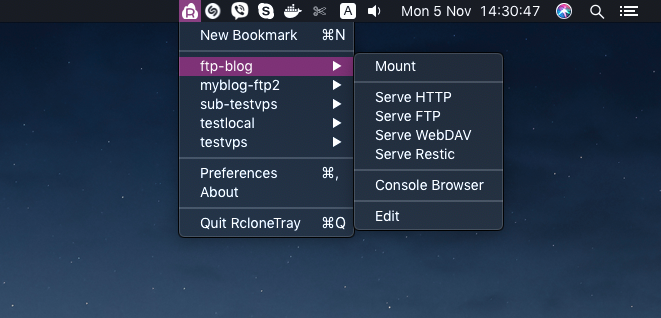
- 🗂️ Mount remote storage as local drives
- 🔄 Sync files between local and remote (upload/download)
- 📡 Serve remotes via HTTP, FTP, WebDAV, or Restic
- 🔐 Secure - context isolation enabled, sandboxed renderer
- 💾 Bundled Rclone - works out of the box, no installation required
- 🖥️ Cross-platform - Windows, macOS, and Linux
- 🌙 Dark mode - automatic light/dark theme support
Download the latest release for your platform:
| Platform | Architecture | Download |
|---|---|---|
| Windows | x64, arm64 | .exe installer |
| macOS | Intel & Apple Silicon | .dmg |
| Linux | x64 | .AppImage, .deb |
See the Development section below.
- Windows 7/8/10/11 (x64, arm64)
- macOS 10.10 and later (Intel and Apple Silicon)
- GNU/Linux (x64), DE with tray icons support
To use the mount feature, install the appropriate FUSE driver:
| OS | Required Package |
|---|---|
| Windows | WinFsp |
| macOS | macFUSE |
| Linux | fuse (sudo apt install fuse on Debian/Ubuntu) |
💡 Tip: As an alternative to mounting, you can use the WebDAV serve feature.
- Launch RcloneTray - the app starts in your system tray
- Create a bookmark - click "New Bookmark" from the tray menu
- Select a provider - choose your cloud storage (S3, Google Drive, Dropbox, etc.)
- Configure - enter your credentials and settings
- Use - mount, sync, or serve your remote storage from the tray menu
How do I use my own Rclone installation?
Go to Preferences → Rclone tab → uncheck "Use bundled Rclone".
How do I add authentication to serving?
Go to Preferences → Serving tab and enter your username and password.
Why can't I mount my remote?
Make sure you have the required FUSE driver installed for your OS. See Requirements.
Where is the config file stored?
RcloneTray uses the default Rclone config location:
- Windows:
%APPDATA%\rclone\rclone.conf - macOS:
~/.config/rclone/rclone.conf - Linux:
~/.config/rclone/rclone.conf
- Node.js v20 or later
- npm
git clone https://github.com/ysalitrynskyi/RcloneTray
cd RcloneTray
npm install| Script | Description |
|---|---|
npm start |
Build and start the app |
npm run build |
Compile TypeScript |
npm run typecheck |
Run type checking |
npm run lint |
Run ESLint |
npm run test |
Run unit and integration tests |
npm run test:e2e |
Run E2E tests |
npm run dist |
Create distribution packages |
RcloneTray/
├── src/                    # TypeScript source files
│   ├── main.ts            # Main Electron process
│   ├── tray.ts            # System tray management
│   ├── rclone.ts          # Rclone integration
│   ├── settings.ts        # Settings management
│   ├── dialogs.ts         # Dialog window management
│   ├── dialogs-preload.ts # Preload script (context bridge)
│   ├── types.ts           # Shared TypeScript types
│   └── ui/                # UI assets (HTML, CSS, icons)
├── dist/                   # Compiled JavaScript
├── tests/                  # Test files
└── rclone/                 # Bundled rclone binaries
# Current platform
npm run dist

# All platforms (requires appropriate build environment)
npm run publish- Redesigned Preferences UI - modern sidebar navigation with light/dark mode
- Migrated to TypeScript with strict type checking
- Fixed all dialog issues - Preferences, Add/Edit Bookmark now work correctly
- Modernized Electron APIs - proper context isolation, no deprecated APIs
- Security hardening - sandboxed renderer, removed enableRemoteModule
- Serving authentication - username/password support for serve commands
- Comprehensive test suite - unit, integration, and E2E tests
- CI pipeline - GitHub Actions for automated testing and builds
- Updated npm packages
- Fixed WebDAV and Restic on macOS
- Updated rclone binaries (ARM64 support)
- Fixed tray icon and popup focus on macOS
- Updated app icon and About dialog
See CHANGELOG.md for full history.
Contributions are welcome! Please feel free to submit a Pull Request.
- Fork the repository
- Create your feature branch (
git checkout -b feature/amazing-feature) - Run tests (
npm run test) - Commit your changes (
git commit -m 'Add amazing feature') - Push to the branch (
git push origin feature/amazing-feature) - Open a Pull Request
If you find RcloneTray useful, consider supporting its development:


Your sponsorship helps maintain and improve RcloneTray!
This project is licensed under the MIT License.
- Original RcloneTray by Adrian Dimitrov
- Rclone by Nick Craig-Wood
- Built with Electron