
Internal Network Scanning Tool.


Shadowolf is an advanced internal network auditing tool designed for red teams and cybersecurity professionals. It provides real-time network reconnaissance with high-precision scanning capabilities and automated PDF reporting.
-
Real-Time Network Mapping
- Lightning-fast ARP scanning (1000+ devices per second)
- MAC address vendor identification (75+ OUI database)
- Layer 2/3 topology visualization
-
Advanced Vulnerability Assessment
- CVE-based vulnerability detection (e.g., CVE-2023-XXXX, CVE-2022-XXXX)
- Severity classification (Critical/High/Medium/Low)
- Weak configuration detection (default SSH/FTP credentials)
-
OS Fingerprinting
- Accurate OS detection (Windows/Linux/macOS/Embedded systems)
- Service version enumeration (HTTP/SMB/SQL)
-
Automated Reporting
- Detailed PDF reports with color-coded findings
- Executive summaries and technical details
- Risk prioritization matrix
-
Stealth Mode
- Randomized scan timing (to evade IDS/IPS)
- No external dependencies (fully offline operation)
- Python 3.8+
- Root/Administrator privileges
- libpcap-dev (Linux) / WinPcap (Windows)
# Clone the repository
git clone https://github.com/xtawb/Shadowolf.git
cd Shadowolf

# Install dependencies
pip3 install --break-system-packages -r requirements.txt- Kali Linux 2023.1+
- Ubuntu 20.04/22.04
- Windows 10/11 (WSL2 recommended)
python3 Shadowolf.py [TARGET] [OPTIONS] --output [REPORT_NAME.pdf]| Option | Description |
|---|---|
--arp |
Perform lightning-fast ARP discovery (Layer 2) |
--os |
Advanced OS fingerprinting (TCP/IP stack analysis) |
--vuln |
Full vulnerability assessment (CVE/NVD database integration) |
--weak |
Detect weak configurations (default credentials, open shares) |
--full |
Complete network audit (ARP + OS + Vuln + Weak) |
--output |
Custom report filename (default: wolf_report.pdf) |
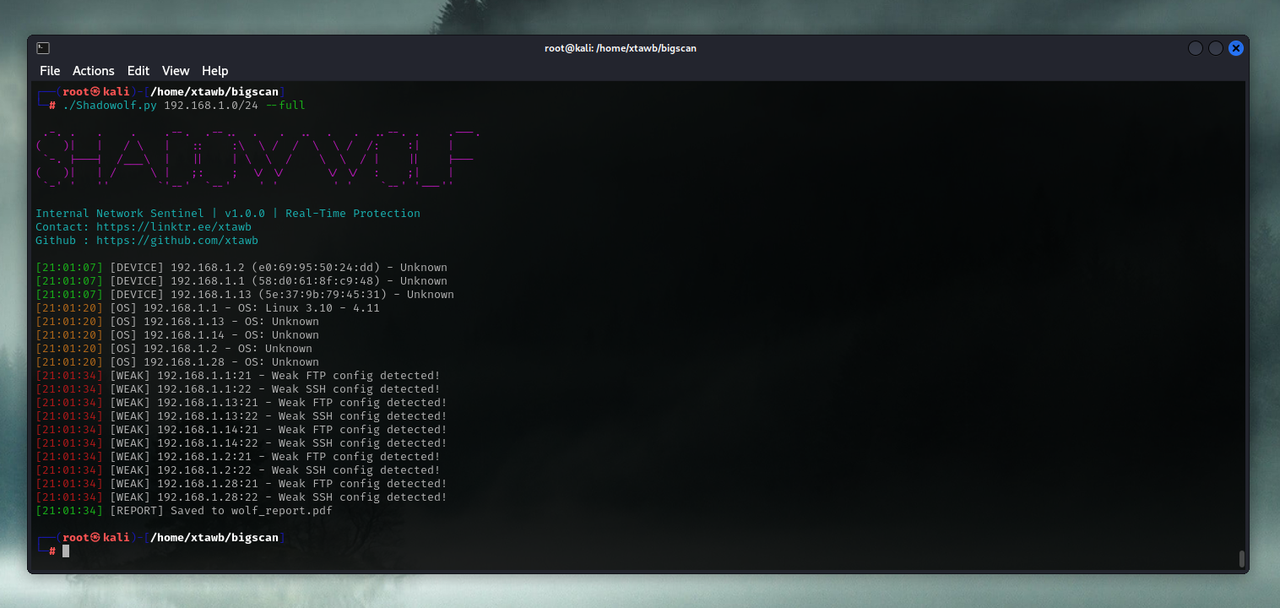
python3 Shadowolf.py 192.168.1.0/24 --full --output enterprise_audit.pdfpython3 Shadowolf.py 10.0.0.5 --vuln --output critical_hosts.pdfpython3 Shadowolf.py 172.16.0.0/16 --arp --os --output asset_report.pdfTerminal Output:
[14:35:22] [DEVICE] 192.168.1.5 (00:0C:29:XX:XX:XX) - VMware ESXi
[14:35:23] [CRITICAL] 192.168.1.5:445 - CVE-2021-34527 (PrintNightmare)
[14:35:24] [WEAK] 192.168.1.5:22 - Weak SSH config detected!
PDF Report Structure:
1. Executive Summary
2. Network Topology Map
3. Critical Vulnerabilities
   - CVE-2021-34527 (CVSS 9.8)
   - CVE-2022-30190 (CVSS 8.8)
4. Device Inventory
5. Recommended Mitigations- Fork the repository
- Create a feature branch (
git checkout -b feature/AmazingFeature) - Commit changes (
git commit -m 'Add AmazingFeature') - Push to branch (
git push origin feature/AmazingFeature) - Open a Pull Request
Coding Standards:
- PEP8 compliance
- Type hinting required
- 100% test coverage for new features
Distributed under MIT License. See LICENSE for details.
Author: xtawb
contact: @xtawb
- Nmap Project Team
- Scapy Development Community
- CVE Database Maintainers
- Open Source Security Foundation (OpenSSF)