
A responsive VS Code-style workbench for the project checkout or worktree behind a bb thread. Desktop has an activity rail, Explorer and Source Control views, editor tabs, and a status bar. Phones switch between full-screen Explorer, Editor, and Source Control destinations from a bottom bar.
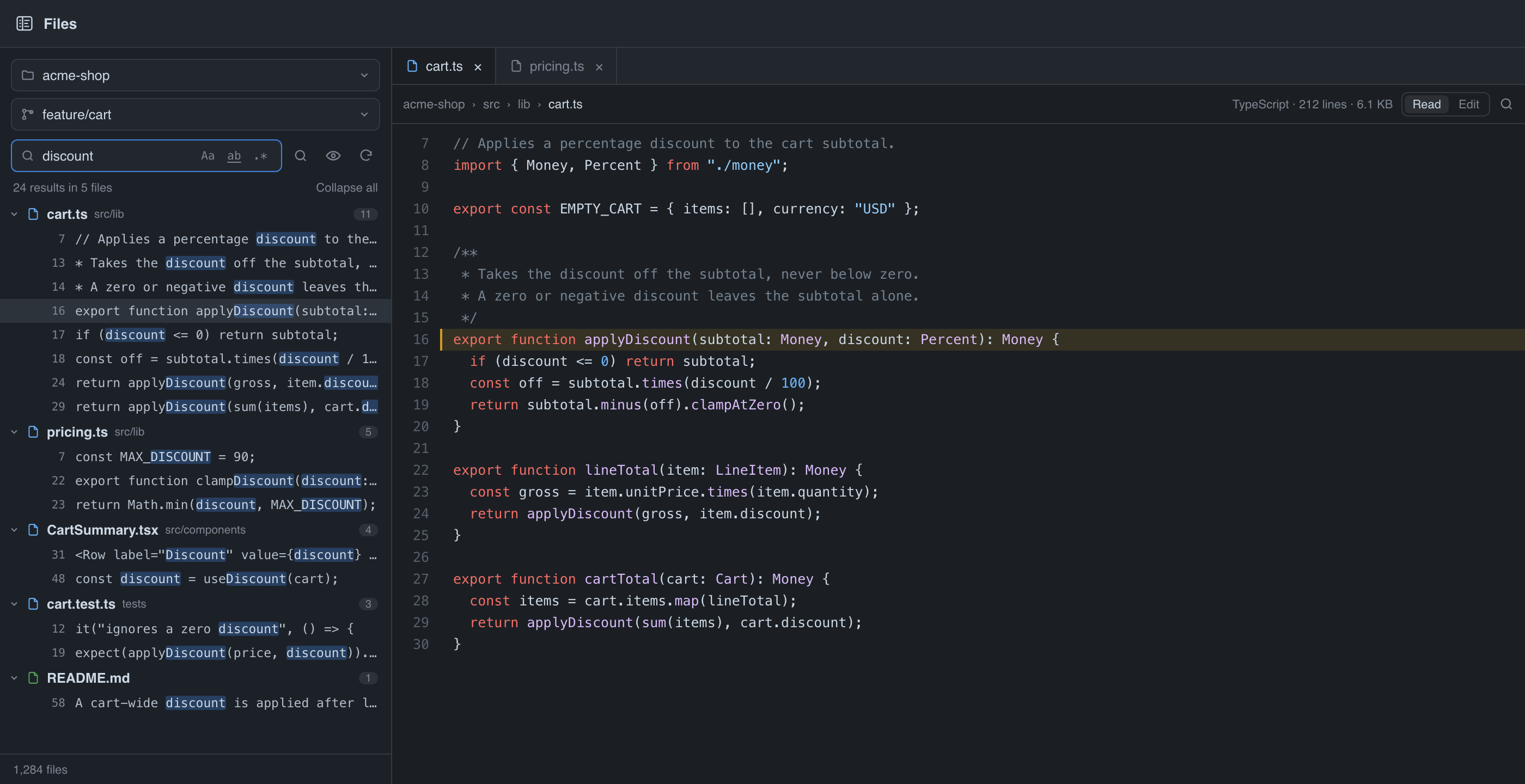
An illustration of the layout, not a screenshot — drawn from docs/preview.html
with invented project data, so no real repository or thread titles appear in it.
- A Files page in the sidebar (
/plugins/files-editor/files) with a workspace picker covering every project checkout and every thread worktree. - A Files tab beside a thread — right panel → new tab → Project files. Pinned to that thread's workspace, so it shows the files the agent in that conversation is editing.
- A persistent Explorer. File and language icons appear in the tree and tabs. Expanded folders and scroll position are saved per workspace; closing the last editor tab returns to the tree at its previous location.
- Source Control across the selected workspace. Every Git root, nested repository, submodule, and worktree is grouped separately. Review staged, unstaged, untracked, and committed branch changes; open individual diffs or an All Changes editor tab. Stage whole files everywhere and individual hunks on desktop.
- Per-repository Git actions. Enter a commit subject manually, commit only staged files, and push explicitly to the upstream. If there is no upstream, choose a configured remote and branch. Unsaved drafts prompt to save, discard, or cancel before staging or committing their file.
- GitHub pull requests. On a workspace host with GitHub CLI (
gh) installed and authenticated, view PR status, enter a title and description manually, create a ready-for-review PR by default, and confirm a merge method enabled by the repository. - Two searches. At the top of the tree, type to prune it to matching paths
with every directory above them opened; ⌘P opens the ranked
go-to-file palette instead. Inside a file, the magnifier in the toolbar (or
⌘F) finds text: match count, Enter / ⇧Enter
to step,
Aafor case, and the hit is revealed whether you are reading or editing. - Project, then workspace. Two dependent pickers — choose the project, then its checkout or one of its worktrees by branch name. Picking a project lands on its checkout.
- Click a file and it opens in full — its own tab, the complete contents, syntax-highlighted by BB's own source renderer, in your BB code theme.
- Edit and save. A Read / Edit toggle switches the pane to an editor; ⌘S writes. Saves are guarded by the hash the file had when you opened it, so if an agent edited it underneath you the save stops and offers Reload or Overwrite rather than clobbering the change.
- Mobile navigation. Explorer, Editor, and Source Control each get the full screen, and their state is retained as you switch destinations.
- Images render, other binaries say so instead of dumping bytes.
bb filesgives an agent the same listing from the CLI.
BB's own recursive listing drops every name starting with ., which is why
.github, .env.example, and .gitignore are missing from other file trees in
the app. For a workspace on the machine BB's server runs on, this plugin walks
the directory itself and shows them; the eye toggle in the explorer turns them
off.
A workspace on a connected machine has to go through BB's listing, so dotfiles are not available there and the toggle is hidden. The explorer says which mode it is in.
bb files root                 # where the workspace is, and on which machine
bb files tree [--depth n] [--all] [--limit n]
bb files find <query> [--limit n]
bb files read <path>
Everything resolves against the thread the command runs in: its worktree when it
has one, otherwise the project's default checkout. It reads through BB, so it
returns the right bytes even when that workspace lives on another machine —
which is exactly when ls and cat would quietly read the wrong disk.
Excluded directories — one name per line, matched against any path segment.
Defaults to .git, node_modules, and vendor — the three dependency trees
big enough to truncate a listing on their own. Remove one to browse it, or add
dist, .venv, target. Applies to the tree, the palette, and the CLI.
bb plugin install git:https://github.com/wernerbihl/bb-plugin-files-editor.git@mainThat tracks the main branch, so bb plugin outdated and bb plugin update
pick up later commits pushed there. To work on it locally instead, clone it and
install the path:
bb plugin install /path/to/bb-plugin-files-editornpm install --include=dev
npm test # pure logic: trees, ranking, find, paths
npm run typecheck
bb plugin dev # rebuild + reload on savelib/ holds the logic worth testing on its own — tree assembly, the fuzzy
ranker, in-file search, workspace grouping, workspace-relative path resolution,
route encoding. server.ts is mostly wiring; the components are the view.
- The local walk stops at 40,000 entries and BB's remote listing at 10,000, and the explorer mounts at most 600 rows at a time. The footer says when either limit is in play; widening Excluded directories is the fix for a truncated listing.
- Every
bb filescommand is capped by BB's 1 MB limit on a command's output. Past that it prints what fits — whole lines, for a listing — and says how much it cut. BB discards an oversize result rather than truncating it, so the clipping is the difference between a partial answer and none. - The editor is a textarea with a gutter, not a code editor: no completion and no multiple cursors, and find is literal text — no regex, no replace. For those, BB's builtin File Editor (Monaco) plugin claims the file-preview surface; the ↗ button in the toolbar hands it the current file.
- Reading, a find hit highlights its whole line, because line ranges are what BB's source viewer accepts. Editing selects the exact match.
- Files over 4 MB open read-only.
- Git operations run on the machine that owns the selected workspace and require
Git to be installed there. GitHub PR controls also require GitHub CLI (
gh) installed and authenticated on each workspace host where you use them. Commit messages and pull request text are entered manually. This version supports BB Plugin SDK 0.6.15 and later. - The tree does not create, rename, or delete files.