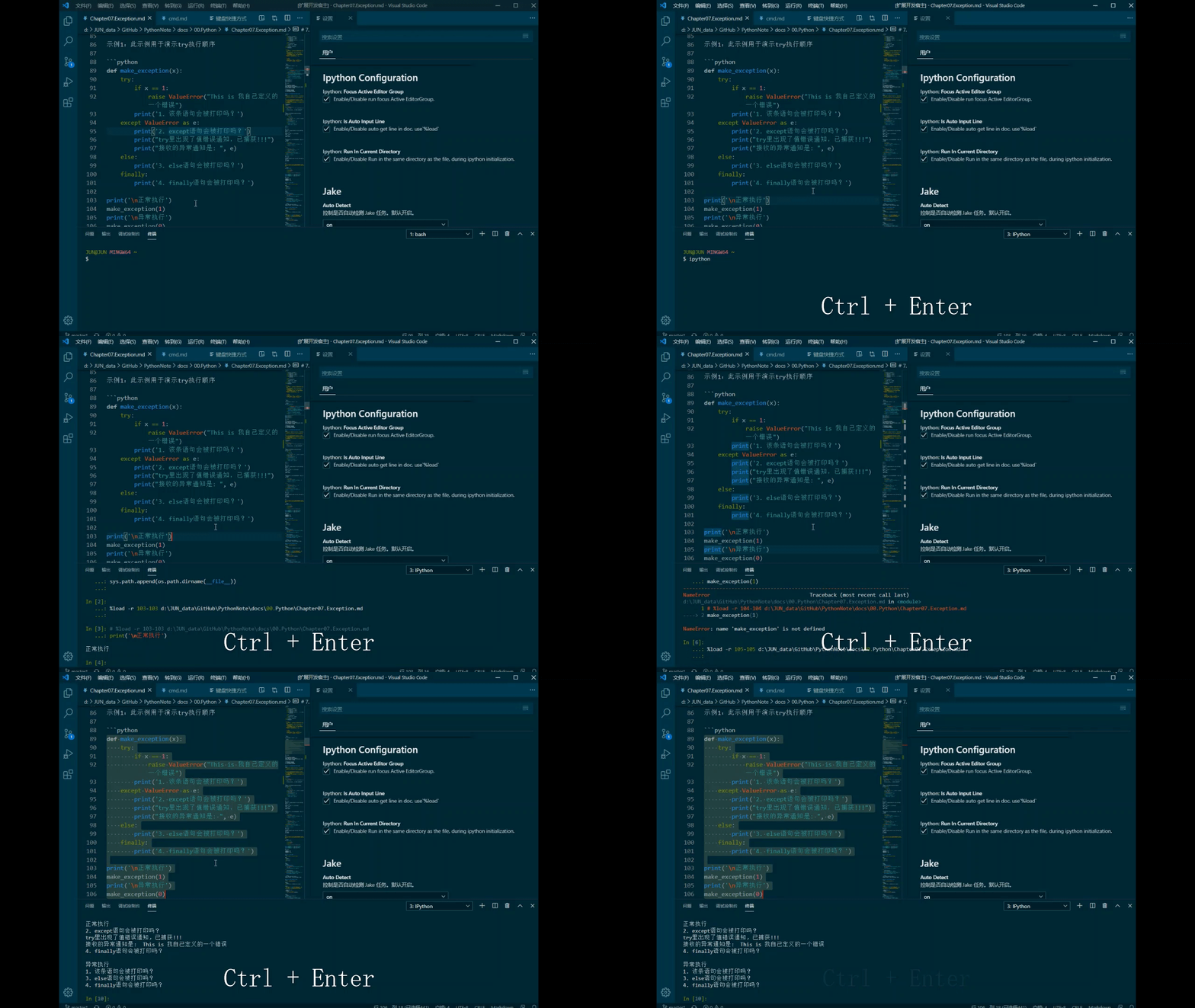

(示例中,设置了用户快捷键 ctrl+enter 作为命令 terminal.sendSelectedToTerminal 的启动。)
鸣谢:
- 首先特别鸣谢开源的原始开发者及其贡献项目(pancho111203 / vscode-ipython);原作链接:ipython for VSCode - Visual Studio Marketplace
- 因编辑端与终端交互需要,特此修改插件以便个性化使用。
功能简介:
- 将活动窗口的文本发送到
terminal运行。
个性化修改:
- 设置可选:在
terminal运行代码后,是否设置直接返回聚焦于文档的编辑窗口。 - 设置可选:运行时在
terminal初始化中是否自动加载进入到编辑文件所在文件夹去运行(可方便读取不同级文件夹文件)。 - 设置可选:发送前可以选择是否自动保存,此选项配合
terminal语法load的使用。 - 设置可选:发送后是否让光标自动切换到下一行,方便更为快捷
文件-->终端的交互。
后续改进计划
- 增加类似于Jupyter的Cell功能,一次性将一个Cell以
{commands}形式发送至终端。- 开发
{ \n commands \n }块读取形式,新增一条命令,自动发送该块。 - 开发
#%% \n commands \n #%%类似Jupyter Cell形式(难度较高,暂无时间弄~)
- 开发
- 增加光标自动跳过注释行的功能,比如下一列是注释,运行后可设置直接跳过。
- 增加自动判断shell的基本循环语句块,如
do/then/...
当前它包括一个命令:
terminal.sendSelectedToTerminal: 将选定的行或光标所在的行发送到打开的terminal实例(如果没有打开,则发送新的行)
功能优化
- 解决空行跳转时,弹出:
Illegal value for line on run#1问题。
功能优化
- 自动跳过注释行和空行。
修复BUG
- 修复更新 vscode
January 2021 (version 1.53)后无法正常使用的BUG。
功能优化
- 选中状态下,不自动跳转下一行。
第一次新版本发布
- 设置可选:在
terminal运行代码后,是否设置直接返回聚焦于文档的编辑窗口。- 设置可选:运行时在
terminal初始化中是否自动加载进入到编辑文件所在文件夹去运行(可方便读取不同级文件夹文件)。- 设置可选:发送前可以选择是否自动保存,此选项配合
terminal语法load的使用。- 设置可选:发送后是否让光标自动切换到下一行,方便更为快捷
文件-->终端的交互。
(In the example, the user shortcut key ctrl+enter is set as the start of the command terminal.sendSelectedToTerminal.)
Thanks:
- First of all, special thanks to the original open source developers and their contributions (pancho111203 / vscode-ipython); original link: [ipython for VSCode-Visual Studio Marketplace] (https://marketplace.visualstudio.com/items?itemName=pancho111203.vscode-ipython)
- Due to the interaction between the editor and the terminal, the plugin is hereby modified for personalized use.
Function introduction:
- Send the text of the active window to
terminalto run.
Personalized modification:
- Optional setting: After running the code in
terminal, whether to set to return directly to the editing window focused on the document. - Optional setting: whether to automatically load into the folder where the edited file is located during the initialization of
terminalduring runtime (it is convenient to read files in different levels of folders). - Optional settings: you can choose whether to save automatically before sending. This option is used in conjunction with the
terminalsyntaxload. - Optional setting: whether to make the cursor automatically switch to the next line after sending, which is convenient and quicker to interact with
File-->Terminal.
Follow-up improvement plan
- Added cell function similar to Jupyter, sending a cell to the terminal in the form of
{commands}at a time.- Developed
{ \n commands \n }block reading form, added a new command, and automatically sent the block. - Develop
#%% \n commands \n #%%Cell format (the difficulty is high, there is no time to get it~)
- Developed
- Add the function that the cursor automatically skips the comment line. For example, the next column is a comment, and it can be set to skip directly after running.
- Add basic loop statement block that automatically judges shell, such as
do/then/...
Currently it includes a command:
terminal.sendSelectedToTerminal: Send the selected line or the line where the cursor is located to the opened terminal instance (if it is not open, send a new line)
Function optimization
- Solve the problem of
Illegal value for line on run#1 when jumping to a blank line.
Function optimization
- Automatically skip comment lines and empty lines.
Bug fixes
- Fixed the bug that prevented normal use after updating vscode
January 2021 (version 1.53).
Function optimization
- In the selected state, do not automatically jump to the next line.
First new version release
- Optional setting: After running code in
terminal, whether to set to return directly to the editing window focused on the document.- Optional setting: Whether to automatically load into the folder where the edited file is located during
terminalinitialization at runtime (convenient for reading files in different level folders).- Optional setting: Whether to automatically save before sending. This option is used in conjunction with the
terminalsyntaxload.- Optional setting: Whether to make the cursor automatically switch to the next line after sending, facilitating quicker
File->Terminalinteraction.