Skip to content

1440p Native UI Scaling Fix - #541

Merged
trustno1-coder merged 2 commits into
trustno1-coder:mainfrom
Remorc-e:fix/1440p-ui-scaling
Nov 28, 2026
Merged

trustno1-coder merged 2 commits into
trustno1-coder:mainfrom
Remorc-e:fix/1440p-ui-scaling

Conversation

@Remorc-e

@Remorc-e Remorc-e commented Nov 28, 2026 •

Copy link
Copy Markdown
Contributor

The problem

With the 1440p output (-Res 1440, the launcher's default):

With -Res 4k, and in Series S mode, both are correct.

The cause

The game's menus and map are authored for 3840x2160. Series S outputs 1920x1080 and scales them down; its settings preset says how, with three video settings:

Legacy UI flag Legacy UI (layout) size Output size TV mode (SDR)
Series S (stock) 1 3840x2160 1920x1080 3840x2160
Series X (stock) 0 (none) 3840x2160 3840x2160
Series X, 1440p before this PR 0 (none) 2560x1440 patched to 2560x1440
Series X, 1440p with this PR 1 3840x2160 2560x1440 3840x2160

Everything that lays out the interface asks the settings for the layout size (0x7B4E10). That query returns the legacy size when the flag is on, and the output size when it's off. Its readers:

  • the menus and HUD;
  • the game's screen size (0x92D7924), which places the map's icons;
  • the pause map's render targets.

A real Series X always outputs 4K, so its preset never needs the flag. With a 1440p output and the flag off, the layout became 2560x1440 while the content stayed 4K-sized: menus and HUD 1.5 times too large. Captures of the frontend layer at 1440p and at 4K show every element's screen transform exactly 1.500x larger at 1440p, at the same pixel offsets. Forcing the flag only where it is read fixed the menus. But the map's targets still got 2560x1440 from the settings, while its icons were placed for 3840x2160.

The fix

apps/victory/src/native_1440p.rs. Each patched place is checked against the stock bytes first (as a BLAKE3 hash), like the existing ones:

  • The settings themselves (0x1D70B98, in the settings collection's copy 0x1D70750). Every settings store goes through this copy: the start-up apply, runtime updates and backups. Its last store of the video block jumps to our code in int3 padding between two functions (0x55FF285). That code does the same store, then writes:

    • the legacy UI flag = 1;
    • the legacy UI size = 3840x2160;
    • the output size = 2560x1440;

    and jumps back. The game's own code then gives every reader the Series S arrangement. The rest of the preset stays Series X.

  • The SDR mode stays at stock 3840x2160, as on Series S. No longer patched to 2560x1440. run.rs no longer reports a 2560x1440 display (VICTORY_DISPLAY_MODE): the game sees the 3840x2160 default, as on Series S.

  • 0x247AD4A, the UI memory pool. The constant this file called the scanout reservation is the Series X UI pool size in the UI setup at 0x247AD10 (mov ecx, 0x4000000). Series S gets 0x5200000 there, through a cmovne on the game's Series S check.

    • With the flag set, the UI setup makes two 3840x2160 legacy surfaces and two 2560x1440 targets in that pool. It asserts that at most 0x1FFFFF is left over (0x247AF25).
    • The pool is now 0x5E00000 (94 MiB): those four surfaces rounded up to 2 MiB. Without the room, the game's allocator asserted (int3 at 0x56A2AFD).
    • Renamed to UI_POOL.
  • 0x58048D4, the Settings preview viewport load, is no longer redirected to the SDR mode. With the flag set, the legacy size it loads is the right one.

  • The temporal scene scale stays as before. No renderer changes: nothing in draw.rs.

The cost is what Series S pays: one 4K UI layer, and the pause map drawn at 4K and scaled down. The scene and the output stay 1440p.

Screenshots

Series X profile at the 1440p output, RTX 4070 Ti.

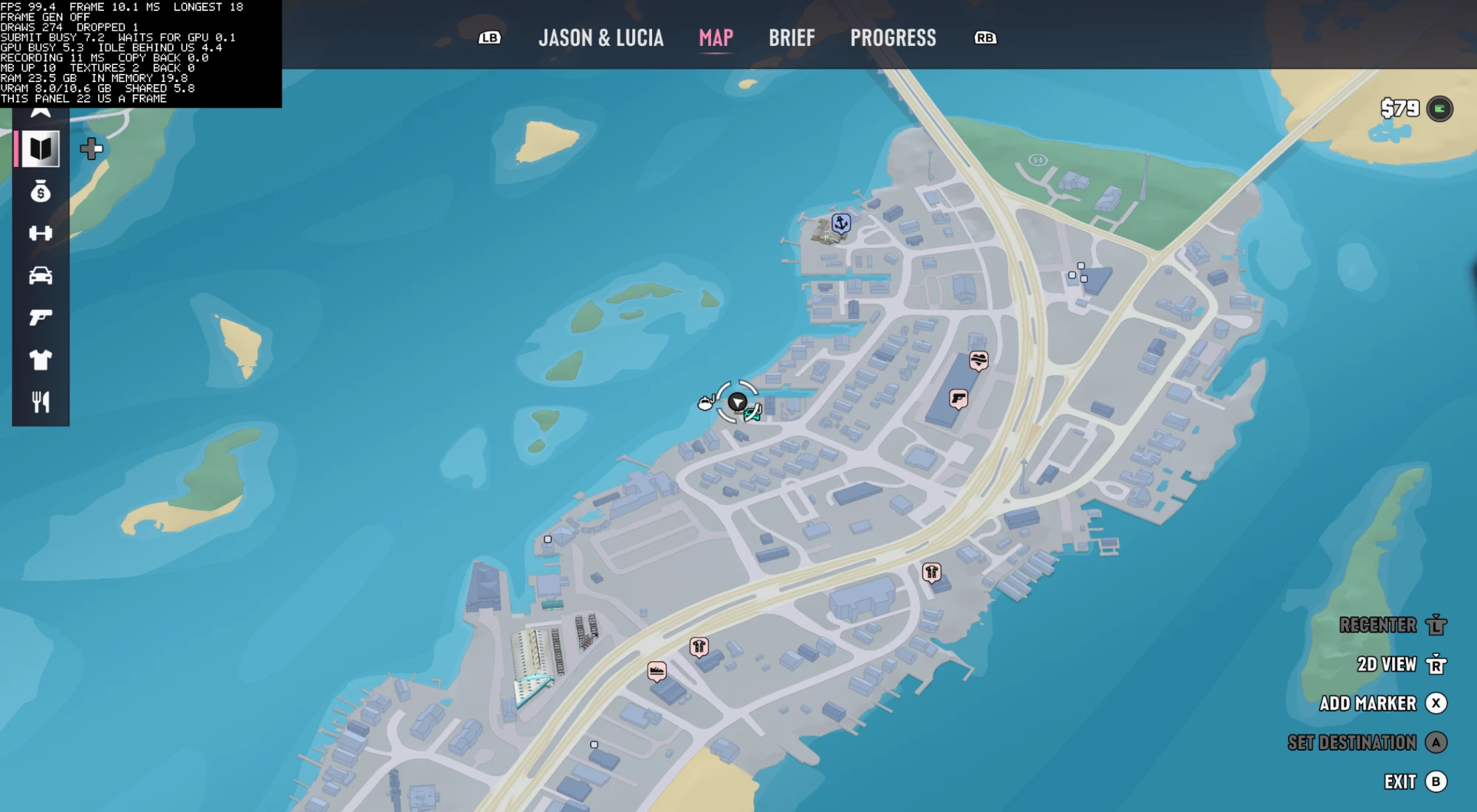
Pause map: the player arrow and the blips sit on their places.

Pause map at 1440p

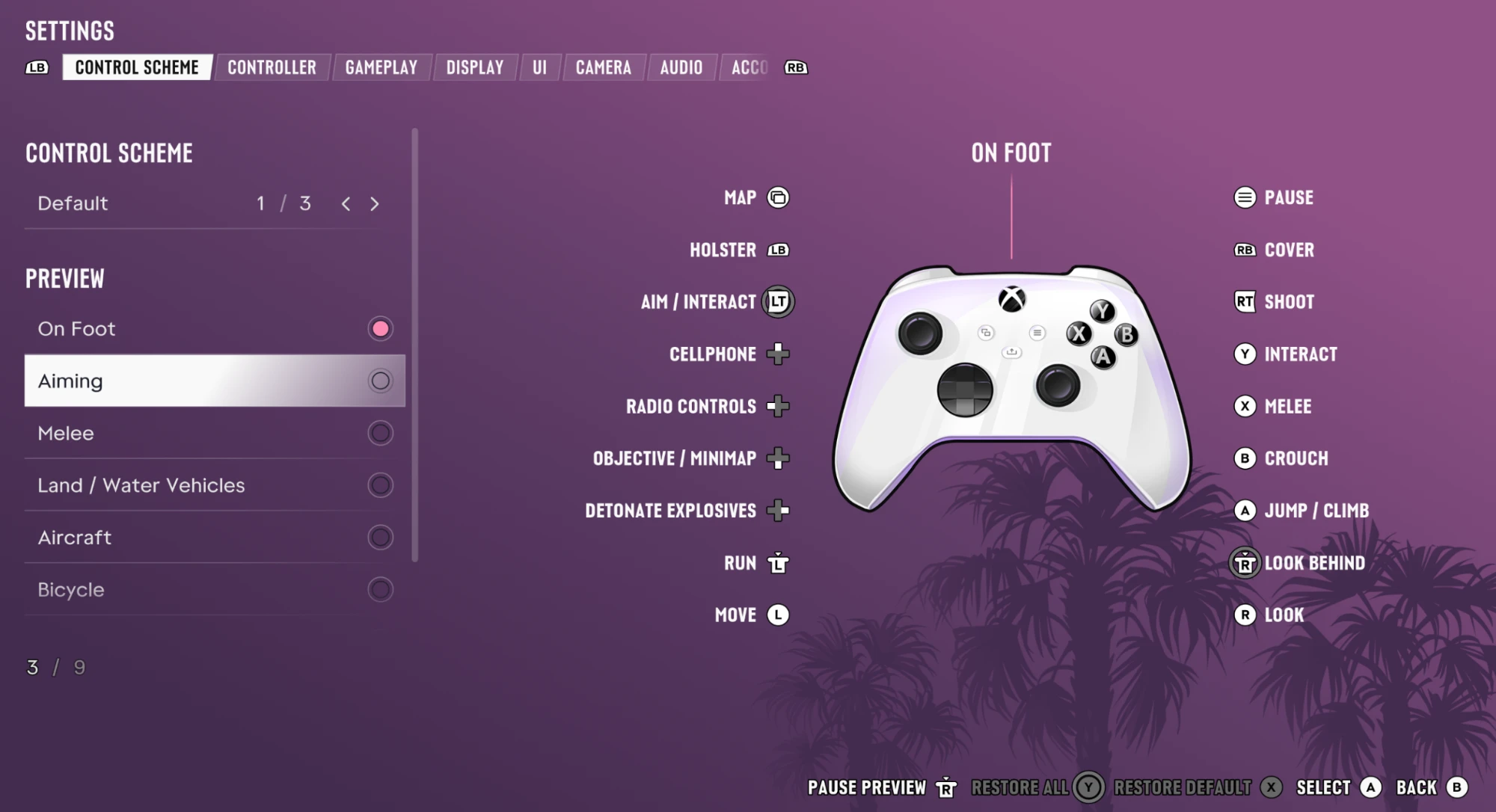
Settings > Control Scheme: laid out as at 4K output.

Settings > Control Scheme at 1440p

Testing

  • In game: RTX 4070 Ti, Windows 11, Series X profile, 1440p output with DLSS Performance.
    • The pause map's icons and player arrow sit on their places.
    • Settings > Control Scheme is laid out as at 4K output, and the HUD is correct in play.
  • Values in a check run: layout 0xA9438EC/F0 = 3840x2160, output 0xA9438CC/D0 = 2560x1440, flag 0xA9438F4 = 1, screen size 0x92D7924/8 = 3840x2160. No assertions.
  • cargo test --locked -p victory with VICTORY_DISPLAY_PROFILE_TEST_IMAGE pointing at the retail v1.0.2.1 exe: all pass. The 1440p test checks:
    • the SDR mode stays stock;
    • the UI pool size;
    • the jump to our code, and that its jump back lands right after the patched site.
  • cargo xtask policy: ok. cargo clippy -p victory: no warnings in the changed files.

Not tested:

@Remorc-e

Remorc-e commented Nov 28, 2026 •

Copy link
Copy Markdown
Contributor Author

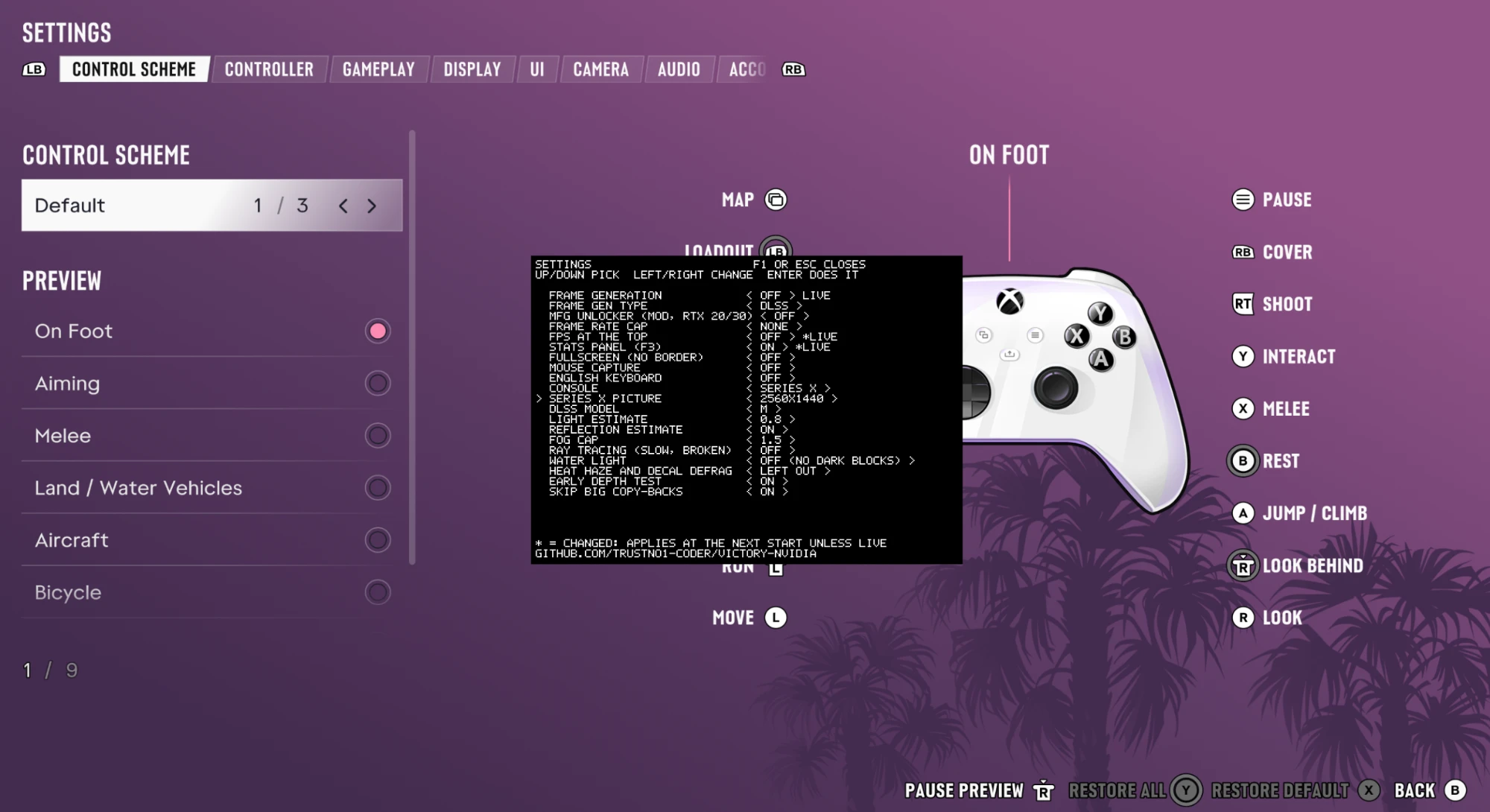
Screenshots from this branch, Series X profile at the 1440p output (RTX 4070 Ti, DLSS and frame generation on).

Settings > Control Scheme with the F1 menu open, showing CONSOLE: SERIES X and SERIES X PICTURE: 2560X1440:

Settings at 1440p with the F1 menu

The same screen without the menu: every callout sits next to its button, the list shows all six rows with its 3 / 9 counter, and the footer prompts are evenly spaced, as at the 4K output:

Settings > Control Scheme at 1440p

… large)

With the 1440p output, menus and the HUD were drawn 1.5 times too large
and overlapped (Settings > Control Scheme, the tab row, footer prompts;
issues trustno1-coder#98, trustno1-coder#301). The title lays its UI out on the 3840x2160 size its
menus are authored for and scales it onto a smaller surface only when its
legacy UI flag (0xA9438F4) is set. Its console preset sets the flag on
Series S, whose menus are right at 1080p, and leaves it 0 on Series X,
whose output is always 3840x2160. With the 1440p patch the Series X UI was
laid out on a 2560x1440 stage while its content stayed 4K-sized.

native_1440p.rs, each field checked against the stock bytes first:
- 0x1E0FB69: the preset's legacy UI byte loads as 1 (mov al, 1).
- 0x26192F9: the settings update stores 1 in the flag.
- 0x247AD4A, the UI memory pool (named the scanout reservation before; it
  is the Series X value beside the Series S one, 0x5200000): 0x5E00000,
  two 3840x2160 legacy UI surfaces and two 2560x1440 targets rounded to
  2 MiB, within the title's leftover check at 0x247AF25. The previous size
  had no room for the legacy surfaces (the title's allocator asserted).
- The stock bytes of the two new places are kept as BLAKE3 hashes and
  checked with same(), as the others are since 64d4931.
- 0x58048D4, the Settings viewport load, is left stock: with the flag set
  the legacy size it loads is the right one.

Tested on an RTX 4070 Ti, 1440p output with DLSS and frame generation:
Settings > Control Scheme laid out as at 4K, no crash over three minutes,
about 32 fps in the menus as before. The retail-image tests pass
(VICTORY_DISPLAY_PROFILE_TEST_IMAGE set).

Co-Authored-By: Gemini <noreply@google.com>
Co-Authored-By: Claude Opus 5.5 <noreply@anthropic.com>
@Remorc-e
Remorc-e force-pushed the fix/1440p-ui-scaling branch from 8ea68dd to 01e35e4 Compare November 28, 2026 00:40
@SeaLife

SeaLife commented Nov 28, 2026

Copy link
Copy Markdown

Tested this on a combined local branch, findings below.

Setup: RTX 4070 Ti 12 GB, Ryzen 9 9950X, 64 GB RAM, Windows 11 (10.0.26300), driver 621.1.0, retail 1.0.2.1 (exe SHA-256 e95020b2…). Series X profile, 1440p output, DLSS Performance (scene 1280x720), DLSS frame generation 2x.

Base: main @ 64d4931 plus these open PRs:
#428, #340, #423, #339, #400, #315 (incl. #243), #242, #257, #223, #253, #222, #177, #353, #225, #386, #169, #390, #285, #280, #394, #534, #521, #475.
(#534 conflicts with #428 in emit/lower.rs on the pixel colour output; resolved by chaining both: let s = self.scrub_nan(f); self.clamp_hdr(s). Shader tests 292/292 pass.)

#541 against #391: they are mutually exclusive (combined, the interface would be scaled down twice), so for this test #391 was reverted and #541 merged on its own. native_1440p retail-image tests pass with the real exe.

What breaks with #541 here: the map (pause menu → KARTE).

What we use instead (#391 + two additions), tested in gameplay:
With #391 alone, two things were still off at 1440p:

  1. Shop goods/prices (the list pinned to the item, e.g. "PATRIOT-BIER (5 $)") were cut to a fragment.
    • These are drawn in a movie inset by the safe area: viewport 77,54 3686x2052 on the 2560x1440 output.
    • on_canvas() only matches a viewport of exactly 3840x2160, so this one was drawn unscaled.
    • Fix (draw.rs): a viewport that reaches past the 2560x1440 output but lies inside the canvas also counts as canvas. No draw onto the output itself has such a viewport.
  2. After (1), shop labels and boot prompts (LB/X/Y at a car's boot) sat at exactly 2/3 of their position (e.g. "X LAGER" at (760,613) instead of about (1140,920)).
    • Their anchor comes from GetScreenSize through the interface's vtable (.rdata 0x619bd70, slot +0x30 at 0x619bda0, 0xcab820), which still answers 2560x1440.
    • Fix (native_1440p.rs): that slot points to HUD : Size the interface for 3840x2160 on the 1440p output (HUD, menus, map cursor) #391's legacy-size copy (0x55ff290, 3840x2160), as on the stock 4K output. Switch: VICTORY_UI_SCREEN_VTABLE=0.
    • Either change alone is wrong: (2) without (1) put the boot prompts 1.5x too far; (1) without (2) gives the 2/3 offset. Together, shop list, boot prompts, HUD, menus and the map (terrain, fog, cursor) are in place.

Diagnostics we used: VICTORY_UI_CANVAS_LOG=1 logs each new viewport/scissor on the 2560x1440 output and whether it is scaled. That is how the 77,54 3686x2052 safe-area viewport showed up.

Happy to share the diff if it helps. #541's approach (letting the title use its own legacy UI path) looks cleaner long-term, if the map's terrain/fog can be made to follow it.

karte

@Remorc-e

Copy link
Copy Markdown
Contributor Author

Double checking now, went with native legacy UI path to avoid needing to do per-screen type patches like in #391 .

I wasn't seeing that in my build which is just main + #541 . Not sure if there are compounding conflicts when you add all the others in.

@Remorc-e

Copy link
Copy Markdown
Contributor Author
Screenshot 2026-11-27 202605

Not able to replicate that screenshot you shared earlier.

@SeaLife

SeaLife commented Nov 28, 2026

Copy link
Copy Markdown
Screenshot 2026-11-27 202605

Not able to replicate that screenshot you shared earlier.

As you can see in your screenshot, the red dot is not where its supposed to be. I just ran main + 541 and you can see here, its not scaling right. So #391 plus the changes i made are working well on 1440p.

https://cdn.discordapp.com/attachments/1575253173256462492/1576055187502530560/2026-11-28_02-58-30.mp4?ex=6b0b8746&is=6b0a35c6&hm=cf0df1070905fc3fd8a74a2fa61e032a8d39f0fea3afbe90832e0c3384a87d7c&

@Remorc-e

Copy link
Copy Markdown
Contributor Author
Screenshot 2026-11-27 202605 Not able to replicate that screenshot you shared earlier.

As you can see in your screenshot, the red dot is not where its supposed to be. I just ran main + 541 and you can see here, its not scaling right. So #391 plus the changes i made are working well on 1440p.

https://cdn.discordapp.com/attachments/1575253173256462492/1576055187502530560/2026-11-28_02-58-30.mp4?ex=6b0b8746&is=6b0a35c6&hm=cf0df1070905fc3fd8a74a2fa61e032a8d39f0fea3afbe90832e0c3384a87d7c&

I misunderstood then, I thought you were referring to the double image you have in your screenshot where it looks like the map is pulled up 3/4 of the way to the top.

…(map icons 1.5x out)

The pause map's icons sat 1.5 times too far from the map's top left corner.
Its targets are sized from the title's UI layout size, which the settings
give through 0x7B4E10: the legacy UI size when the settings' legacy UI flag
is on, the output size when it is off. The flag was set only where it is
read (0x1E0FB69, 0x26192F9), so the settings still had it off. The map was
then drawn at 2560x1440 while its icons were placed for 3840x2160.

Series S's preset sets three video settings: legacy UI flag 1, legacy UI
size 3840x2160, output 1920x1080. Series X's has the flag at 0 and no legacy
size. Those three are now written into the title's settings, with a
2560x1440 output. The place is the settings collection's copy (0x1D70750),
which every settings store goes through: its last store of the video block
(0x1D70B98, 11 bytes, checked by BLAKE3) jumps to our code in int3 padding
(0x55FF285). That code does the same store, writes the three settings and
jumps back.

The SDR mode stays at stock 3840x2160 and the reported display at the
3840x2160 default, as on Series S. The SDR mode patch, the
VICTORY_DISPLAY_MODE override and the two flag patches are gone. The UI pool
and the temporal scene scale stay.

Tested on an RTX 4070 Ti at 1440p with DLSS Performance:
- the map's icons, menus and HUD line up;
- 0xA9438CC/D0 = 2560x1440, 0xA9438EC/F0 = 3840x2160, flag 1, screen size
  3840x2160, no assertions.
cargo test -p victory with the retail image: 23 + 2 passed. xtask policy
ok. No clippy warnings in the changed files.

Co-Authored-By: Claude Opus 5.5 <noreply@anthropic.com>
@Remorc-e

Remorc-e commented Nov 28, 2026 •

Copy link
Copy Markdown
Contributor Author

Updated: the map icons are fixed, by having the game run with Series S's own output settings.

  • Why the icons were off: the pause map's targets are sized from the game's own UI layout size. The first version set the legacy UI flag where the game reads it. The settings themselves still said "flag off", so the map was drawn at 2560x1440 while its icons were placed for 3840x2160.
  • The fix: the three output settings Series S's preset sets (legacy UI flag on, layout size 3840x2160, output size) are now written into the game's settings themselves, with a 2560x1440 output. One patch, in the routine every settings change goes through. Every reader (menus, HUD, the game's screen size, the pause map) then gets the Series S arrangement.
  • The SDR mode and the reported display stay at stock 3840x2160, as on Series S. The old SDR mode patch and the VICTORY_DISPLAY_MODE override are gone.
  • Removed: the two flag patches (0x1E0FB69, 0x26192F9).
  • Kept: the UI pool size (0x247AD4A) and the temporal scene scale.
  • No renderer workaround: nothing changes in draw.rs (unlike HUD : Size the interface for 3840x2160 on the 1440p output (HUD, menus, map cursor) #391's viewport scaling).
  • Tested on an RTX 4070 Ti at 1440p: map icons, the player arrow, menus and HUD line up. Unit tests with the retail image pass; asset policy ok; no clippy warnings in the changed files.

Thanks for the report on the map icons.

Pause map at 1440p

@abilliontokens

Copy link
Copy Markdown

Tested: works here.

Setup: RTX 5060 Ti 16 GB, Windows 11 (26200), retail 1.0.2.1, Series X profile, -Res 1440, DLSS off, diag build. Base 63b902f + this PR (head 0c0d466, applied unchanged) + #937.

  • Before: every Settings page overlapped at 1440p (Control Scheme, Controller, Gameplay, UI). Writing 2560x1440 into resolutionFullscreen in settings.xml (the lever suggested in [BUG] Series X: the interface is laid out for 4K, and the world-map waypoint lands away from the picked point #828) and dropping the 0x58048D4 viewport redirect each changed nothing.
  • After: Control Scheme and Controller are laid out as at 4K output.
  • Memory: a VICTORY_WATCH on 0xA9438F4/0xA9438EC/0xA9438CC showed the game set the legacy UI flag to 1 and the legacy size to 3840x2160 itself during start-up. Forcing the flag to 1 at run time instead crashes the title (null at 0x1EB9AAE), so setting it through the settings, as this PR does, is the way that works.
  • Test: patches_the_retail_image_for_1440p passes against the retail exe (VICTORY_DISPLAY_PROFILE_TEST_IMAGE).

Not checked here: the pause map icons and the 1080to1440 profile.

@ZackariaB

Copy link
Copy Markdown

Tested on main 63b902f + this PR (0c0d466), Series X profile, -Res 1440, DLSS Quality, retail 1.0.2.1: works here.

  • Settings > Control Scheme laid out as at 4K output.
  • HUD in play the right size.
  • Pause map: cursor centred, hovering a point of interest selects it, fog and zone borders in place, player arrow on its place.
  • Shop goods and prices whole, and the car boot prompts (LB/X/Y) in their place.

Thanks, this is the better approach: the title's own Series S path keeps every reader of the UI size consistent, where #391 patched them one by one. Closing #391 in favour of this one.

@sawetco

sawetco commented Nov 28, 2026

Copy link
Copy Markdown

Independent check on the 1080p to 1440p F1 option with the RTX 5070.

Setup: RTX 5070 (621.40), Ryzen 5 7600X, Windows 11 build 26300, retail 1.0.2.1 and the same local save. Series X, F1 picture 1080p to 1440p, DLSS Quality (K), DLSS Frame Generation 2x, ray tracing off. Compared installed v2026.11.27.10 with main 63b902f plus #541 head 0c0d466, with no other PRs applied.

Check Installed release Main + #541
Settings > Control Scheme Controller callouts overlap the setting and preview list, with some content clipped at the bottom. The list, controller diagram and callouts fit in their own areas. The bottom prompts are readable.
Pause map after panning The visible reticle jumps up and left of the center. The reticle stays centered. Set Destination placed the marker directly under the reticle.

Both runs logged DLSS Quality at 1706 × 960 internally and 2560 × 1440 output for this F1 selection. The patched run also logged 4 presents with frame generation on and 8 frames shown in a sample, with status 0x0.

Both native_1440p tests passed with the local retail image, and cargo xtask policy passed. This was a short layout check.

@mokkamokacaffe

Copy link
Copy Markdown

Hardware validation: RTX 4080 SUPER / Series X 1440p

Tested the current PR head:

  • PR head: 0c0d466238f5187537fa5743e8c91464eb1d0b9f
  • Base: 64d4931b3dd90305134512b805fc98f04119fb6e
  • Windows 11 24H2, build 26100.9711
  • Intel Core i9-14900KF
  • 64 GB RAM
  • NVIDIA GeForce RTX 4080 SUPER
  • NVIDIA driver 621.40
  • Retail build 1.0.2.1
  • Series X profile
  • 2560×1440 output
  • Isolated VIctory data directory with an existing save copied into it

The PR head remained unchanged when rechecked after testing.

Build and automated checks

  • cargo build --release --locked -p victory: pass
  • cargo test --locked -p victory -- --test-threads=4: pass
    • library tests: 23 passed
    • integration tests: 2 passed
    • failures/skips: 0
    • includes both native_1440p retail-image tests
  • cargo xtask policy: pass (290 files ok)
  • git diff --check: pass
  • Source worktree was clean.

Manual results

With DLSS Performance, matching the configuration reported in the PR:

  • Account picker scaling: pass
  • Settings and Control Scheme layout: pass
    • tabs fit correctly;
    • control labels no longer overlap;
    • lists and footer prompts are fully visible.
  • Gameplay HUD placement: pass
  • Pause map: pass
    • player arrow and icons were correctly positioned;
    • point-of-interest selection worked;
    • terrain and fog covered the complete map;
    • no dark area appeared over the right side;
    • bottom prompts were not clipped.
  • World rendering: pass
  • No NGX evaluate feature failed messages were recorded during the DLSS Performance run.

The same UI, HUD, map and world-rendering checks also passed with DLSS disabled.

Separate DLSS Quality observation

One DLSS Quality run produced a black game world while UI/objective symbols remained visible. The log repeatedly reported:

NGX evaluate feature failed 0xbad00005

There was no device-removal or crash record. Relaunching the same PR build with DLSS disabled restored the world, and DLSS Performance subsequently ran cleanly.

I have not compared DLSS Quality against the exact parent under equivalent conditions, so I am not attributing this observation to this PR. It may be a pre-existing or configuration-specific Streamline issue.

Result

The 1440p UI-scaling fix works on the RTX 4080 SUPER. The account picker, menus, HUD and pause map all render and align correctly under the Series X 1440p profile.

@trustno1-coder
trustno1-coder merged commit f68597b into trustno1-coder:main Nov 28, 2026
@trustno1-coder trustno1-coder mentioned this pull request Nov 28, 2026
Sign up for free to join this conversation on GitHub. Already have an account? Sign in to comment

Labels

None yet

Projects

None yet

Development

Successfully merging this pull request may close these issues.

7 participants