





Security-focused launcher for OBS Studio that validates plugin integrity, applies temporary firewall protections, verifies installation state, and safely manages OBS sessions.
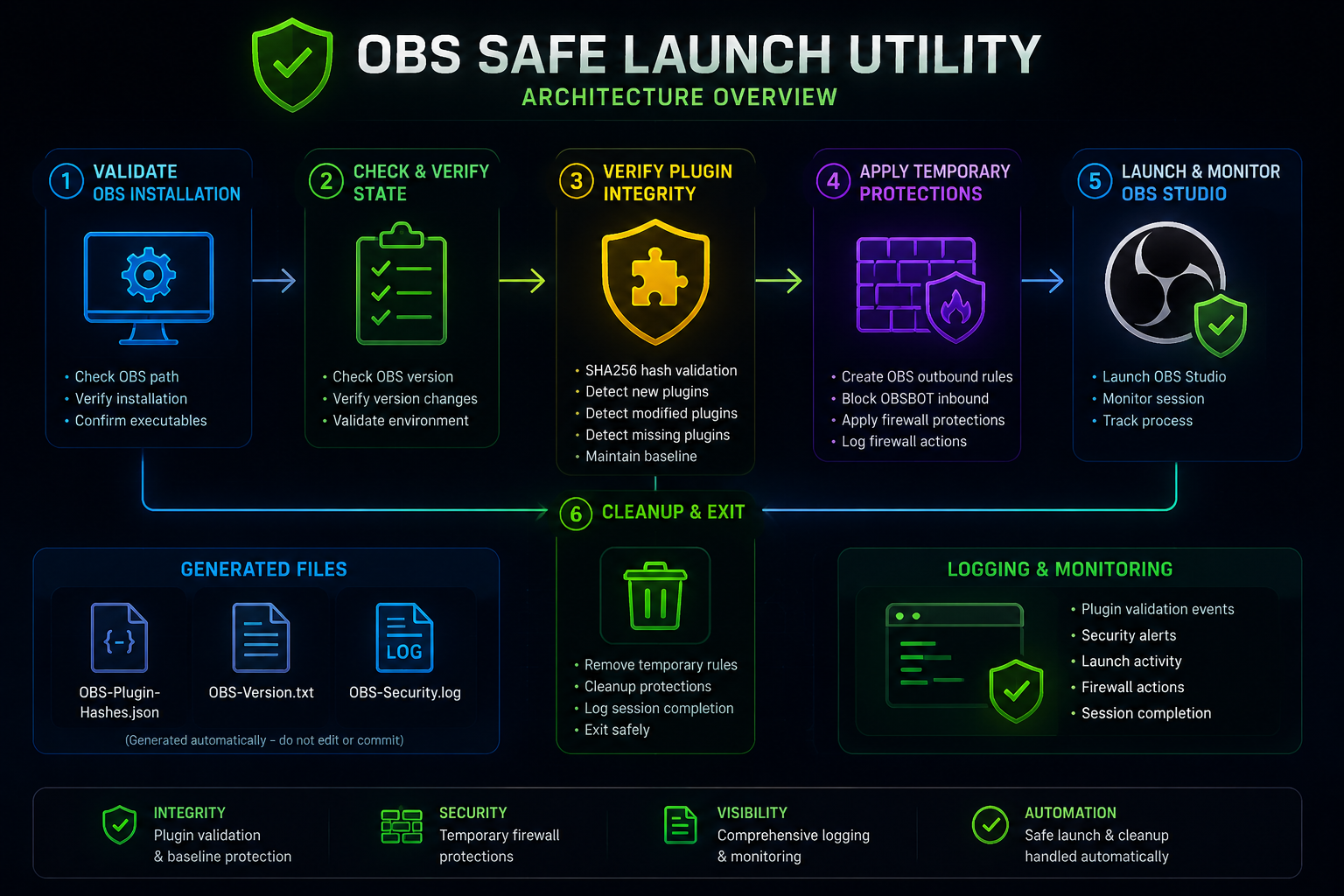
- SHA256 plugin hash validation
- Baseline generation and verification
- Detection of new plugins
- Detection of modified plugins
- Detection of missing plugins
- OBS version awareness
- Temporary firewall rule management
- OBS outbound rule creation
- OBSBOT inbound protection
- Automatic cleanup of temporary rules
- Security event logging
- Plugin validation events
- Launch tracking
- Session completion records
- Validates OBS installation
- Verifies plugin state
- Checks version changes
- Applies temporary protections
- Launches OBS Studio
- Cleans up security rules after exit
Create:
C:\Update Code
Place:
OBS-Safe-Launch.ps1
inside:
C:\Update Code
Open PowerShell as Administrator.
Run:
cd "C:\Update Code"
Unblock-File .\OBS-Safe-Launch.ps1
.\OBS-Safe-Launch.ps1
Or run everything at once:
cd "C:\Update Code"; Unblock-File .\OBS-Safe-Launch.ps1; .\OBS-Safe-Launch.ps1When executed for the first time, the utility creates a trusted baseline of installed OBS plugins.
Generated files:
OBS-Plugin-Hashes.json
OBS-Version.txt
OBS-Security.log
These files are generated automatically and should not normally be committed to source control.
Validate OBS Installation
        ↓
Check OBS Version
        ↓
Verify Plugin Integrity
        ↓
Apply Temporary Firewall Rules
        ↓
Launch OBS Studio
        ↓
Monitor Session
        ↓
Remove Temporary Rules
        ↓
Exit
Security events are recorded in:
C:\Update Code\OBS-Security.log
The log contains:
- Plugin validation events
- Security alerts
- Launch activity
- Firewall actions
- Session completion records
- Do not manually edit generated hash files
- Do not replace plugins without rebuilding the baseline
- Do not commit generated logs to source control
- Do not disable Windows Firewall while using this utility
This project demonstrates:
- PowerShell Automation
- Application Integrity Validation
- Windows Firewall Administration
- Security Monitoring
- Secure Application Launching
- Security Event Logging
obs-safe-launch-utility/
│
├── OBS-Safe-Launch.ps1
├── README.md
├── LICENSE
└── OBS Safe Launch Utility overview.png
TCDOverLord
GitHub: https://github.com/tcdoverlord
Licensed under the MIT License.