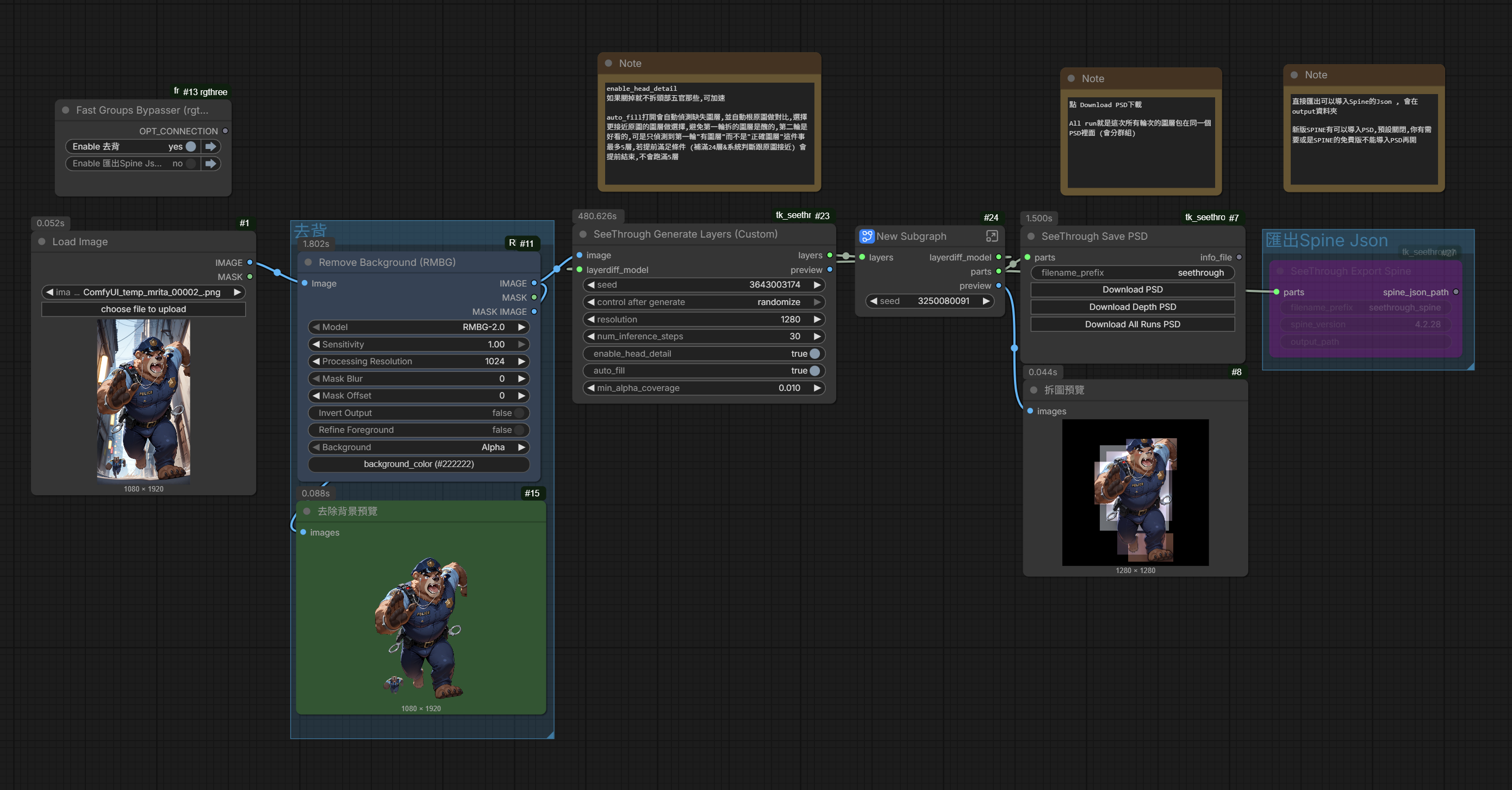
A fork of ComfyUI-See-through by @jtydhr88, adding a custom node with the option to skip the head detail inference stage for faster processing.
- New node SeeThrough Load Source: same dropdown as ComfyUI's LoadImage, plus outputs
source_filenamefor preserving the original filename in PSD output. - SeeThrough Save PSD now accepts optional
original_image+source_filenameinputs, automatically includes the original input image as a visible base layer in the generated PSD, and uses the source filename in output filenames when available. - PSD layer structure is now grouped:
Original(visible, bottom),Parts(hidden),Runs(hidden, grouped-PSD mode only) — opens the PSD on the original so you can toggle groups to edit specific parts.
- Fix: Depth model fails to download — HuggingFace repo ID updated — The default Marigold depth model repo
24yearsold/seethroughv0.0.1_marigoldwas moved tolayerdifforg/seethroughv0.0.1_marigold. Updated the default repo ID so depth model auto-download works again. (#3)
- Fix: PSD download fails with "Failed to load ag-psd bundle from any path" — ComfyUI's new frontend loads extensions via ES module
import(), causingdocument.currentScriptto benull. Replaced withimport.meta.urlfor reliable bundle path resolution regardless of install folder name. (#1) - Fix: Nodes fail to load in fresh environments — The upstream Marigold module imports
matplotlibat module level for an optional visualization function, causingModuleNotFoundErroron environments withoutmatplotlib. Changed to lazy import so nodes load without requiringmatplotlib.
- Spine Export Nodes — New
Layer Rename,Layer Filter, andExport Spinenodes for Spine 2D animation preparation. - Auto-Fill Missing Layers — Enable
auto_fillon GenerateLayers (Custom) to automatically re-run inference up to 5 times, filling missing layers and upgrading low-quality layers by comparing against the original image. - All Runs PSD — When
auto_fillis enabled, a new "Download All Runs PSD" button appears on Save PSD. It creates a single PSD with group folders for each run, so you can manually compare and pick layers. - PSD Download Buttons — Save PSD now has 3 buttons:
- Download PSD (green) — best layers after auto-fill selection
- Download Depth PSD (purple) — depth maps
- Download All Runs PSD (orange) — all runs grouped by folder (requires
auto_fill)
A new node SeeThrough_GenerateLayers_Custom that adds one parameter compared to the original SeeThrough Generate Layers:
| Parameter | Default | Description |
|---|---|---|
enable_head_detail |
true | v3 models only: toggle the head detail inference stage on/off |
auto_fill |
false | Auto-fill missing layers: re-runs inference (up to 5 times) until all expected layers are generated (v3+head=24, v3 body=13, v2=19) |
min_alpha_coverage |
0.01 | Minimum alpha coverage ratio to consider a layer valid. Only used when auto_fill is enabled |
The v3 See-through model runs in two inference stages:
- Body stage — Generates 13 body-level layers (front hair, back hair, head, neck, neckwear, topwear, handwear, bottomwear, legwear, footwear, tail, wings, objects)
- Head stage — Crops the head region from stage 1, upscales it, and runs a second inference pass to generate 11 fine-grained head layers (headwear, face, irides, eyebrow, eyewhite, eyelash, eyewear, ears, earwear, nose, mouth)
Each stage is a full diffusion pipeline call. By setting enable_head_detail = false, the entire head stage is skipped (no GPU computation), saving approximately 50% of the total inference time.
This is useful when you only need body-level decomposition and don't require fine-grained facial features.
The diffusion model is stochastic — each run may produce slightly different results. Sometimes a layer (e.g., face or hand) is missing or nearly empty in one run but present in another.
Enable auto_fill to automatically re-run inference until all expected layers are generated with good quality:
- Run 1 uses the original seed — this is the primary result
- Each layer is compared against the original image to compute a similarity score (0~1)
- Layers that are missing (alpha coverage below threshold) or have low similarity (< 0.85) trigger additional runs
- Run 2 uses
seed + 1, Run 3 usesseed + 2, etc. - For each layer, the version with the highest similarity to the original is kept
- The process repeats up to 5 runs or until all layers have good similarity
This means even if Run 1 generates a face layer, if Run 2 produces a face that better matches the original image, Run 2's version will be used automatically.
Models are loaded to GPU only once across all runs — the overhead is only the additional diffusion time, not model loading.
Note: For v2 models, this toggle has no effect since v2 uses a single-stage inference.
This fork has been synced with upstream v0.2.2, incorporating the following improvements:
- VRAM Offloading — Models now stay on CPU and are moved to GPU only during inference, then offloaded back. This significantly reduces VRAM usage, making it possible to run on GPUs with 8GB or less.
- Text Encoder Offloading — Text encoders are loaded to GPU for prompt encoding, then offloaded before loading UNet+VAE, so they never compete for VRAM at the same time.
- Marigold Compatibility Fix — Fixed
resizecall for torchvision >= 0.23 which introduced stricterInterpolationModechecks. - Web Fixes — Subpath deployment support; ag-psd bundle 404 fix on case-sensitive filesystems.
- Custom Node Optimization — When
enable_head_detail = false, head text encoding is also skipped (not just diffusion), further reducing GPU memory usage.
| Node | Description |
|---|---|
| SeeThrough Load LayerDiff Model | Load the LayerDiff SDXL pipeline |
| SeeThrough Load Depth Model | Load the Marigold depth estimation pipeline |
| SeeThrough Generate Layers | Original layer generation (all stages, all layers) |
| SeeThrough Generate Layers (Custom) | Layer generation with enable_head_detail toggle |
| SeeThrough Generate Depth | Depth map estimation per layer |
| SeeThrough Post Process | Left/right splitting, hair clustering, color restoration |
| SeeThrough Save PSD | Export layers as PNGs + metadata; download Best PSD, Depth PSD, or All Runs PSD via browser |
| SeeThrough Layer Rename | Rename layer tags to Spine-friendly names (customizable) |
| SeeThrough Layer Filter | Include/exclude specific layers before export |
| SeeThrough Export Spine | Export layers as a Spine 2D skeleton project (JSON + images) |
For Spine animation preparation, connect:
PostProcess → Layer Rename (optional) → Layer Filter (optional) → Export Spine
Maps internal tags to Spine-friendly names. Has built-in defaults for all tags. The custom_mapping_json field is optional — leave it empty to use defaults.
When to use it:
- You want clean, readable names in Spine (e.g.
front-hairinstead ofhairf) - Your team has a naming convention and you need custom names
Built-in default mapping (partial list):
| Original tag | → Renamed to |
|---|---|
hairf |
front-hair |
hairb |
back-hair |
eyel |
eye-left |
eyer |
eye-right |
handwearl |
handwear-left |
handwearr |
handwear-right |
earl |
ear-left |
earr |
ear-right |
topwear |
topwear (unchanged) |
face |
face (unchanged) |
Tags that already have clean names (e.g.
face,head,nose) are kept as-is.
Custom mapping example: To override specific names, enter a JSON object in custom_mapping_json:
{
  "hairf": "bangs",
  "hairb": "back-hair",
  "topwear": "shirt",
  "bottomwear": "skirt",
  "handwearl": "left-glove",
  "handwearr": "right-glove"
}
Only the tags you specify in the JSON will be overridden — all other tags still use the built-in defaults. Invalid JSON is ignored with a warning.
Removes unwanted layers using include or exclude mode. All available tags are pre-filled by default — delete the ones you don't need. Enter one tag per line.
Tip: If Layer Rename is connected before Layer Filter, use the renamed tag names (e.g.
front-hair). If not using Layer Rename, use original tags (e.g.hairf).
Outputs a folder with a configurable output path (defaults to ComfyUI output directory):
{prefix}.json— Spine skeleton file (open directly in Spine editor)images/— cropped PNG files for each layer- Set
output_pathto export to a custom directory (e.g.D:/my_project/spine_assets)
Coordinates are automatically converted from image space (Y-down) to Spine space (Y-up, origin at bottom-center). Draw order follows depth ordering from PostProcess.
Spine Professional (3.6+) can import PSD files directly, so you may wonder whether this JSON export is needed. Here's the comparison:
| Save PSD → Spine PSD Import | Export Spine (JSON + images) | |
|---|---|---|
| Spine version | Professional 3.6+ only | All versions (Essential + Professional) |
| Layer positioning | Automatic | Automatic (coords pre-converted) |
| Layer naming | Depends on PSD layer names | Controllable via LayerRename |
| Layer filtering | Must hide/delete in PSD first | Built-in LayerFilter node |
| Iteration | Re-import PSD to update images | Re-export to update |
| Bone hierarchy | Not auto-created | Not auto-created |
| Best for | Spine Professional users who want a quick start | Spine Essential users, or teams wanting pre-filtered/renamed layers in an automated pipeline |
Recommendation:
- Spine Professional users → Use Save PSD and import via Spine's built-in PSD import. It's the simplest workflow.
- Spine Essential users → Use Export Spine, as Essential does not support PSD import.
- Automated pipelines → Use Export Spine with LayerRename + LayerFilter for consistent, pre-processed output.
Available layer tags (after LayerRename, 38 tags)
| Category | Tags |
|---|---|
| Hair | front-hair, back-hair |
| Head | head, headwear |
| Face | face, nose, mouth |
| Eyes | eye-left, eye-right, eyewear |
| Eye detail | irides, irides-left, irides-right, eyebrow, eyebrow-left, eyebrow-right, eye-white, eye-white-left, eye-white-right, eyelash, eyelash-left, eyelash-right |
| Ears | ears, ear-left, ear-right, earwear |
| Body | neck, neckwear, topwear, bottomwear |
| Limbs | handwear, handwear-left, handwear-right, legwear, footwear |
| Other | tail, wings, objects |
If not using LayerRename, use original tags: hairf, hairb, eyel, eyer, handwearl, handwearr, earl, earr, etc.
Clone this repository into your ComfyUI custom_nodes directory:
cd ComfyUI/custom_nodes
git clone https://github.com/tackcrypto1031/tk_seethrough.git
Install dependencies:
cd tk_seethrough
pip install -r requirements.txt
Restart ComfyUI. The nodes will appear under the SeeThrough category.
Models are downloaded automatically from HuggingFace on first use:
| Model | HuggingFace Repo | Purpose |
|---|---|---|
| LayerDiff 3D | layerdifforg/seethroughv0.0.2_layerdiff3d |
SDXL-based transparent layer generation |
| Marigold Depth | layerdifforg/seethroughv0.0.1_marigold |
Fine-tuned monocular depth for anime |
You can also download models manually and place them in ComfyUI/models/SeeThrough/.
- Add SeeThrough Load LayerDiff Model and SeeThrough Load Depth Model
- Add SeeThrough Generate Layers (Custom) — connect both models and a Load Image node
- Uncheck
enable_head_detailif you want faster processing without head detail layers - Connect to SeeThrough Generate Depth → SeeThrough Post Process → SeeThrough Save PSD
- Run the workflow and click Download PSD to export
For Spine export: Replace step 4's Save PSD with Layer Rename → Layer Filter → Export Spine. Open the output JSON in Spine editor.
This project is a fork of ComfyUI-See-through by @jtydhr88. Huge thanks for creating the original ComfyUI integration.
The underlying research is See-through by shitagaki-lab. Paper: arxiv:2602.03749 (Conditionally accepted to ACM SIGGRAPH 2026)
PSD generation uses ag-psd in the browser.
MIT