Claude Code, Codex and Cursor each name a chat from your first message — then freeze it forever. An hour later your sidebar still says Check if branches are synced while the work has long since moved on. Multiply by a few hundred sessions and your history becomes unsearchable.
rename watches in the background. When a session goes idle, it rewrites the title to
match what the work actually became. Then rename search lets you find it again — across
every tool at once.
brew install study8677/rename/rename     # macOS, via Homebrew tap
pipx install git+https://github.com/study8677/rename.git
uv tool install git+https://github.com/study8677/rename.git
No API key required. Zero runtime dependencies. Works on macOS and Linux.
rename status                 # what was detected on this machine
rename list                   # preview new titles (writes nothing)
rename once                   # one pass, then exit
rename install                # run forever, in the background
A pass wakes every minute, looks for sessions idle ≥ 5 minutes, and rewrites the title when content has changed since it last looked. Re-runs are free; a clean tree is a no-op.
Each tool names a chat from your opening prompt and freezes it there. The title becomes fiction in minutes.
| Tool | What the sidebar says | What the session is now about |
|---|---|---|
| Cursor | Add a loading spinner |
migrating the database to Postgres |
| Codex | Fix a typo in the README |
debugging a flaky CI pipeline |
| Claude Code | Check if branches are synced |
implementing the audit-log feature |
A week later you know you solved this bug with the AI before. You can't find the conversation. The conversation exists. The label hides it.
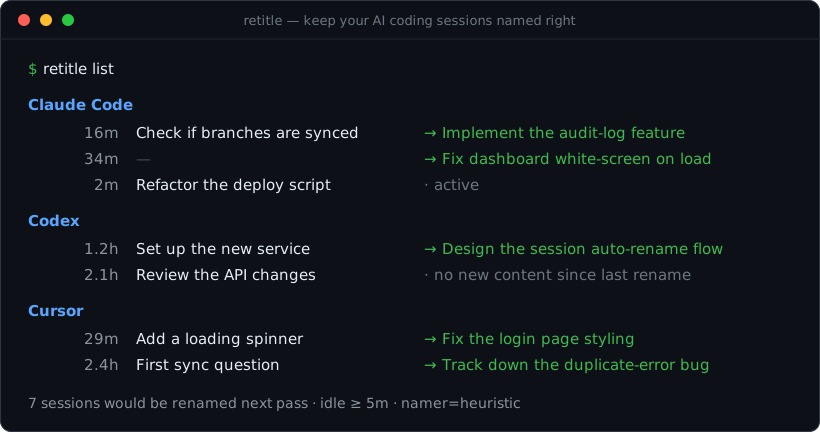
$ rename list

Claude Code
     16m  Check if branches are synced          → Implement the audit-log feature
     34m  —                                     → Fix dashboard white-screen on load
      2m  Refactor the deploy script            · active

Codex
    1.2h  Set up the new service                → Design the session auto-rename flow
    2.1h  Review the API changes                · no new content since last rename

Cursor
     29m  Add a loading spinner                 → Fix the login-page style regression
    2.4h  First sync question                   → Track down the duplicate-error bug

7 session(s) would be renamed next pass (idle ≥ 5m, namer=heuristic).
Run `rename once` to apply, or `rename install` to do it continuously.Accurate titles are half. Finding the session is the other half. rename search looks
across every supported tool at once.
$ rename search "stripe webhook"

  Cursor        3h    Wire up the Stripe webhook handler    payments-api
  Claude Code   2d    Debug the Stripe webhook signature    billing-svc

$ rename search postgres --content # also grep message text, with snippets ┌──────────── every poll_seconds (default 60s) ────────────┐
│ │
discover ──► for each session idle ≥ 5m with NEW content ──► namer ──► write title back
(per tool) │ │ │
Claude Code │ skip if still active │ ├─ Claude Code: append an `ai-title` line
Codex │ skip if unchanged since last rename │ ├─ Codex: UPDATE threads SET title
Cursor │ skip if a human renamed it (until │ └─ Cursor: patch composerHeaders + composerData
│ the conversation moves on) │
The decision rule for each session is deliberately conservative:
- Still in use? Idle for less than your threshold → leave it alone.
- Nothing new? Content hash matches the title we last wrote → skip (re-runs are free).
- Renamed by hand? We never clobber a human edit — until you send new messages and it goes idle again.
- Otherwise: generate a fresh title and write it.
This makes the whole thing idempotent and safe to run continuously.
Where the title comes from. By default rename shells out to the claude
(or codex) CLI you're already logged into — claude --model haiku -p "…" — so
titles are real LLM summaries of the conversation, with no API key. No CLI
installed? It falls back to the offline heuristic.
Safe by default on existing machines. When you install rename, the daemon records a baseline timestamp and leaves every chat from before that moment alone. The background loop only renames conversations that become active after install — your history is never retroactively touched without consent.
Rename past sessions on demand. When you actually want the backlog renamed, opt in explicitly. The macOS / Windows dashboard has a "Rename historical sessions" button with confirm + dry-run, and the CLI mirror is:
rename once                          # latest batch only (default behaviour)
rename once --historical --dry-run   # preview every pre-install chat
rename once --historical             # rename the whole backlog (ignores max-age & batch cap)
rename once --session <id> # force-rename one specific session| Tool | Reads | Writes | Status |
|---|---|---|---|
| Claude Code | ~/.claude/projects/**/<id>.jsonl |
appends an ai-title line (append-only — the safest write) |
✅ stable |
| Codex | ~/.codex/state_*.sqlite + rollout files |
UPDATE threads SET title |
✅ stable |
| Cursor | state.vscdb (composerHeaders + composerData) |
patches both title fields | |
| Antigravity (Google) | IDE: state.vscdb (antigravityUnifiedStateSync.trajectorySummaries) — Companion: ~/.gemini/antigravity/agyhub_summaries_proto.pb |
rewrites the summary field of one CascadeTrajectorySummary (atomic-rename for the Companion file) |
|
| Continue (continue.dev) | ~/.continue/sessions/<id>.json |
rewrites title and atomic-renames the file |
|
| Zed (zed.dev Assistant) | ~/Library/Application Support/Zed/conversations/<uuid>.json (etc.) |
rewrites summary / title and atomic-renames |
|
| Windsurf (Codeium) | state.vscdb (Cursor-fork layout) |
reuses the Cursor write path with the Windsurf store path | |
| Aider | .aider.chat.history.md (per project) |
sidecar .aider.chat.history.md.title file (read-only as far as Aider itself is concerned) |
A note on writing while the app is open. Codex, Cursor and Antigravity keep their data in live SQLite databases.
renamewrites carefully (read-only reads,busy_timeouton writes), and only ever touches idle sessions. Still, the host apps cache chats in memory, so a title you change on disk may be overwritten if you reopen that exact chat in the running app. For the most reliable results, letrenamerun while the app is closed. Claude Code's append-only format has no such caveat.
Antigravity ships in two forms — the IDE (a VS Code fork with a Gemini sidebar)
and a standalone Companion App (Windows-only). rename supports both:
| Flavor | Title store | Format |
|---|---|---|
| IDE | state.vscdb → ItemTable['antigravityUnifiedStateSync.trajectorySummaries'] |
base64(envelope(base64(CascadeTrajectorySummary))) — same pattern as Cursor |
| Companion App | ~/.gemini/antigravity/agyhub_summaries_proto.pb |
raw protobuf, repeated TopEntry { uuid; CascadeTrajectorySummary } |
Both flavors share the same CascadeTrajectorySummary schema (reverse-engineered
from Antigravity 2.0's bundled FileDescriptorProto); only the outer wrapping
differs. The IDE store is rewritten via UPDATE; the Companion file is rewritten
by atomic rename. Conversation transcripts (~/.gemini/antigravity/conversations/<uuid>.pb)
are encrypted at rest in either flavor, but Antigravity's agent writes plaintext
working artifacts to ~/.gemini/antigravity/brain/<uuid>/ (task.md,
implementation_plan.md, walkthrough.md, plus *.metadata.json summaries) — those
are the material rename feeds to the namer.
- ✅ Antigravity sessions show up in
rename list,rename search,rename stats - ✅ Automatic rename works for any conversation that has produced brain artifacts (longer / planning-heavy chats — the ones whose title most often drifts). Short chats with no artifacts are skipped by the substance gate, which is fine — there'd be nothing to title with anyway.
- ✅ Manual
rename once --tool antigravityworks regardless.
If Antigravity ships an extension API exposing raw chat-session transcripts later, we'll wire it in for full coverage. Track at #1.
The default, auto, needs no API key at all. rename reuses the claude or
codex CLI you're already logged into to write good, LLM-quality titles, and falls
back to a fully-offline heuristic if neither is installed. You never paste a key.
namer |
What it does | API key? |
|---|---|---|
auto |
your logged-in claude / codex CLI, else heuristic |
none · default |
heuristic |
a cleaned-up snippet of your latest message; instant, offline | none |
claude |
always the claude CLI (fast Haiku model) |
none — your login |
codex |
always the codex CLI (gpt-5-codex) |
none — your login |
anthropic |
Anthropic API directly | ANTHROPIC_API_KEY |
openai |
OpenAI API directly | OPENAI_API_KEY |
Out of the box — nothing to configure, no key to paste — you get LLM-quality titles
using credits you already have. Prefer zero cost / fully offline? Set namer = "heuristic".
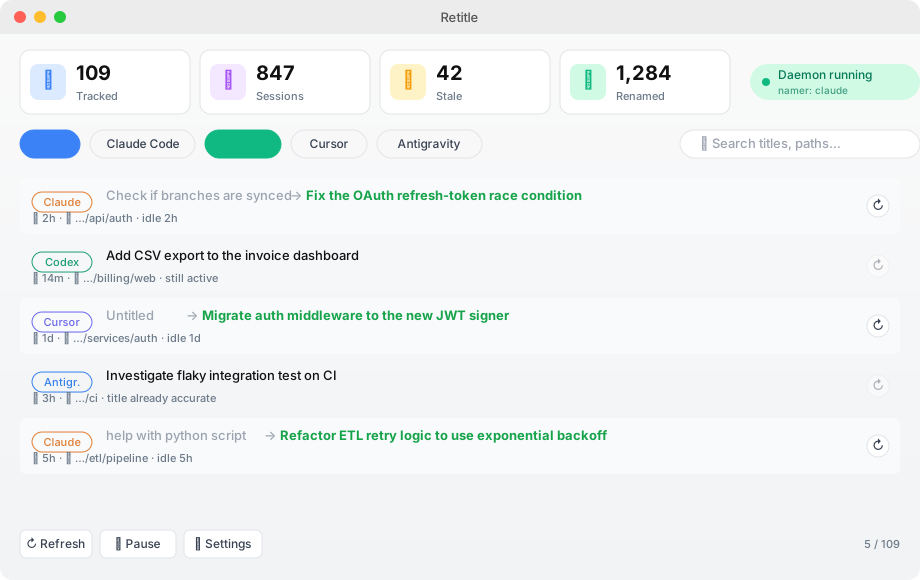
rename status # shows what auto resolved to, e.g. "namer=auto → claude"rename ships two optional GUI front-ends. Both are thin viewers over the
Python CLI — the daemon you installed with rename install keeps doing all
the real work, the apps just let you see what's happening.
| Flavor | Path | Toolchain | Status |
|---|---|---|---|
| macOS native | macos-app/ |
Swift + SwiftUI, requires Command Line Tools only | ✅ tested |
| Windows / cross-platform | windows-app/ |
Python + PySide6 (Qt6), runs on Windows / macOS / Linux | ⚠ shipped untested — see app's README |
Both apps share the same feature set:
- Tray / menu bar icon with running/paused indicator and the last few renames (old title → new title)
- Dashboard window with stat cards (Tracked / Sessions / Stale / Renamed), brand-coloured tool filter chips, search across titles & paths, per-session "Rename now" button (bypasses the idle gate), before/after diff
- Visual settings dialog — sliders, dropdowns and toggles that read & write
your
config.toml, so you don't have to edit TOML by hand - Friendly progress — no raw
stderr; everything is surfaced as toast notifications or native system notifications - First-launch permissions onboarding (macOS) — one click to System Settings → Full Disk Access so the OS stops asking on every refresh
- Lazy scanning — session lists are only fetched when the dashboard is open or you hit Refresh, not on every status poll
- Localized — English and 简体中文, auto-detected from system language
cd macos-app
./build-app.sh
open Rename.app
Drag Rename.app into ~/Applications and add it to Login Items to
persist across reboots. It's a LSUIElement app — menu bar only, no Dock icon.
cd windows-app
python -m venv .venv && .venv\Scripts\activate
pip install -e .
rename-gui
For auto-start, drop a shortcut into %APPDATA%\Microsoft\Windows\Start Menu\Programs\Startup.
Both apps talk to the CLI through subprocess / Process and JSON. The CLI
exposes rename status --json, list --json, stats --json, search --json,
and once --session <id> — the GUI calls these and renders the results. There
is no extra state, no extra storage, and no extra daemon — the existing Python
daemon stays the single source of truth.
rename config creates and prints ~/.config/rename/config.toml:
idle_seconds = 300          # rename after 5 minutes idle
poll_seconds = 60           # scan once a minute
batch_size = 25             # rename at most N sessions per scan (0 = no limit)
tools = ["claude-code", "codex", "cursor"]
namer = "heuristic"         # heuristic | claude | codex | anthropic | openai
max_age_days = 7            # ignore sessions older than a week
min_user_messages = 1       # need at least this many real messages
dry_run = false

[anthropic]
model = "claude-haiku-4-5"

[openai]
model = "gpt-4o-mini"
Any field can be overridden per-invocation: rename run --idle 600 --namer anthropic --tool cursor.
| Command | Description |
|---|---|
rename list |
Preview every discovered session and its proposed title (writes nothing) |
rename search <q> |
Find sessions across all tools by title (add --content to grep message text) |
rename stats |
A quick overview: sessions per tool, how many are untitled / stale |
rename once |
Rename the latest batch now (--limit N, --all, --dry-run) |
rename run |
Run continuously in the foreground (add --once, --dry-run) |
rename install |
Install + start the background service (launchd on macOS, systemd on Linux) |
rename uninstall |
Stop and remove the background service |
rename status |
Show config, detected tools, and daemon status |
rename config |
Create / print the config file |
rename list,rename searchandrename statsalso accept--jsonfor scripting.
- No key to paste; titling uses your own logged-in tool. The default
autonamer asks theclaude/codexCLI you're already signed into to write the title, so a short transcript excerpt goes to that provider (credits you already have — no API key needed). Want nothing to leave your machine at all? Setnamer = "heuristic"and it's 100% offline. - No surprise retroactive renames. First run records a baseline timestamp;
pre-existing chats are skipped by the background loop. Renaming your backlog
is a deliberate one-click action (or
rename once --historical), never a side-effect of installing the daemon. - It only ever changes titles.
renamereads transcripts and writes a single title field / appends a single line. It never edits, deletes, or reorders your conversations. - It's reversible and idempotent. A bad title is just a title — send a message and it gets re-evaluated. Re-running does nothing unless content changed.
Will it fight with the tool's own auto-naming?
No. The tools title once and stop; rename only acts after a session is idle, so they aren't
writing at the same time.
Will it overwrite titles I set myself? No — not until you add new messages to that session. Manual titles are respected until the conversation actually moves on.
Do I need an API key?
No. The default reuses the claude / codex CLI you're already logged into — no key to
paste. It spends credits you already have; for zero cost, set namer = "heuristic" (offline).
Is it safe to run all the time? Yes — that's the design. See How it works. The one caveat is editing Cursor's DB while Cursor is open (above).
What happens to my existing chats when I first install rename?
Nothing automatic. First run records a baseline timestamp; the background daemon
only renames sessions that become active after that. If you want your backlog
processed too, hit "Rename historical sessions" in the dashboard or run
rename once --historical --dry-run to preview, then drop --dry-run.
Curious how it works under the hood — including the reverse-engineered session storage format of each tool? See ARCHITECTURE.md.
Adding support for another tool is one file — implement four methods (available, discover,
read_transcript, set_title) in src/rename/adapters/. See CONTRIBUTING.md.
git clone https://github.com/study8677/rename.git && cd rename
pip install -e ".[dev]"
pytest@xiongaox filed #1
asking for Antigravity support. That issue unlocked the whole Antigravity adapter — the
protobuf schema reverse-engineering, the brain/ artifacts discovery, and (after the
Companion App's .pb file was shared) the Companion App store format.
MIT © JingWen Fan