





Keep your AWS IAM Identity Center (formerly AWS SSO) in sync with your Google Workspace directory using an AWS Lambda function. 🚀
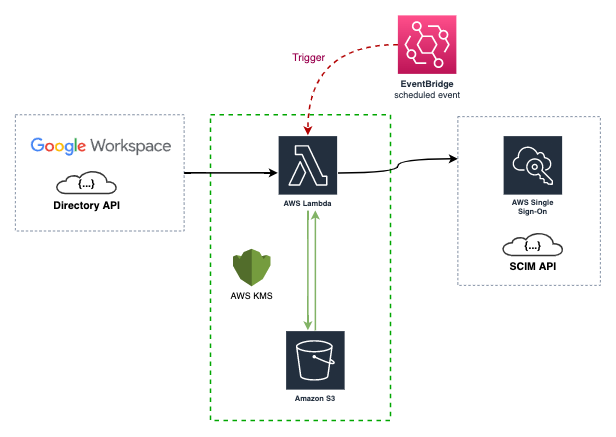
- ✅ Extended Attribute Support: Syncs extended AWS SSO SCIM API fields as described in the official documentation.
- ✅ Configurable User Fields: Choose which optional user attributes (phone numbers, addresses, enterprise data, etc.) to sync. See Configurable User Fields for details.
- ✅ Efficient Data Retrieval: Uses partial responses from the Google Workspace API to fetch only the data you need.
- ✅ Nested Groups Support: Supports nested groups in Google Workspace thanks to the
includeDerivedMembershipAPI query parameter. - ✅ Multiple Deployment Options: Can be deployed via the
AWS Serverless Application Repository, as aContainer Image, or as aCLI. - ✅ Incremental Sync: Drastically reduces the number of requests to the AWS SSO SCIM API by using a state file to track changes.
For a detailed list of new features, improvements, and bug fixes in each release, see the What's New page.
This project is compatible with the latest AWS Lambda runtimes. Since version v0.0.19, it uses the provided.al2 runtime and arm64 architecture.
| Version Range | AWS Lambda Runtime | Architecture | Deprecation Date |
|---|---|---|---|
<= v0.0.18 |
Go 1.x | amd64 (Intel) | 2023-12-31 |
>= v0.0.19 < v0.31.0 |
provided.al2 | arm64 (Graviton 2) | 2026-06-30 |
>= v0.31.0 |
provided.al2023 | arm64 (Graviton 2) | 2029-06-30 |
The AWS Lambda function is triggered by a CloudWatch event rule (every 15 minutes by default). It syncs your AWS IAM Identity Center with your Google Workspace directory using their respective APIs.
During the first sync, the data of your Groups and Users is stored in an AWS S3 bucket as a state file. This state file is a custom implementation to save time and requests to the AWS SSO SCIM API, and to mitigate some of its limitations.
This project is developed using the Go language and AWS SAM.
For more details on the resources created by the CloudFormation template, please check the AWS SAM Template documentation.
Note: If this is your first time implementing AWS IAM Identity Center, please read Using SSO.
This repository builds two binaries from the cmd/ directory:
| Program | Source | Purpose |
|---|---|---|
idpscim |
cmd/idpscim |
Main synchronization program that runs as the Lambda function, a local CLI, or a container command |
idpscimcli |
cmd/idpscimcli |
Helper CLI used to inspect AWS SCIM and Google Workspace data while validating configuration |
After make build, the binaries are available in build/:
./build/idpscim --help
./build/idpscimcli --helpThe repository documentation is organized as follows:
| Document | Purpose |
|---|---|
| docs/idpscim.md | Main program reference for the idpscim sync executable |
| docs/idpscimcli.md | Command reference for the idpscimcli validation and inspection CLI |
| docs/Configuration.md | Configuration sources, examples, and environment variable usage |
| docs/AWS-SAM.md | Source deployment, Serverless Application Repository update flow, and maintainer publishing workflow |
| docs/AWS-SAM-Template.md | Template parameters, generated resources, and Lambda environment mapping |
| docs/Development.md | Local development workflow, build steps, tests, and SAM-based cloud testing |
| docs/Using-SSO.md | Practical rollout guidance for AWS IAM Identity Center and Google Workspace group design |
| docs/State-File-example.md | Example state file structure and notes about how sync state is stored |
| docs/Demo.md | Visual walkthrough screenshots of the sync process and resulting AWS and Google Workspace data |
| docs/Release.md | Maintainer release flow based on semantic version tags and GitHub Actions |
| docs/Whats-New.md | Release notes and notable changes across versions |
The easiest way to deploy and use this project is through the AWS Serverless Application Repository.
You will need to configure credentials for both Google Workspace and AWS.
-
Google Workspace API Credentials
- Follow the Google Workspace documentation to create credentials.
- You will need to create a Service Account and delegate domain-wide authority to it with the following scopes:
https://www.googleapis.com/auth/admin.directory.group.readonlyhttps://www.googleapis.com/auth/admin.directory.user.readonlyhttps://www.googleapis.com/auth/admin.directory.group.member.readonly
-
AWS SSO SCIM API Credentials
- Configure these credentials in the AWS IAM Identity Center service by following the Automatic provisioning guide.
You have several options to use this project:
-
AWS Serverless Application Repository (Recommended)
- Deploy the application directly from the AWS Serverless Application Repository.
- To update an existing deployment to a newer published version, reuse the same original application name that you entered when you first deployed it. Do not use the generated
serverlessrepo-...stack name. See docs/AWS-SAM.md for the full update flow.
-
AWS SAM
- Build and deploy the Lambda function from your local machine.
- Quick start:
export AWS_PROFILE=<profile_name>
export AWS_REGION=<region>
GIT_VERSION=dev sam build
sam deploy --guided --stack-name idp-scim-sync --capabilities CAPABILITY_IAM CAPABILITY_NAMED_IAM- For full validation, source deployment, publish, and update guidance, see docs/AWS-SAM.md and docs/AWS-SAM-Template.md.
- Build from Source
- Quick start:
make
./build/idpscim --help
./build/idpscimcli --help-
Run the programs
- idpscim runs the actual synchronization logic.
- idpscimcli helps you validate your AWS SCIM and Google Workspace configuration before enabling automated sync.
- See docs/idpscim.md, docs/idpscimcli.md, docs/Configuration.md, and docs/Development.md for examples, flags, and the full local workflow.
-
Pre-built Binaries
- Download the binaries from the GitHub Releases.
-
Container Image
- Pull the image from the GitHub Container Registry.
- Container build and execution details are documented in docs/idpscim.md, docs/idpscimcli.md, and docs/Development.md.
By default, all optional user attributes are synced from Google Workspace to AWS SSO SCIM. You can control which optional fields are included using the sync_user_fields configuration option.
Supported optional fields include phoneNumbers, addresses, title, preferredLanguage, locale, timezone, nickName, profileURL, userType, and enterpriseData.
Required fields are always synchronized: name, userName, displayName, emails, and active.
For config file examples, environment variable usage, CLI flags, SAM parameter usage, and behavior notes, see docs/Configuration.md and docs/idpscim.md.
- Group Limit: The AWS SSO SCIM API has a limit of 50 groups per request. Please support the feature request on the AWS Support site to help get this limit increased.
- Throttling: With a large number of users and groups, you may encounter a
ThrottlingExceptionfrom the AWS SSO SCIM API. This project uses the httpx library with automatic retry and jitter backoff to mitigate this, but it's still a possibility. - User Status: The Google Workspace API doesn't differentiate between normal and guest users except for their status. This project only syncs
ACTIVEusers.
If you are coming from the awslabs/ssosync project, please note the following:
- This project only implements the
--sync-method groups. - This project only implements filtering for Google Workspace Groups, not Users.
- This project supports selecting which optional user attributes to sync via
--sync-user-fields(e.g., phone numbers, addresses, enterprise data). - The flag names are different.
This project is released under the Apache License 2.0. See the LICENSE file for more details.

