Repository navigation
[compass] Anode after the launch: be where agents look, and show what it is for #27
New issue
Have a question about this project? Sign up for a free GitHub account to open an issue and contact its maintainers and the community.
By clicking “Sign up for GitHub”, you agree to our terms of service and privacy statement. We’ll occasionally send you account related emails.
Already on GitHub? Sign in to your account
Merged
Merged
Changes from all commits
Commits
Show all changes
4 commits
Select commit
Hold shift + click to select a range
8705fe6
[compass] Docs: when to use Anode, and three use-case guides
skulitom a5df42c
docs: acquire desktop lease before guide launches
skulitom c7fe88c
Merge remote-tracking branch 'origin/main' into compass/followup-2026…
skulitom a620889
[compass] Docs: fix the guides' lease order, Android status and drop-…
skulitom File filter
Filter by extension
Conversations
Failed to load comments.
Loading
Jump to
Jump to file
Failed to load files.
Loading
Diff view
Diff view
There are no files selected for viewing
This file contains hidden or bidirectional Unicode text that may be interpreted or compiled differently than what appears below. To review, open the file in an editor that reveals hidden Unicode characters.
Learn more about bidirectional Unicode characters

Loading
Sorry, something went wrong. Reload?
Sorry, we cannot display this file.
Sorry, this file is invalid so it cannot be displayed.

Loading
Sorry, something went wrong. Reload?
Sorry, we cannot display this file.
Sorry, this file is invalid so it cannot be displayed.
This file contains hidden or bidirectional Unicode text that may be interpreted or compiled differently than what appears below. To review, open the file in an editor that reveals hidden Unicode characters.
Learn more about bidirectional Unicode characters
This file contains hidden or bidirectional Unicode text that may be interpreted or compiled differently than what appears below. To review, open the file in an editor that reveals hidden Unicode characters.
Learn more about bidirectional Unicode characters
| Original file line number | Diff line number | Diff line change |
|---|---|---|
| @@ -0,0 +1,141 @@ | ||
| # When to use Anode, and when to use something else | ||
|
|
||
| Anode gives an agent a second Windows session on your own PC: a desktop with its own screen, pointer | ||
| and keyboard focus, so the agent works there while you keep using yours. Other tools solve nearby | ||
| problems in other ways, and some of them suit a job better. This page says which, as fairly as we | ||
| can. | ||
|
|
||
| Facts about the other tools come from their own pages and repositories, **read on 8 October 2026**. | ||
| They change often, so follow the links before you decide. Corrections are welcome as an | ||
| [issue](https://github.com/skulitom/Anode/issues/new?template=bug_report.yml). | ||
|
|
||
| ## The short answer | ||
|
|
||
| | You want… | Use | | ||
| | --- | --- | | ||
| | An agent that drives Windows apps and headed browsers while you keep working on the same PC, with nothing moving under your mouse | **Anode** | | ||
| | The same without a second session, on macOS or Linux as well, and you can accept that some targets refuse background input | [Cua Driver](#cua-driver) | | ||
| | An agent that drives your own desktop while you watch, on any Windows edition, Home included | [Windows-MCP](#windows-mcp) | | ||
| | Files, terminal commands and processes, with no GUI at all | [Desktop Commander](#desktop-commander) | | ||
| | A whole Windows PC for the agent that isn't yours: managed in the cloud, signed in with your organization's identities | [Windows 365 for Agents](#windows-365-for-agents) | | ||
| | A security boundary for untrusted code | A virtual machine or sandbox. None of the local tools here is one, Anode included. | | ||
|
|
||
| ## Side by side | ||
|
|
||
| | | Anode | Windows-MCP | Cua Driver | Desktop Commander | Windows 365 for Agents | | ||
| | --- | --- | --- | --- | --- | --- | | ||
| | Where the agent works | A second Windows session for your account, on your PC | Your own session | Your own session | Your own session (files and shell only) | A Cloud PC in Microsoft's cloud | | ||
| | Your pointer and focus | Untouched: the seat has its own | Moved by the agent; you take control back by moving the mouse | Untouched in its default background mode; its foreground mode briefly brings the target forward | Not used | Not on your PC | | ||
| | GUI apps | Yes | Yes | Yes | No | Yes | | ||
| | Screenshots and accessibility tree | Yes (seat only) | Yes | Yes | No | Yes (accessibility tree of the foreground window) | | ||
| | Browsers | Headed Chrome or Edge in the seat, on a profile you sign in to once | DOM mode for Chrome, Edge and Firefox | Chrome and Edge through the DevTools protocol | No | DOM tools on Edge only | | ||
| | Android emulators | Yes, booted in the seat | Not mentioned | Not mentioned | No | Not mentioned | | ||
| | Windows editions | 10/11 Pro, Enterprise, Education, Server; not Home | Windows 7 to 11 in its README | Windows 10/11, plus macOS and Linux | Windows, macOS, Linux | Cloud PCs; nothing to install locally | | ||
| | Price | Free, MIT | Free, MIT | Free, MIT (cloud machines billed separately) | Free locally, MIT; a hosted remote tier | $0.40 an hour in the US, plus $5 a month for an always-available PC | | ||
|
|
||
| ## Anode's difference, and its limits | ||
|
|
||
| **The difference.** The seat is a Windows *child session*: Windows' own second session for your | ||
| account, with its own desktop, focus and screen ([how it works](ARCHITECTURE.md)). An agent can | ||
| click, type into any app, use Chromium pages that ignore background messages, run games with a | ||
| virtual controller and boot Android emulators there, without bringing anything to the front of your | ||
| desktop. Tools that work inside your session have to share your focus and pointer, or avoid them | ||
| target by target; the seat has its own. | ||
|
|
||
| **The limits.** Be sure these fit before you choose it: | ||
| - Windows 10/11 **Pro, Enterprise or Education**, or Windows Server, on x64. Windows Home has no | ||
| child sessions. `anode setup` needs administrator rights once | ||
| ([what it changes](SECURITY.md#what-anode-setup-changes)). | ||
| - One seat per Windows session, shared by your agents in turn ([leases](MULTI-AGENT.md)). | ||
| - The seat runs as you and shares your files, accounts and network. **Desktop isolation, not a | ||
| security sandbox** ([security](SECURITY.md)). | ||
| - Single-instance apps may already belong to your main session; use separate browser profiles. | ||
| - Builds are unsigned, so SmartScreen may warn. Anode is young and has few users so far. | ||
|
|
||
| ## Windows-MCP | ||
|
|
||
| [CursorTouch/Windows-MCP](https://github.com/CursorTouch/Windows-MCP) is a Python MCP server with | ||
| about 8,200 GitHub stars, installed with `uvx windows-mcp serve`. It has `Screenshot` and `Snapshot` | ||
| (UI Automation) tools, and a DOM mode for Chrome, Edge and Firefox | ||
| ([README](https://github.com/CursorTouch/Windows-MCP)). | ||
|
|
||
| - It works in your own session and moves the real pointer. Its README says moving the physical | ||
| mouse "returns control to the user until 10 seconds of inactivity", and calls that takeover | ||
| "best-effort, not a security boundary" | ||
| ([README, ControlStatus](https://github.com/CursorTouch/Windows-MCP)). | ||
| - Its security notes say it is not sandboxed and suggest Windows Sandbox or a VM for isolation | ||
| ([SECURITY.md](https://github.com/CursorTouch/Windows-MCP/blob/main/SECURITY.md)). | ||
| - Anonymous telemetry is on by default; `ANONYMIZED_TELEMETRY=false` turns it off | ||
| ([README, Telemetry](https://github.com/CursorTouch/Windows-MCP)). | ||
|
|
||
| **Choose it** when you watch the agent work on your own desktop, need Windows Home or older | ||
| Windows, or want a mature project with many users. **Choose Anode** when you want to keep using | ||
| your mouse and keyboard during the agent's work. | ||
|
|
||
| ## Cua Driver | ||
|
|
||
| [Cua Driver](https://cua.ai/docs/cua-driver/quickstart) is part of | ||
| [trycua/cua](https://github.com/trycua/cua) (about 28,900 stars across the project), with a CLI, | ||
| an MCP server and SDKs for macOS, Windows and Linux. Its driver releases, for every platform, are | ||
| marked pre-release on GitHub ([releases](https://github.com/trycua/cua/releases)). | ||
|
|
||
| - It runs in your own interactive session. Its default **background** mode never moves your pointer | ||
| or raises the target: it uses UI Automation, pen or touch injection on a visible window, and | ||
| window messages | ||
| ([Windows notes](https://github.com/trycua/cua/blob/main/libs/cua-driver/rust/Skills/cua-driver/WINDOWS.md)). | ||
| - On its native input route, when the target is covered by another window or the event is one it | ||
| knows gets dropped (Chromium mouse events and key combinations, GTK buttons, LibreOffice shortcuts, | ||
| some terminal and WPF text), it returns `background_unavailable` and recommends its **foreground** | ||
| mode, which brings the target forward briefly and then restores it (same page). | ||
| - Chrome and Edge pages are driven through the DevTools protocol instead, where it reports validated | ||
| background delivery on Windows | ||
| ([browser notes](https://github.com/trycua/cua/blob/main/libs/cua-driver/rust/Skills/cua-driver/BROWSER.md), | ||
| [platform support](https://cua.ai/docs/cua-driver/concepts/platform-support)). Its pages don't | ||
| mention Android emulators. | ||
|
|
||
| **Choose it** when you need macOS or Linux too, are on Windows Home, or your targets accept | ||
| background input. **Choose Anode** when the agent must reach covered windows, Electron and other | ||
| Chromium windows without DevTools, games or emulators without anything coming to the front of your | ||
| desktop. | ||
|
|
||
| ## Desktop Commander | ||
|
|
||
| [Desktop Commander](https://github.com/wonderwhy-er/DesktopCommanderMCP) (about 9,960 stars) gives | ||
| an agent files, search, editing, terminal commands and processes. It has no screenshot, click or | ||
| accessibility tools, so it doesn't drive GUI apps. The local server is free; a hosted remote tier | ||
| is free up to 10,000 tool calls a month or $20 a month | ||
| ([pricing](https://desktopcommander.app/pricing)). | ||
|
|
||
| **Choose it** for file and shell work across operating systems. It and Anode do different jobs and | ||
| work well side by side: Anode's own `seat_exec` is for builds and servers that a desktop test needs, | ||
| not a general shell. | ||
|
|
||
| ## Windows 365 for Agents | ||
|
|
||
| [Windows 365 for Agents](https://learn.microsoft.com/en-us/windows-365/agents/introduction-windows-365-for-agents) | ||
| gives agents Cloud PCs that they check out and back in, managed with Microsoft Entra and Intune. It | ||
| has been generally available since the week of 1 June 2026 | ||
| ([what's new](https://learn.microsoft.com/en-us/windows-365/agents/whats-new)). | ||
|
|
||
| - Agents reach it through an MCP server: they check a Cloud PC out with a tool call, then use mouse | ||
| and keyboard, screenshots, the accessibility tree of the foreground window, an allow-listed shell, | ||
| and DOM-level browser tools that work on Edge only | ||
| ([tool reference](https://learn.microsoft.com/en-us/microsoft-copilot-studio/mcp-windows-365-agents)). | ||
| - In the US it costs $0.40 an hour, rounded up to the next full hour; an always-available Cloud PC | ||
| adds $5 a month on top ([pricing](https://learn.microsoft.com/en-us/windows-365/agents/pricing-paygo-always-available)). | ||
| It is billed through an Azure subscription ([billing](https://learn.microsoft.com/en-us/windows-365/agents/billing-w365a)). | ||
|
|
||
| **Choose it** for organizations that want agents on managed machines away from people's PCs, or | ||
| many machines at once. **Choose Anode** to test what is installed on your own PC (your builds, your | ||
| emulators, your signed-in tools) for free, with nothing to provision. | ||
|
|
||
| ## Coming from Microsoft | ||
|
|
||
| Microsoft announced process and session isolation for agents in June 2026, as an early preview that | ||
| starts with non-interactive sessions | ||
| ([Windows Developer Blog](https://blogs.windows.com/windowsdeveloper/2026/06/02/windows-platform-security-for-ai-agents/)). | ||
| Its [MXC SDK](https://github.com/microsoft/mxc) reached 1.0 on 7 October 2026; its session backend | ||
| has no display inside the session and captures only standard output and error | ||
| ([design notes](https://github.com/microsoft/mxc/blob/main/docs/development/architecture/backends/isolation-session/oneshot.md)). | ||
| That makes it a sandbox for commands, not a desktop for GUI work, for now. We will update this page | ||
| as it changes. |
This file contains hidden or bidirectional Unicode text that may be interpreted or compiled differently than what appears below. To review, open the file in an editor that reveals hidden Unicode characters.
Learn more about bidirectional Unicode characters
| Original file line number | Diff line number | Diff line change |
|---|---|---|
| @@ -0,0 +1,95 @@ | ||
| # Guide: check an Android app on an emulator in the seat | ||
|
|
||
| Before a release, you want an agent to install your APK on an emulator, open it, look at a few | ||
| screens in light and dark mode, and check the log for crashes. Anode boots the emulator inside the | ||
| seat, so its window never appears on your screen, and its Android tools act only on that emulator, | ||
| never on your own emulators or a phone on USB. | ||
|
|
||
| 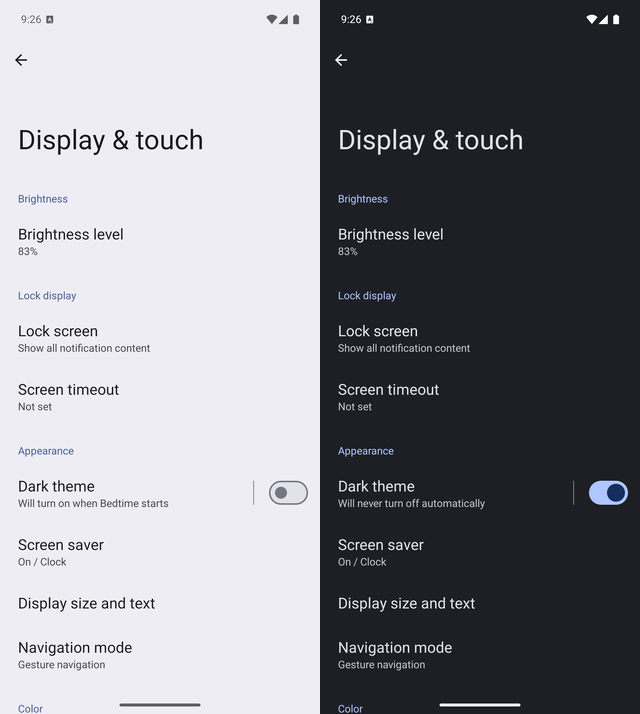 | ||
|
|
||
| <sub>Captured with Anode 0.11.0 from a Pixel 9 Pro emulator (API 36) in the seat: the device's own | ||
| pixels, before and after `cmd uimode night yes`. It booted in 6.7 s.</sub> | ||
|
|
||
| ## Before you start | ||
|
|
||
| You need Android Studio's SDK and at least one AVD, as on your desktop. Check what Anode finds. The | ||
| check starts nothing, so it needs Anode running: if it says "Anode is not running", start it with | ||
| `anode start --hidden` and run it again. | ||
|
|
||
| ```powershell | ||
| anode android | Out-Host | ||
| ``` | ||
|
|
||
| Note the AVD name, such as `Pixel_9_Pro`. Emulators are heavy: run one at a time, and only while the | ||
| seat is free. | ||
|
|
||
| ## Ask for the check | ||
|
|
||
| > Use Anode to boot Pixel_9_Pro in the seat, install C:\work\app-release.apk, open | ||
| > com.example.quiz, and send me screenshots of the first screen in light and dark mode. Then check | ||
| > logcat for crashes and stop the emulator. | ||
|
|
||
| Or run the guided prompt `/mcp__anode__android_test` and name your APK. | ||
|
|
||
| ## What the agent does | ||
|
|
||
| ```json | ||
| {"tool": "android_status", "arguments": {}} | ||
| {"tool": "seat_lease", "arguments": {"action": "acquire"}} | ||
| {"tool": "android_emulator", "arguments": {"action": "start", "avd": "Pixel_9_Pro"}} | ||
| {"tool": "android_emulator", "arguments": {"action": "adb", "serial": "emulator-5554", "args": ["install", "-r", "C:\\work\\app-release.apk"]}} | ||
| {"tool": "android_emulator", "arguments": {"action": "adb", "serial": "emulator-5554", "args": ["shell", "monkey", "-p", "com.example.quiz", "1"]}} | ||
| {"tool": "android_emulator", "arguments": {"action": "screenshot", "serial": "emulator-5554", "maxWidth": 540}} | ||
| {"tool": "android_emulator", "arguments": {"action": "adb", "serial": "emulator-5554", "args": ["shell", "cmd", "uimode", "night", "yes"]}} | ||
| {"tool": "android_emulator", "arguments": {"action": "screenshot", "serial": "emulator-5554", "maxWidth": 540}} | ||
| {"tool": "android_emulator", "arguments": {"action": "adb", "serial": "emulator-5554", "args": ["logcat", "-d", "-s", "AndroidRuntime:E"]}} | ||
| {"tool": "android_emulator", "arguments": {"action": "stop", "serial": "emulator-5554"}} | ||
| {"tool": "seat_lease", "arguments": {"action": "release"}} | ||
| ``` | ||
|
|
||
| - `start` returns the serial to use, such as `emulator-5554`, and `booted: true` once Android is up. | ||
| It starts **read-only**: the AVD keeps nothing from the test, and it can run in the seat while the | ||
| same AVD is open on your desktop. | ||
| - `screenshot` returns the device's own pixels. To tap something in it, scale the image's | ||
| coordinates back to the device (`x * sourceWidth / width`) and use | ||
| `["shell", "input", "tap", "X", "Y"]`. | ||
| - An empty `logcat -d -s AndroidRuntime:E` means no app hit an uncaught Java or Kotlin exception | ||
| since boot. Native crashes log elsewhere (`logcat -d -s DEBUG:F` shows their tombstones). | ||
|
|
||
| ## The same from a script | ||
|
|
||
| ```powershell | ||
| $env:ANODE_AGENT_ID = 'android-check' | ||
| $lease = anode lease acquire | Out-String | ConvertFrom-Json | ||
| if ($LASTEXITCODE -ne 0) { throw 'Desktop acquisition failed.' } | ||
| $env:ANODE_LEASE_TOKEN = $lease.leaseToken | ||
| anode android start Pixel_9_Pro | Out-Host | ||
| anode android adb emulator-5554 -- install -r C:\work\app-release.apk | Out-Host | ||
| anode android adb emulator-5554 -- shell monkey -p com.example.quiz 1 | Out-Host | ||
| anode android shot emulator-5554 light.png | Out-Host | ||
| anode android adb emulator-5554 -- shell cmd uimode night yes | Out-Host | ||
| anode android shot emulator-5554 dark.png | Out-Host | ||
| anode android adb emulator-5554 -- logcat -d -s AndroidRuntime:E | Out-Host | ||
| anode android stop emulator-5554 | Out-Host | ||
| anode lease release | Out-Host | ||
| ``` | ||
|
|
||
| Use the serial `android start` prints; `android shot` saves the screen at the device's resolution. | ||
|
|
||
| ## When it doesn't work | ||
|
|
||
| - **`booted: false`.** The boot outlasted the wait, and the emulator keeps booting; check | ||
| `anode android status --json` (or `android_status`) until the seat's emulator shows | ||
| `"booted": true`. The plain-text summary doesn't show it. A cold boot takes longer. | ||
| - **adb keeps saying `device offline`.** The device itself is failing. After a quick boot, stop it | ||
| and start again with `coldBoot` (`--cold`). If it still never comes online, the AVD may be damaged, | ||
| which only you can repair or recreate; trying another AVD tells you quickly | ||
| ([details](ANDROID.md#when-an-emulator-does-not-finish-booting)). | ||
| - **The screen stays black.** Start again with `gpu: "software"` (`--gpu software`) | ||
| ([troubleshooting](TROUBLESHOOTING.md#an-android-emulator-will-not-start-or-stays-black)). | ||
| - **"runs outside the seat".** That serial is an emulator on your desktop, which Anode never drives; | ||
| start one in the seat and use its serial. | ||
| - **The emulator keeps running after the test.** A lease can end between two steps, so emulators | ||
| outlive it; stop yours when you're done. | ||
|
|
||
| More: [Android apps and web consoles](ANDROID.md). | ||
Oops, something went wrong.
Oops, something went wrong.
Add this suggestion to a batch that can be applied as a single commit.
This suggestion is invalid because no changes were made to the code.
Suggestions cannot be applied while the pull request is closed.
Suggestions cannot be applied while viewing a subset of changes.
Only one suggestion per line can be applied in a batch.
Add this suggestion to a batch that can be applied as a single commit.
Applying suggestions on deleted lines is not supported.
You must change the existing code in this line in order to create a valid suggestion.
Outdated suggestions cannot be applied.
This suggestion has been applied or marked resolved.
Suggestions cannot be applied from pending reviews.
Suggestions cannot be applied on multi-line comments.
Suggestions cannot be applied while the pull request is queued to merge.
Suggestion cannot be applied right now. Please check back later.
Uh oh!
There was an error while loading. Please reload this page.