



⚡ Zero-copy GPU capture · 👁️ Sees occluded & off-workspace windows · 🦀 Rust · 🪟 Wayland-native · 🎨 Themeable · 🌍 13 languages
Five graphical tools for wlroots and derivatives.
| Tool | What it does | crate |
|---|---|---|
| wlr-chooser | Window & screen picker for screencast portals (xdg-desktop-portal-wlr) — a rofi-like overlay with live thumbnails. |
 |
| wlr-switcher | Live Alt-Tab / exposé window switcher (macOS-style strip, full-screen grid, or card) with hold-to-switch and live previews. Ships with wlr-chooser, and with wlr-overlayd — the optional daemon that puts either overlay on screen in milliseconds. |
|
| wlr-peek | Inspect the screen — colour picker, loupe, OCR, live picture-in-picture mirror (window or region), change monitor (watch), and visual grep. |
 |
| wlr-shot | Screen capture — screenshots of an output/region/window (PNG/JPEG/PPM/PAM), copy to clipboard; plus recording (MP4/MKV in H.264, or animated GIF/WebP) with system audio & timelapse (NVENC/VAAPI/libx264). Shoots and records windows, even those you can't see — occluded behind others, or on another workspace — by name, with no clicking. |  |
| wlr-draw | Draw on screen — a transparent annotation overlay (gromit-mpx-style): freehand, shapes, arrows, text, dwell-to-snap, element move, plus presenter spotlight, freeze-frame and save. Daemon + control socket. |  |
Point at a window you can't see.
wlr-shotandwlr-peektake--app-id/--title, so you can screenshot, record, mirror, OCR or watch a window by name — even one occluded behind others or on another workspace, with no clicking and no workspace switch (wlr-shot screenshot --list-windowsshows what's open). Reaching hidden and off-screen windows is the whole point of building onext-foreign-toplevelrather than grabbing a visible output.
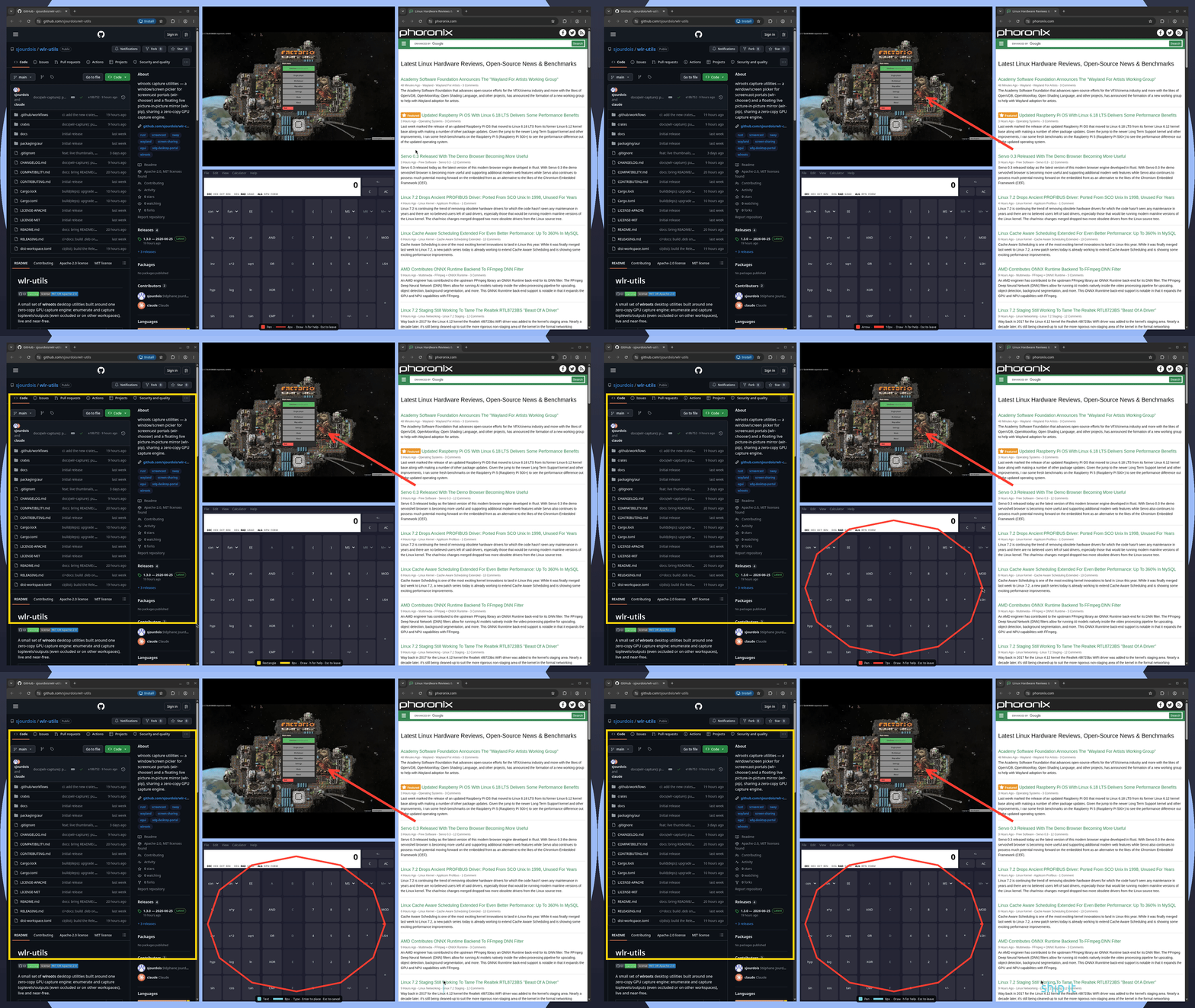
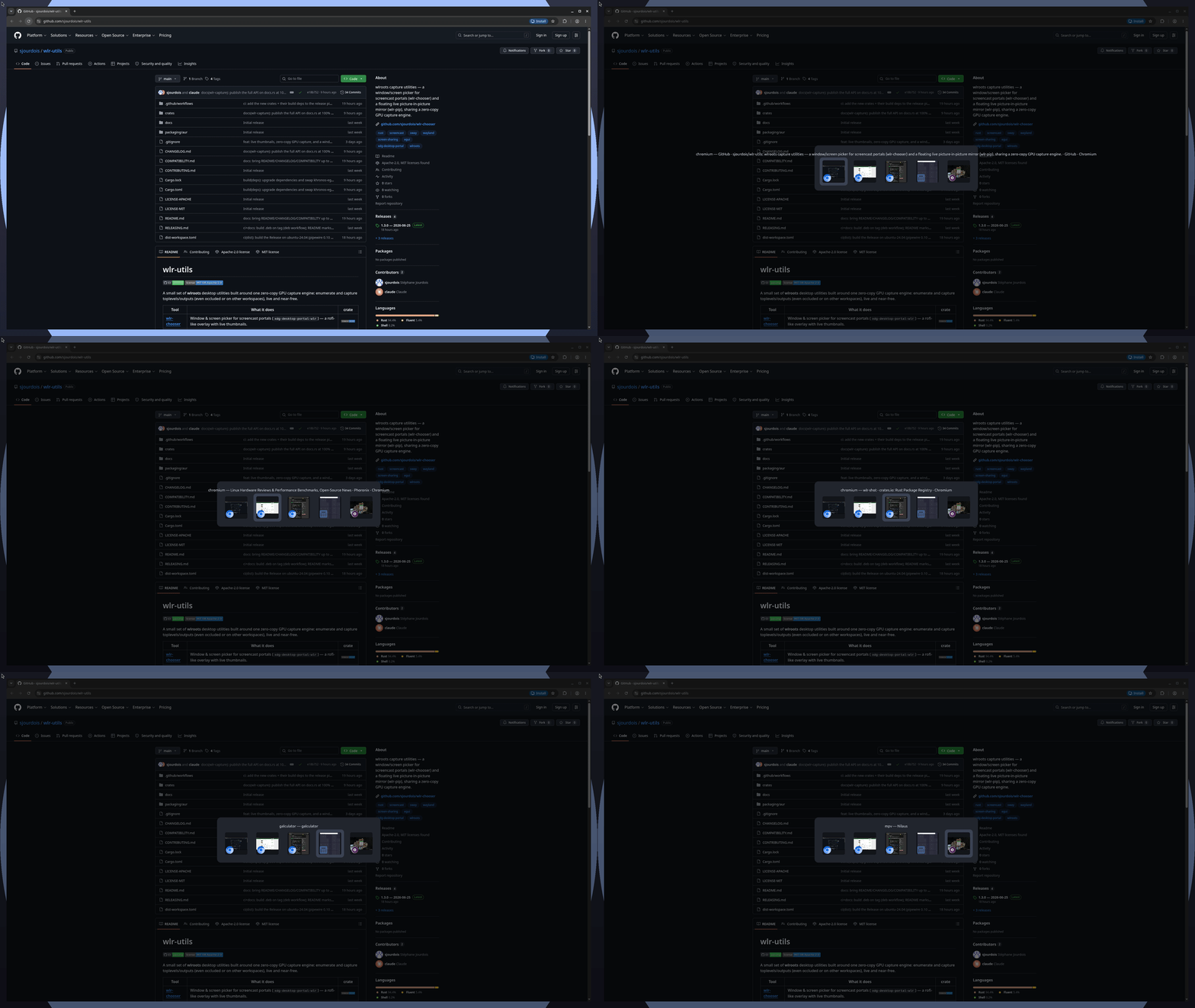
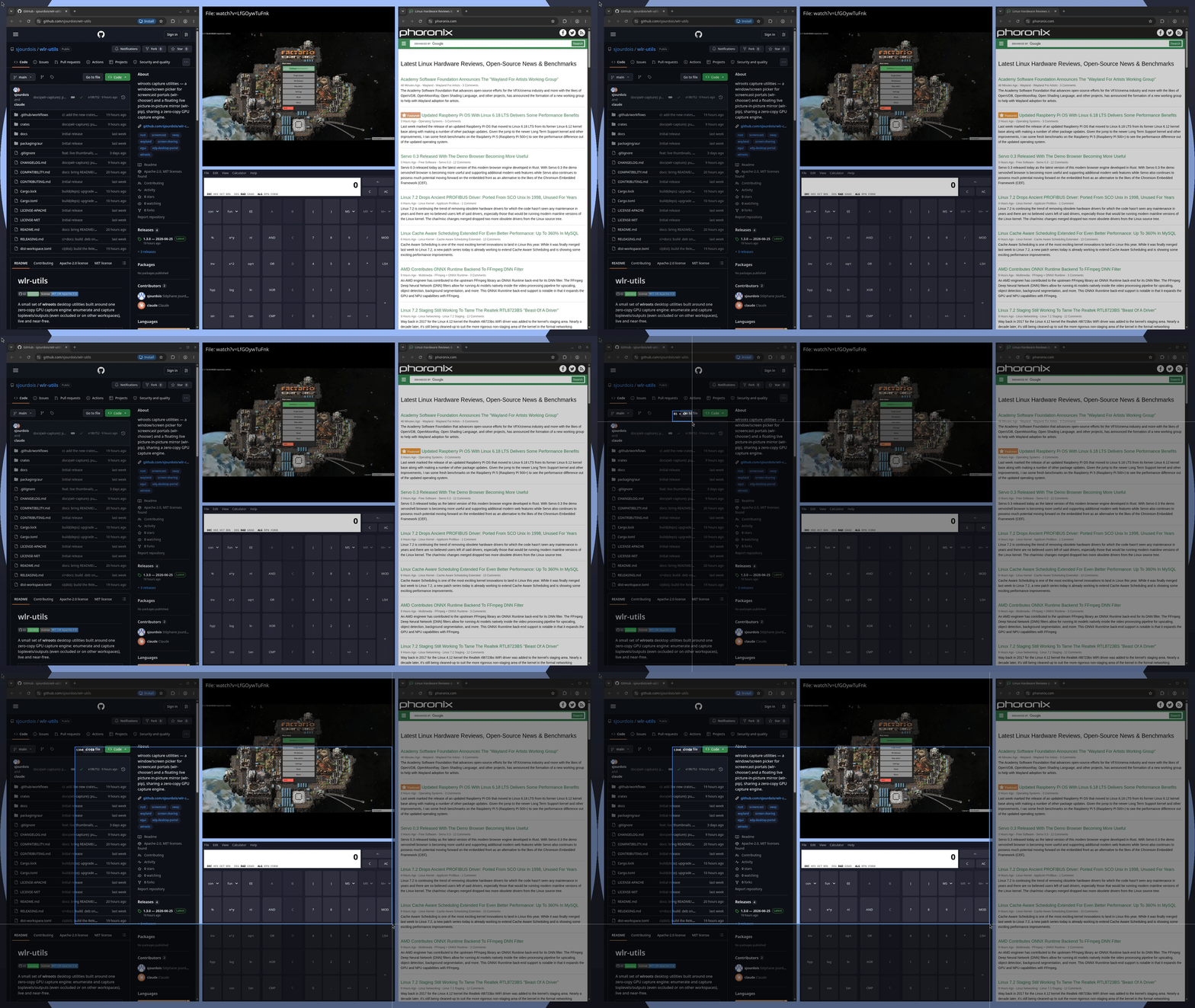
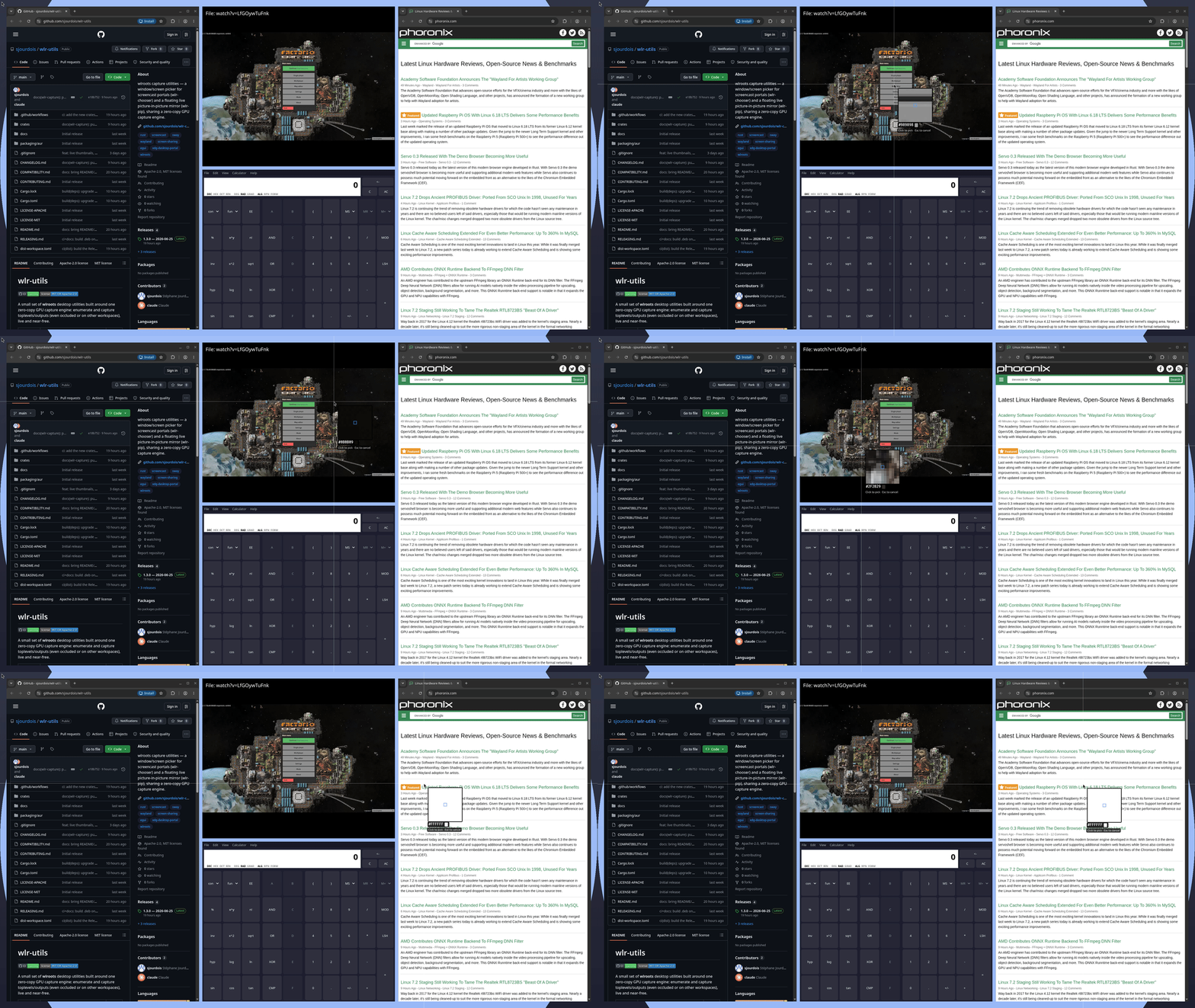
wlr-draw · wlr-switcher · wlr-shot · wlr-peek — see the showcase
Every route below installs the same six binaries (wlr-chooser, wlr-switcher,
wlr-overlayd, wlr-peek, wlr-shot, wlr-draw). The AUR and .deb packages also
install the themes and the systemd --user units for the wlr-overlayd and wlr-draw
daemons; enable the one you want with systemctl --user enable --now wlr-overlayd.service.
paru -S wlr-utils-bin    # prebuilt from the release (fast)
paru -S wlr-utils        # …or built from source
Both ship the same tools and conflict with each other — pick one. Any AUR helper works.
One package with the whole suite is attached to every release, built per distro so it links against that distro's FFmpeg / Leptonica. Pick the matching asset (the forky, sid and 26.04 builds are experimental, and a release may lack them):
| Distro | Asset suffix |
|---|---|
| Debian 12 (bookworm) | …_amd64.bookworm.deb |
| Debian 13 (trixie) | …_amd64.trixie.deb |
| Debian 14 (forky) / sid | …_amd64.forky.deb / …_amd64.sid.deb |
| Ubuntu 22.04 (jammy) | …_amd64.jammy.deb — screenshots only, no wlr-shot record |
| Ubuntu 24.04 (noble) / 26.04 | …_amd64.noble.deb / …_amd64.ubuntu2604.deb |
sudo apt install ./wlr-utils_*_amd64.trixie.deb # apt pulls the dependencies in, OCR data includedUbuntu 22.04's PipeWire / FFmpeg are too old to build the recorder, so that .deb omits
wlr-shot record, and a source build there hits the same limit.
Important
These .debs link dynamically against the FFmpeg (libavutil) and Leptonica
(libleptonica, formerly liblept) of the distro they were built on. If your installed
versions don't match (different release, backports, a soname your distro doesn't ship),
the package won't install or the tool won't start —
error while loading shared libraries: libavutil.so.NN. Build from source instead: it
links against whatever you have.
Packaged in nixpkgs, on the unstable channel.
nix-shell -p wlr-utils                 # try it
nix profile install nixpkgs#wlr-utils  # …or install it
On NixOS, add wlr-utils to environment.systemPackages.
One archive with every binary, no Rust toolchain needed. It is built on Ubuntu 24.04 and
linked to its FFmpeg, PipeWire and Leptonica, so elsewhere it needs those same versions —
a package or a source build is the safer route. The one-line installer puts the binaries
in ~/.cargo/bin and adds it to your PATH (unless WLR_UTILS_NO_MODIFY_PATH=1), with no
theme and no systemd unit:
curl --proto '=https' --tlsv1.2 -LsSf \
  https://github.com/sjourdois/wlr-utils/releases/latest/download/wlr-utils-installer.sh | sh
The archive, unpacked by hand, installs itself with its units, themes and example
configuration, into /usr/local:
curl -LO https://github.com/sjourdois/wlr-utils/releases/latest/download/wlr-utils-x86_64-unknown-linux-gnu.tar.xz
tar xf wlr-utils-x86_64-unknown-linux-gnu.tar.xz
cd wlr-utils-x86_64-unknown-linux-gnu
sudo sh install.sh                 # or elsewhere: sudo env PREFIX=/usr sh install.sh
# or for yourself alone, without root: PREFIX=~/.local sh install.shFirst, Rust 1.95 or newer and the development packages. For the whole suite, the ones CI installs:
# Debian 13: its own cargo is too old, the backports' is recent enough
sudo apt install -t trixie-backports cargo
# Debian 14, sid: plain `sudo apt install cargo`
sudo apt install build-essential pkg-config clang libwayland-dev libxkbcommon-dev \
  libfontconfig-dev libgbm-dev libavcodec-dev libavformat-dev libavutil-dev \
  libavfilter-dev libavdevice-dev libswscale-dev libswresample-dev libva-dev \
  libpipewire-0.3-dev libtesseract-dev libleptonica-dev
# Arch
sudo pacman -S --needed base-devel cargo clang wayland libxkbcommon fontconfig mesa \
  ffmpeg libva libpipewire tesseract leptonica
Ubuntu up to 26.04 ships an older Rust: take it from rustup, or
install the .deb instead. Each tool's README says which of these
packages it needs on its own.
Then:
cargo install wlr-utils # the whole suiteEach tool is also its own crate, if you want just one — it then pulls only that tool's system dependencies (see its README):
cargo install wlr-chooser        # window/screen picker + wlr-switcher (Alt-Tab/exposé) + wlr-overlayd
cargo install wlr-peek           # colour picker, loupe, OCR, live mirror, watch
cargo install wlr-shot           # screenshots + recording
cargo install wlr-draw           # annotation overlay
To install a checkout with its systemd units and themes, build the bundle and run the
install script. It installs into /usr/local; PREFIX and DESTDIR change that, as the
AUR packages do:
cargo build --release -p wlr-utils
sudo sh packaging/install.sh # or for yourself alone: PREFIX=~/.local sh packaging/install.shA compositor that speaks the wlroots protocols — wlroots-based or not, since Hyprland, niri and cosmic-comp implement them on their own stacks. What you get depends on which capture protocols it exposes:
| Capability | Compositor floor | Wayland protocol |
|---|---|---|
| Overlays (pickers, region selection, annotation) | any | wlr-layer-shell |
| Screen capture (screenshots, recording, loupe, wlr-draw's freeze and save) | wlroots ≥ 0.19 · Sway ≥ 1.11, or any compositor with wlr-screencopy |
ext-image-copy-capture-v1 (else wlr-screencopy) |
Window capture (switcher, -w, window mirror/record) |
wlroots ≥ 0.20 · Sway ≥ 1.12 | adds the foreign-toplevel capture source and ext-foreign-toplevel-list-v1 |
Tools degrade gracefully: where windows aren't capturable they keep their screen features and say so. See COMPATIBILITY.md for the full matrix (Hyprland, niri, labwc, …), and Troubleshooting to check your own compositor.
Runtime libraries:
| Library | Needed by | Why |
|---|---|---|
libegl1 |
every tool | EGL/GLES overlay rendering |
libfontconfig1 |
every tool | looking up the UI font; without it the overlay falls back to the embedded fonts, which have no CJK coverage |
libgbm (Mesa) |
every tool | zero-copy GPU capture path; --no-gpu (or WLR_NO_GPU=1) captures through shared memory instead, but the library must still be there |
FFmpeg (libav*), libpipewire-0.3 |
wlr-shot record |
encoding, and recording system sound |
Tesseract, Leptonica, the eng tessdata pack |
wlr-peek ocr / grep |
text recognition |
xdg-desktop-portal-wlr ≥ 0.8 |
wlr-chooser |
portal-based picking |
wlr-foreign-toplevel-management-v1, or cosmic-toplevel-management |
wlr-switcher |
focusing windows |
wlr-shot doctor                   # what your compositor supports
wlr-shot screenshot -s shot.png   # drag a region on a frozen screen, saved to shot.png
wlr-peek color                    # pick a colour anywhere, printed as #rrggbb
wlr-switcher                      # the Alt-Tab switcher, opened once from the terminal
wlr-draw &                        # the annotation daemon…
wlr-draw toggle                   # …then draw on screen; Esc gives the pointer back
Then bind them to keys, in sway for instance:
bindsym Mod1+Tab exec wlr-switcher
bindsym Print exec wlr-shot screenshot -s -c
bindsym $mod+p exec wlr-draw toggle
The first binding gives a true Alt-Tab: hold Alt, Tab cycles, release switches. The
second copies the region to the clipboard. Key bindings and startup, per
compositor has the same in Hyprland and niri, and
each tool's README has more. For screen sharing, point the portal at
wlr-chooser.
Every tool reads one file, ~/.config/wlr-utils/config.toml ($XDG_CONFIG_HOME is
honoured). ~/.wlr-utils.toml works too, and /etc/xdg/wlr-utils/config.toml is the
system's default: the first one found is the only one read. Nothing in it is required.
A mistake is reported on stderr and by doctor, and the rest still applies.
[theme]
name = "catppuccin-mocha"   # a theme, by name or by path
accent = "#89b4fa"          # …and any of its keys, set over it
corner-radius = 0           # square corners

[chooser]
tile-width = 360            # the overlays' sizes

[draw]
dwell-ms = 400

[draw.keys]
undo = ["u", "z"]
docs/config.toml lists every setting, commented out at its default:
copy it and uncomment what you change. Packages install it in /usr/share/doc/wlr-utils.
They install the themes in
/usr/share/wlr-utils/themes, named for name as catppuccin-mocha,
catppuccin-macchiato, catppuccin-frappe, catppuccin-latte, nord, gruvbox-dark,
dracula and tokyo-night. Yours go in ~/.config/wlr-utils/themes, and that is also
where to copy docs/themes after a cargo install, which installs none. A
name holding a / is a path instead, relative to the folder of config.toml (~ is
not expanded).
Until wlr-utils 2.0, the old ~/.config/wlr-chooser/theme.toml and
~/.config/wlr-draw/keys.toml are still read when there is no config.toml, with a
warning. One command moves them in, comments included, then deletes them; with -, it
prints the new file instead and touches nothing, for a configuration kept in a dotfile
manager:
wlr-draw migrate-config     # also wlr-shot and wlr-peek, or wlr-chooser/wlr-switcher --migrate-config
wlr-draw migrate-config -The examples in these READMEs are written for sway. The same binding, and the same command run at startup, elsewhere:
| Key binding | At startup | |
|---|---|---|
| sway | bindsym Mod1+Tab exec wlr-switcher |
exec wlr-overlayd |
Hyprland ≥ 0.55 (hyprland.lua) |
hl.bind("ALT + Tab", hl.dsp.exec_cmd("wlr-switcher")) |
hl.on("hyprland.start", function () hl.exec_cmd("wlr-overlayd") end) |
Hyprland, hyprland.conf |
bind = ALT, Tab, exec, wlr-switcher |
exec-once = wlr-overlayd |
| niri | Alt+Tab { spawn "wlr-switcher"; } in binds |
spawn-at-startup "wlr-overlayd" |
On niri, a command with a pipe or a $(…) goes through spawn-sh "…" (or
spawn-sh-at-startup), and each argument of spawn is its own string:
spawn "wlr-switcher" "--layout" "grid". What runs where is in each tool's README and in
COMPATIBILITY.md.
Each overlay is a wlr-layer-shell surface named after the command that shows it, so a
layer rule (blur, animation, …) can target one tool:
| Namespace | Overlay |
|---|---|
wlr-chooser |
the source picker, also when wlr-shot or wlr-peek asks it for a window |
wlr-switcher |
the window switcher and its exposé |
wlr-draw |
the annotation overlay |
wlr-shot |
region selection |
wlr-peek |
the colour picker, the loupe and region selection |
wlr-peek mirror is an ordinary window instead, with the app id wlr-peek-mirror for
window rules.
- What does my compositor support?
wlr-shot doctor(orwlr-peek doctor,wlr-draw doctor,wlr-chooser --doctor) lists the protocols it advertises and says what screen capture, window capture and window focus will do there. It also captures a frame through the GPU path and reports whether it can be imported: if previews or captures come out broken,--no-gpu(orWLR_NO_GPU=1) captures through shared memory instead. - A mistake in
config.tomlis named, with its file and key, on stderr when a tool starts, bywlr-draw reload, and bydoctor; the rest of the file still applies. - A daemon's output —
journalctl --user -t wlr-draw -f(or-t wlr-overlayd) when systemd started it; started from the compositor, it goes wherever the compositor's output goes. - Reporting a bug — paste the whole
doctoroutput into the issue: it is the environment block a report needs.
Package installs come off the usual way (paru -R wlr-utils-bin, sudo apt remove wlr-utils);
run systemctl --user disable --now first on any unit you enabled.
A cargo install drops the binaries in ~/.cargo/bin; remove the bundle with
cargo uninstall wlr-utils, or an individual tool the same way:
cargo uninstall wlr-utils        # the whole bundle
cargo uninstall wlr-draw         # …or just one: wlr-chooser / wlr-peek / wlr-shot
What packaging/install.sh installed comes off by hand, from the same PREFIX:
sudo rm -rf /usr/local/bin/wlr-{chooser,switcher,overlayd,peek,shot,draw} \
  /usr/local/lib/systemd/user/wlr-{overlayd,draw}.service \
  /usr/local/share/{wlr-utils,doc/wlr-utils,licenses/wlr-utils}
Installed for yourself alone (PREFIX=~/.local), the same files sit under ~/.local,
with the units in ~/.local/share/systemd/user.
The prebuilt installer also puts the binaries in ~/.cargo/bin, but cargo does not know
them, and it leaves a receipt; on Nix, remove the profile entry:
rm -f ~/.cargo/bin/{wlr-chooser,wlr-switcher,wlr-overlayd,wlr-peek,wlr-shot,wlr-draw} \
      ~/.config/wlr-utils/wlr-utils-receipt.json
nix profile remove wlr-utils
wlr-draw also registers an XDG autostart entry on first run (see its README). Drop the
checkbox in its tray menu, or delete the files by hand (honouring $XDG_CONFIG_HOME /
$XDG_STATE_HOME if you set them):
rm -f ~/.config/autostart/wlr-draw.desktop \
      ~/.local/state/wlr-draw/autostart-initialized
# and, if you enabled the systemd unit:
systemctl --user disable --now wlr-draw.service
rm -f ~/.config/systemd/user/wlr-draw.service   # only if you copied it there
If you started wlr-overlayd from its systemd unit, take that one out the same way —
otherwise it is only a line in your compositor's config:
systemctl --user disable --now wlr-overlayd.service
rm -f ~/.config/systemd/user/wlr-overlayd.service # only if you copied it there- wlr-chooser README — portal setup, options,
the
wlr-switcherAlt-Tab/exposé, thewlr-overlayddaemon, theming and localisation. - wlr-peek README — colour picker, loupe, OCR, live mirror, change monitor and visual grep.
- wlr-shot README — screenshots, recording and timelapse, with system audio and hardware encoding.
- wlr-draw README — the annotation overlay: daemon, control socket, tools and example key bindings.
- wlr-capture README — the capture engine every
tool shares:
ext-image-copy-capture-v1, zero-copy dma-buf with a shared-memory fallback, and the egui/EGL toolkit the overlays draw with. - wlr-config README — the configuration, its themes and the migration from the old files.
- wlr-i18n README — the shared localisation plumbing.
Bug reports, translations and patches welcome — see
CONTRIBUTING.md. Please keep cargo fmt, cargo clippy and
cargo test clean.
- Jadi Mirmirani — graphics tablet (stylus) support in wlr-draw (#9)
- Ben Reinhold — faster overlay startup through fontconfig's
cache (#10); most recently used
window order and reliable quick Alt-Tab in wlr-switcher
(#14); overlays that set their own
cursor, so one hidden by another window shows again
(#16); sway's scratchpad, custom
cycle keys and one-window auto-select in wlr-switcher
(#20);
--movein wlr-switcher (#21)
Licensed under either of Apache-2.0 or MIT at your option.