
Your browser records everything. It understands nothing.
openloops is the AI intelligence for your browser history — reconstructing what you were trying to do, and helping you finish it, entirely on your machine.



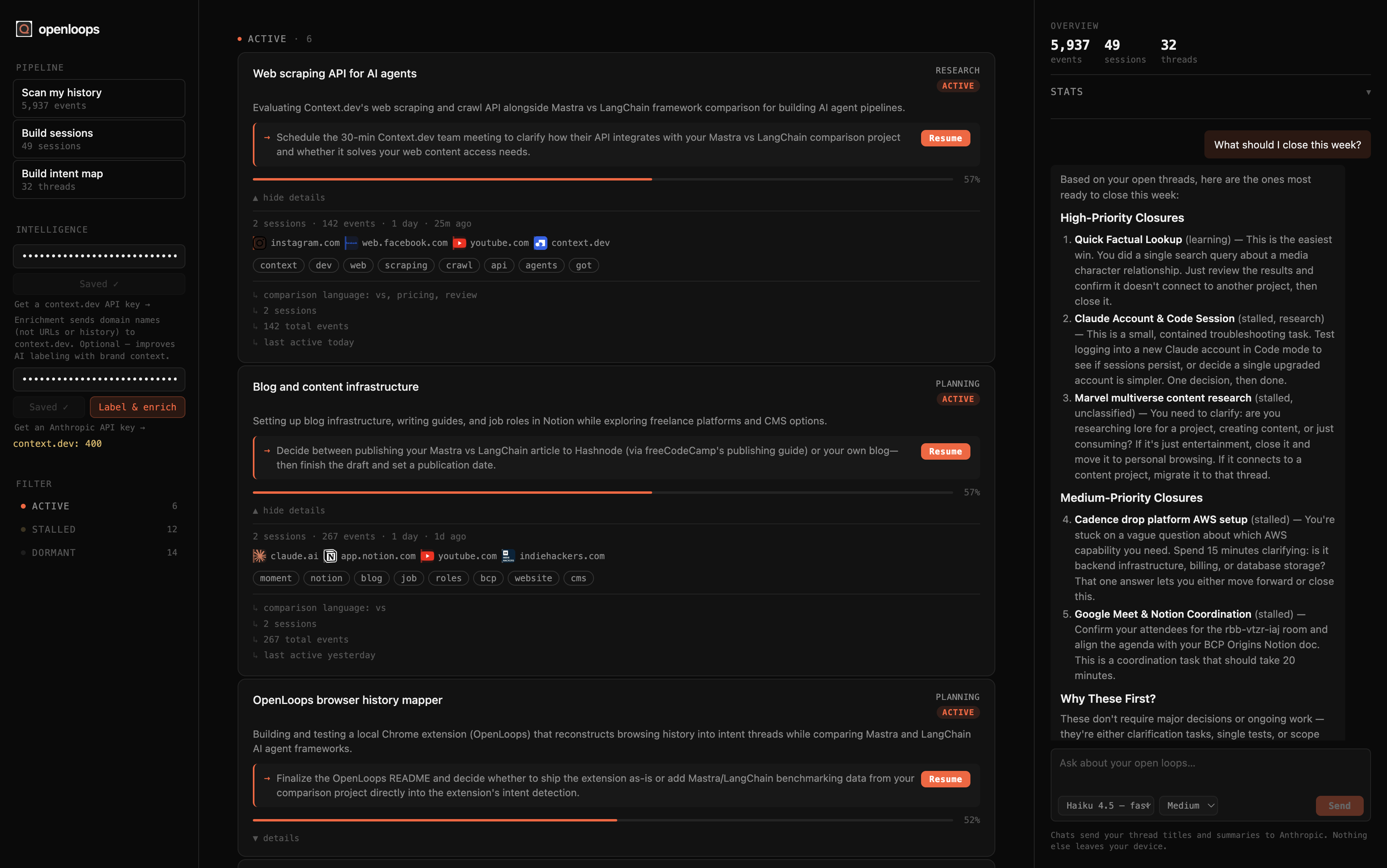
openloops is a local-only Chrome extension that turns raw browsing history into intent threads — the open loops you never closed.
Not bookmarks. Not a reading list. Threads: an active decision still in progress, a product you were comparing before you got distracted, a question you keep returning to. openloops surfaces those patterns from what you were actually doing, groups them into coherent research arcs, and scores how alive each thread still is.
Every thread gets a plain-language summary, a concrete next step, and a Resume button that reopens the pages you left off on. A built-in AI assistant sits in the dashboard's right column — ask "what should I close this week?" and it ranks your open threads by how easy they are to resolve versus how much of a real decision they still need, with a one-line reason for each. Click a thread to focus the assistant on it and ask how to finish that one specifically.
Everything runs on-device. There are three optional, opt-in features, each triggered explicitly with your own API key: brand enrichment via context.dev, AI thread labeling via Claude, and the AI assistant chat. None of them send raw URLs, page content, or full browsing history.
┌─────────────────────────────────────────────────┐
│                   CAPTURE                        │
│  chrome.history (14-day backfill)                │
│  chrome.tabs.onUpdated (live)                    │
└─────────────────┬───────────────────────────────┘
                  │  raw_events (IndexedDB)
                  ▼
┌─────────────────────────────────────────────────┐
│                NOISE FILTER                      │
│  domain blocklist · generic titles               │
│  platform stopwords · adult/junk domains         │
│  localhost · private IPs · dev servers           │
└─────────────────┬───────────────────────────────┘
                  │
                  ▼
┌─────────────────────────────────────────────────┐
│             SESSION SEGMENTATION                 │
│  30-minute idle gap splits a new session         │
│  keyword extraction per session                  │
└─────────────────┬───────────────────────────────┘
                  │  sessions (IndexedDB)
                  ▼
┌─────────────────────────────────────────────────┐
│           AMBIENT DOMAIN DETECTION               │
│  ubiquity = distinct days / total active days    │
│  ≥ 0.6 on ≥ 3 days → excluded from clustering   │
└─────────────────┬───────────────────────────────┘
                  │
                  ▼
┌─────────────────────────────────────────────────┐
│               CLUSTERING                         │
│  greedy agglomerative · Jaccard similarity       │
│  0.5 × domain overlap + 0.5 × keyword overlap    │
└─────────────────┬───────────────────────────────┘
                  │
                  ▼
┌─────────────────────────────────────────────────┐
│                 SCORING                          │
│  type (buying/research/learning/planning)        │
│  confidence · status · human-readable signals    │
└─────────────────┬───────────────────────────────┘
                  │  intent_threads (IndexedDB)
                  ▼
┌─────────────────────────────────────────────────┐
│              INTENT MAP (dashboard)              │
│  status-grouped cards · Resume · React           │
└─────────────────┬───────────────────────────────┘
                  │  optional, opt-in
                  ▼
┌─────────────────────────────────────────────────┐
│         BRAND ENRICHMENT (opt-in)                │
│  context.dev · domain names only                 │
│  → company name · industry · description         │
│  → logo URL · brand color                        │
└─────────────────┬───────────────────────────────┘
                  │  optional, opt-in
                  ▼
┌─────────────────────────────────────────────────┐
│              AI LABELING (opt-in)                │
│  Claude · your key · batched (10 threads/req)    │
│  grounded in enriched company descriptions       │
│  → title + summary + type + next step per thread │
└─────────────────┬───────────────────────────────┘
                  │  optional, opt-in
                  ▼
┌─────────────────────────────────────────────────┐
│              AI ASSISTANT (opt-in)               │
│  chat grounded in your threads · your key        │
│  model + effort selectable · focus on a thread   │
└─────────────────────────────────────────────────┘
| Stage | What it does | Where in code |
|---|---|---|
| Capture | Backfills 14 days via the History API (search + per-URL getVisits); live-captures new visits via tabs.onUpdated. Skips non-HTTP schemes, deduplicates within 3 s. |
src/pipeline/backfill.ts, src/background.ts |
| Noise filter | Drops events matching a domain blocklist (comms tools), adult/junk domains, generic/navigational titles (e.g. "New Tab", "Loading…"), and localhost / 127.0.0.1 / *.local / private IP ranges — your own dev servers and LAN devices. Also strips platform brand tokens before keyword extraction. |
src/pipeline/noise.ts, src/pipeline/keywords.ts, src/lib/util.ts (isLocalHost) |
| Sessions | Splits the event stream into sessions wherever a 30-minute idle gap occurs. Extracts top keywords per session; prunes trivial single-event, zero-keyword sessions. | src/pipeline/sessions.ts, src/pipeline/keywords.ts |
| Ambient detection | Computes per-domain ubiquity (distinct days seen ÷ total active days). Domains present on ≥ 60% of active days over ≥ 3 days (Google, YouTube, etc.) are excluded from similarity scoring. | src/pipeline/ambient.ts |
| Clustering | Greedy agglomerative pass over chronological sessions. Similarity = 0.5 × domain Jaccard + 0.5 × keyword Jaccard (over non-ambient domains). Sessions above the threshold join the nearest thread; otherwise they start a new one. Prunes threads with 1 session and fewer than 3 events. | src/pipeline/threads.ts |
| Scoring | Assigns type via keyword scanning (BUYING_WORDS, LEARNING_WORDS). Computes confidence from four weighted signals: distinct days (35%), sessions (25%), events (20%), clear type (20%). Sets status: active < 48h, stalled < 7d, dormant otherwise. |
src/pipeline/threads.ts |
| Brand enrichment | Optional. Sends the domain names found in each thread to the context.dev API (skipping localhost/private hosts). Returns structured company records — name, industry, one-sentence description, logo URL, brand color — stored on the thread and displayed as domain chips. Results are cached, so a domain is only resolved once. Only domain names leave the device. |
src/pipeline/enrich.ts |
| AI labeling | Optional. Sends compact thread descriptors — keywords, domain names, a sample of page titles, and (when enrichment has run) the enriched company descriptions — to Claude in batches of 10 threads per request. Overwrites title and type, and adds a one-sentence summary and a concrete next step per thread. Requires the user's own Anthropic API key. | src/pipeline/label.ts |
| AI assistant | Optional. A chat in the dashboard's right column, grounded in thread titles, summaries, next steps, and domains — and, when a thread is focused, its keywords, recent page titles, and enriched company descriptions. Model (Haiku 4.5 / Sonnet 4.6 / Opus 4.6 / 4.7 / 4.8) and "effort" (response depth) are user-selectable and persisted. Uses the same Anthropic key as labeling. | src/dashboard/Assistant.tsx |
The optional intelligence features build on each other, and each one works on its own.
Brand enrichment (context.dev) resolves the domain names that appear in each thread into structured company records: a canonical name, an industry category, a one-sentence description of what the company does, a logo URL, and a brand color. This data is stored on the thread and surfaced in the UI as domain chips — a small monogram square that becomes a real logo, with the brand color as an accent, once enriched.
The key insight is that domain names alone are weak signals. stripe.com and dashboard.stripe.com/logs are the same intent; linear.app and linear.app/issues/ABC-123 are the same company. The enriched description — "Linear is a project management tool for software teams" — is a far stronger input to a classifier than the raw keyword tokens extracted from page titles.
AI labeling (Claude) receives the (optionally enriched) thread descriptors in batches of 10. Each descriptor contains the thread's top keywords, top domains, a sample of page titles, and — when enrichment has run — the company descriptions for each domain. The model assigns a short title, a one-sentence summary, a type (buying / research / learning / planning / unclassified), and one concrete next step: a specific action that would move the thread forward or close it (e.g. "Decide between the MacBook Pro and the Dell XPS — your open question was battery life"). With enrichment, it's working from grounded facts about what each site is; without it, from page-title keywords alone.
AI assistant is a chat that lives in the dashboard's right column, grounded in your thread data — titles, summaries, next steps, and domains for every thread, plus a focused thread's keywords, recent page titles, and enriched company descriptions when you click a card to select it. Ask it things like "what should I close this week?" or "what have I stalled on longest?", or focus a thread and ask "how do I finish this one?". You can pick the model (Haiku 4.5 by default, or Sonnet 4.6, Opus 4.6, Opus 4.7, Opus 4.8) and an "effort" level (Low / Medium / High, mapped to max_tokens as a simple proxy for response depth); both choices persist across sessions.
None of the three steps is required. The core pipeline — capture, noise filter, sessions, clustering, scoring — runs entirely on-device and produces a working intent map with no network calls. context.dev is purely an enhancement: AI labeling and the assistant both work with just an Anthropic key, and get sharper when context.dev is also configured.
The core pipeline — capture, noise filtering, session segmentation, ambient detection, clustering, and scoring — runs entirely on-device in IndexedDB. No data leaves your machine, and there are no servers, accounts, analytics, or telemetry of any kind.
There are exactly three optional, opt-in network calls, each triggered manually by you with your own API key:
| What leaves your device | When | Where it goes |
|---|---|---|
Domain names only (e.g. stripe.com, notion.so) — never localhost, private IPs, or .local hosts |
Clicking "Label & enrich" with a context.dev key saved | api.context.dev |
| Thread keywords, domain names, a sample of page titles, and (if enriched) company descriptions | Clicking "Label & enrich" with an Anthropic key saved | api.anthropic.com |
| Thread titles, summaries, next steps, and domains for all threads — plus, if a thread is focused, its keywords, recent page titles, and enriched company descriptions | Each message sent to the AI assistant | api.anthropic.com |
None of these calls ever send raw URLs, full page content, browsing timestamps, or anything that could identify a specific page visit. All three are skipped entirely if you don't add the relevant key — context.dev in particular is purely an enhancement, marked optional in the UI, and "Label & enrich" works fully with just an Anthropic key.
Both API keys are stored in chrome.storage.local — on-device, never in the repository, and never transmitted anywhere other than the respective API endpoint during the operation they enable.
The dashboard opens as a full Chrome tab (via options_page), laid out in three columns.
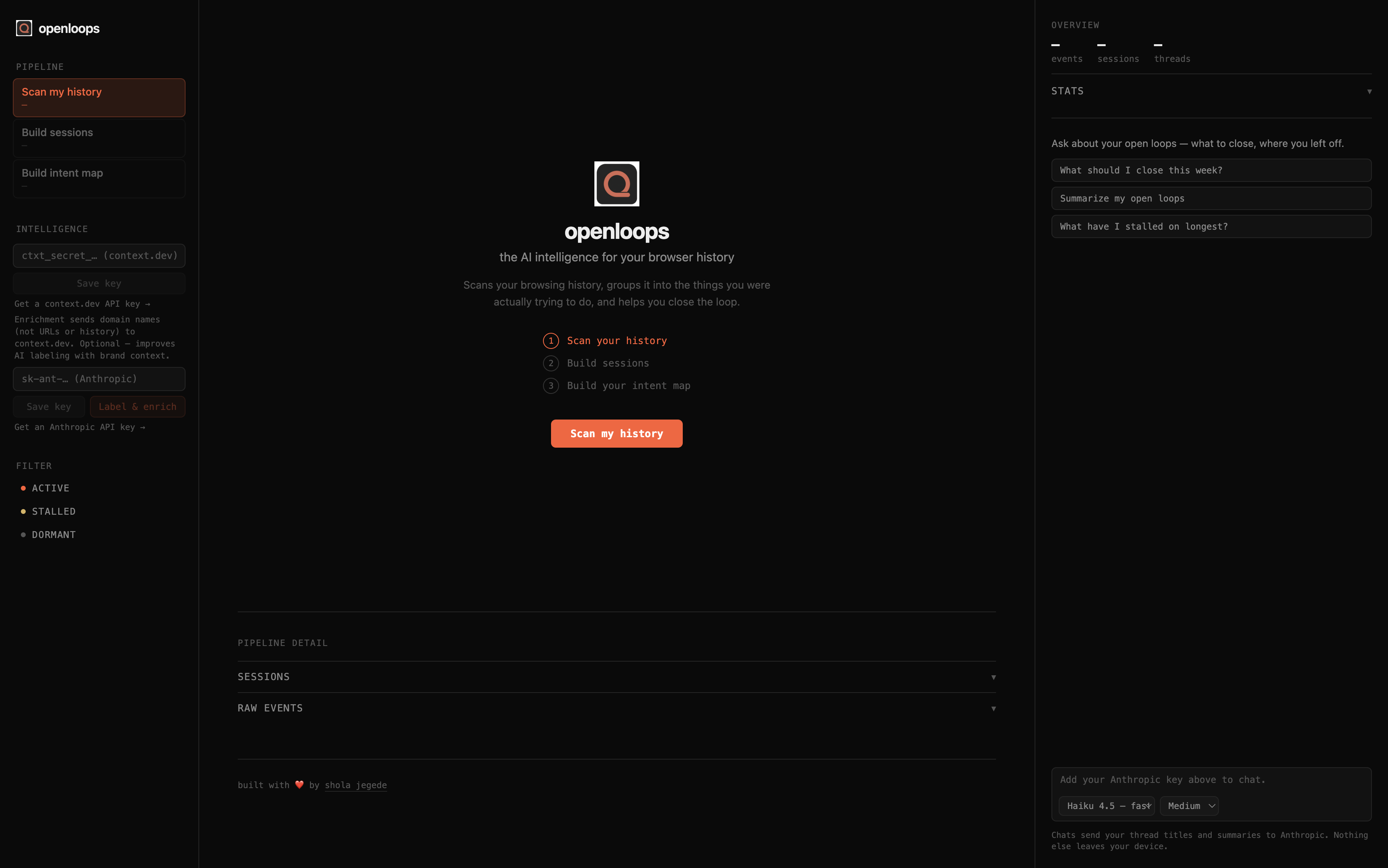
Left rail
- Pipeline — three actions: Scan my history, Build sessions, Build intent map. Each shows its output count once run. Buttons follow a simple state machine: disabled until their input exists, accent-highlighted on whichever step is next, and normal (still re-runnable) once done.
- Intelligence — an Anthropic key field and a context.dev key field, each with a "Save key" button and a "Get a … API key →" link to the provider's key page. context.dev is marked optional. A single Label & enrich button runs enrichment first (if a context.dev key is saved) and then AI labeling (if an Anthropic key is saved) — either works independently.
- Filter — toggle ACTIVE / STALLED / DORMANT threads on or off in the main column.
Main column On first run, before an intent map exists, a centered welcome screen shows the logo, tagline, a short explainer, a 3-step preview (Scan → Build sessions → Build intent map), and a single CTA button that always matches whichever pipeline step is next.
Once an intent map exists, threads render as cards grouped under ACTIVE / STALLED / DORMANT headers, sorted by confidence within each group. Each card shows:
- Title and one-sentence summary (AI-generated after labeling; a heuristic keyword-derived title before that)
- A next step with a Resume button that reopens the thread's most recent non-ambient pages in new tabs
- A type badge (
buying/research/learning/planning/unclassified) and a status pill (active/stalled/dormant) - A confidence bar (0–100%)
- A collapsible details section: session/event/day counts and last-active time, domain chips (real logos and brand-color accents once enriched), keyword pills, and human-readable "signals" explaining the classification
Clicking a card selects it, which focuses the AI assistant on that thread. Below the intent map, a collapsible Pipeline Detail section holds the full Sessions list and the 20 most recent Raw Events.
Right column
- Overview — compact totals (events / sessions / threads), with a collapsible Stats disclosure showing status distribution, top domains, and date range.
- AI Assistant — a chat grounded in your thread data, with markdown-rendered responses, suggested-prompt chips, a "Focused: {thread}" header with a clear (✕) button when a card is selected, and model + effort selectors that persist across sessions. Shows a prompt to add an Anthropic key if one isn't saved yet.
All tunables are named constants — change the value, rebuild, and re-run the pipeline from the dashboard.
| Constant | Default | File | Effect |
|---|---|---|---|
SESSION_GAP_MS |
30 min |
src/pipeline/sessions.ts |
Minimum idle gap that starts a new session. Lower → more, shorter sessions. |
UBIQUITY_THRESHOLD |
0.6 |
src/pipeline/ambient.ts |
Fraction of active days a domain must appear on to be considered ambient. Lower → more domains excluded from clustering. |
MIN_ACTIVE_DAYS |
3 |
src/pipeline/ambient.ts |
Minimum active-day count before ubiquity is even computed. |
SIMILARITY_THRESHOLD |
0.15 |
src/pipeline/threads.ts |
Jaccard threshold for merging sessions into the same thread. Lower → more aggressive merging (fewer, bigger threads). Higher → more fragmentation (more, smaller threads). |
BLOCKED_DOMAINS |
(list) | src/pipeline/noise.ts |
Comms/utility domains dropped before sessionization. Add domains freely. |
ADULT_DOMAINS / JUNK_DOMAINS |
(lists) | src/pipeline/noise.ts |
Separate lists merged at runtime; either is independently removable. |
PLATFORM_STOPWORDS |
(list) | src/pipeline/keywords.ts |
Social-platform brand and UI tokens excluded from keyword extraction. |
BATCH_SIZE / MAX_TOKENS_PER_BATCH |
10 / 4000 |
src/pipeline/label.ts |
Threads per AI-labeling request and the output budget per request. Lower BATCH_SIZE if responses get truncated on very large thread sets. |
Assistant effort → max_tokens |
Low 512 / Medium 1024 / High 2048 |
src/dashboard/Assistant.tsx |
Maps the chat's Low/Medium/High "Effort" selector to a response-depth budget. |
openloops/
├── public/
│   └── openloops-logo.png
├── src/
│   ├── background.ts          # service worker: install hook + live capture
│   ├── types.ts               # shared TypeScript interfaces
│   ├── db/
│   │   └── index.ts           # IndexedDB schema + helpers (raw_events, sessions, intent_threads, domain_brands)
│   ├── lib/
│   │   ├── settings.ts        # chrome.storage.local: API keys, assistant model + effort
│   │   └── util.ts            # isHttpUrl, isLocalHost, extractDomain, hashId
│   ├── pipeline/
│   │   ├── backfill.ts        # history API backfill
│   │   ├── noise.ts           # domain blocklist + title filter + local-host filter
│   │   ├── keywords.ts        # keyword extraction + stopword lists
│   │   ├── sessions.ts        # gap-based segmentation
│   │   ├── ambient.ts         # ubiquity-based ambient domain detector
│   │   ├── threads.ts         # clustering + scoring
│   │   ├── enrich.ts          # opt-in brand enrichment (context.dev)
│   │   └── label.ts           # opt-in AI labeling + next steps (Claude)
│   └── dashboard/
│       ├── index.html
│       ├── main.tsx
│       ├── App.tsx            # React dashboard — rail, intent map, overview
│       ├── Assistant.tsx      # AI assistant chat
│       └── app.css
├── manifest.json
├── vite.config.ts
├── tsconfig.json
├── CONTRIBUTING.md
└── LICENSE
Prerequisites: Node 18+, Chrome (or any Chromium-based browser).
git clone https://github.com/sholajegede/openloops.git
cd openloops
npm install
npm run build
Then in Chrome:
- Go to
chrome://extensions - Enable Developer mode (top-right toggle)
- Click Load unpacked and select the
dist/folder
There is no .env file and no environment variables to set. API keys are pasted directly into the dashboard at runtime and stored in chrome.storage.local on your device — they never touch the repository.
Both keys are optional, and the app is fully functional without either — context.dev in particular is an enhancement, not a requirement.
| Feature | Key source | Where to paste it | Free tier |
|---|---|---|---|
| AI labeling, next steps, and the assistant chat | console.anthropic.com — "Get an Anthropic API key →" link in the UI | INTELLIGENCE panel in the left rail → Anthropic key input | Yes (usage-based, starts free) |
| Brand enrichment (optional) | context.dev — "Get a context.dev API key →" link in the UI | INTELLIGENCE panel in the left rail → context.dev key input | Yes |
Paste a key, click Save key, then click Label & enrich. With only the Anthropic key saved, labeling runs without enrichment. Keys are persisted across sessions in chrome.storage.local — you only need to paste them once.
- Click the openloops toolbar icon to open the dashboard.
- On first run, a centered welcome screen walks you through the pipeline — its CTA always points at the next step.
- Scan my history — backfills 14 days of browsing into IndexedDB.
- Build sessions — segments events into sessions and extracts keywords.
- Build intent map — clusters sessions into threads, scores them, and groups them by status.
- (Optional) Add your Anthropic key (and a context.dev key for richer titles) in the INTELLIGENCE panel, then click Label & enrich — rewrites titles, adds summaries and next steps, and pulls in logos and brand colors.
- Click Resume on a thread to reopen the pages you left off on, or click a card to focus the AI assistant and ask how to finish it.
Run steps 3–5 again any time to rebuild from scratch with the latest browsing data.
- TypeScript — strict types throughout
- Vite + @crxjs/vite-plugin — build and HMR for Manifest V3 extensions
- React 18 — dashboard UI (full Chrome tab via
options_page) - idb — typed IndexedDB wrapper
- react-markdown — renders the AI assistant's responses
- context.dev — optional brand intelligence / enrichment layer: resolves domain names into company records (name, industry, description, logo, brand color)
- Claude — optional AI thread labeling (batched, grounded by enriched company descriptions, adds a next step per thread) and the AI assistant chat (model-selectable: Haiku 4.5, Sonnet 4.6, Opus 4.6, Opus 4.7, Opus 4.8) — bring your own key
- Chrome Extension Manifest V3 — service worker,
history/tabs/storagepermissions
MIT License — see LICENSE.