https://github.com/sanatanisher01/Boli
A modern auction platform with voice-powered bidding capabilities built with Django.
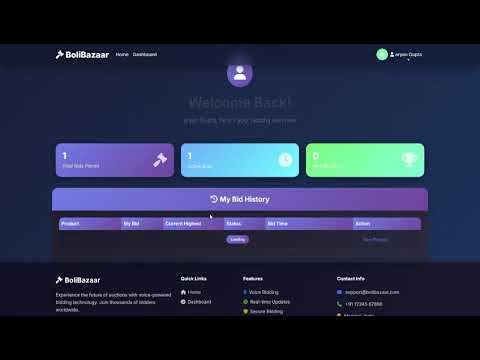
- Public Users: Register, browse auctions, place bids via voice or manual input
- Admin Users: Manage products, view bids, generate reports
- Voice Commands:
- "What is the current bid on [Product Name]?"
- "Place a bid of [Amount] rupees on [Product Name]"
- Real-time Updates: Live countdown timers and bid updates
- Responsive Design: Works on desktop and mobile
- Dark/Light Theme: Toggle between themes
- Report Generation: PDF and CSV reports for admins
- Python 3.8+
- pip
-
Clone/Download the project
cd BoliBazaar -
Install dependencies
pip install -r requirements.txt
-
Set up the database
python manage.py makemigrations
python manage.py migrate
-
Create sample data
python setup.py
-
Start the server
python manage.py runserver
-
Visit the website Open http://127.0.0.1:8000 in your browser
- Username: admin
- Password: admin123
- Access: Full admin dashboard, product management, reports
- Username: demo
- Password: demo123
- Access: Regular user features, bidding
-
Check Current Bid
- "What is the current bid?"
- "What is the current bid on [Product Name]?"
-
Place Bid
- "Place a bid of [amount] rupees"
- "Place a bid of [amount] rupees on [Product Name]"
- Click the microphone button on product detail pages
- Wait for the "Listening..." prompt
- Speak clearly in English
- The system will process your command and respond
- Register: Create account with name, email, password
- Browse: View active auctions on homepage
- Bid: Click on products to view details and place bids
- Dashboard: Track your bidding history and status
- Login: Use admin credentials
- Add Products: Create new auction items
- Manage: Edit or delete existing products
- Reports: Generate PDF/CSV reports of all auctions
- Monitor: View all bids and auction status
- Backend: Django 4.2.7
- Frontend: HTML5, CSS3, JavaScript, Bootstrap 5
- Database: SQLite (default)
- Voice: Web Speech API
- Reports: ReportLab (PDF), CSV
BoliBazaar/
├── auction/                 # Main app
│   ├── models.py           # Database models
│   ├── views.py            # Business logic
│   ├── forms.py            # Form definitions
│   └── urls.py             # URL routing
├── templates/              # HTML templates
│   ├── base.html          # Base template
│   ├── auction/           # App templates
│   └── registration/      # Auth templates
├── static/                # Static files
├── media/                 # Uploaded files
└── manage.py              # Django management
- Product: Auction items with title, description, price, end time
- Bid: User bids with amount, timestamp, bidder info
- User: Django's built-in user model extended with profiles
- Modify models in
auction/models.py - Create/update views in
auction/views.py - Add URL patterns in
auction/urls.py - Create templates in
templates/auction/
- Edit
templates/base.htmlfor global styles - Bootstrap 5 classes are available throughout
- Custom CSS can be added to the base template
- Extend
processVoiceCommand()function in product detail template - Add new command patterns and responses
- Modify speech recognition settings as needed
-
Voice not working
- Ensure you're using HTTPS or localhost
- Check browser microphone permissions
- Try Chrome/Edge browsers for best compatibility
-
Images not displaying
- Check MEDIA_URL and MEDIA_ROOT settings
- Ensure media directory has proper permissions
-
Database errors
- Run
python manage.py makemigrations - Run
python manage.py migrate - Delete db.sqlite3 and recreate if needed
- Run
- Voice Features: Chrome, Edge, Safari (latest versions)
- General Features: All modern browsers
- Mobile: Responsive design works on all devices
This project is created for educational purposes. Feel free to modify and use as needed.
- Fork the project
- Create feature branch
- Make changes
- Test thoroughly
- Submit pull request
For issues or questions:
- Check the troubleshooting section
- Review Django documentation
- Check browser console for JavaScript errors
Happy Bidding! 🎉