A mask-driven cutout widget — punch through content to reveal what's beneath.
蒙版镂空组件,将指定形状从内容中挖除,透出底层背景。


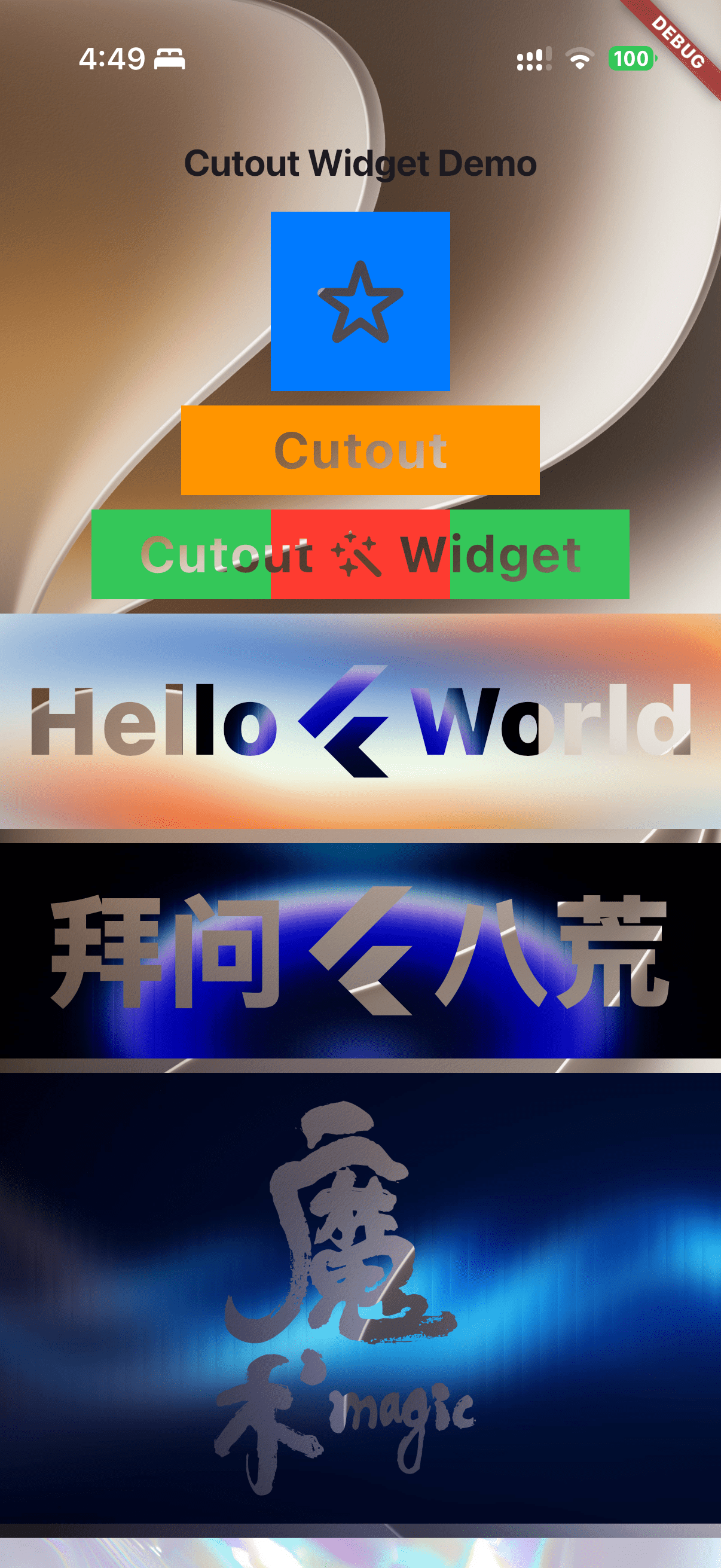
- Any widget as mask — Use icons, text, images, or any widget as the cutout shape
- Images as mask — Use transparent Image (eg.
PNG) as cutout shapes - Flexible alignment — Full control over mask positioning via
alignment
- 任意组件做蒙版 — 支持图标、文字、图片或任意组合作为镂空形状
- 图片蒙版 — 使用带透明度图片(如
PNG)作为镂空底图 - 灵活对齐 — 通过
alignment参数完全控制蒙版位置
Install via pub.dev → pub.dev/packages/cutout/install
https://runoob-coder.github.io/flutter_cutout_widget/
Cutout(
  alignment: Alignment.center,
  maskChild: const Icon(Icons.star, size: 50),
  child: Container(
    width: 100,
    height: 100,
    color: Colors.blue,
  ),
)Cutout(
alignment: Alignment.center,
maskChild: const Text(
'Cutout',
style: TextStyle(fontSize: 30, fontWeight: FontWeight.bold),
),
child: Container(
width: 200,
height: 50,
color: Colors.orange,
),
)Cutout(
alignment: Alignment.center,
maskChild: const Row(
mainAxisSize: MainAxisSize.min, // must be min / 约束必须为 min
children: [
Text('Cutout', style: TextStyle(fontSize: 30, fontWeight: FontWeight.bold)),
Icon(Icons.auto_awesome, size: 30),
Text('Widget', style: TextStyle(fontSize: 30, fontWeight: FontWeight.bold)),
],
),
child: Container(
width: 300,
height: 50,
color: Colors.green,
),
)SizedBox(
height: 120,
child: Stack(
alignment: Alignment.center,
children: [
// Background image showing through the holes / 底层背景透过镂空区域显示
Image.asset('assets/background.jpg'),
Cutout(
alignment: Alignment.center,
maskChild: const Row(
mainAxisSize: MainAxisSize.min,
children: [
Text('Hello', style: TextStyle(fontSize: 56, fontWeight: FontWeight.w900)),
FlutterLogo(size: 70),
Text('World', style: TextStyle(fontSize: 56, fontWeight: FontWeight.w900)),
],
),
child: Image.asset(
'assets/gradient.jpg',
fit: BoxFit.fill,
width: double.infinity,
),
),
],
),
)Cutout(
alignment: Alignment.center,
maskChild: Image.asset('assets/magic.png', height: 220), // use an image with transparency / 请使用透明度图
child: Image.asset('assets/16-fractal-glass-hero-gradients.jpg'),
)1. Content children → rasterized into offscreen buffer
2. Mask child drawn with BlendMode.dstOut → opaque mask pixels punch holes
3. Buffer composited back onto canvas
1. 内容子组件 → 光栅化到离屏缓冲区
2. 蒙版子组件以 BlendMode.dstOut 绘制 → 不透明像素在内容上镂空
3. 缓冲区合成回Canvas
Important
Content children that push their own composited layers — such as AnimatedSwitcher, Opacity, FadeTransition, ClipRect, Transform, BackdropFilter, etc. — will have those layers composite outside the internal saveLayer buffer, defeating the mask effect.
Avoid nesting layer-pushing widgets inside Cutout.child !
This is a fundamental limitation of Flutter's compositing pipeline and cannot be fixed at the framework level — it would require changes to the Flutter engine itself. If you have a solution, PRs are welcome!
RenderCutout.paintStack isolates content inside a canvas.saveLayer buffer,
but when context.paintChild draws a content child (e.g. FadeTransition inside AnimatedSwitcher),
the child may push its own composited layer (e.g. OpacityLayer) into the layer tree via pushOpacity.
These layers become siblings of the current ContainerLayer and escape the saveLayer buffer,
breaking the dstOut cutout.
Important
如果 Cutout.child 中包含会推送自身合成层的组件(如 AnimatedSwitcher、Opacity、FadeTransition、ClipRect、Transform、BackdropFilter 等),这些层会在内部 saveLayer 缓冲区外部合成,导致镂空失效。
避免在 Cutout.child 中嵌套会推送层的组件!
这是 Flutter 合成管线的底层限制,无法在框架层修复 — 需要调整 Flutter 引擎本身。如果你有解决方案,欢迎贡献 PR!
RenderCutout.paintStack 使用 canvas.saveLayer 做外层隔离,
但 context.paintChild 绘制内容子节点时,子节点(如 AnimatedSwitcher 内部的 FadeTransition)
可能通过 pushOpacity 等调用向 layer tree 推入独立的合成层(如 OpacityLayer)。
这些合成层是当前 ContainerLayer 的兄弟节点,会逃逸出 saveLayer 缓冲区,导致dstOut镂空失效。
| Parameter | Type | Default | Description / 说明 |
|---|---|---|---|
maskChild |
Widget |
required | The shape to punch through / 用于镂空的形状 |
child |
Widget |
required | The content to be cut through / 被镂空的内容 |
alignment |
AlignmentGeometry |
Alignment.topStart |
Mask alignment / 蒙版对齐方式 |
textDirection |
TextDirection? |
null |
Text direction for alignment / 文本方向 |
fit |
StackFit |
StackFit.loose |
How to size the stack / Stack尺寸约束 |
clip |
Clip |
Clip.hardEdge |
Clip behavior / 裁剪行为 |
- Homepage: GitHub
- Issue Tracker: GitHub Issues
If Cutout helps you build better UIs, please consider supporting it.
It only takes a few seconds and helps other Flutter developers discover the library.
如果 Cutout 帮助了你,请考虑支持它,只需几秒即可帮助更多 Flutter 开发者发现此库。
