Song Search on the Chrome Web Store
If you've worked in the music industry, you know ASCAP, BMI, and SESAC -- these are the three major performance-rights organizations. They manage huge databases of compositions, songwriters, and publishers. If you're doing composition research -- "Who is Billy Joel's publisher?" or "What percentage of 'I Choose You' does Sara Bareilles own?' -- you have to look in three separate places. Why not search all of these sites at the same time?
Enter Song Search.
Inside of the Song Search Chrome extension, users can search by title, composer, publisher, artist, catalog number, or ISWC number. Song Search launches new tabs and that target the appropriate search results on ASCAP, BMI, and/or SESAC's websites.
Song Search is built using vanilla JavaScript, HTML, and CSS.
When a user clicks on the extension badge, popup.html is displayed.
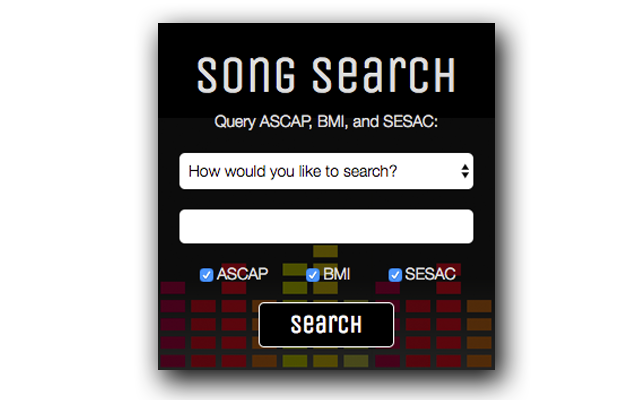
The user can then:
- Select a search type:
- Title
- Artist
- Writer
- Publisher
- Catalog id
- ISWC
- Enter a query
- Choose orgs: (checkboxes)
- ASCAP
- BMI
- SESAC
Upon submit, the extension will launch a new tab for each of the selected organizations.
In order for the extension search form to handle incorrect user input and display appropriate errors, popup.js listens for form submit and invokes preventDefault().
Searching for composition information by ISWC (International Standard Musical Work Code) is a great tool if you already have this number handy. Unfortunately SESAC doesn't support search using this type of query. In order to account for this difference between the rights-orgs, Song Search listens for change of the <select> dropdown. If ISWC is selected, popup.js adds the attribute disabled to the SESAC checkbox, so that a tab can't be created for this type of search.
// './popup.js'

if (iswcOption.selected) {
  sesacBox.checked = false;
  sesacBox.setAttribute("disabled", "");
} else {
  sesacBox.removeAttribute("disabled");
}
popup.js also handles incorrect user input. If a user accidentally clicks submit without selecting a search type or entering a search query, the form will prompt the user for a different input.
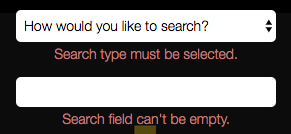


popup.js will return early (i.e. new tabs won't launch) if an error is detected. It also removes the error message from the extension search form when a user modifies their input.
// './popup.js'

let errors = false;

["emptySelect", "emptyQuery"].forEach((condition) => {
  let element = document.querySelector(`.${condition}`);
  if (errorConditions[condition]()) {
    element.innerHTML = errorMessages[condition];
    errors = true;
  } else {
    element.innerHTML = "";
  }
});

if (errors) return;When directing users to search results on ASCAP, BMI, or SESAC, it's convenient to build a custom URL with the user's query inserted. Unfortunately, SESAC's website doesn't support this kind of searching. In order to accomplish the intended functionality of the Song Search extension, it's necessary to auto-fill and auto-submit the remote site's search form immediately following DOMContentLoaded.
BMI does include params in their search URLs, however, because the user must accept the terms & conditions of (i.e. receive a cookie from) their site before viewing certain search results, it makes more sense to use the same technique described above for SESAC on BMI's site.
For all three rights-orgs, Song Search uses chrome.tabs.create() to launch a new tab. Song Search allows the user to select one, two, or three different rights-orgs and launches their respective, new tabs in the following, largest-to-smallest order:
- ASCAP
- BMI
- SESAC
ASCAP has the largest database and SESAC has the smallest, so it makes sense to display first the site where the user is most likely to find what they are looking for. popup.js also manages which of the new tabs will be in focus.
// './popup.js'

var active = true;

if (e.target.ascap.checked) {
  let address = ascap[search.type] + subSpaces(search.query);
  chrome.tabs.create({url: address, active: active});
  active = false;
}
This extra active logic also allows the executeScript() callback to be run on BMI and SESAC's sites without being interrupted by the tab's changing status.
If the target site requires us to fill the search form manually, tabs.create() adds an executeScript() callback which injects javaScript into the page. This script selects search type, fills the search form, and triggers submit. The implementation of this inserted script is a little bit different for each site. This is the implementation for BMI's website:
// './popup.js'

if (e.target.bmi.checked) {
  chrome.tabs.create({url: bmi, active: active}, function(tab1) {
    chrome.tabs.executeScript(tab1.id, {code: `
      document.querySelectorAll('option[selected]')[0].removeAttribute('selected');
      document.querySelectorAll('option[value="` + search.type + `"]')[0].setAttribute('selected', '');
      document.querySelector(".main-search").value ="` + lastNameFirst(search.query, search.type) + `";
      document.querySelector('#Form1').submit();
    `, runAt: "document_end"});
  });
  active = false;
}
If the target site has params in the URL (i.e. ASCAP), there's no executeScript() callback required.