Issue 16: Add Rocket Employee Store #21
Conversation


 RudyBecker
changed the title
RudyBecker
changed the title

| <h2 class="title">Rocket Employees</h2> | ||
| <ul v-for="employee in employees" :key="employee.id"> | ||
| <li > | ||
| Name: {{employee.name}} | ||
| </li> | ||
| <li > | ||
| Position: {{employee.position}} | ||
| </li> | ||
| <img :src="`${employee.imageUrl}`" /> | ||
| <!-- Employee ID commented out for privacy --> | ||
| <!-- <li > | ||
| ID: {{employee.id}} | ||
| </li> --> |

There was a problem hiding this comment.
In the issue, I mentioned we should focus this PR on the business store logic. But since we don't have any tests it's valuable to have this shown here. Contentful uses imgix under the hood for their images, so you can request the size, scaling, compression, etc. as query params to the image request. So we should definitely do that. For the compression (I think they call it "quality") I've always found that 60% is a good compromise for jpegs.
After we land this PR, let's figure out a good Tailwind component to use for this list. Soon we'll merge this data with some Slack data and we'll have a lot more to sure for each user.
There was a problem hiding this comment.
should I work on the query params aspect of the image request on this PR or when we land on a fitting Tailwind component?
| const notBotEmployees = _.filter(slackEmployees.members, e => !e.is_bot) | ||
| console.log("filtered by is_bot",notBotEmployees) | ||
| const formattedNotBotEmployees = _.map(notBotEmployees , item => { |
There was a problem hiding this comment.
First, a note on the word "collection." I tend to use it as "an array of objects where every object has the same structure." Lodash uses that word to mean a standard array or an array of objects.
This filter and map could be combined into one step. Since you're mapping over the collection, which means you're going to iterate over every item of the collection, you can do your filtering and assignment in the same step. That way you're not looping over the same data twice. The map step can check for that is_bot flag... but... a twist!
Since mapping makes you return something for each iteration of the collection, that means the length of the input collection will be the length of the output collection. But, because of is_bot, we actually don't want that. If we stuck with map, we'd have to return undefined or false and then use something like _.compact to remove those falsey values.
But... there's reduce. Reduce is rad AF and so many people overlook it. But map/reduce is what made "big data" a whole thing for a few years so it's worth knowing. Suffice to say, knowing map and reduce well will take you very far for just about any structure of data you'll come across.
With reduce, you're boiling down your data, and you can end up with whatever you want. An array, a number, an object, etc. When using reduce, the function that gets called on each loop gets a new first argument: the "total" or the thing you're building up as you go. If that's an array, you're building up array items as you go. If it's an object, you're building up object properties as you go. If it's a number, you're doing math as you go. That function for the reduce method must return the new "total" every time. This is a common example, using our is_bot for inspiration (note that I've referred to our "total" here as list):
// note the third argument, the empty array: that's the default
// value reduce starts with, so on the first loop, `list === []`

_.reduce(collection, (list, user, index) => {
   if (user.is_bot) return list
   return [...list, user]
}, []}
That's along the lines of what you're looking for here. Reduce is fun to play with, but it definitely takes some practice and muscle memory before you'll reach for it right away.
| import { WebClient } from '@slack/web-api' | ||
|
|
||
| const state = () => { | ||
| return {employeeHeadshots: null, |
There was a problem hiding this comment.
There's a whole bunch of formatting issues with this file again too. Let's pair soon and figure out the root cause of this.
| const itemsFilteredEmployees = _.map(employees.items, e => _.pick(e, itemsFields)) | ||
| const includesFields = ['fields.file.fileName', 'fields.file.url', 'sys.id'] | ||
| const includesFilteredEmployees = _.map(employees.includes.Asset, e => _.pick(e, includesFields)) | ||
| const mergedFilteredEmployees = _.values(_.merge(_.keyBy(includesFilteredEmployees,'sys.id'), _.keyBy(itemsFilteredEmployees,'fields.profilePic.sys.id' ) )) |
There was a problem hiding this comment.
Ha! I just realized this would be a great exercise for a _.reduce function. See below if you haven't seen that comment yet :)
There was a problem hiding this comment.
@brandonaaskov
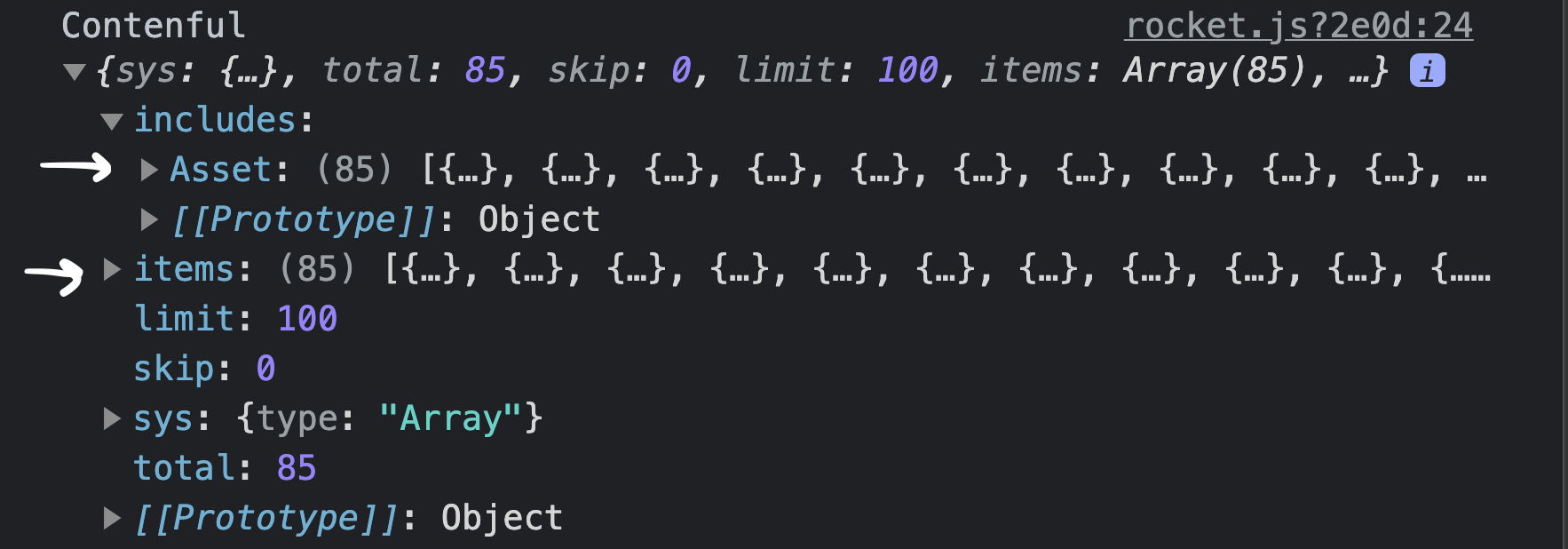
In this case I am needing to merge two separate arrays of objects. Given the initial employees object contains two separate arrays "items" and "includes.Assets" which I am pulling data from. Both the "items" and "includes.Assets" arrays are not ordered as in items[0] and includes[0] both correspond to "Matt D". I am trying to implement the reduce function but is it possible to use the reduce function on two different arrays to merge them, pluck fields I want and combine them to one? (I was able to change the map/filter function below on a single array of objects to use reduce, but not sure how to implement when it is two different unordered arrays as the "sources" of iterations. Here is the shape of the employees object:

| try{ | ||
| const web = new WebClient(this.$config.slackBearerToken) | ||
| const slackEmployees = await web.users.list({team_id:'T03TAQHEU'}) | ||
| const formattedNotBotEmployees = _.reduce(slackEmployees.members, (list, user) => { |
There was a problem hiding this comment.
Updated to use reduce function.
2 participants


Screen.Recording.2021-07-21.at.3.25.25.PM.mov