

Expanding perception and visibility of complex distributed computing systems through spatial visualization.
Gets the list of objects from Kubernetes and displays it in 3d space with meta info embedded in visual representation. In the ProxyService, there are still classes to fetch data from GC Compute and OpenShift, but in the current branch, the focus is on Kubernetes.
[3d client] <--websocket--> [proxy service] <--http(s)---> [APIs, data sources]
3d Client talks to ProxyService via JSON asynchronously.
ProxyService is an intermediary that proxies data from K8s API. It provides a WebSocket and HTTP server and keeps track of client sessions. It is written in Java and Spark framework. Currently has Kubernetes, OpenShift, and GCP Compute data sources (plugins), where the focus is on Kubernetes. Apart from the WebSocket endpoint service also has an HTTP endpoint for static content. By default, the service runs on port 4567 (both HTTP and WS)
For the plugin to work, you need to have either:
- Configured kubectl on the machine where Inviso ProxyService will run or config file with at least one context. On Linux, usually in ~/.kube/config.
- If deployed using Helm, it will pick the config from within the cluster (Service account RO access rights defined in Helm needs to be applied during installation)
Gets and filters pods from OpenShift API. The plugin was tested with OKD v3.11 with API v1. Currently only works with token auth. To get your API key, use oc tool:
oc login -u your_username https://url_to_your_openshift.com:8443
oc whoami -t
Update config.properties accordingly.
Uses Google's API Client for Java and gcloud CLI authentication.
Howto for installing the gcloud command line tool: https://cloud.google.com/sdk/docs/quickstarts After setting it up and successfully authenticating, you need you set the environment variable GOOGLE_APPLICATION_CREDENTIALS to point to the gcloud credentials token.
In Linux/bash:
export GOOGLE_APPLICATION_CREDENTIALS = /home/YOUR_HOME_DIR/.config/gcloud/legacy_credentials/YOUR_USER@SOMEWHERE.COM/adc.json
Or use your preferred IDE to set up runtime environment variable.
All static content (clients) reside in /src/main/resources/public/
Service serves this content on http://localhost:4567 (if you are running the service locally)
Technology: html, .js, WebGL, three.js
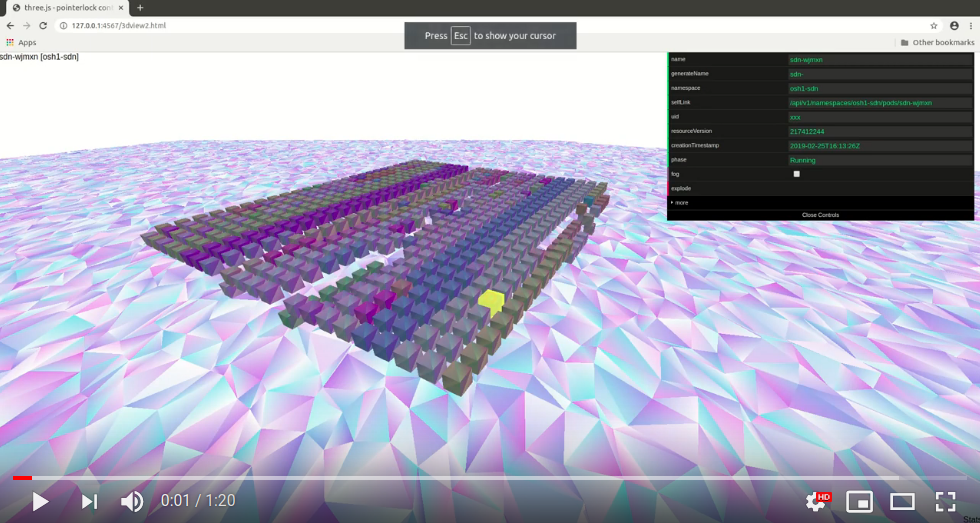
3D representation of nodes. Each box represents one node/container/VM where position represents state (higher = online / lower = offline) Colors represent different roles. Aiming and clicking on a specific box shows basic info in the properties box.
If run locally, you can access it on: http://localhot:4567/3dview.html
The current configured frontend is 3dviewV2.js, and it supports only Kubernetes visualization
- Kubernetes query string format:
http://localhost:4567/3dview.html?provider=k8s&context=YOUR-K8S-CONTEXTIf it is run within clustercontextis ignored.
Move around by using standard WASD keys + mouse aiming
Pressing ~ button will bring down quake-style console. Typing help into the console will show basic commands
Inspiration for the 3Dviewer was three.js example: (https://threejs.org/examples/#misc_controls_pointerlock)
location /debug.html
Displays server (ProxyService) messages and active clients
Tested with JDK 9 and OpenJDK 9
Copy dist.config.properties to config.properties and update authentication and config data.
cp dist.config.properties config.properties
mvn clean compile assembly:single
java -cp target/inviso-1.0-SNAPSHOT-jar-with-dependencies.jar ProxyService
If running locally you should go to http://localhost:4567 for index page
Get the repository and change directory
git clone git@github.com:rgombash/inviso3d.git & cd inviso3d
cp dist.config.properties config.properties
Edit config.properties and update authentication and config data according to your setup
Note: For viewing GC Compute or Kubernetes, you must get your configs into the container image by adding them to Dockerfile or using the 'docker cp' command. Refer to the plugins section for details.
Build the image
docker build -t inviso .
Run the image
docker run -p 4567:4567 inviso
dependencies: installed and configured kubectl and helm
from the source root:
cd charts
helm install inviso ./inviso
- Enable HTTPS and WSS
- Add more object types like deployments, replica sets, services etc. and make hierarchical representation of the objects
- Test subscription model, client subscribes to periodic streaming updates and refreshes states periodically
Inviso3d is a hobby project that I have been playing with sporadically for a few years now. The initial concept was written in Python and the Panda3d engine and was later rewritten to Java and Three.js engine. The code was prototyped fast and dirty (also my first Java service), so do not expect high-quality code.