A CSS/JS theme library that applies Material Design 3 design system to Ionic applications.
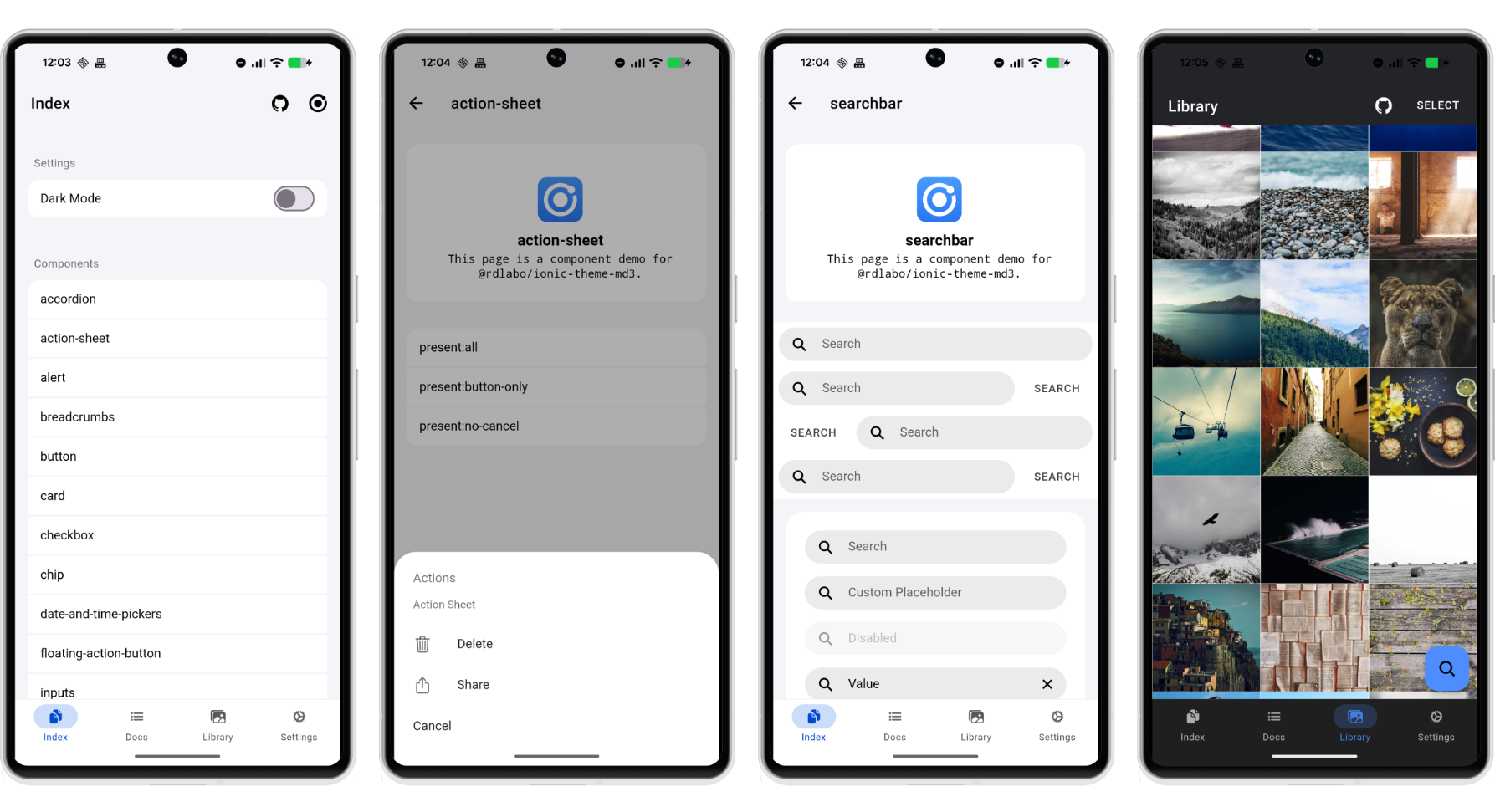
DEMO is here: https://ionic-theme-md3.rdlabo.dev/
This library provides CSS/JS files that bring the Material Design 3 design system to Ionic applications. It updates the look and feel of Ionic components to match the latest Material Design 3 guidelines.
This project aims to follow the core concepts of Ionic as closely as possible, while placing a strong emphasis on compatibility with @rdlabo/ionic-theme-ios26. Just as Ionic provides beautiful styling whether it displays the ios or md theme from a single HTML structure, our goal is to ensure that this theme and @rdlabo/ionic-theme-ios26 are fully compatible.
If you don't know about @rdlabo/ionic-theme-ios26, you should definitely give it a try!
👉️rdlabo-dev/ionic-theme-ios26
If you need a more comprehensive Material Design 3 implementation, you may also be interested in:
- md3-for-ionic by danielkleebinder
Note: This theme is purpose-built for compatibility with Ionic's design approach and
@rdlabo/ionic-theme-ios26; it is not intended as a strict, full MD3 recreation.
After Installation, import the theme CSS and set navAnimation as shown below.
This is a CSS theme for extending your Ionic project. It does not work on its own, so use it together with the Ionic Framework.
npm install @rdlabo/ionic-theme-md3Note: If you use @ionic/core@ < 8.8.0, use @rdlabo/ionic-theme-md3@1.0.2.
And import the theme in your project's main CSS file (e.g., src/styles.scss).
@import '@rdlabo/ionic-theme-md3/dist/css/default-variables.css';
@import '@rdlabo/ionic-theme-md3/dist/css/ionic-theme-md3.css';Install the iOS 26 theme to style both Ionic modes from the same application.
The current releases of both themes require @ionic/core 8.8.1 or later. Upgrade Ionic before using this setup if your application is on 8.8.0 or earlier.
npm install @rdlabo/ionic-theme-ios26When your global stylesheet uses Sass, initialize the themes in this order:
@use '@rdlabo/ionic-theme-ios26/src/styles/default-variables.scss' as ios26-vars;
@use '@rdlabo/ionic-theme-ios26/src/styles/ionic-theme-ios26.scss';
@use '@rdlabo/ionic-theme-ios26/src/styles/ionic-theme-ios26-dark-class.scss';
@use '@rdlabo/ionic-theme-ios26/src/styles/md-remove-ios-class-effect.scss';
@use '@rdlabo/ionic-theme-md3/dist/css/default-variables.css' as md3-vars;
@use '@rdlabo/ionic-theme-md3/dist/css/ionic-theme-md3.css';
The example uses Ionic's class-based dark mode. Your global stylesheet must also load Ionic's matching dark palette, such as @ionic/angular/css/palettes/dark.class.css for Angular. When using dark-system or dark-always, select the same variant for both Ionic's palette and the iOS 26 theme. See Ionic's Dark Mode documentation. The explicit ios26-vars and md3-vars namespaces prevent the two variable modules from using the same default namespace.
Configure both transition implementations when both themes are installed:
import { isPlatform } from '@ionic/core'; // or @ionic/angular (Ionic 9), @ionic/angular/standalone (Ionic 8), @ionic/react, @ionic/vue
import { iosTransitionAnimation, popoverEnterAnimation, popoverLeaveAnimation } from '@rdlabo/ionic-theme-ios26';
import { mdTransitionAnimation } from '@rdlabo/ionic-theme-md3';

// Angular
provideIonicAngular({
    ...
    navAnimation: isPlatform('ios') ? iosTransitionAnimation : mdTransitionAnimation,
    popoverEnter: isPlatform('ios') ? popoverEnterAnimation : undefined,
    popoverLeave: isPlatform('ios') ? popoverLeaveAnimation : undefined,
});

// React
setupIonicReact({
    ...
    navAnimation: isPlatform('ios') ? iosTransitionAnimation : mdTransitionAnimation,
    popoverEnter: isPlatform('ios') ? popoverEnterAnimation : undefined,
    popoverLeave: isPlatform('ios') ? popoverLeaveAnimation : undefined,
});

// Vue
createApp(App)
    .use(IonicVue, {
        ...
        navAnimation: isPlatform('ios') ? iosTransitionAnimation : mdTransitionAnimation,
        popoverEnter: isPlatform('ios') ? popoverEnterAnimation : undefined,
        popoverLeave: isPlatform('ios') ? popoverLeaveAnimation : undefined,
    });
If you installed only the MD3 theme, configure its animation as follows.
import { isPlatform } from '@ionic/core'; // or @ionic/angular (Ionic 9), @ionic/angular/standalone (Ionic 8), @ionic/react, @ionic/vue
import { mdTransitionAnimation } from '@rdlabo/ionic-theme-md3';

// Angular
provideIonicAngular({
    ...
    navAnimation: isPlatform('ios') ? undefined: mdTransitionAnimation,
});

// React
setupIonicReact({
    ...
    navAnimation: isPlatform('ios') ? undefined: mdTransitionAnimation,
});

// Vue
createApp(App)
    .use(IonicVue, {
        ...
        navAnimation: isPlatform('ios') ? undefined: mdTransitionAnimation,
})Start with Installation. Pair this theme with @rdlabo/ionic-theme-ios26 when you need both platforms from one markup tree.
-
Special markup — opt-in component combinations used by the demo.
-
Using ion-item-group — shared inset-list markup for iOS 26 and MD3.
-
Migration — changes required when updating theme markup.
Full documentation: https://docs.rdlabo.dev/projects/ionic-theme-md3
The same demo is deployed against both supported Ionic versions:
- Ionic 9 demo — canonical
- Ionic 8 demo — compatibility
The demo/ directory contains the Angular application used by both deployments. To run it locally:
cd demo
npm install
npm startWe use Playwright for visual regression testing to ensure consistent styling across all components. The test suite automatically captures screenshots of all routes in both light and dark modes.
cd demo

# Run all E2E tests
npm run test:e2e

# Run tests in UI mode (interactive)
npm run test:e2e:ui

# Debug tests
npm run test:e2e:debug

# Update baseline screenshots (when intentionally changing UI)
npm run test:e2e:update