
A Windows app that reads your PC, shows what it found, and offers changes that it can put back, with one exception (see What it never does).
It was built around one rig and one problem: stutter in iRacing that no single setting explained. Most of what it checks was measured on that rig. It does not claim to fix stutter, and nothing in it will tell you it has.
It shows each item of the list that it changed, and it puts it back. One change stays: Quiet turns on the Windows Task Scheduler event log, so that race watch can read it, and leaves it on. It does not promise a better frame rate or a smoother race.
The app is made for Windows 11. Setup does not check the Windows version. It has never run on Windows 10.
Extract the whole zip to a real folder - Downloads is fine - and run Setup.cmd.
Setup refuses rather than guessing. It will not install from inside a zip, or from a temporary folder Windows can empty part way through, and it copies nothing until the files match SHA256SUMS. If it stops, the message says what it saw.
It needs PowerShell 7.5 or newer and the .NET 9 Desktop Runtime. If either is missing, Setup installs it with winget, one package at a time, and you see whatever winget asks.
To remove it: Setup.cmd /uninstall. That takes the program folder, the shortcuts and the sign-in task. Your sessions and settings stay where they are. The profiles are in the program folder, so they go with it.
In this beta the About screen, and the My PC, Gaps, Score, Share and First run screens with it, cannot be opened: no button on the main screen reaches them yet. Everything the app does for a session - preflight, quiet, race watch, restore and copy - is on the main screen.
On a first run the app will almost certainly say NOT READY. That is the normal result. The check compares your PC with a known good state for a race, and a PC that nobody has set up for racing does not match it. The rows under the banner list each check. The checks that differ come first.
These two pictures come from a test run of the app on a Windows virtual machine, not from a racing PC. On your PC the numbers and the rows will differ.
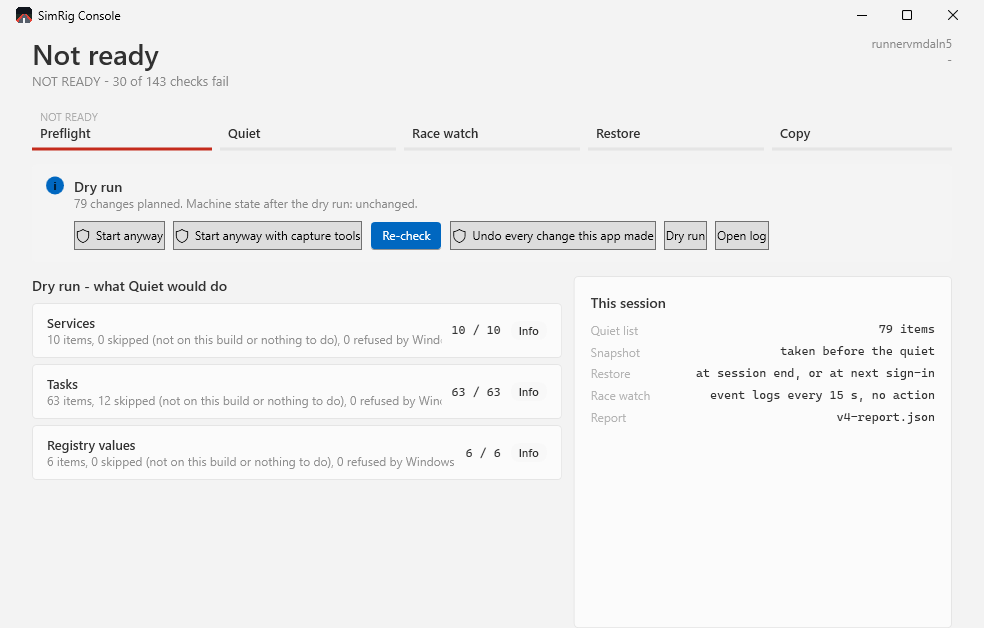
A dry run. The app lists the changes that Quiet would make, and reports that the PC is unchanged.
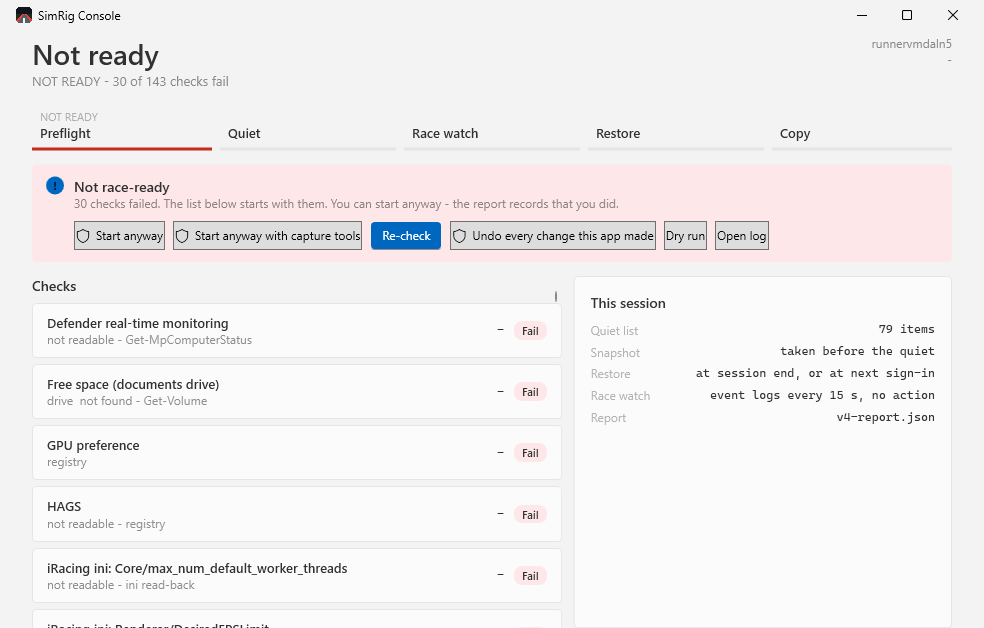
NOT READY. On a first run the app will almost certainly say this. The list starts with the checks that failed.
Preflight. Reads the machine and grades it against a set of rules. Each rule has a note that says where its value came from. A row says what was found and where it was read.
A session. It quiets a list of Windows services, scheduled tasks and registry values for the length of a race. It takes a snapshot first, and puts everything back afterwards. In this beta you cannot choose single items. If the app or Windows stops mid-session, a task that Quiet registers restores Windows at your next sign-in.
Windows can refuse. Windows does not let any program change some of the items on the list. On the author's own PC, Windows refused about a quarter of the 90 items (25 or 26 in different runs). The app reports each refused item as refused. When Restore can read the record of the session, it does not blame the app for an item that it never changed.
Tuning. On a supported PC, Apply tuning offers two display settings: Multiplane Overlay (MPO) and hardware-accelerated GPU scheduling (HAGS). It can also change the power plan in one case: a CPU with two CCDs on a plan that parks no cores. The new plan is Windows Balanced. Each change has a tick, shows the value now and the new value, and asks a second time before it writes. HAGS has no tick at the start: HAGS off stops frame generation in games that use it, and it needs a restart. Undo tuning puts back each value that Apply tuning wrote, also after the app was closed.
A supported PC has an AMD X3D CPU, an NVIDIA graphics card, Windows 11, and is not a laptop. On any other PC the app does not show Apply tuning. Quiet and Restore work on each PC.
GPU interrupt steering is not in this beta for your PC. The app does not offer it, and Undo tuning does not put it back.
It does not do what it cannot restore, with one exception. One change stays: Quiet turns on the Windows Task Scheduler event log, so that race watch can read it, and leaves it on. These four rules follow:
- It does not set CPU affinity or CPU-Sets on iRacing's processes. That risks your iRacing account, whether it works or not. The only affinity the app can write is GPU interrupt affinity, on the graphics device, not on a process - and this beta does not offer that on your PC.
- It does not overclock or undervolt, and it does not change voltage, power limits or fan curves.
- It does not change process priority.
- It does not touch the game, its files or its memory. Nothing it does is hidden from iRacing's anti-cheat, and nothing it does needs to be.
The quiet list is the file quiet-list.psd1 in the program folder. Only an administrator can change it. A changed file makes the check Script integrity fail, and the next Setup puts back the original. If you edit it, the result is your own responsibility.
It does not delete a race session.
| What | Where |
|---|---|
| The app | wherever Setup put it (%ProgramFiles%\SimRig by default) |
| Sessions, snapshots and logs | C:\SimRacer\Logs\v4 |
| Your settings | C:\SimRacer\settings.json |
| Profiles and rules | profiles\ and rules\ beside the app |
The window keeps a log next to your sessions. If a session was quieted and never restored, open the app and press Restore - the snapshot is the record of what your PC was before, and it is the only one.
If the app will not start at all, C:\SimRacer\Logs\v4 still has the log from its last run.
If SimRig Console does not start and Windows is still quiet, run RESTORE-NOW.cmd by hand. It is in the folder where you extracted the zip, and in C:\Program Files\SimRig. It needs no console. RESTORE-NOW puts back the values that SimRig saved before the session. If you applied tuning, it also undoes the tuning. If SimRig cannot read the record of the session, RESTORE-NOW does not put back the session values and tells you. If the record can be read but the saved values cannot, RESTORE-NOW puts back the Windows default values and says so. If no session is found, you can type DEFAULTS to put back the Windows default values.
This beta has no button that sends logs. To send them by hand: close SimRig Console, right-click the folder C:\SimRacer\Logs\v4, choose Compress to ZIP file, and send the zip to simrig@rickshank.com. The logs can have your computer name in them, for example in the file v4-report.json.
Windows updates can undo what the app set. Run the preflight again after a Windows update. One person maintains this app, as best effort, with no service level. Restore does not depend on the author: RESTORE-NOW.cmd works with no console, from the installed copy or from the extracted zip.
This repository receives one export of the app for each release. Pull requests are not merged here, because the next export would overwrite them. Send a patch by mail to simrig@rickshank.com; contributors are named in the release notes. GitHub Issues are closed for this beta.
The older batch files and the guide are in iracing-stutter-fix, which takes pull requests as before.
MIT. See the file LICENSE.