Table of contents
Users can utilize Mobile Device Management (MDM) or Policy Control Tools to disable and remove bloatware (unnecessary features) from Android browsers by provisioning the device as a managed profile, work profile, profile owner, or device owner.
-
What MDM / Policy Control Tools can be used to set up these profiles?
Below are free and open-source tools for MDM setup: -
How to implement a specific policy?
MDM / Policy Control Apps >> Apps Management >> choose Apps (Brave/Edge/Chrome) >> Managed Configuration. -
Why setting up group policy with managed configuration?
Because there are some settings that are not visible in the normal settings, even making changes and some settings withchrome://flagshas no effect and doesn't mean anything to Brave Browser / Edge Browser / Chrome.
That's why as users, we can take advantage of the highest privileges of group policy set from managed configuration to apply some settings that users can't change in the normal settings. -
Where to check known all available group policy key names for managed configuration?
chrome://policy- in the Applications menu section within Managed Configuration of MDM Tools.
- official documentation from developer/publisher, for example:
- Brave Group Policy https://support.brave.app/hc/en-us/articles/360039248271-Group-Policy
- Microsoft Edge Mobile - Policies https://learn.microsoft.com/en-us/deployedge/microsoft-edge-mobile-policies
- Chrome Enterprise policy list https://chromeenterprise.google/policies/
Note:
- Before setting up an MDM profile, users must log out of all active accounts from the Android device.
if not want log out, use adb shell uninstall but keep all data and caches, after finish setup device owner just install again that apk with all data still preserved
adb shell pm uninstall -k com.example.apps
how check account logged in in your devices?
adb shell dumpsys acccount - And before starting MDM setup, the device doesn't have a second user (guest mode), not set up as a managed profile, and has not set up a private space.
- In here will not explain how to provision the device as a
managed profile, work profile, profile owner, or device owner. All documentation about setting up MDM is already on the TestDPC and OwnDroid repo, if encounter any difficulties or issues when setting up MDM, please visit https://deepwiki.com/BinTianqi/OwnDroid - Managed Configuration is not limited to browser applications such as Chrome, Brave and Edge only; it can be implemented for all applications that support Policy settings, but the focus here is on specific about policy settings of Google Chrome Brave Browser and Edge Browser for Android.
How to remove:
- Brave AI Leo Chat
- Brave News
- Brave Firewall + VPN
- Brave Rewards
- Brave Wallet
And add other policy configurations to increase Brave Browser privacy.
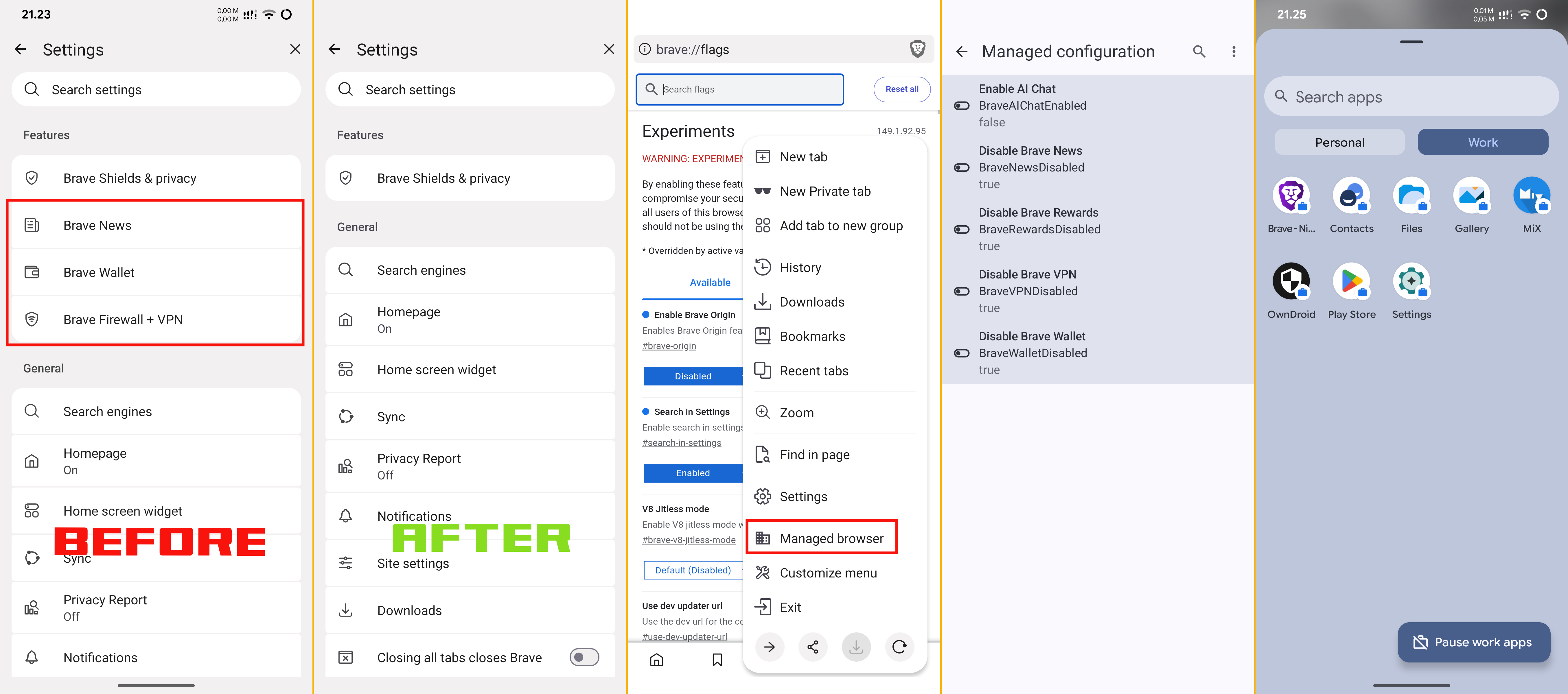
Brave Specific Policy Settings
Key name list and values for Managed Configuration in Brave Browser:
| Name Description | Key Name | Policy Values |
|---|---|---|
| Settings for Google's AI Mode integrations in the address bar and New Tab page search box. | AIModeSettings | 1 |
| Enable AI Chat | BraveAIChatEnabled | false |
| Configure Global Privacy Control | BraveGlobalPrivacyControlEnabled | true |
| Disable Brave News | BraveNewsDisabled | true |
| Enable Privacy Preserving Product Analytics (P3A) | BraveP3AEnabled | false |
| Enable Brave Playlist | BravePlaylistEnabled | false |
| Disable Brave Rewards | BraveRewardsDisabled | true |
| Enable Stats Usage Ping | BraveStatsPingEnabled | false |
| Disable Brave Talk | BraveTalkDisabled | true |
| Disable Brave VPN | BraveVPNDisabled | true |
| Disable Brave Wallet | BraveWalletDisabled | true |
| Enable Web Discovery | BraveWebDiscoveryEnabled | false |
| Brave cloud policy overrides Platform policy. | CloudPolicyOverridesPlatformPolicy | false |
| Enable Touch to Search | ContextualSearchEnabled | false |
| Control HTTPS upgrade behavior | DefaultBraveHttpsUpgradeSetting | 2 |
| Default idle detection setting | DefaultIdleDetectionSetting | 2 |
| Allow reporting of domain reliability related data | DomainReliabilityAllowed | false |
| Specifies whether in-product Brave surveys are shown to users. | FeedbackSurveysEnabled | false |
| Settings for Chrome Finds | FindsSettings | 2 |
| Enforce Google SafeSearch | ForceGoogleSafeSearch | false |
| Allows Gemini app integrations to directly act on web pages | GeminiActOnWebSettings | 1 |
| Settings for Gemini integration | GeminiSettings | 1 |
| Settings for GenAI local foundational model | GenAILocalFoundationalModelSettings | 1 |
| Allow HTTPS-Only Mode to be enabled | HttpsOnlyMode | force_enabled |
| Enable automatic HTTPS upgrades | HttpsUpgradesEnabled | true |
| Enable reporting of usage and crash-related data | MetricsReportingEnabled | false |
| Enable network prediction | NetworkPredictionOptions | 0 |
| Enable Safe Browsing Extended Reporting | SafeBrowsingExtendedReportingEnabled | false |
| Enable content sharing with Google AI Mode and Lens integrations | SearchContentSharingSettings | 1 |
| Enable URL-keyed anonymized data collection | UrlKeyedAnonymizedDataCollectionEnabled | false |
| Allow collection of WebRTC event logs from Google services | WebRtcEventLogCollectionAllowed | false |
official source and credit from the Brave Group Policy.
Note: If some Policy Key Names above are missing or can't be found, that Key Name may be already deprecated, or Brave has changed their Policy Key Name.
Reminder Brave claim on their published article "What does brave remove from the Chromium engine?", some privacy/security related already disable by default and delete the code entirely, but in reality still appears in policy list. So it's better to configure it than not at all, we don't know if the code is actually removed or not.
Besides setting up Managed Configurations via Group Policy, it is also recommended for users to configure the options below directly in the Brave Browser settings:
- Settings >> Brave Shields & privacy >> Allow app links to open in apps outside of Brave (set to 'disable')
- Settings >> Privacy Report >> Privacy Report Notification "Sends a weekly privacy report" (set to 'disable')
- Settings >> Site settings >> Autoplay (set to 'Not allowed')
Also recommended for Brave users to set up these flags:
| Flags | Value | Description |
|---|---|---|
| chrome://flags/#search-in-settings | enable | adds a search bar for easily finding specific internal settings |
| chrome://flags/#brave-origin | disable | disable the Brave Origin menu in settings |
| chrome://flags/#brave-adblock-show-hidden-components | enable | Reveals adblock filter list components in brave://adblock |
In addition to the settings I mentioned above, Brave Browser has well-managed default settings, such as already disabling third-party cookies, enabling anti-fingerprinting, enabling built-in ad-blocking including language-specific filter rules, etc. Now Brave Browser is ready to use. No further setup changes are needed. Users can customize other settings themselves.
Adblock Tips
If the web page rendering feels sluggish, slow and stuttering in Brave Browser, please open chrome://components/ check and update all Chromium components, and open brave://adblock to update all filter rules. Brave Browser adds many filter rules to their Default adblock filter rules. If still no changes, try customizing or disabling the default Brave adblock filter rules from brave://adblock, and changing with minimal and basic filter rules:
- https://easylist.to/easylist/easylist.txt
- https://easylist.to/easylist/easyprivacy.txt
- https://secure.fanboy.co.nz/fanboy-mobile-notifications.txt
- https://secure.fanboy.co.nz/fanboy-cookiemonster.txt
- and add your region or language-specific filter rules, can get source from easylist, AdBlock Plus and AdGuard
Reminder adding too many adblock filter rules sometimes doesn't make the ad blocking experience better, it can cause the filter rules to conflict with each other and make ad blocking less effective.
Copilot AI in Microsoft Edge version 148 and above, currently can't be completely disabling/turned off from settings, which Copilot AI always could read active tabs and text typed by the user in Edge Browser.
Update: now in Edge Browser v149.0.4022.67 Microsoft brings back the feature to disable Copilot directly from Edge Settings
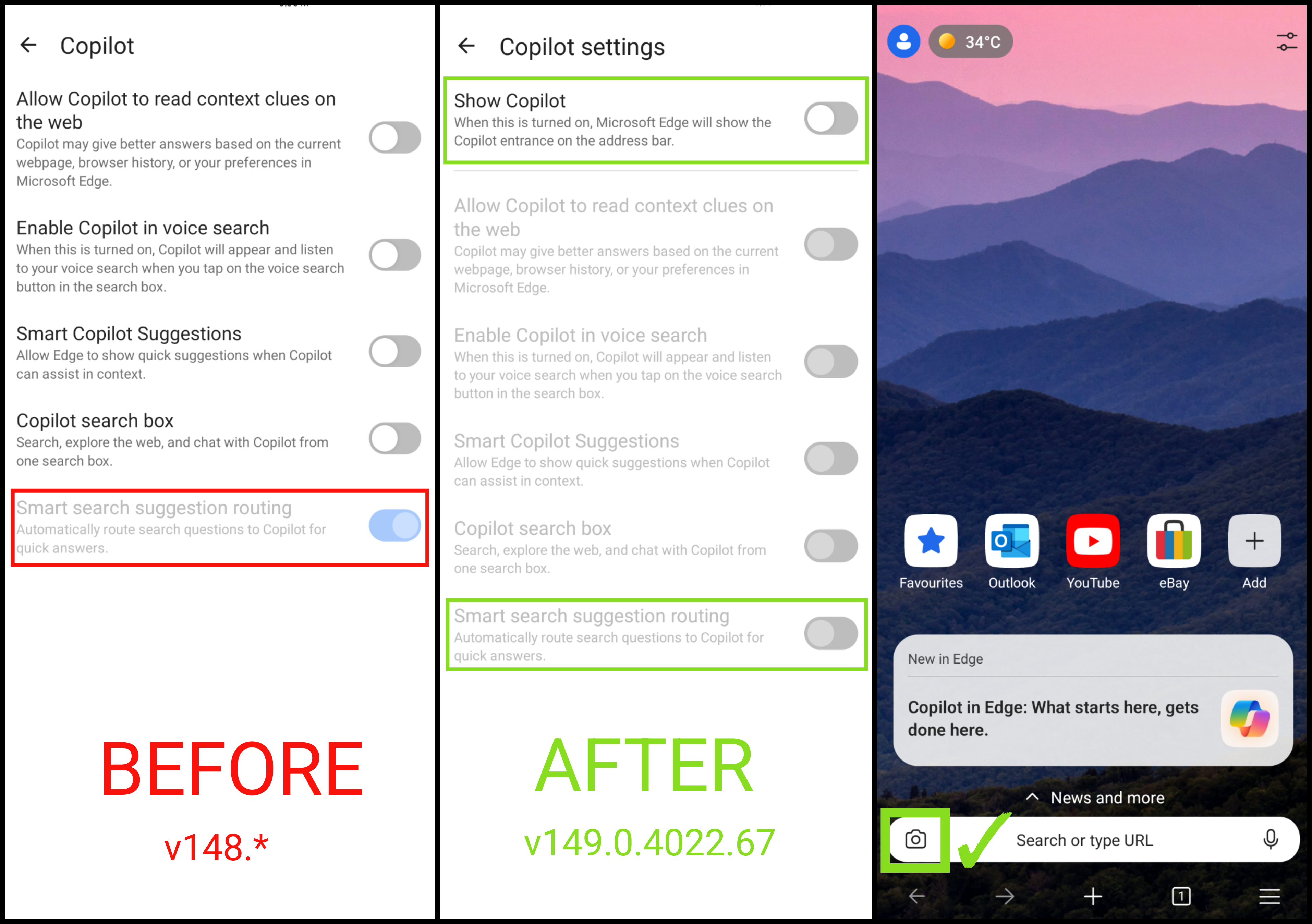
However, to disable Copilot entirely, utilize Group Policies via Managed Configuration.
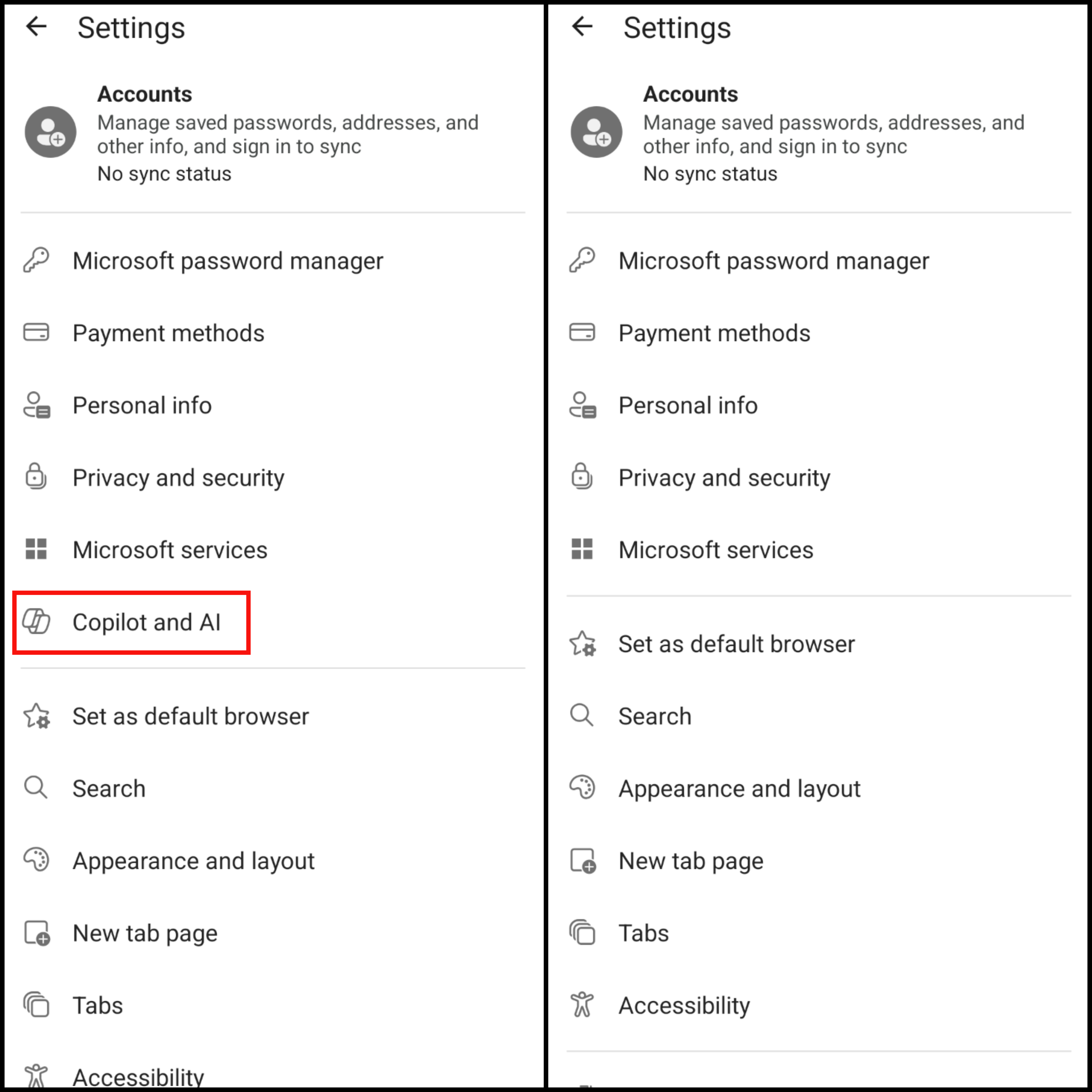
Microsoft implements different policies (Data Protection and Privacy Rights / GDPR) for different regions and languages. Certain options are not available across different regional or language-specific locales, and are intentionally hidden by Microsoft (for example, users can't change settings directly from Edge Browser to enable HTTPS-only and set up a secure DNS resolver), by utilizing an MDM users can apply these and other settings through Managed Configurations to enhance Edge Browser privacy on Android devices.
Microsoft Edge Android Browser Specific Policy Settings.
key name list and values setup for Managed Configuration for Microsoft Edge Browser:
| Name Description | Key Name | Policy Values |
|---|---|---|
| Allow Accessibility Performance Filtering. | AccessibilityPerformanceFilteringAllowed | false |
| Enable Work Search suggestions in the address bar | AddressBarWorkSearchResultsEnabled | false |
| Suggest similar pages when a webpage can't be found | AlternateErrorPagesEnabled | false |
| Enable the Copilot new tab page | CopilotNewTabPageEnabled | false |
| Default idle detection setting | DefaultIdleDetectionSetting | 2 |
| Control the mode of DNS-over-HTTPS | DnsOverHttpsMode | secure |
| Specify URI template of desired DNS-over-HTTPS resolver | DnsOverHttpsTemplates | https://cloudflare-dns.com/dns-query / other dns resolver |
| Allow download restrictions | DownloadRestrictions | 0 |
| Enable Copilot | EdgeCopilotEnabled | false |
| Disable data sharing usage data for personalization for iOS and Android | EdgeDisableShareUsageData | false |
| Enforce Google SafeSearch | ForceGoogleSafeSearch | false |
| Force minimum YouTube Restricted Mode | ForceYouTubeRestrict | 0 |
| Settings for GenAI local foundational model | GenAILocalFoundationalModelSettings | 1 |
| Allow HTTPS-Only Mode to be enabled | HttpsOnlyMode | force_enabled |
| Enable automatic HTTPS upgrades | HttpsUpgradesEnabled | true |
| Enable network prediction | NetworkPredictionOptions | 0 |
| Prevent bypassing Microsoft Defender SmartScreen prompts for sites | PreventSmartScreenPromptOverride | false |
| Prevent bypassing of Microsoft Defender SmartScreen warnings about downloads | PreventSmartScreenPromptOverrideForFiles | false |
| Prevent bypassing Edge Website Typo Protection prompts for sites | PreventTyposquattingPromptOverride | false |
| Enable search suggestions | SearchSuggestEnabled | false |
| Enable Microsoft Defender SmartScreen DNS requests | SmartScreenDnsRequestsEnabled | false |
| Enable Microsoft Defender SmartScreen DNS requests | SmartScreenDnsRequestsEnabled | false |
| Configure Microsoft Defender SmartScreen | SmartScreenEnabled | false |
| Configure Microsoft Defender SmartScreen to block potentially unwanted apps | SmartScreenPuaEnabled | false |
| Configure Edge Website Typo Protection | TyposquattingCheckerEnabled | false |
official source and credit from the Microsoft Edge Mobile - Policies.
Note: If some Policy Key Names above are missing or can't be found, that Key Name may be already deprecated, or Microsoft has changed their Policy Key Name.
Besides setting up Managed Configurations via Group Policy, it is also recommended for users to configure the options below directly in the Edge Browser settings:
- Settings >> Privacy and security >> Diagnostic data >> Optional diagnostic data (set to 'disable')
- Settings >> Microsoft services >> Improve quality of shortcuts on homepage (set to 'disable')
- Settings >> Search >> Show me search and site suggestions using my typed characters (set to 'disable')
- Settings >> Appearance and layout >> Theme and Wallpaper (optional. if liked, keep it enabled and customize)
- Settings >> New tab page >> Weather (optional. if liked, keep it enabled)
- Settings >> New tab page >> Continue browsing where I left off (select and activate this)
- Settings >> Site settings >> Site permissions >> Third-party cookies (set to 'disable')
- Settings >> Site settings >> Block opening external apps (set to 'disable')
- Settings >> Site settings >> Block ads (optional. if liked, enabled built-in Block ads and disable 'Acceptable Ads') but recommended to use uBlock Origin extension for better ads blocking.
Home Page settings, tap hamburger menu on top right
- Show sponsored shortcuts (set to 'disable')
- Cards >> Edge tips (set to 'disable')
- Show feed (optional. if liked read news, keep it enabled)
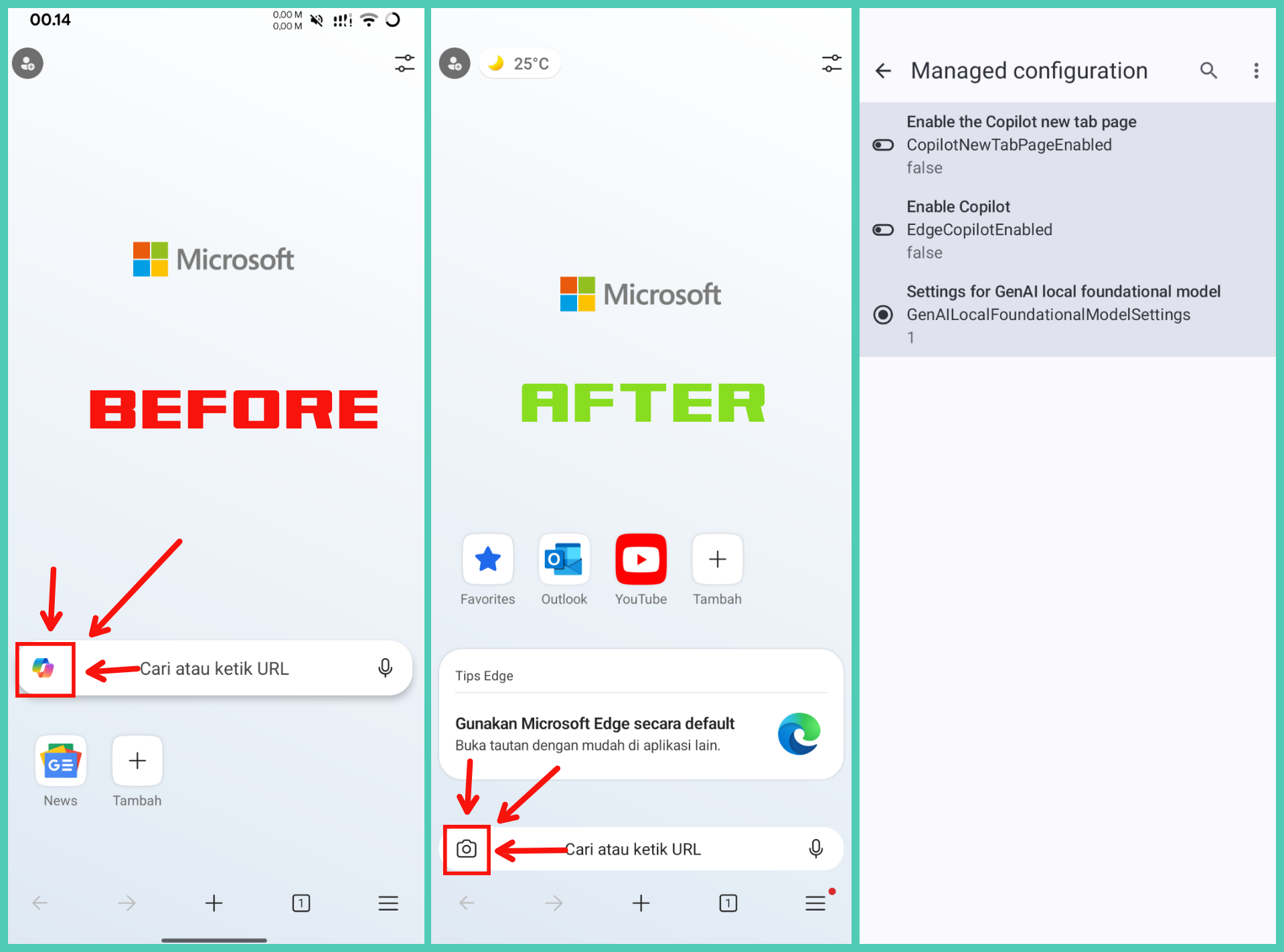
In addition to the settings I mentioned above, Edge Browser is ready to use. No further setup changes are needed. Users can customize other settings themselves.
Change Language Edge Browser Android.
The basic feature for changing language isn't available in Edge Browser settings. Edge Browser uses the language autodetection applied to the Android System. To change Edge Browser language, it can be enforced with ADB Shell or with apps Language Selector (vegabobo.languageselector) + Shizuku.
ADB Shell Command for changing application language
adb shell cmd locale set-app-locales com.example.app --user current --locales "<language_code>-<country_code>"
Where provide info about language code and country code?
- ISO 639-1 Code about Language code
- ISO 3166 Alpha-2 code about Country codes
for example changing Microsoft Edge languages to english - United States
adb shell cmd locale set-app-locales com.microsoft.emmx --user current --locales "en-US"
Google Chrome Android Browser Specific Policy Settings.
key name list and values setup for Managed Configuration for Google Chrome Android:
| Name Description | Key Name | Policy Values |
|---|---|---|
| Settings for Google's AI Mode integrations in the address bar and New Tab page search box. | AIModeSettings | 1 |
| Ads setting for sites with intrusive ads | AdsSettingForIntrusiveAdsSites | 2 |
| Allow automatic sign-in to Microsoft® cloud identity providers on Android | AndroidEntraSsoEnabled | 0 |
| Enable AutoFill for addresses | AutofillAddressEnabled | false |
| Enable AutoFill for credit cards | AutofillCreditCardEnabled | false |
| Settings for enhanced autofill | AutofillPredictionSettings | 2 |
| Allow media autoplay | AutoplayAllowed | false |
| Block third party cookies | BlockThirdPartyCookies | true |
| Allow Chrome for Testing | ChromeForTestingAllowed | true |
| Determine the availability of variations | ChromeVariations | 1 |
| Google Chrome cloud policy overrides Platform policy. | CloudPolicyOverridesPlatformPolicy | false |
| Default clipboard setting | DefaultClipboardSetting | 2 |
| Default idle detection setting | DefaultIdleDetectionSetting | 2 |
| Default pop-ups setting | DefaultPopupsSetting | 2 |
| Controls the mode of DNS-over-HTTPS | DnsOverHttpsMode | automatic |
| Specify URI template of desired DNS-over-HTTPS resolver | DnsOverHttpsTemplates | https://cloudflare-dns.com/dns-query |
| Allow reporting of domain reliability related data | DomainReliabilityAllowed | false |
| Specifies whether in-product Google Chrome surveys are shown to users. | FeedbackSurveysEnabled | false |
| Settings for Chrome Finds | FindsSettings | 2 |
| Force Google SafeSearch | ForceGoogleSafeSearch | false |
| Allows Gemini app integrations to directly act on web pages | GeminiActOnWebSettings | 1 |
| Settings for Gemini integration | GeminiSettings | 1 |
| Settings for GenAI local foundational model | GenAILocalFoundationalModelSettings | 1 |
| Use the Happy Eyeballs V3 algorithm | HappyEyeballsV3Enabled | true |
| Allow HTTPS-Only Mode to be enabled | HttpsOnlyMode | force_enabled |
| Enable automatic HTTPS upgrades | HttpsUpgradesEnabled | true |
| Enable reporting of usage and crash-related data | MetricsReportingEnabled | false |
| Show content suggestions on the New Tab page | NTPContentSuggestionsEnabled | false |
| Allow websites to query for available payment methods. | PaymentMethodQueryEnabled | false |
| Enable Safe Browsing Extended Reporting | SafeBrowsingExtendedReportingEnabled | false |
| Safe Browsing Protection Level | SafeBrowsingProtectionLevel | 1 |
| Allow Safe Browsing Proxied Real Time Checks | SafeBrowsingProxiedRealTimeChecksAllowed | false |
| Control SafeSites adult content filtering. | SafeSitesFilterBehavior | 0 |
| Enable content sharing with Google AI Mode and Lens integrations | SearchContentSharingSettings | 1 |
| Enable search suggestions | SearchSuggestEnabled | false |
| Enable the Shared Clipboard Feature | SharedClipboardEnabled | false |
| Allow the shopping list feature to be enabled | ShoppingListEnabled | false |
| Enable URL-keyed anonymized data collection | UrlKeyedAnonymizedDataCollectionEnabled | false |
| Allow collection of WebRTC event logs from Google services | WebRtcEventLogCollectionAllowed | false |
official source and credit from the Chrome Enterprise policy list.
Note: If some Policy Key Names above are missing or can't be found, that Key Name may be already deprecated, or Google has changed their Policy Key Name.