


Zustand OOP is a library that allows you to use Object-Oriented Programming (OOP) with Zustand. It combines the simplicity and power of Zustand with the structure and familiarity of class-based programming.
npm install zustand-oop
# or
yarn add zustand-oop- Combines the simplicity of Zustand with the structure of OOP
- Allows for easy organization of complex state logic
- Familiar syntax for developers coming from class-based backgrounds
- Maintains the performance benefits of Zustand
First, create a store class:
import { immutable, create } from "zustand-oop";

@immutable
class BearState {
  bears = 0;

  increasePopulation() {
    this.bears++;
  }

  removeAllBears() {
    this.bears = 0;
  }

  get hasBears() {
    return this.bears > 0;
  }
}

export const BearStore = create(new BearState());
Then use it in your components:
function BearCounter() {
  const state = BearStore.useState();
  return <h1>{state.bears} around here ...</h1>;
}

function Controls() {
  const actions = BearStore.useActions();
  return <button onClick={actions.increasePopulation}>one up</button>;
}Zustand OOP allows you to create complex stores by combining multiple state classes. Here's an example using a Todos application:
First, we define the TodoItem class to represent individual todo items:
@immutable
export class TodoItem {
  id = uuidv4();
  title = "";
  detail = "";
  completed = false;
  deadline = moment().add(7, "days").format("YYYY-MM-DD HH:mm:ss");

  get remainingTime() {
    return moment(this.deadline).diff(moment(), "days");
  }

  setCompleted(value: boolean) {
    this.completed = value;
  }

  updateTodoTitle(title: string) {
    this.title = title;
  }

  updateTodoDeadline(deadline: string) {
    this.deadline = deadline;
  }
}
Now, we create the TodosState class to manage the collection of todos:
import { Type, immutable } from "zustand-oop";

@immutable
class TodosState {
  // @Type is used for deserialization from persisted state
  // if not using persist middleware, you don't need to use @Type for deserialization
  @Type(() => TodoItem)
  todos = [] as TodoItem[];

  keyword = "";

  setKeywords(value: string) {
    this.keyword = value;
  }

  completeAll() {
    this.todos.forEach((todo) => {
      todo.setCompleted(true);
    });
  }

  addTodo(title: string) {
    const todo = new TodoItem();
    todo.title = title;
    this.todos.push(todo);
  }

  deleteTodo(id: string) {
    this.todos = this.todos.filter((todo) => todo.id !== id);
  }

  get filteredTodos() {
    return this.todos.filter((todo) =>
      todo.title.toLowerCase().includes(this.keyword.toLowerCase())
    );
  }
}
Finally, we create and export the TodosStore using zustand-oop:
export const TodosStore = create(
  devtools(
    persist(() => new TodosState(), {
      name: "todos",
      deserializeClass: TodosState,
    }),
    {
      name: "todos",
    }
  )
);
Here are some examples of how to use zustand-oop store in your components:
class TodoItemComponentProps {
  todo: TodoItem;
  onDelete?: (id: string) => void;
  className?: string;
}

function TodoItemComponent(props: TodoItemComponentProps) {
  const { todo, onDelete } = props;
  const itemActions = TodosStore.useActions((state) =>
    state.todos?.find((todo) => todo.id === props.todo.id)
  );

  return (
    <div>
      <div className='todo-content'>
        <Checkbox
          checked={todo.completed}
          onChange={(checked) => {
            itemActions.setCompleted(checked);
          }}
        />
        <Input
          value={todo.title}
          className='ml-2'
          onChange={itemActions.updateTodoTitle}
        />
      </div>
      <div>
        <DatePicker
          value={todo.deadline}
          format={"YYYY-MM-DD HH"}
          showTime
          onChange={itemActions.updateTodoDeadline}
        ></DatePicker>
      </div>
      <div className='separator'></div>
      <div className='ops'>
        <Button
          onClick={() => {
            onDelete(todo.id);
          }}
        >
          delete
        </Button>
      </div>
    </div>
  );
}

function Todos() {
  const [store, actions] = TodosStore.useStore();
  const [createTodoVisible, setCreateTodoVisible] = React.useState(false);

  return (
    <div>
      <div className='headers'>
        <div className='flex items-center'>
          search todo:
          <Input
            value={store.keyword}
            placeholder='input todo keyword please'
            className='w-[200px] ml-2'
            onChange={(value) => {
              actions.setKeywords(value);
            }}
          />
        </div>
        <div className='buttons'>
          <Button
            onClick={() => {
              setCreateTodoVisible(true);
            }}
          >
            create todo
          </Button>
          <Button
            className='ml-2'
            onClick={() => {
              actions.completeAll();
            }}
          >
            complete all
          </Button>
        </div>
      </div>
      <div className='list'>
        {store.filteredTodos.map((todo, index) => {
          return (
            <TodoItemComponent
              onDelete={actions.deleteTodo}
              className='mt-2'
              key={todo.id}
              todo={todo}
            />
          );
        })}
      </div>
    </div>
  );
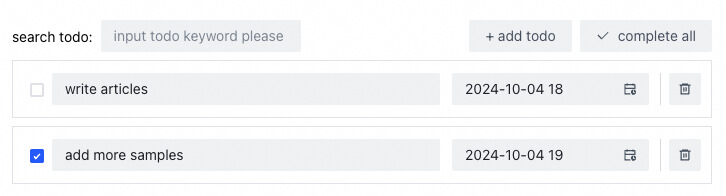
}Zustand OOP works seamlessly with Redux DevTools, allowing you to inspect and debug your state changes. Here are some examples of how it looks in action:
devtools:

todos app:
Zustand OOP supports computed properties using getter methods:
@immutable
class AdvancedBearState {
  bears = 0;
  fish = 0;

  get bearsPerFish() {
    return this.fish === 0 ? 0 : this.bears / this.fish;
  }

  addBear() {
    this.bears++;
  }

  addFish() {
    this.fish++;
  }
}

export const AdvancedBearStore = create(new AdvancedBearState());Declarative requests are truly convenient, and zustand-oop also supports SWR. Here's an example of how to use it:
import { createSWRAction } from 'zustand-oop';

class PetStore {
  status = ['available', 'pending', 'sold'];

  setStatus(status: string[]) {
    this.status = status;
  }

  pets = createSWRAction((status) => {
    return useSWR(`https://petstore.swagger.io/v2/pet/findByStatus?status=${status.join(',')}`)
  });
}

export const PetStore = create(() => new PetStore());

function PetList() {
  const [petstore, actions] = PetStore.useStore();

  actions.pets.useRequest(petstore.status);

  return <div>
    <div>
      <Checkbox.Group
        checked={petstore.status}
        onChange={(newStatus) => {
          actions.setStatus(newStatus);
        }}
      />
    </div>
    <Spin loading={petstore.pets.loading}>
      {(petstore.pets.data || []).map((pet) => {
        return <div key={pet.id}>{pet.name}</div>
      })}
    </Spin>
  </div>
}Zustand OOP supports Zustand middleware. Here's an example using the persist middleware:
import { persist, devtools, immutable, create } from "zustand-oop";

@immutable
class PersistentBearState {
  bears = 0;

  addBear() {
    this.bears++;
  }
}

export const PersistentBearStore = create(
  devtools(
    persist(new PersistentBearState(), {
      name: "bear-storage",
      deserializeClass: PersistentBearState,
    }),
    { name: "bear-storage" }
  )
);Zustand OOP is written in TypeScript and provides full type support out of the box.
- Organize your stores into logical classes
- Use computed properties for derived state
- Leverage TypeScript for better type safety and autocompletion
We welcome contributions!
Zustand OOP is MIT licensed.