A music streaming startup, Sparkify, has grown their user base and song database and want to move their processes and data onto the cloud. Their data resides in S3, in a directory of JSON logs on user activity on the app, as well as a directory with JSON metadata on the songs in their app.
As their data engineer, you are tasked with building an ETL pipeline that extracts their data from S3, stages them in Redshift, and transforms data into a set of dimensional tables for their analytics team to continue finding insights in what songs their users are listening to. You'll be able to test your database and ETL pipeline by running queries given to you by the analytics team from Sparkify and compare your results with their expected results
In this project we are going to use two Amazon Web Services resources:
The data sources to ingest into data warehouse are provided by two public S3 buckets:
- Songs bucket (s3://udacity-dend/song_data), contains info about songs and artists. All files are in the same directory.
- Event bucket (s3://udacity-dend/log_data), contains info about actions done by users, what song are listening, ... We have differents directories so we need a descriptor file (also a JSON) in order to extract data from the folders by path. We used a descriptor file (s3://udacity-dend/log_json_path.json) because we don't have a common prefix on folders
The objects contained in both buckets are JSON files. The song bucket has all
the files under the same directory but
the event ones don't,
so we need a descriptor file (also a JSON) in order to extract
data from the folders by path. We used a descriptor file because we don't
have a common prefix on folders
We need to ingest this data into AWS Redshift using COPY command. This command get JSON files from buckets and copy them into staging tables inside AWS Redshift.
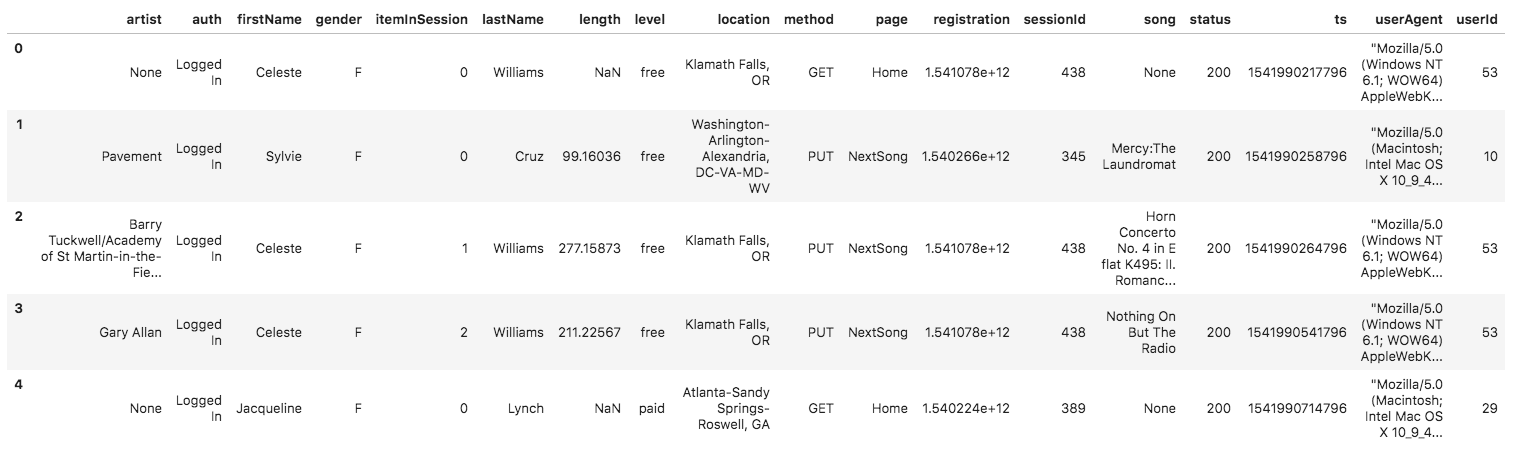
Log Dataset structure:
 https://video.udacity-data.com/topher/2019/February/5c6c3ce5_log-data/log-data.png
Song dataset structure:
https://video.udacity-data.com/topher/2019/February/5c6c3ce5_log-data/log-data.png
Song dataset structure:
{"num_songs": 1, "artist_id": "ARJIE2Y1187B994AB7", "artist_latitude": null, "artist_longitude": null
, "artist_location": "", "artist_name": "Line Renaud", "song_id": "SOUPIRU12A6D4FA1E1",
"title": "Der Kleine Dompfaff", "duration": 152.92036, "year": 0}
- Go to dwh.cfg to fill in your [AWS] Key and Secret
- run create_redshift_iam jupyter notebook and follow the important section at the bottom of the notebook.
- run "python etl.py"
- to destroy the infrastructure after finish reviewing , run "python destroy_redshift_iam.py"
This is the schema of the database
| COLUMN | TYPE | FEATURES |
|---|---|---|
| num_songs | int | |
| artist_id | varchar | |
| artist_latitude | decimal | |
| artist_longitude | decimal | |
| artist_location | varchar | |
| artist_name | varchar | |
| song_id | varchar | |
| title | varchar | |
| duration | decimal | |
| year | int |
| COLUMN | TYPE | FEATURES |
|---|---|---|
| artist | varchar | |
| auth | varchar | |
| firstName | varchar | |
| gender | varchar | |
| itemInSession | int | |
| lastName | varchar | |
| length | decimal | |
| level | varchar | |
| location | varchar | |
| method | varchar | |
| page | varchar | |
| registration | varchar | |
| sessionId | int | |
| song | varchar | |
| status | int | |
| ts | timestamp | |
| userAgent | varchar | |
| userId | int |
| COLUMN | TYPE | FEATURES |
|---|---|---|
| user_id | int | distkey, PRIMARY KEY |
| first_name | varchar | |
| last_name | varchar | |
| gender | varchar | |
| level | varchar |
| COLUMN | TYPE | FEATURES |
|---|---|---|
| song_id | varchar | sortkey, PRIMARY KEY |
| title | varchar | NOT NULL |
| artist_id | varchar | NOT NULL |
| duration | decimal |
| COLUMN | TYPE | FEATURES |
|---|---|---|
| artist_id | varchar | sortkey, PRIMARY KEY |
| name | varchar | NOT NULL |
| location | varchar | |
| latitude | decimal | |
| logitude | decimal |
| COLUMN | TYPE | FEATURES |
|---|---|---|
| start_time | timestamp | sortkey, PRIMARY KEY |
| hour | int | |
| day | int | |
| week | int | |
| month | int | |
| year | int | |
| weekday | int |
| COLUMN | TYPE | FEATURES |
|---|---|---|
| songplay_id | int | IDENTITY (0,1), PRIMARY KEY |
| start_time | timestamp | REFERENCES time(start_time) sortkey |
| user_id | int | REFERENCES users(user_id) distkey |
| level | varchar | |
| song_id | varchar | REFERENCES songs(song_id) |
| artist_id | varchar | REFERENCES artists(artist_id) |
| session_id | int | NOT NULL |
| location | varchar | |
| user_agent | varchar |
All the transformations logic (ETL) is done in SQL inside Redshift.
There are 2 main steps:
- Ingest data from s3 public buckets into staging tables:
- Insert record into a star schema from staging tables
The structure is:
- create_tables.py - This script will drop old tables (if exist) ad re-create new tables
- etl.py - This script orchestrate ETL.
- sql_queries.py - This is the ETL. All the transformatios in SQL are done here.
- /img - Directory with images that are used in this markdown document
We need an extra file with the credentials an information about AWS resources named dhw.cfg