Update: It appears that hiding review intervals is an option in the Anki settings, and the add-on is unnecessary! Thanks to the reviewer for this information!
To update the setting: View > Preferences > Review > "Show next review time above answer buttons" (uncheck this)
Your brain knows if you know something. Your eyes seeing intervals makes you second-guess. Trust your brain.
A simple Anki add-on that hides the expected review interval (like "10d" or "2min") that normally appears beneath each answer button during card review.
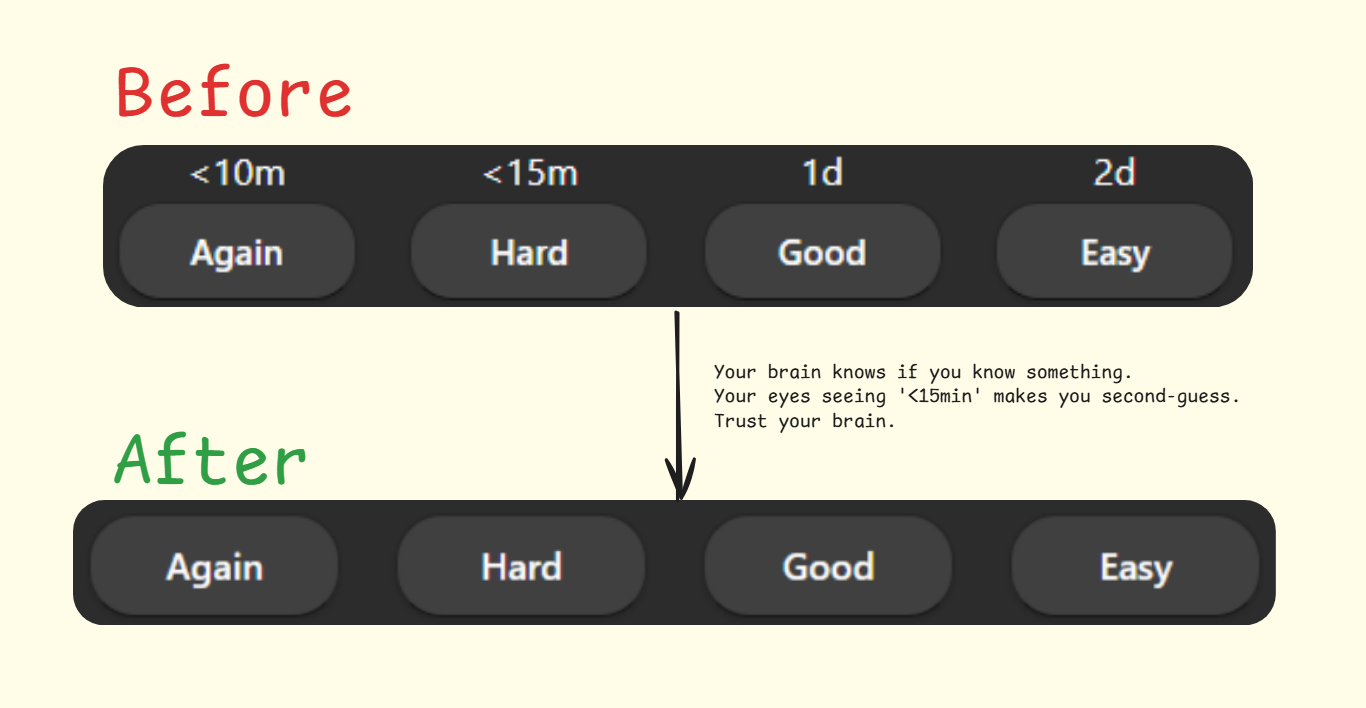
When reviewing cards, seeing the upcoming intervals can unconsciously bias your decision:
- You might choose "Hard" instead of "Again" if you see the "Again" interval is very short
- You might avoid "Easy" if you see it will push a card too far into the future
- You might pick "Good" by default without truly assessing your knowledge
By hiding these intervals, you can:
- Make decisions based purely on how well you knew the answer
- Develop a more honest assessment of your knowledge
- Trust Anki's algorithm to handle the scheduling
The add-on makes the interval text invisible while preserving the original layout structure, maintaining consistency in the review screen appearance.
- Maintains the original button layout and spacing
- Works seamlessly with both V2 and V3 schedulers
- No configuration needed - works automatically after installation
- Works with Anki 2.1.50 and above
- Compatible with most other add-ons
- Open Anki
- Go to Tools > Add-ons > Get Add-ons
- Paste the code: 1015550873
- Restart Anki
- Download the latest release from the GitHub repository
- Open Anki
- Go to Tools > Add-ons > Install from file
- Select the downloaded
.ankiaddonfile - Restart Anki
If you find this add-on useful, please consider:
- Leaving a review on AnkiWeb
- Reporting any issues on the GitHub repository
- Sharing with other Anki users who might benefit