
A writing studio for novels in plain Markdown.




Website · Try a sample book · Start a book in your browser · Quick start
Proseview turns a folder of Markdown scenes into a place to write, structure, revise, and publish a book.
You read and edit each scene in clean book typography instead of looking at raw Markdown code (#, **, YAML). Your files stay plain .md on your computer, so you can keep using Obsidian, VS Code, Vim, or Git alongside it. A save changes only what you edited.
Everything runs locally on your machine: no account, no subscription, no database, and no telemetry. AI is optional and off until you ask; without it, Proseview is still a complete writing studio that works offline.
pipx install proseview
proseview --root /path/to/your/novel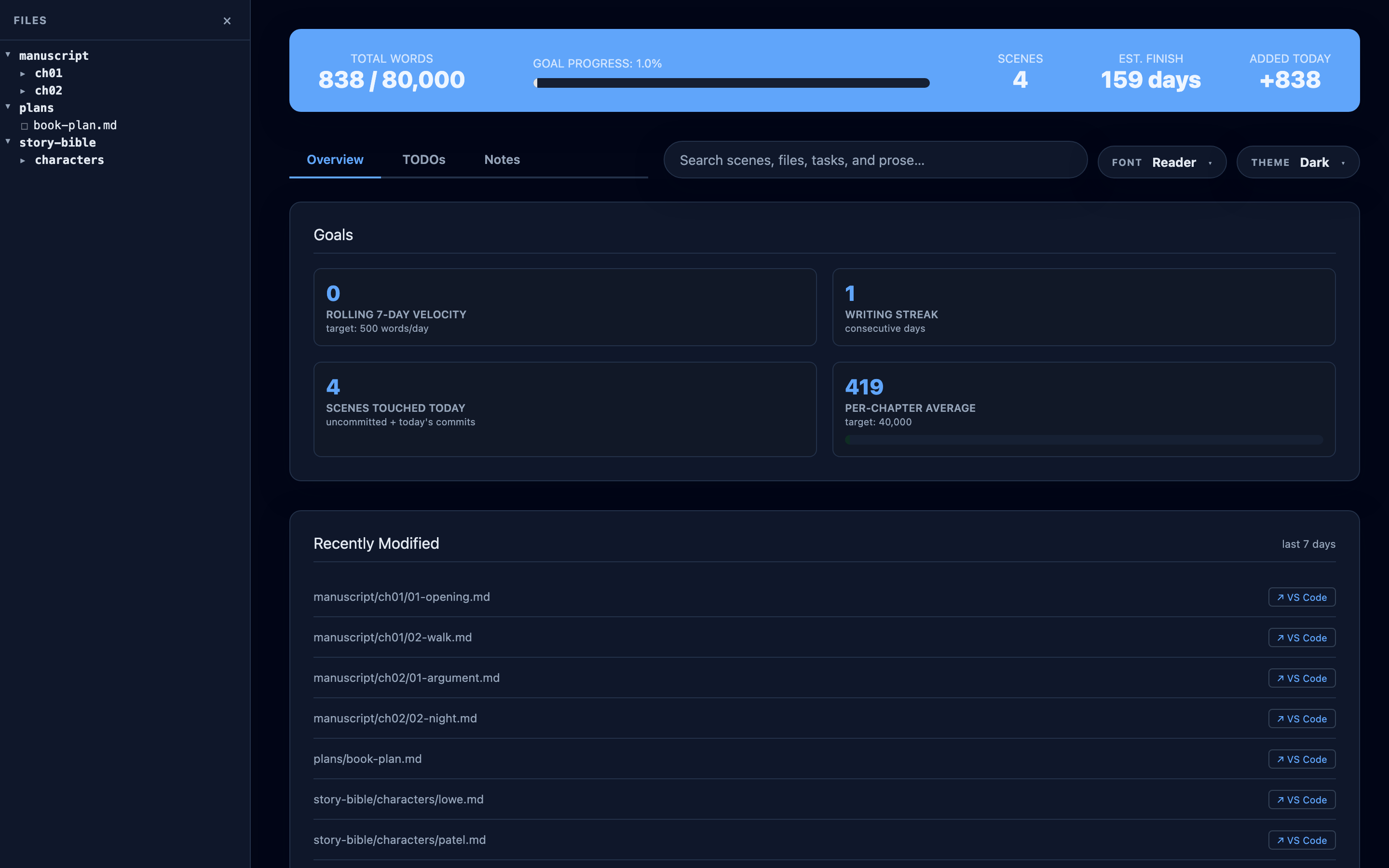
Try it first. The sample book is the dashboard for Alice's Adventures in Wonderland, in your browser: read, search, open the analysis, edit a scene and export it. Start a book in your browser runs Proseview itself with nothing to install; the book stays in that browser, and you can download it as a folder to carry on in the installed app.
- Read like a book, edit in place. Your prose appears with comfortable
margins, serif type, and dialogue formatting, with no Markdown symbols in the
way.
Press
Eto edit directly on the page with the same typography; pressMod-Sto save and return to reading. - Conflict guard. If you edit a scene in Obsidian, Vim, or any external editor while Proseview is open, Proseview prevents overwriting it and shows a side-by-side diff of what changed on disk.
- Drafting aids and callouts. Highlight any line to reformat it, add a
callout box (
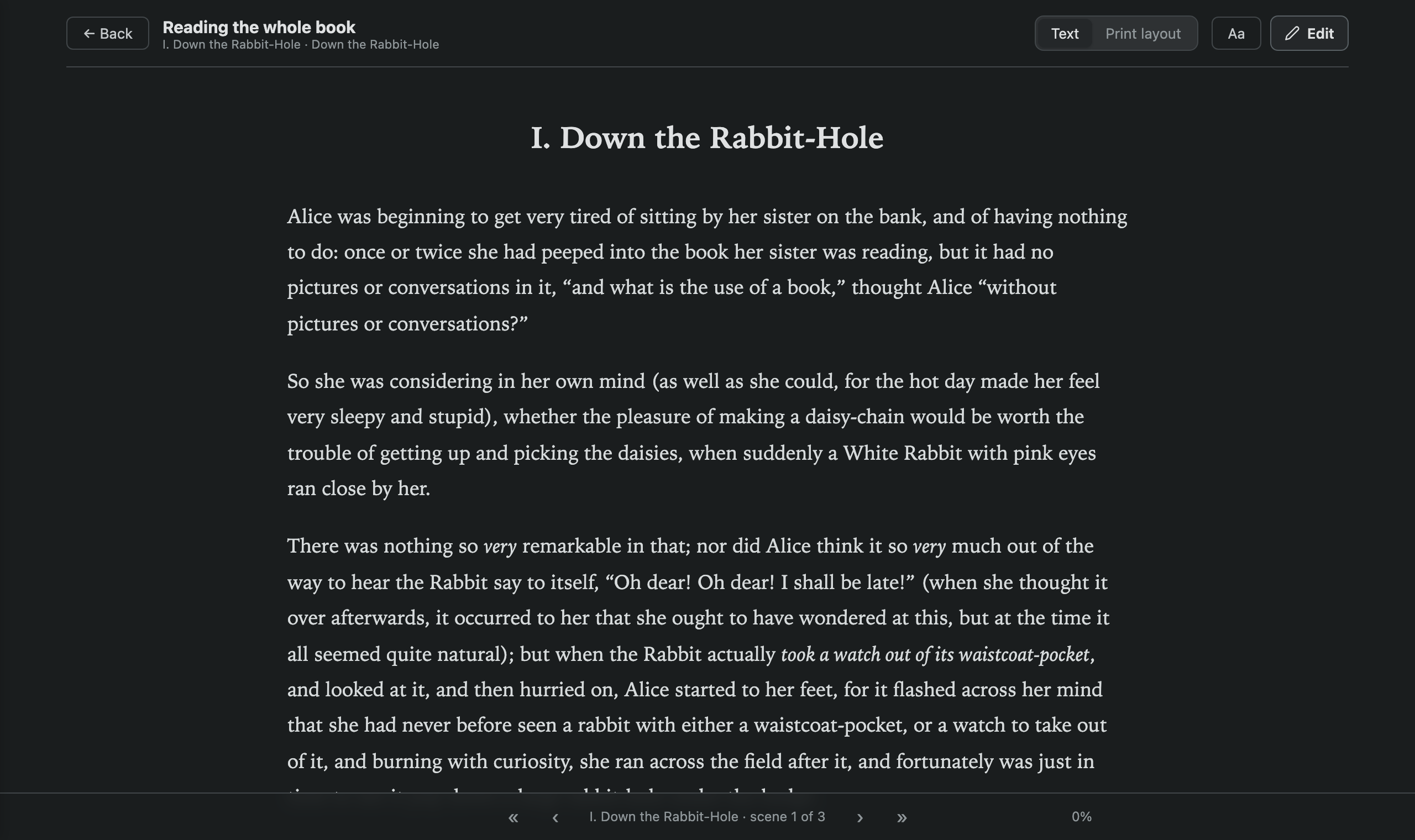
> [!letter]for letters or text messages), or drop in an inline<!-- TODO -->or<!-- NOTE -->without leaving your drafting flow. - Read the book. Read the whole manuscript as one continuous text, or turn on Print layout to read facing pages with running heads and chapter drops exactly as Export will print them. It reopens where you stopped.
- Every Markdown file. Story bibles, character bios, and worldbuilding notes open and edit the same way, with automatic backups. Obsidian wikilinks, callouts, and embeds stay as written.
- Files and search. Create, rename, and move scenes from the sidebar;
Mod-Ksearches scene titles, YAML metadata, TODOs, notes, and prose across the whole book. - Privacy screen. Press
Mod-J J(holdModand tapJtwice) to instantly cover the page with a plain budget spreadsheet; do it again to uncover your prose, caret, and scroll exactly where you left them. Optional password →
- Beat Map. Your agent reads a scene and maps how it moves: its beats on an estimated tension curve (from calm to crisis), and its moments by kind: dialogue, action, inner thought, or silent reaction. Click a moment to jump to its paragraph. It is made only when you ask, and is marked out of date when the scene changes.
- Timeline and storylines. See the proportion of your chapters, words per scene, and storylines as parallel lanes. Compare reading order against story chronology so flashbacks and out-of-order scenes are easy to audit.
- Character presence and pairings. See which chapters each character appears in, and check a co-occurrence chart to see which characters share scenes and who never meets.
- Progress and What changed. A Progress card tracking words against your goal, today's word count, writing pace, and streak. What changed shows the words written and cut scene by scene, either by period or against a Git commit.
- 13 Editorial passes. Built-in checks mark the page with quiet underlines
and match counts:
- Pacing and flow: sticky sentences (glue words that slow a sentence down) and repeated sentence openings.
- Repetition: echoes (a word back within 50 words) and the scene's most repeated words.
- Clarity and style: passive voice, filter verbs ("she heard", "he saw"), crutch words, hyperbole, figurative language, and sensory details.
- Dialogue and POV: dialogue tags (fancy verbs, adverbs, long runs with no tag), all speech tinted, and first-person slips in third-person scenes.
- Highlight cards. Click any mark for a short note on what the check found. With an agent, Suggest offers rewrites in the card, and one click applies one.
- Word variety (MATTR & MTLD). Tracks vocabulary richness across nearby words and whole scenes against typical ranges for your genre (contemporary, literary, speculative, or children's). Every metric includes an ⓘ explaining how it is measured. What the numbers mean →
- Tasks and notes. Aggregates every
TODOand taggedNOTEcomment across all scene files into one place so you don't lose track of revision thoughts. - File history. Step back through earlier versions of a scene, comparing changes in a side-by-side or inline diff before restoring.
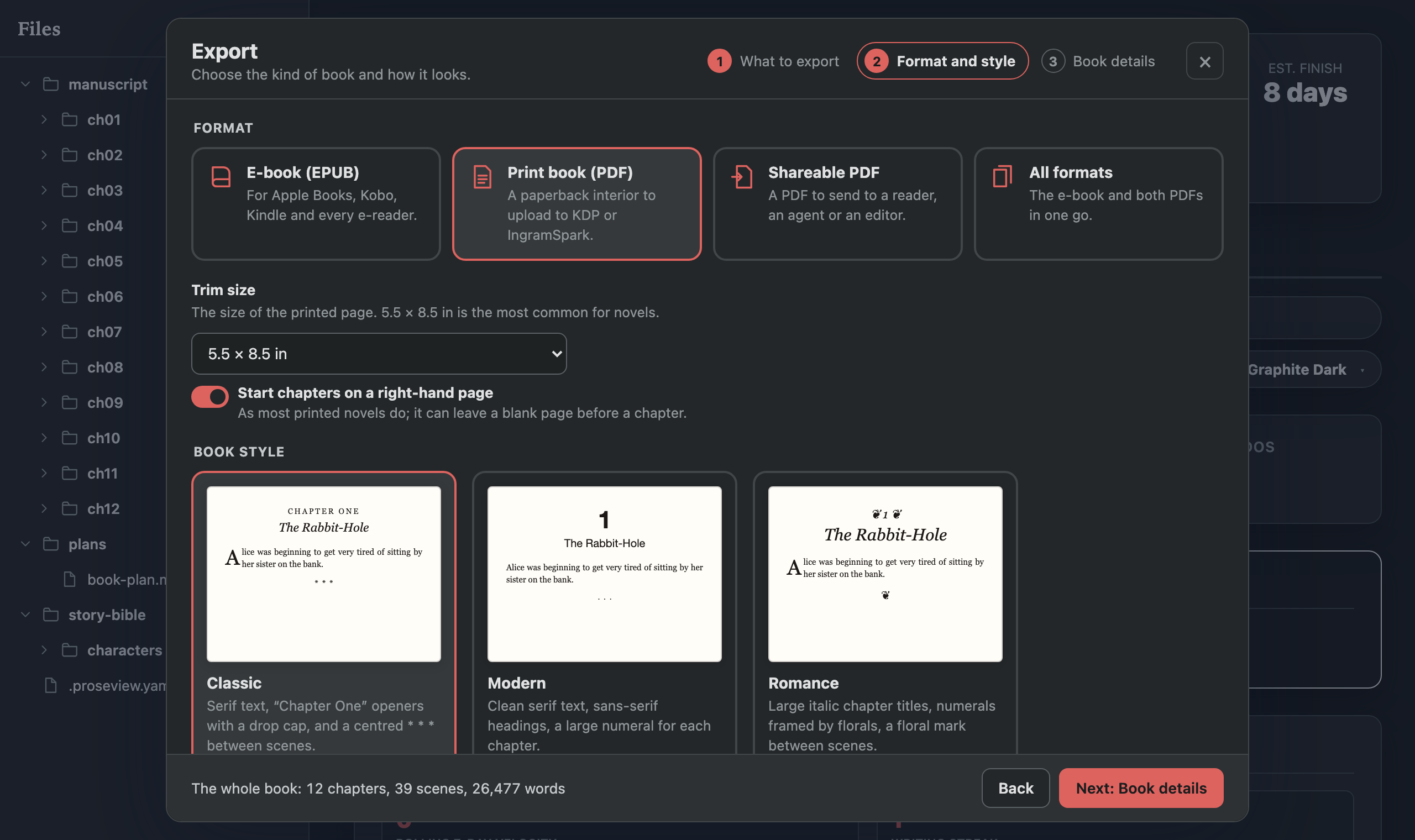
- Print-ready PDF. Typesets a paperback interior using Typst across standard trim sizes (5 × 8, 5.25 × 8, 5.5 × 8.5, 6 × 9 in, or A5). Includes recto chapter starts, running heads, and page numbers.
- EPUB e-books. Exports clean, store-ready EPUB3 files with your cover art, metadata, and formatted chapters.
- Word documents (
.docx). Exports formatted manuscripts for editors or beta readers, including standard submission manuscript format with support for tracked changes. - Interactive print preview. Preview the facing pages, trim sizes, and typography before exporting. Export guide →
- A read-only copy to share.
proseview snapshotcompiles the dashboard into a static website you can host anywhere (such as GitHub Pages) for beta readers to browse. Details →
Proseview has no AI model of its own and needs no API keys. It drives the Codex or Claude command-line tools already installed and signed in on your computer, so your agent works under your own account and its own privacy terms. Proseview itself sends nothing anywhere.
Nothing runs until you ask:
- The Writers’ Room. One conversation with two editors (by default, a
Story Editor for plot and pacing and a Voice Editor for tone and
style) who discuss your book with you and with each other.
@mentionone to ask just them. - Codex and Claude tabs. One tab per agent in the side panel, each with
its own conversation. Mention files with
@or select prose to ask about it. - Edits you can see. An edit an agent makes is saved and shown in a card with the diff, Undo all and Looks good.
- Continuity checks. Ask whether a passage fits the rest of the book, and the answer cites the lines it relies on.
| Key | Action |
|---|---|
E |
Edit the scene you are reading |
Mod-S |
Save edits and return to reading |
Mod-K |
Search scenes, notes, and prose |
Mod-J J |
Cover / uncover with the privacy screen |
P |
Polish the selected prose with your agent |
A |
Ask an agent about the selected passage |
X |
Open the Export dialog |
F / Shift-F |
Distraction-free focus layout / Fullscreen |
Each prose pass shows its match count for the scene; switching one on marks the page you are reading.

Edit turns the page you were reading into the page you type into, with the
same typography. Mod-S saves the file and returns to reading. A scene's
frontmatter sits above its prose as YAML you can edit, and a typo that is not
valid YAML is pointed out rather than saved.

The whole manuscript as one continuous text, with a quiet bar for progress, scene and chapter skips and a chapter list. Print layout shows the same book as Export lays it out, page by page, in your chosen style and trim.
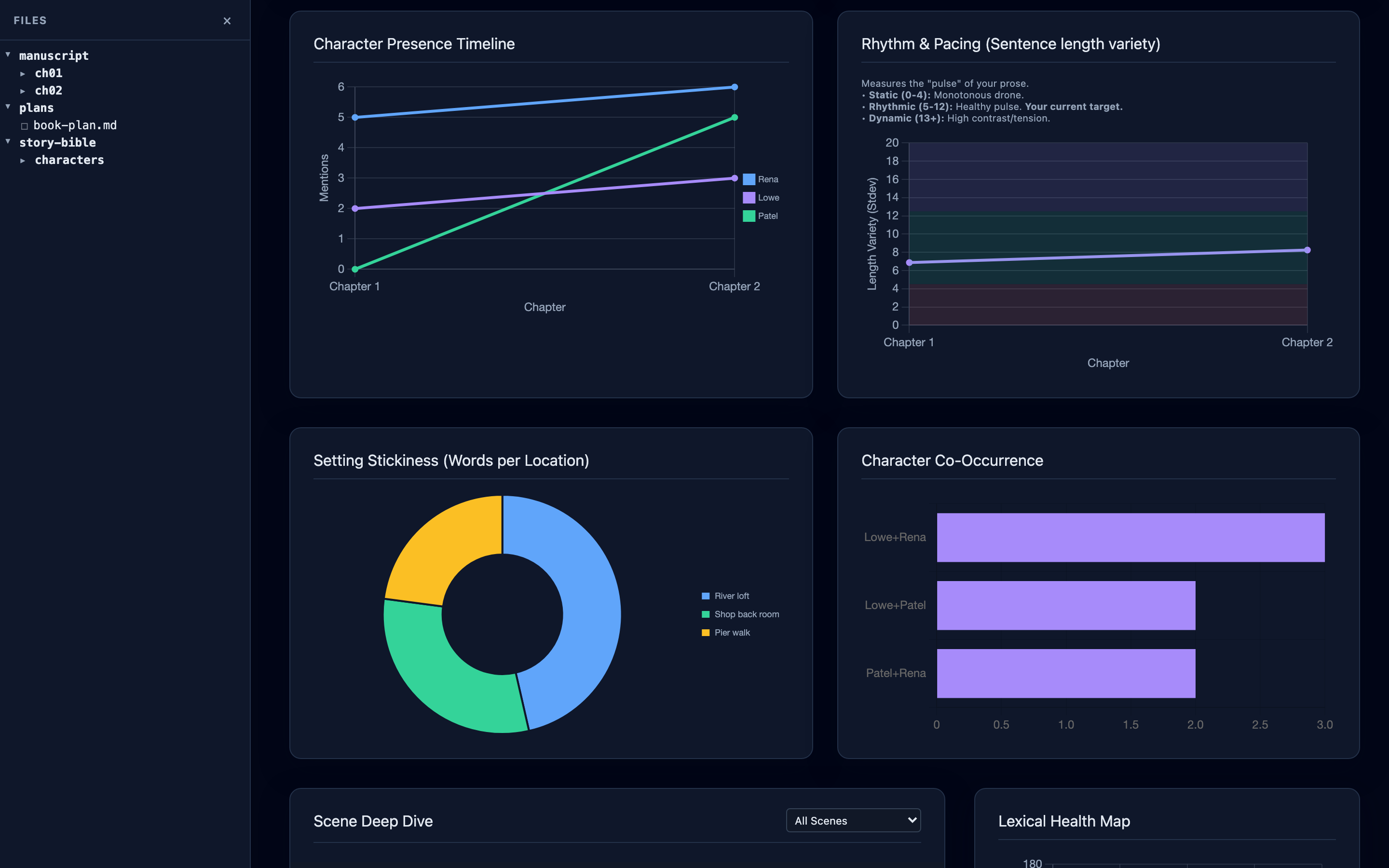
Chapter proportions, words per scene, storylines as lanes, and reading order against the order events happen, so a scene read far from where it happens is easy to spot.

Your agent maps a scene's beats on a tension line and lists its moments by kind. Click a moment and the page shows its paragraph.

Ask the room a question and both editors answer in one conversation, each from their own side of the book.

Codex and Claude each keep their own conversation. Opening another file does not reset either one; the next question simply says which file you are in.


Choose the format and style, then see the pages exactly as the file will be.
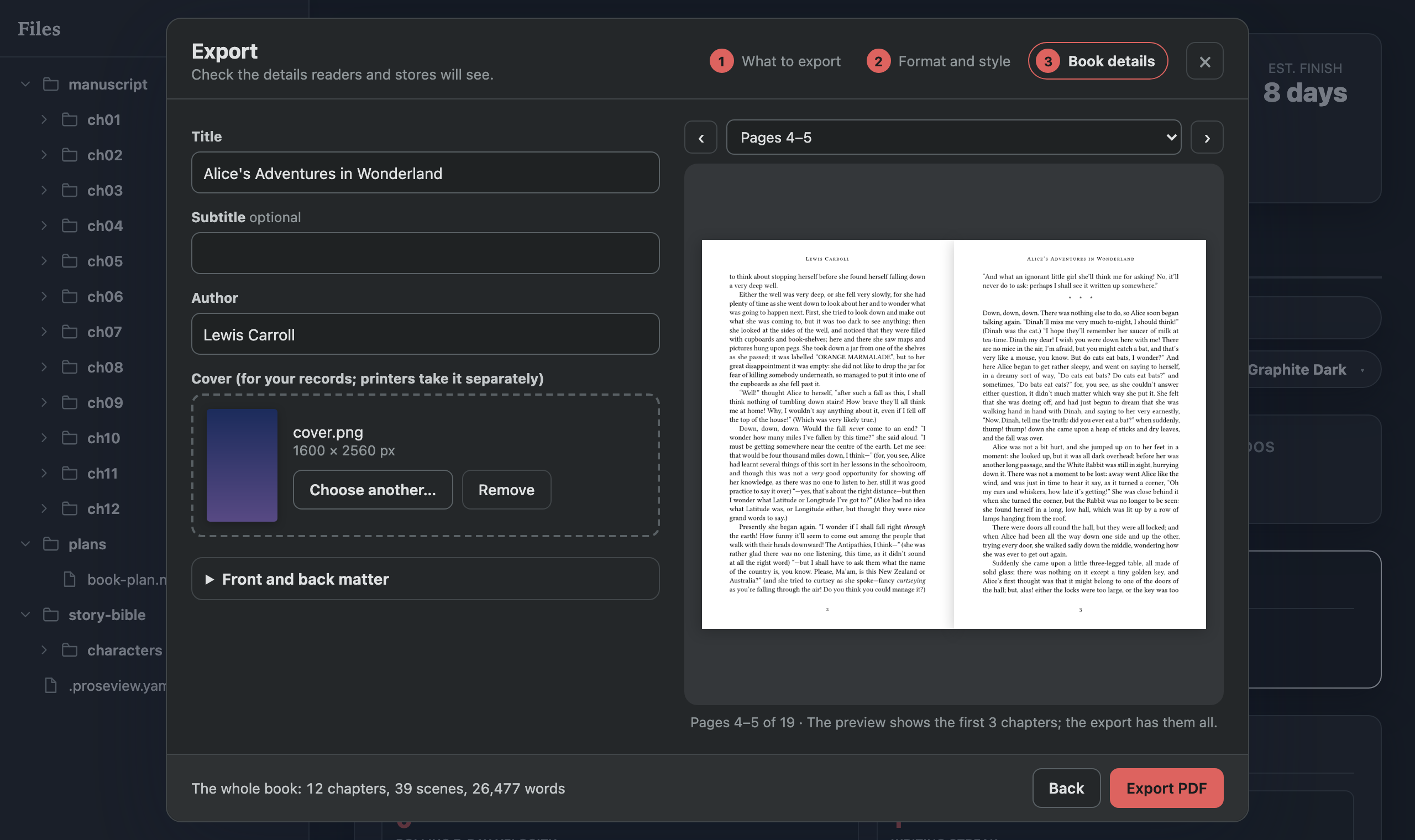
The screenshots use the bundled demo manuscript, Alice's Adventures in Wonderland (public domain), split into 39 scenes across 12 chapters. See fixtures/demo-book.
Requires Python 3.11+ on macOS, Linux or Windows.
pipx install proseview
proseview --root /path/to/your/novel
A browser tab opens at http://localhost:7842; press Ctrl-C to stop. If you
want to use Claude in the side panel, install the [claude] extra instead:
pipx install "proseview[claude]".
Proseview's book features read a manuscript/ folder with one folder per
chapter and one Markdown file per scene. Frontmatter is optional. Point it at a
folder without a manuscript, such as an Obsidian vault, and it opens as plain
Markdown you can read, edit and search; Choose manuscript folder… tells it
where the book is.
my-novel/
├── manuscript/
│   ├── ch01/
│   │   ├── 01-opening.md
│   │   └── 02-meeting.md
│   └── ch02/
│       └── 01-aftermath.md
└── .proseview.yaml          # optional
In Chrome or Edge, click the install icon at the right of the address bar.
The dashboard then opens in its own window with its own Dock or taskbar icon.
It is still the local server underneath, so start proseview first; opened
without it, the window says so. The app is tied to localhost:7842: it shows
whichever book is served there, and a book that falls back to another port
opens in the browser as before.
proseview snapshot --root /path/to/your/novel --out ~/my-novel-siteThis writes the dashboard as static files any web host can serve, including
GitHub Pages. Readers can browse scenes, search and read the analysis; nothing
on it edits and no server runs, and paths from your computer are replaced by
the folder's name. --demo also lets visitors try editing (saved only in their
browser) and download ready-made EPUB, PDF and Word files. --title,
--site-url and --preview-image set how a link to it looks when shared.
| Command | Description |
|---|---|
proseview serve |
Start the local dashboard server (default) |
proseview export |
Compile the manuscript into an EPUB, PDF, or Word document |
proseview snapshot |
Write a read-only copy of the dashboard as static files |
proseview roster |
Suggest character names found in the manuscript prose |
proseview privacy-password |
Set or change the password that uncovers the privacy screen |
proseview init |
Write a starter .proseview.yaml in the book's folder |
Proseview needs no config file. A .proseview.yaml at the root of the book can
change where things live, set word goals, choose which agent tab opens first,
or point the Timeline at your own frontmatter keys; proseview init writes a
starter file. Goals, word variety (genre), and color theme can also be changed
in Settings, behind the gear in the header.
manuscript_path: manuscript/
target_words: 80000
discuss:
agent: codex- Manuscript layout and frontmatter
- Configuration reference
- Working with AI
- What the numbers mean
- Exporting: EPUB, PDF and Word
Proseview is alpha: everything described above works today. Still unfinished:
- The
$skill picker on the Claude tab lists only Codex's skills; Claude still uses your Claude skills on its own. - Read the book does not yet update live when a scene changes on disk.
The full list is in plans/roadmap.md.
pip install -e ".[dev]"
pytest
This runs over a thousand unit tests and an HTTP end-to-end tier that starts a
real proseview process and checks what reaches the disk: saves and the
conflict guard, TODOs and notes, the agent bridge and live reload. Agent tests
use a deterministic fake and never contact Codex, Claude or the network.
A browser tier drives the real interface in Chromium:
pip install -e ".[e2e]"
python -m playwright install chromium
pytest -m e2e_browser
Both tiers work on a throwaway copy of fixtures/demo-repo. See
CONTRIBUTING.md.
MIT. See LICENSE.