Releases: osmphp/osmsoftware-website
v0.4.8

Two new blog posts have been written about Osm Admin:
Also, Osm Admin v0.2 documentation added. As it fills in, it'll become more and more useful.
v0.4.7
There a new blog post about mass-editing feature in Osm Admin.
I've also fixed a couple of bugs. One was untested multi-year blog filter markup, and another was rendering incorrect links in the documentation sidebar.
v0.4.6
There is one new blog post on Osm Admin Filters.
And there is a fix that made me smile. After releasing the first 2022 blog post, I saw that the page design isn't tested for multiple years. How shortsighted I was!
v0.4.5
New Content
As indexing, compared to the initial design, has changed a lot, I wrote a detailed article in its actual inner workings. Also, I wrote a lot about grid/form visual interface concept and implementation efforts:
v0.4.4
New Content
I wrote a lot about implementing queries and indexing in Osm Admin:
v0.4.3
New Content
I've documented the new features of Osm Framework and Osm Admin in the blog:
- Osm Admin
- Osm Framework
Other Changes
As number of blog articles grows in each category, they don't fit the default limit of 10 posts per page. I removed the limit for now.
Later, I'll return to post pagination with something similar to infinite scrolling, but better.
v0.4.2
In this new minor update, I've added Osm Admin to the home page, and reorganized all the blocks on the home page. I've also blogged about Osm Admin development.
v0.4.1
New Content
NotImplemented- All the documentation that was originally written as blog posts, and now moved to the documentation section, is properly marked, both visually and using canonical URLs.
New Features
- Let Google know about the original source of content by assigning
canonical_urlin themetasection of any Markdown document - Use relative links on documentation pages that work both on GitHub, and on osm.software.
v0.4.0
New Documentation Home
From now on, Osm Framework documentation resides in the docs/ directory of osmphp/framework repository, and it is displayed in a separate section of osm.software website:
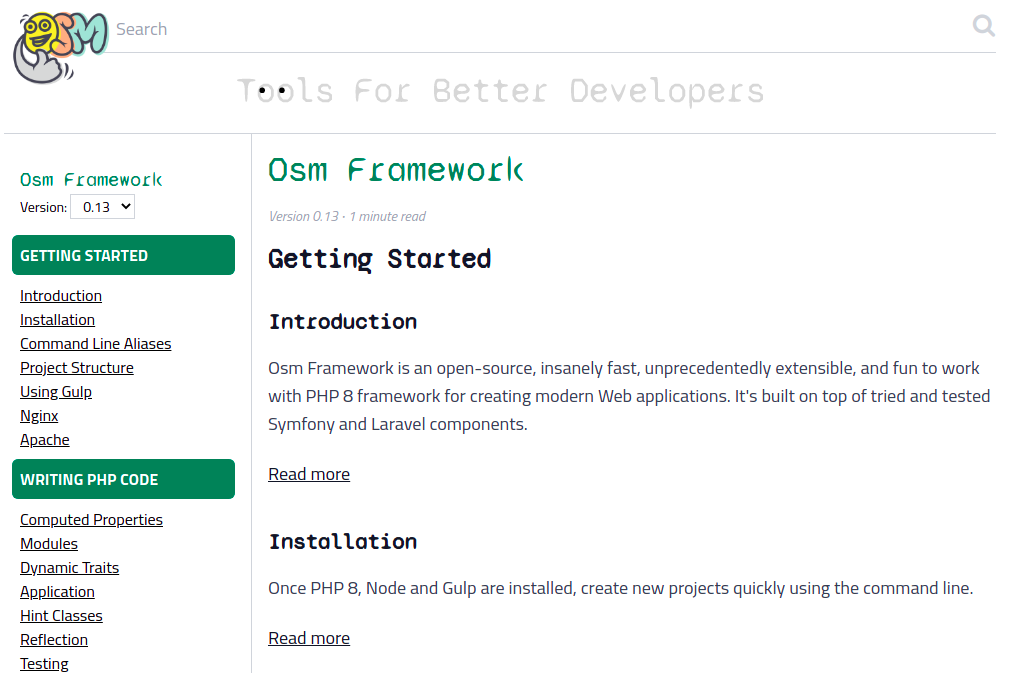
The documentation books and versions are configured in settings.php:
...
/* @see \Osm\Docs\Docs\Hints\Settings\Docs */
'docs' => (object)[
    'index_modified' => true,
    'books' => [
        /* @see \Osm\Docs\Docs\Hints\Settings\Book */
        'framework' => (object)[
            'repo' => 'https://github.com/osmphp/framework.git',
            'path' => "{$osm_app->paths->temp}/docs/framework",
            'dir' => 'docs',
            'color' => 'green-700',
            'versions' => [
                /* @see \Osm\Docs\Docs\Hints\Settings\Version */
                '0.12' => (object)['branch' => 'v0.12'],
                '0.13' => (object)['branch' => 'v0.13'],
            ],
        ],
    ],
],
The specified versions are cloned/pulled into the specified temp/ directory, and the documentation index in MySql and ElasticSearch is update from the command line:
osm docs:pull
osm index
Future Reusable Packages
We've decided that reusable solutions - flat-file blog, flat-file docs, and the data management logic that they have in common - built for osm.software website should live as separate Composer packages, so you'll be able to use them in any project.
Before creating the first versions of osmphp/blog, osmphp/docs and osmphp/data, they should be uncoupled from the website. Until then, we moved all these pieces from My\ namespace to, Osm\Blog and Osm\Docs namespaces respectively, replaced all references in the codebase, put the code into the packages/ directory, and configured composer.json to load classes of the future packages:
{
    ...
    "autoload": {
        "psr-4": {
            "My\\": "src/",
            "Osm\\Framework\\": "packages/framework/",
            "Osm\\Data\\": "packages/data/",
            "Osm\\Blog\\": "packages/blog/",
            "Osm\\Docs\\": "packages/docs/"
        }
    },
    ...
}
Renamed Console Commands
Blog-specific console commands had too generic names, they are currently renamed:
# osm index
osm index:blog

# osm check:index
osm check:blog-index

# osm check:links
check:blog-links
New Indexing Engine
The documentation indexing is implemented on top of brand-new data indexing engine. Later, the blog indexing will be rewritten using this engine, too.
Data sources (or just sources) store data. For example, the documentation is stored in the file system, in the database, and in a search index. Each of these storages is a source, named docs, db__docs, and search__docs, respectively.
Indexers synchronize data across the sources. An indexer reads the data changed in one or more sources, transforms it and writes to a target source. In the documentation subsystem, one indexer updates db__docs from docs, and another one updates search__docs from db__docs.
In more complex applications, lots of indexers may sync multiple targets from multiple sources. The indexing engine orchestrates the execution of the indexers, so that dependent indexers are executed after their dependencies. Run all the indexers with a single command:
# only process invalidated data
osm index

# re-index everything anew
osm index -f

# invalidate and process a source
osm index docs
One More Example Of Dynamic Routing
Dynamic routing of documentation page is quite sophisticated and, yet, elegant, check packages/docs/Docs/Routes/Front/Dynamic.php:
- a book usually starts with a single version; while it's the case, it's accessible at
/docs/framework/...URL. - multi-versioned book redirects
/docs/framework/...to the latest book versiondocs/framework/0.13.... docs/framework/0.13anddocs/framework/0.13/redirect todocs/framework/0.13/index.html- and more
Markdown Placeholders
In addition to the {{ toc }} placeholder, which collects all Markdown file headings and shows them as a table of contents, there is a new {{ child_pages }} placeholder in the documentation pages that lists all the child documentation pages and their abstracts.
Define your own placeholders by deriving the Placeholder class, specifying its name, what type of Markdown file it's applicable to, and whether it's required to start from a new line:
<?php

namespace Osm\Docs\Docs\Placeholder;

use Osm\Core\Attributes\Name;
use Osm\Data\Markdown\Attributes\In_;
use Osm\Data\Markdown\File;
use Osm\Data\Markdown\Placeholder;

#[Name('child_pages'), In_(Page::class)]
class ChildPages extends Placeholder
{
    public bool $starts_on_new_line = true;

    public function render(File $file): ?string
    {
        ...
    }
}
Other Changes
- Better handling of an empty blog.
- Apply dynamic traits using
#[UseIn]attribute.
v0.3.0
New Visual Look
Yes, the website got the whole new visual look. Compare
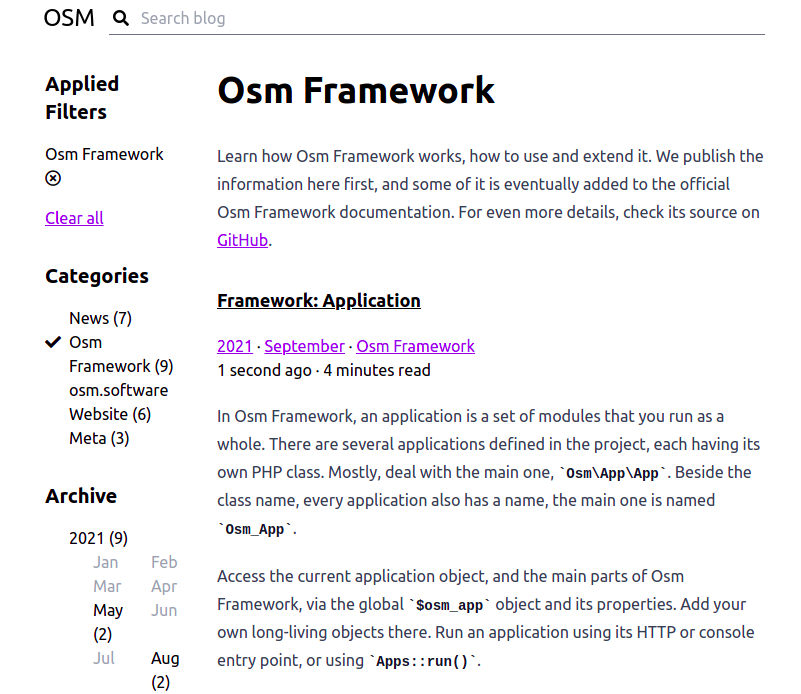
with
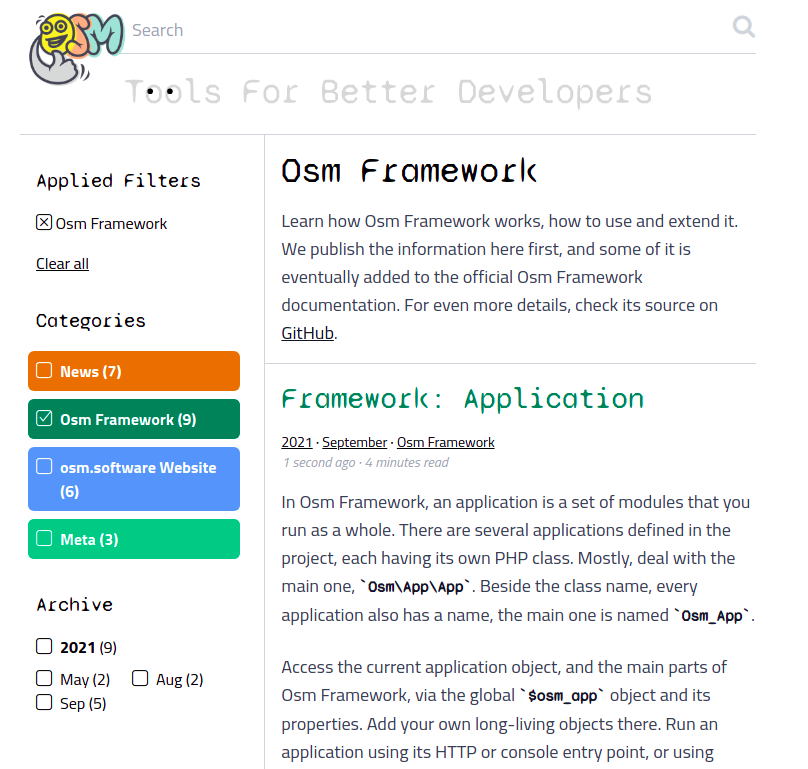
Better, huh?
From a technical perspective, this effort demonstrates that an Osm Framework-based website can have multiple themes that can be switched with a single change in the settings. For more details, compare the old and new themes, and check the theme setting, too.
New Content
New articles about Osm Framework have been written, and previous articles have been edited and revised:
Other Changes
- The project migrated on Osm Framework
^0.12 - A few bug have been fixed