
Run local LLMs on your Intel Arc GPU with one command.
Arc Llama detects your Arc card, installs a verified portable llama.cpp
runtime (Vulkan by default, SYCL when you ask for it), downloads a model that
fits your VRAM, and serves it with a web UI and OpenAI and Ollama compatible
APIs. It handles the Arc specific gotchas so you don't have to find them the
hard way.
pip install arc-llama
arc-llama start
That opens a browser page that walks you from "card detected" to your first
answer. Prefer the terminal? arc-llama run unsloth/Qwen3-8B-GGUF:Q4_K_M
does the same in one line. See Quick start for more.
Works with: Arc B-series (Battlemage), A-series (Alchemist) and Lunar Lake, on Linux and Windows 11, Python 3.10 or newer. Validated hardware is listed in Tested hardware.
Something broke? Click Report a problem on the System page, or run
arc-llama report. It opens a GitHub issue with your version, GPU, backend and
log tail already filled in, and nothing is sent until you submit it yourself.
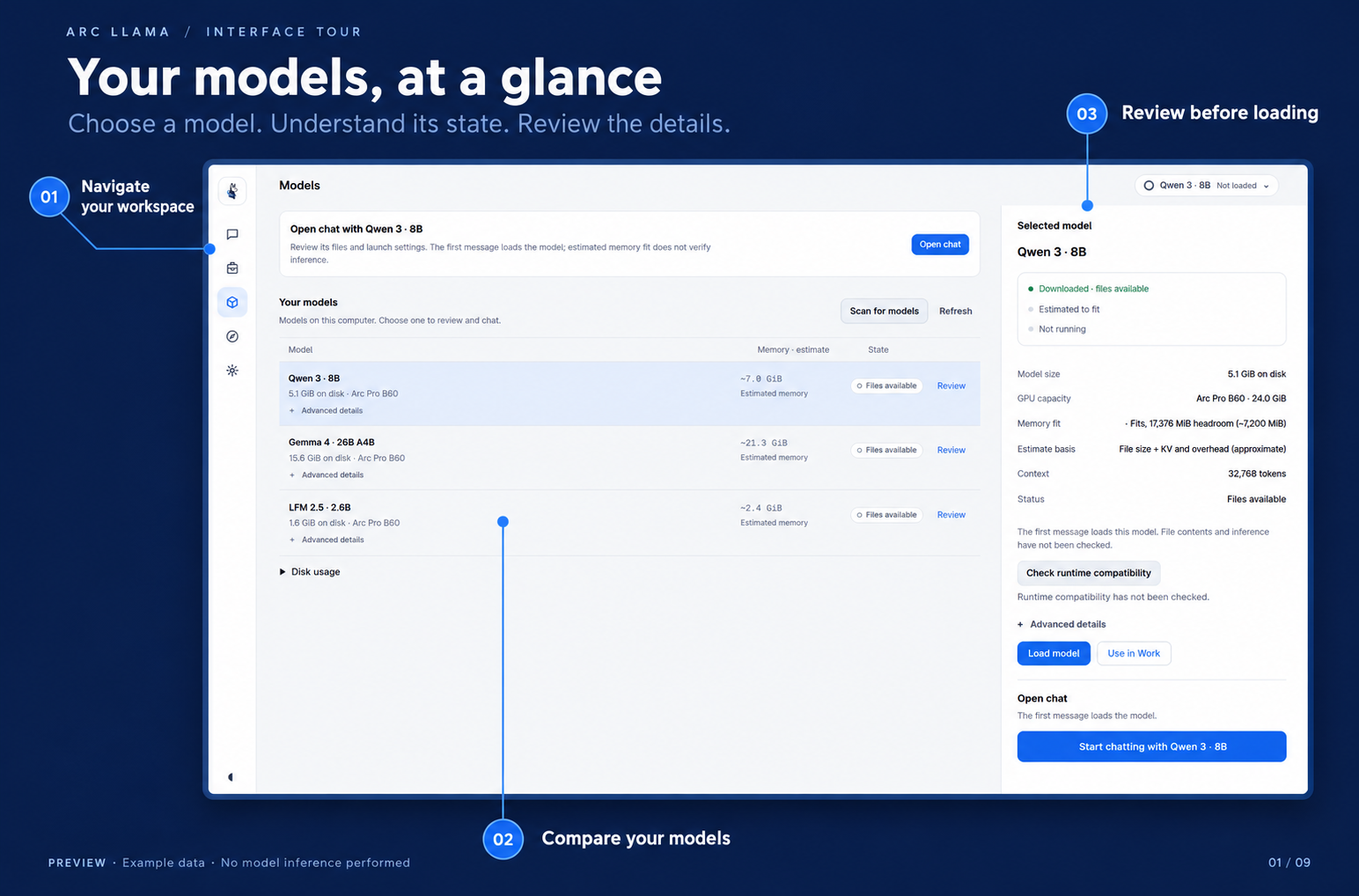
Click through the screenshot tour · All screenshots and interactive gallery
Release notes for every version are in the changelog and on the releases page.
⭐ If this saved you a few hours, a star on this repo keeps me building.
- Auto-discovery of GPUs and models.
arc-llama initfinds your Intel card and walks the configured scan paths for.gguffiles, registering every one with a sensible recipe, context length sized to your VRAM, KV-cache class inferred from the filename. You should never needarc-llama addfor a GGUF that's already on disk. - Auto-discovery of every Intel GPU on the host (
Alchemist,Battlemage, Lunar Lake iGPU). PCI device-ID table covers the common SKUs and falls back to OpenCL device-name parsing for the rest. - Per-arch SYCL profiles , env vars like
SYCL_CACHE_PERSISTENT=0are applied automatically, and known-bad ones (e.g.GGML_SYCL_DISABLE_OPT,SYCL_PI_LEVEL_ZERO_USE_IMMEDIATE_COMMANDLISTS) are stripped from the inherited shell environment. - Smart defaults for
-ctx,--cache-type-k/v, and-nglbased on the detected VRAM and the model's quantized tensor size, never starts a model you can't fit. - Model registry in TOML at
$XDG_CONFIG_HOME/arc-llama/config.toml, trivially editable. - One process per model, swapped in/out by an internal router. Default policy is single-resident across all GPUs (good for thermals); flip it to multi-resident if you have headroom.
- OpenAI-compatible API at
http://127.0.0.1:11437/v1/.... Plug it into Open WebUI, OpenCode, anything that speaks OpenAI. - Ollama-compatible API at
http://127.0.0.1:11437/api/.... Use/api/tags,/api/chat, and/api/generatewith Ollama-compatible clients; see the compatibility contract for the supported request and streaming behavior. - Plugin extension point for adding routes and lifecycle integrations
without modifying the inference core. Plugins are isolated at startup and
are optional; see
examples/hello-pluginfor a minimal example. - A web UI at
http://127.0.0.1:11437/, included with the install. Chat, model management, Hugging Face discovery, and system status share one interface, with experimental Work agents on this branch. Model controls include load/stop, inline ctx + KV-quant editing, and GPU/VRAM information. Pure HTML/JS, no build step. - A terminal UI (
arc-llama tui) using Textual , same load/stop/edit controls, no browser needed. Optional install:pip install 'arc-llama[tui]'. - Background autotune. Drop in a GGUF, use it once, and
arc-llama servemeasures a faster recipe in the next idle window — no manualtune. Sweeps abort instantly if a real request arrives. - No magic with your existing stack. It uses your
llama-serverbinary; you're never locked into a specific build.
The guided launcher is new in the 1.1 development branch. On 1.0, use the
run examples below. With 1.1 installed, open the guided browser setup:
pip install arc-llama
arc-llama start
Keep the terminal open while you use it. The browser shows your detected GPU, searches the current public Hugging Face catalog for a chat model with known GGUF file sizes and estimated memory fit, and offers Download and start. It prepares a missing portable runtime, downloads and verifies the model, shows real setup stages, and loads it before opening Chat. Suggestions fill the message box; nothing is sent until you press Send. Choose another model opens Discover.
If the catalog can't be read or finds nothing, setup falls back to one pinned
model (Qwen2.5 0.5B Instruct at a fixed commit), checked the same way. Set
ARC_LLAMA_STARTER_CATALOG=off to always get that model, for repeatable runs.
Discovery considers up to 32
popular public, ungated text-generation repositories, filters for chat/instruction
metadata and complete standard 4–8-bit GGUF files, and checks a bounded model
header. It shows the publisher’s license and pins the accepted repository commit.
The runtime must recognize its architecture before downloading weights; this
does not guarantee GPU execution or answer quality. Recommendations cache for
five minutes; an unavailable catalog or no suitable match offers retry and
manual discovery. Catalog popularity orders candidates; it is not a benchmark.
Pause after this step lets the current download or load finish safely; continue later without repeating completed steps. Refreshing the browser preserves an active setup. Interrupted server sessions can retry using completed files; partial-download reuse depends on the download cache. Memory fit remains an estimate, and driver or runtime failures show a retryable setup error.
Later launches open Chat when models are already registered. Use
arc-llama start --no-open on a machine without a browser, or --port 11438
if the default port is occupied. The launcher binds to this machine only.
If you already know which model you want, run still accepts a registered
model name, local GGUF, or explicit Hugging Face GGUF/quant specification:
pip install arc-llama
arc-llama run /path/to/Qwen3-8B-Q4_K_M.gguf

# Also valid after registration, or for a Hugging Face download:
arc-llama run qwen3-8b-q4_k_m
arc-llama run unsloth/Qwen3-8B-GGUF:Q4_K_M
On a fresh machine, run detects the Arc GPU, installs and verifies the
portable Vulkan llama-server, registers the model with a VRAM-sized recipe,
prints the fit estimate and endpoints, then serves. An existing recognised
SYCL runtime is preserved. Use --setup-only to prepare and inspect the launch
plan without starting the service, or --backend sycl to request SYCL.
The individual steps remain available when you want explicit control:
# 1. Install
pip install arc-llama

# Or install in editable mode for development:
# git clone https://github.com/offbyonebit/arc-llama
# cd arc-llama
# pip install -e .

# 2. Detect GPUs and write a starter config (no llama-server needed yet)
arc-llama init

# 3. Download a portable Vulkan llama-server and wire it into the config.
#    No oneAPI, no building llama.cpp. (Use --backend sycl for the SYCL build.)
arc-llama install-runtime

# 4. Look at what was found
arc-llama doctor
arc-llama gpus

# 5. Auto-register every GGUF found under your scan paths.
#    `init` ran this once; rerun any time you drop new files in.
arc-llama scan
# (or for one-offs: arc-llama add /path/to/some.gguf,
#  or HF: arc-llama add unsloth/gemma-4-31B-it-GGUF:Q4_K_M --from-hf)

# 6. Run the OpenAI-compatible server (also serves the web UI at /)
arc-llama serve

# 7. Drop a GGUF and use it once — auto-tune fires after the idle window,
#    or tune manually now:
arc-llama benchmark <model>
arc-llama benchmark <model> --depths default   # decode speed at 0/4k/16k/32k context
arc-llama tune <model>
arc-llama tune --status            # print per-model tune state, no sweep
arc-llama serve --no-auto-tune     # disable the background sweeps

# 8. (Optional) Open the terminal UI in another window
arc-llama tui

# 9. (Optional) Install a systemd --user unit
arc-llama systemd --write
systemctl --user daemon-reload
systemctl --user enable --now arc-llama.service
Then point any OpenAI-compatible client at http://127.0.0.1:11437/v1:
curl http://127.0.0.1:11437/v1/chat/completions \
  -H "Content-Type: application/json" \
  -d '{
    "model": "gemma-4-31b-q4_k_m",
    "messages": [{"role": "user", "content": "hi"}]
}'arc-llama runtime update installs the newest llama.cpp release beside your
current one and switches only after it passes two checks: its flags cover
every recipe you have registered, and a canary launch of your smallest model
answers a short prompt. Otherwise your current runtime stays selected and the
command explains why.
arc-llama runtime update                 # check, canary, switch
arc-llama runtime update --dry-run       # check and canary, keep current
arc-llama runtime rollback               # undo the last switch
Stop arc-llama serve first if it has a model loaded; the canary respects the
single-resident GPU lock.
In the bundled chat, use Compact chat or /compact (optionally
/compact <focus>) when a conversation grows long. It summarizes older turns
and keeps the two newest exchanges, or the latest exchange in a short chat.
The full transcript stays visible, saved, and included in exports. Undo
compaction or /uncompact restores full context, including later messages.
Summaries can omit details, so undo when exact earlier wording matters.
Compaction runs through the selected model and may take several requests
for oversized histories. Cancel stops summarizing; a failed summary or save
leaves the chat unchanged. Token reductions are estimates. Image files stay in
the transcript, but their contents are not read during text summarization.
If the recent turns alone exceed the context estimate, use more context or
start a new chat.
The chat meter includes the reply token limit (1024 by default). Change it in Settings → Chat preset → Reply token limit. For a resident local text model, Arc Llama applies its chat template and tokenizer and reads its actual per-slot context, including parallel inference limits. An exact over-budget request offers compaction or settings changes before generation. The saved transcript stays intact. Upstream models, images, unloaded models, and runtimes without counting endpoints show an explicitly approximate budget; image token costs depend on the projector. Counting never loads a model or sends chat text to an external upstream.
Stopped and interrupted answers retain their partial text and reasoning, with a status label that survives reopening and exporting the chat. A disconnected or unfinished stream is marked interrupted; it is not presented as a completed answer.
Local streaming requests have separate deadlines after model loading completes:
[server]
inference_first_response_seconds = 600.0  # headers and first streamed bytes
inference_stream_idle_seconds = 120.0     # gap between subsequent chunks
Set either value to 0 for an intentional unlimited deadline. Long prefills use
the first-response allowance; active streams can run longer than either deadline.
A timeout closes the backend request and releases its request/resource counters,
so a later request can proceed. Connection establishment has a separate 10-second
limit. Non-streaming requests retain their existing 600-second network timeout.
Hugging Face model choices include a Download folder on this server field
and available disk space. Use an absolute path on the machine running Arc Llama;
leave it blank for paths.models_dir. The choice is remembered in this browser,
and retries keep the original destination. A missing folder is created by the
download. Permissions and advertised download size are checked before queuing;
known-size jobs check free space again when they start. This is a preflight check,
not a disk reservation, and other writes can still exhaust free space.
Models downloaded elsewhere are registered normally. File deletion remains
restricted to paths.models_dir; removing an external model registration leaves
its files in place.
Enable experimental Work when starting the server:
ARC_LLAMA_EXPERIMENTAL_AGENT=1 arc-llama serveFor a service installation, set the variable in the service environment and
restart the service. Open Work in the sidebar (or /work), choose a model
and a project folder on the server, select an Agent, and send a task.
Follow-ups retain earlier conversation context. The activity display shows
startup, thinking, writing, tool execution, and pending approvals as reported
by the agent. Use Stop to cancel the active task.
Work integrates each harness through an adapter; support is specific to the agents below. External agents must be installed separately and available to the process running Arc Llama.
| Agent | Integration | Available controls |
|---|---|---|
| Built-in | Included with Arc Llama | File/command tools, approvals, and optional auto-approve |
| OpenCode | Installed opencode executable |
Streamed replies, approvals, tool profiles, and native slash commands |
| Hermes Agent | Installed hermes with ACP support |
Streamed replies and thought activity, file-edit and flagged-command approvals; no auto-approve |
Arc Llama finds OpenCode on PATH, or through ARC_LLAMA_OPENCODE_BIN. OpenCode
uses its existing project/user tool setup. Named tool profiles let you choose
which MCP servers, skills, web tools, and other tools a task can use.
Type / in the composer to see available commands, including Work's /compact.
For Hermes, hermes acp --check should succeed. Arc Llama discovers the binary
on PATH, or you can set ARC_LLAMA_HERMES_BIN. Each task uses an isolated
Hermes home; global Hermes credentials, MCP configuration, skills, and memory
are not imported. Primary and auxiliary model requests use Arc Llama's selected
local model, with cloud fallback disabled. Hermes uses its native approval
policy: file edits and flagged commands ask, while routine commands can run
under that policy. OpenCode profiles and native slash commands are unavailable
for Hermes. See Work harness details.
Open Sessions in Work to reopen a saved conversation with its project, model, agent selection, and earlier tasks, then send a follow-up. This restores the conversation; it does not restart an interrupted process. Chat has a separate History control for saved chats.
The Work context meter shows token usage against the model's context limit and
flags partial or approximate counts. Before an external agent's first request,
its instructions and tools are not yet counted. Once inference starts, the
meter counts the full model request; exactness depends on the local runtime's
counting support. Use Compact session or /compact <focus> after a task
finishes to summarize earlier context. The full session stays saved, but a
summary can omit details.
Conversational Work operates in the selected project folder. Review the file
changes after a task and use Undo while the run's backup is available.
Undo refuses to overwrite later independent edits and may be unavailable for
large projects or files. Reopened sessions retain change history, but cannot
restore the original run's Undo backup. On Linux, the built-in agent's shell
commands run under Landlock (kernel 5.19+; arc-llama doctor shows whether it
is on, and each command's output says so when it isn't): they can only create, change or
delete files inside the project folder, temp folders and your cache folder
(~/.cache, which Go, uv and pip need), and get "Permission denied" elsewhere. They can still read anything you can read, use the network
and change file permissions, so this limits accidents, not a determined attacker.
On Linux 6.7 and newer they also can't connect to Arc Llama's own API port. On older
kernels they can, so a command could use the local admin API to start another run;
there, leave auto-approve off for Work runs that may run commands.
Set ARC_LLAMA_COMMAND_SANDBOX=off to turn it off. OpenCode and Hermes run
commands under their own policies, and Windows has no command sandbox.
Connected tools may access external services according to the harness setup.
The earlier project-job interface remains at /workbench. Register a project
folder, choose a local model, and save project instructions and permissions.
New jobs use an independent copy of the current regular files, including
uncommitted edits. Your original project stays unchanged until you review and
explicitly apply a job's changes. Undo restores the original file contents and
refuses to overwrite later independent edits.
Jobs run independently of the browser. Progress, tool results, approvals, and conversation state are saved after each step. Pause takes effect between steps. A server restart pauses interrupted work; uncertain tool operations require your review before resume and are never automatically repeated. Commands need a separate approval for each exact call. File-edit permission applies only to the job copy, and saved project-setting changes apply to future jobs.
Work supports file-only jobs across platforms. Optional commands require Linux, Bubblewrap, prlimit, and a working systemd user session. The command sandbox has no host-home, network, or GPU access; only its project copy is writable, along with a temporary directory. It uses aggregate memory/process limits, a CPU quota, and time/output/file-size limits. There is no fallback to an unrestricted shell.
Copies exclude Git metadata, environments, dependencies, build outputs, .env
files, and symbolic links. Limits: 4000 files, 16 MiB per file, 128 MiB per copy,
20 retained copies, and 30 model turns per job. Project virtual environments and
MCP/user-skill tools are not exposed in these copy-based jobs. Commands use
installed OS tools. A finished agent run still needs review; a completed job is
not a claim that its code passed tests. See Work details.
The recorded native validations below used the candidates, models and recipes in the linked reports (Linux: 0.9.0rc2; Windows: the 1.0 development branch). They do not establish validation for every driver, model, or later release.
| GPU | Platform | Backend | Recorded validation |
|---|---|---|---|
| Arc Pro B60 (24 GiB) | Linux | Vulkan and SYCL | Native release validation |
| Alchemist (A-series) | Linux / Windows | Vulkan / SYCL | Hardware reports requested |
| Lunar Lake | Linux / Windows | Vulkan / SYCL | Hardware reports requested |
| Arc Pro B60 (24 GiB) | Windows 11 | Vulkan | Native Windows validation |
Alchemist and Lunar Lake are detected and use the same runtimes, so they are expected to work, but they stay outside the compatibility contract until a native result is recorded.
Have one of these devices? Submit a hardware validation report with your environment, configuration, and observed results. Reports can include checks you have not run; mark them as “not run” so the remaining coverage is clear.
- Kernel 6.14+ recommended for Battlemage (
xedriver; 6.8 is the minimum wherexeexists, but 6.14+ is stable for BMG) or 5.17+ for Alchemist (i915). This matches the thresholdarc-llama doctorwarns on. - User in the
renderandvideogroups (arc-llama doctorwill tell you; see GPU setup for the fix).
- Windows 10/11 with Intel Arc graphics drivers installed.
- For the SYCL backend: Intel oneAPI Base Toolkit installed.
arc-llama doctorwill report which tools and runtime libraries it finds.- The
systemdcommand is not available on Windows; use Task Scheduler or runarc-llama servemanually.
- ReBAR enabled in BIOS; without it llama.cpp falls back to slow paths on Arc.
- A
llama-serverbuilt with the SYCL or Vulkan backend.
For a SYCL build on Linux, the supported path is:
source /opt/intel/oneapi/setvars.sh
cmake -B build -DGGML_SYCL=ON -DCMAKE_C_COMPILER=icx -DCMAKE_CXX_COMPILER=icpx
cmake --build build --config Release -j
If you installed oneAPI to a non-standard prefix (tarball install, relocated
/opt/intel, etc.), arc-llama detects setvars.sh (Linux) or setvars.bat
(Windows) from $ONEAPI_ROOT, $CMPLR_ROOT, and common prefixes, and sources
it automatically when the runtime libraries are not visible to the system
loader. You can also pin the path in config.toml:
[paths]
oneapi_setvars = "/your/prefix/oneapi/setvars.sh"   # Linux
# oneapi_setvars = "C:\\Program Files (x86)\\Intel\\oneAPI\\setvars.bat" # WindowsStatic defaults can't know whether your card/model/llama.cpp build prefers f16 or q8_0 KV cache, a 512 or 2048 ubatch, or flash attention on/off — the SYCL backend's answer genuinely differs per SKU and per revision. So measure:
# One-shot measurement (prompt-eval + generation tok/s, VRAM)
arc-llama benchmark qwen3-7b

# Sweep context lengths × KV types
arc-llama benchmark qwen3-7b --sweep-ctx 8192,32768 --kv f16 --kv q8_0

# Staged greedy sweep: KV type → ubatch → flash attention. Winner is written
# into the model's recipe and persisted. ~6–9 configs, ~10 min on Battlemage.
arc-llama tune qwen3-7b
arc-llama tune qwen3-7b --target generation   # optimise chat latency only
arc-llama tune qwen3-7b --dry-run             # look, don't touch
arc-llama tune --status                       # print state, no sweep

# Reuse a community result safely. The default path checks confidence and
# llama-server provenance, benchmarks current vs shared, and rolls back unless
# the shared recipe improves the configured workload score.
arc-llama recipes lookup qwen3-7b
arc-llama recipes apply qwen3-7b
Manual tune needs a running arc-llama serve so measurements inherit the
exact SYCL env and router policy your real requests get. When enabled, the
background autotuner runs the same tune_model path over loopback HTTP. Set
[tune] auto = false or pass --no-auto-tune to disable. Candidates that fail
to start (e.g. compute-buffer OOM from a bigger ubatch) simply lose the round
— the tuner always leaves the model in a working config.
arc-llama also probes your llama-server --help once per binary to emit the
right flag dialect (-fa on|off|auto on current builds vs boolean -fa on
pre-b6300 ones), so hand-built and prebuilt binaries both work.
Arc Llama supports llama.cpp's native speculative-decoding modes when the
installed llama-server advertises them. Existing MTP GGUFs continue to be
auto-configured. For ordinary models, register a smaller model from the same
family and let Arc Llama choose it conservatively:
arc-llama speculative qwen3-30b --dry-run
arc-llama speculative qwen3-30b --auto   # target-only vs draft A/B; keeps only a win
# or: arc-llama speculative qwen3-30b --draft qwen3-4b
arc-llama speculative qwen3-30b --ngram
Drafts are stored by registered model name and resolved only when the target
starts. They must use a tokenizer compatible with the target. Arc Llama hashes
the tokenizer-defining GGUF metadata and rejects a known mismatch; older GGUFs
without enough tokenizer metadata remain explicitly unverified. By default the
command then benchmarks target-only inference against the proposed speculation
recipe and restores the original unless generation improves by at least 2%.
Pass --no-verify only when you intentionally want to save an unmeasured
configuration. Arc Llama checks the llama.cpp help surface and falls back to normal
target-only inference if the requested flags are unavailable. Same-GPU drafts
can be slower or consume too much VRAM, which is why the measured gate remains
authoritative. Cross-vendor or cross-GPU draft/target pipelines are not
implemented; verification remains inside one llama-server process.
arc-llama init registers every Intel GPU it finds. Each model in the config
is bound to a specific PCI slot, and the SYCL device selector
(ONEAPI_DEVICE_SELECTOR=level_zero:N) is set per-model. Add your second card,
re-run arc-llama init --force to refresh [[gpus]], then add models against
either GPU.
The default swap policy is single-resident across all GPUs: pick a model,
and the router stops its other managed models first. Flip
server.single_resident = false in the config if you want different-GPU models
to coexist.
On Linux, a separate llama-server holding DRM allocations on the target GPU
blocks a new load with its PID and service name. Stop that server and disable
its automatic startup if Arc Llama should own the GPU. This check includes
buffers moved into system memory; it does not stop external services for you.
Processes hidden by permissions and servers started after the check cannot be
reserved by this admission check. If forced shutdown times out, Arc retains
the child handle and ownership until exit is confirmed, and rejects a replacement
load. This shutdown protection also applies on Windows.
For Qwen3.6 35B with a vision projector on a 24 GiB B60, the text model,
128k KV context, and MTP can leave little room for GPU vision buffers. Adding
--no-mmproj-offload to that model's existing recipe.extra_flags moves its
vision projector to CPU while retaining image support and the text settings.
This configuration passed live generation, streaming, vision, and model swaps
under hard host-memory limits; see the incident follow-up.
It also passed a fresh 130429-token prompt in the configured 131072 context,
followed by cached generation and image recognition. Larger images may encode
more slowly on CPU. These results do not establish safety for the previous
all-GPU projector recipe.
arc-llama can merge models from other OpenAI-compatible endpoints (e.g. Ollama, vLLM, or another arc-llama instance) into its own model list and proxy requests to them transparently:
# Add an upstream
arc-llama upstream add ollama http://127.0.0.1:11434

# List upstreams
arc-llama upstream list

# Remove
arc-llama upstream remove ollama
Upstream models appear in /v1/models with owned_by: "upstream:NAME" and are
routed directly to the upstream endpoint — no local llama-server is started.
The model list is cached for 30 seconds and refreshed on demand.
Models can select a dedicated runtime and environment
from Model settings, TOML, or arc-llama model-runtime.
On Linux the config lives at $XDG_CONFIG_HOME/arc-llama/config.toml (usually
~/.config/arc-llama/config.toml). On Windows it lives at
%APPDATA%\arc-llama\config.toml.
version = 1

[server]
host = "127.0.0.1"
port = 11437
single_resident = true

[paths]
llama_server = "/usr/local/bin/llama-server"   # Windows: "C:\\...\\llama-server.exe"
models_dir   = "~/.local/share/arc-llama/models" # Windows: "%LOCALAPPDATA%\\arc-llama\\models"
state_dir    = "~/.local/state/arc-llama"        # Windows: "%LOCALAPPDATA%\\arc-llama"

[tune]
auto         = true      # idle-time background sweeps
idle_seconds = 120

[[gpus]]
pci_slot   = "0000:03:00.0"   # Windows: PNPDeviceID such as "PCI\\VEN_8086&DEV_E211&..."
sycl_index = 0
arch       = "battlemage"
backend    = "sycl"          # or "vulkan" for a Vulkan llama-server build
vram_mb    = 24480
enabled    = true
name       = "Arc Pro B60"

[[models]]
name             = "qwen3-7b"
display_name     = "Qwen 3 7B"
path             = "/home/me/models/qwen3-7b-q4_k_m.gguf"   # Windows: use double backslashes or forward slashes
gpu_pci_slot     = "0000:03:00.0"
port             = 18080
kv_class         = "default"
aliases          = ["qwen3-7b-q4_k_m.gguf"]

[models.recipe]
ctx              = 32768
cache_type_k     = "q8_0"
cache_type_v     = "q8_0"
n_gpu_layers     = 999
parallel         = 1
extra_flags      = []

[[upstreams]]
name = "ollama"
url  = "http://127.0.0.1:11434"
Note
The optional agent/coding-assistant mode is experimental. Enable it by setting
ARC_LLAMA_EXPERIMENTAL_AGENT=1 before running arc-llama serve for web Work,
or before running arc-llama agent, code, or agent-tui.
kv_class controls the KV-cache size estimate that arc-llama add uses to
pick a context length. Currently:
| value | per-token f16 KV | typical for |
|---|---|---|
default |
~80 KiB | most ≤30B dense models, conservative ceiling |
qwen3_27b_dense |
~70 KiB | Qwen 3 27B dense |
moe_a3b |
~24 KiB | Qwen 3 30B/35B-A3B MoE |
gemma_swa |
~16 KiB | Gemma 3/4 (interleaved sliding-window attn) |
arc-llama add sizes the context length to the detected GPU's VRAM and the
model's file size. You can cap the auto-suggested value with the environment
variable ARC_LLAMA_MAX_CTX (e.g. ARC_LLAMA_MAX_CTX=8192), or override per
model with --ctx N. Use --ubatch-size N and --batch-size N to override
the prompt-processing batch defaults on cards where the auto-selected values
do not fit your workload.
┌──────────────────────┐
│  OpenAI client       │  Open WebUI, OpenCode, curl, ...
│  (port 11437)        │
└──────────┬───────────┘
           │
           ▼
┌──────────────────────┐
│  arc-llama serve     │  FastAPI, /v1/chat/completions etc.
│   (router + state)   │
└──────────┬───────────┘
           │ ensure_active(model)
           ▼
┌──────────────────────┐
│  Router              │  swaps llama-server subprocesses per request
│  (single/multi-res)  │  applies arch SYCL env, picks safe ctx/KV
└──────────┬───────────┘
           │ subprocess.Popen
           ▼
┌──────────────────────┐
│  llama-server (SYCL) │  one per registered model, on demand
│  bound to GPU N      │
└──────────────────────┘
The router serialises swaps with an asyncio.Lock, so concurrent requests for
the same model fan out to one warm backend. Health is polled at
{backend_url}/health; cold-start budget is 120 s by default to absorb the
SYCL JIT recompile that plain llama.cpp pays on each fresh launch (see
GPU setup to remove it with an AOT build).
- Ollama: now runs on Arc through its Vulkan backend, which its
GPU docs say is on by default. On Windows that
is one installer next to the Arc driver; Linux also needs the Vulkan driver
packages. For the fewest install steps, use Ollama: Arc Llama still needs
Python 3.10+ and
pip. Arc Llama is built only for Arc. It picks a first model that fits your VRAM, tunes and benchmarks launch settings on your card, can run llama.cpp's SYCL build as well as Vulkan for each model, and has experimental Work agents with MCP tools. Ollama clients can use it through its Ollama-compatible API. - IPEX-LLM's Ollama and llama.cpp builds: Intel archived IPEX-LLM in
January 2026 and no longer maintains it. Arc Llama runs current
llama-serverbuilds instead. - vLLM-XPU: still maturing on Arc; weaker quant support. Worth trying for dense >30B if you want throughput, but not yet a one-command experience.
- Plain
llama-server+ scripts: what most Arc owners do today. arc-llama is the formalisation of those scripts, with the gotchas baked in.
Two front-ends are bundled and both talk to the same admin endpoints
(/admin/status, /admin/load/{name}, /admin/stop/{name}, /admin/stop-all):
- Web UI at
http://<host>:<port>/(default127.0.0.1:11437). The Paper sidebar links Chat (/chat), experimental Work (/work), Models (/), Discover (/#discover), and System (/#system). Includes saved conversations, context meters, model Load/Stop controls, GPU status, and a "Stop all" button. Static HTML/CSS/JavaScript with bundled assets and no build step. - Terminal UI via
arc-llama tui, Textual-based. Bindings:rrefresh,lload selected model,sstop selected,Sstop all,qquit. Run it alongsidearc-llama serve(or against a remote one with--server).
The web UI supports light and dark themes and adapts to desktop and mobile.
The dashboard has a Connect a frontend button that opens a guided integration panel for three choices — Open WebUI, Ollama, and any OpenAI-compatible client. The panel is copy-only: it shows the exact values to paste (derived from your configured host/port) with copy buttons, checks whether Ollama is reachable locally, and lists your already-registered upstreams. It never sends credentials anywhere and never signs in to or modifies an external Open WebUI account.
- Open WebUI — Shows the exact Base URL (
http://127.0.0.1:11437/v1by default) with a copy button, plus API-key guidance (any non-empty string works). If the server binds all interfaces, the panel also notes which address to substitute when connecting from another machine. - Ollama — Explains the existing
arc-llama upstream addflow and provides a copyable command; registered upstreams are never overwritten. - OpenAI-compatible client — Shows the OpenAI base URL and a copyable
curlexample (POSIX and Windows variants) that exercises/v1/chat/completions.
The data comes from a read-only GET /admin/integration endpoint (admin
token-gated like the other admin reads). Everything works offline: the
panel uses no external assets and only probes the local Ollama default
address.
A Dockerfile is included that builds llama-server with the SYCL backend (FP16 math path on by default) and installs arc-llama in a single image:
# Build (generic: JIT-compiled device code, works on any Intel GPU)
docker build -t arc-llama:latest .

# Build with AOT device code for your GPU generation — kills the ~20s SYCL
# JIT recompile every cold start pays (Battlemage can't use the JIT cache):
docker build --build-arg GGML_SYCL_DEVICE_ARCH=bmg-g21 -t arc-llama:bmg .  # B-series
docker build --build-arg GGML_SYCL_DEVICE_ARCH=acm-g10 -t arc-llama:acm .  # A770/750/580

# Run (GPU access required)
docker run --rm -it \
  --device /dev/dri:/dev/dri \
  --group-add video --group-add render \
  -p 127.0.0.1:11437:11437 \
  -v $HOME/models:/models:ro \
  arc-llama:latest
The entrypoint auto-runs arc-llama init on first launch if no config exists,
then starts arc-llama serve. Mount your own config.toml for full control:
docker run ... \
  -v $PWD/config.toml:/root/.config/arc-llama/config.toml:ro \
  arc-llama:latest
Open WebUI is a self-hosted ChatGPT-style interface. arc-llama speaks the OpenAI API, so they wire together directly.
# GGUF models from $HOME/models; Open WebUI at http://localhost:3000
docker compose up

# Or point at a different model directory
MODELS_DIR=/mnt/data/models docker compose up
The first time you open http://localhost:3000 you'll create a local admin account. arc-llama's models appear automatically in the model picker.
- Run
arc-llama serve(listening on127.0.0.1:11437by default) - In Open WebUI → Settings → Admin Panel → Connections, add an OpenAI connection:
- Base URL:
http://127.0.0.1:11437/v1 - API Key: any non-empty string (arc-llama does not validate keys)
- Base URL:
- Models appear immediately in the chat model picker.
If Open WebUI and arc-llama are on different machines, replace 127.0.0.1 with the host IP and run arc-llama serve --host 0.0.0.0 (or set ARC_LLAMA_HOST=0.0.0.0).
LMStudio's local server (port 1234 by default) exposes an OpenAI-compatible API. Add it as an arc-llama upstream and its models appear alongside your local Arc models in a single endpoint — useful for running a second model on a CPU or a different GPU while your Arc card handles local GGUF inference.
# LMStudio running on the same machine
arc-llama upstream add lmstudio http://127.0.0.1:1234

# LMStudio on the host from inside a Docker container
docker compose exec arc-llama arc-llama upstream add lmstudio http://host.docker.internal:1234
LMStudio models appear in /v1/models with owned_by: "upstream:lmstudio" and requests are proxied transparently — no local llama-server is started for them.
To point Open WebUI (or any other client) at arc-llama only, and let it discover both local Arc models and LMStudio models through the same /v1 endpoint, no extra configuration is needed — the model list is already merged.
The core inference path is in place. The remaining work is focused on making the first-run experience predictable, expanding real-hardware validation, and defining the compatibility promises that begin with 1.0.
- Hugging Face GGUF download and local model registration.
- Streaming OpenAI-compatible responses.
- Portable Vulkan runtime installation and optional SYCL support.
- Model benchmarking and measured recipe autotuning.
- Background autotuning that yields to real requests.
- Container and Open WebUI integration.
- Polish the one-command first-run experience for Intel Arc.
- Validate clean installation and inference on consumer Arc GPUs.
- Define the supported OpenAI API and configuration compatibility contract.
- Harden remote-access defaults and security documentation.
- Clarify experimental and optional features before 1.0.
- Improve diagnostics for model-startup and GPU-runtime failures.
- Complete a repeatable release-candidate validation checklist.
- Record native Linux and Windows validation on Arc B-series and release 1.0.
The unchecked items will be linked to public tracking issues as they are opened. Multi-GPU support remains available for testing but is not a blocker for the initial single-GPU 1.0 release.
See the compatibility contract, GPU setup guide, remote-access and security guidance, upgrading and rolling back, and release-candidate checklist for the concrete promises and validation matrix. The detailed implementation sequence and release gates are in the 1.0 release plan.
PRs and issues welcome. The most useful contributions today are:
- Confirming or fixing PCI device-ID → arch mappings for your card. If
arc-llama gpusshowsunknownfor a working Arc card, please open an issue withlspci -nnoutput. - Reporting architectures where the default SYCL env profile crashes or underperforms.
- Trying the smoke tests on hardware other than the maintainer's Battlemage B60 development box.
This project is free and I don't ask for anything. If it's useful to you, a star on the repo is appreciated, and if you want to follow along with other things I'm building, you can find them under @offbyonebit.
If something fails, run arc-llama report or click Report a problem on
the System page. Questions and setup stories are welcome in
Discussions.
Follow @OffByOneBit01 on X (Twitter) for development updates. Share feedback there, including how Arc Llama works on your hardware.
If you'd like to support development, you can sponsor me on GitHub.
MIT , see LICENSE.
This improvement was inspired by DeepSeek's DeepInfer and its confidence-scheduled speculative decoding. Arc Llama applies that tuning principle through llama.cpp's native MTP controls. Credit for the inspiration belongs to the DeepSeek team. Any credited performance gain must be supported by local measurements on the stated hardware and workload.
For a registered model with embedded MTP heads or a configured MTP sidecar:
arc-llama speculative MODEL --tune-mtp --dry-run
arc-llama speculative MODEL --tune-mtp
# Use a representative local prompt; save measurements as JSON:
arc-llama speculative MODEL --tune-mtp --prompt-file task.txt --json > mtp-results.json
Run this while the GPU is idle. This opt-in sweep uses the running Arc Llama
server and may take several minutes, restarting the model between recipes.
It tests draft lengths 1–4, then confidence thresholds at the fastest length.
Each recipe gets five uncached repeated requests after warmup, using greedy
sampling and seed 42 to hold the generated workload constant; output hashes
must match before a speedup is accepted. The report
includes median decode speed, complete request time, prompt processing time
(when supplied), and token-weighted draft acceptance (unknown when omitted by
the engine). The default prompt is a Python coding task; use --prompt-file
to measure your workload. Prompt processing time is not a streamed TTFT measurement.
A winner must improve both decode and request throughput by at least 5% against
the original recipe and target-only inference, then pass fresh confirmation.
Target-only may win when speculation costs more than it saves. Otherwise the
original settings are restored, including confidence flags and sidecar settings.
Trials temporarily persist recipes, as with ordinary tuning; interruption and
errors trigger rollback. Do not edit recipes or run another tuner during a sweep.
This does not run in background autotuning and does not guarantee a speedup on
other prompts. --repeats increases sampling; --gen-tokens changes response length.
Use --min-speedup to raise the threshold above 0.05.
Local validation on 2026-10-20 (Arc Pro B60, Qwen3.8-27B UD-Q4_K_XL): the sweep exercised real MTP, confidence thresholds, acceptance telemetry and rollback. Some candidates measured faster, but an exploratory winner failed fresh confirmation. A subsequent greedy, fixed-seed run produced different output hashes even across identical requests on this SYCL runtime, so the strict comparison guard rejected the candidates. The original draft length 3 and effective confidence 0.75 were restored. No additional verified speedup is claimed for this validation; DeepSeek is credited for the tuning approach.