
Repository-aware dependency analysis for JavaScript and TypeScript.


dependency-companion builds a traceable, file-level import graph for a Git
repository and exposes it through a command-line interface, deterministic
snapshots, and an interactive dashboard.
It is designed for architecture work that needs more than a package diagram: investigating dependency direction, finding migration blockers, measuring structural change, and comparing the architecture of two Git refs.
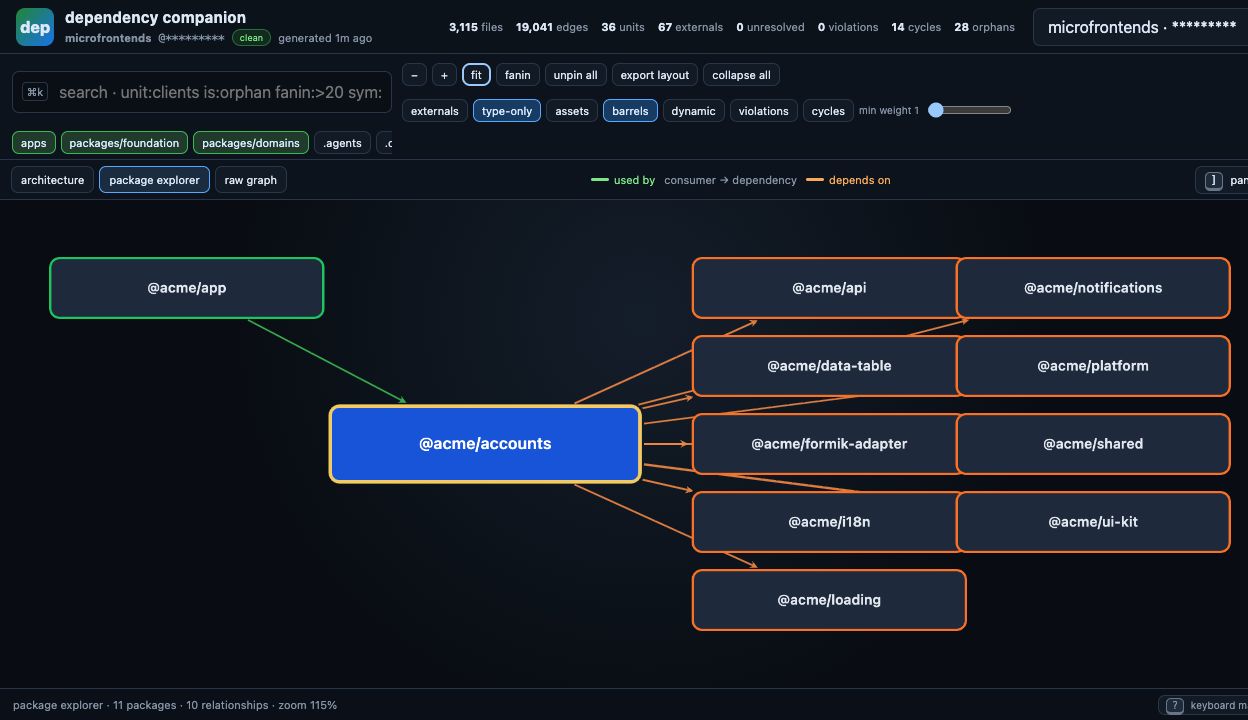
- Complete import-site accounting. Every discovered import is classified as an internal edge, an external package reference, or an unresolved import.
- Repository-derived structure. Workspace groups, packages, source roots, path aliases, and entry points are inferred from repository metadata instead of a project-specific layer map.
- Traceable results. Aggregated relationships retain their underlying files, specifiers, symbols, and source lines.
- Architecture diagnostics. The doctor reports unresolved imports, cycles, unreachable files, dead aliases, invalid package exports, and supported boundary-policy violations.
- Git-ref comparison. Analyze another branch or commit in an isolated temporary worktree without switching the current checkout.
- One dataset, multiple interfaces. The CLI and dashboard consume the same versioned snapshot format.
- Node.js 18 or later
- Git
- A JavaScript or TypeScript repository
The analyzed repository does not need its own node_modules directory when a
different Git ref is inspected. dependency-companion resolves repository
imports from tracked files, TypeScript configuration, workspace manifests, and
package export maps.
Run the dashboard from the root of the repository you want to inspect:
npx dependency-companion dashboardThe command analyzes the current checkout, writes a local snapshot, starts a
server on 127.0.0.1:4177, prints the URL, and opens the dashboard in the
default browser. Stop the server with Ctrl+C. Use --port <n> when that port
is already in use. The server only accepts loopback requests and only serves the
dashboard assets and the generated dataset.
Generated snapshots can contain repository paths, import specifiers, and symbol names. Keep them local by adding this entry to the analyzed repository:
.dependency-companion/To install the CLI as a development dependency:
npm install --save-dev dependency-companionThe shorter depcompanion executable is available as an alias.
npx dependency-companion summary
npx dependency-companion doctor
npx dependency-companion doctor --twice
doctor --twice performs a second analysis and verifies that the serialized
snapshot is byte-identical.
Queries accept a package name, unit name, page name, path, or path prefix.
# What imports this package or directory?
npx dependency-companion consumers @myorg/shared-ui

# What does this package or directory import?
npx dependency-companion deps src/features/billing

# Does one area transitively reach another?
npx dependency-companion reaches src/features/billing legacy-store

# Show up to five paths and a candidate edge cut
npx dependency-companion why src/features/billing src/legacy
Use --level file, --level folder, --level unit, or --level group to
change the aggregation level where the command supports it. The default is
unit.
npx dependency-companion cycles --level file
npx dependency-companion orphans
npx dependency-companion roots
npx dependency-companion violations
npx dependency-companion externals
npx dependency-companion externals react
npx dependency-companion symbols useQuery
violations reports n/a when the analyzed repository configures no boundary
policy, and fails when it configures a broken one. It never presents a missing
or invalid policy as zero violations. Pass --fail-on-violations to use it as a
CI gate.
npx dependency-companion peelability src/features/billing
npx dependency-companion peelability src/features/billing src/features/invoices
peelability identifies outgoing cross-domain dependencies that block moving
the selected files as an isolated unit.
Most read-only commands can use an existing snapshot without rebuilding the graph:
npx dependency-companion summary \
--snapshot .dependency-companion/data/graph.main.jsondoctor, snapshot, dashboard, and progress require a live analysis and
cannot run from --snapshot.
npx dependency-companion progress --before main --after HEADAny side that has no dataset yet is analyzed on demand in a detached temporary worktree, so this works as a one-liner. Pre-generating is still useful when you want to reuse a baseline across runs:
npx dependency-companion snapshot --ref main
npx dependency-companion progress --before main --after HEAD
With no --before, the first existing ref among main, master, develop and
dev is used as the baseline. Datasets are stored under
.dependency-companion/data/; temporary worktrees are created outside the
repository and removed afterwards.
Two non-current refs work the same way:
npx dependency-companion progress \
  --before release/1.x \
  --after release/2.x
The comparison includes metric deltas, external-package changes, TypeScript file correspondence derived from Git renames, deleted and added files, per-unit provenance, and cycle changes.
The architecture map provides a repository-wide overview before any dependency neighborhood is expanded.
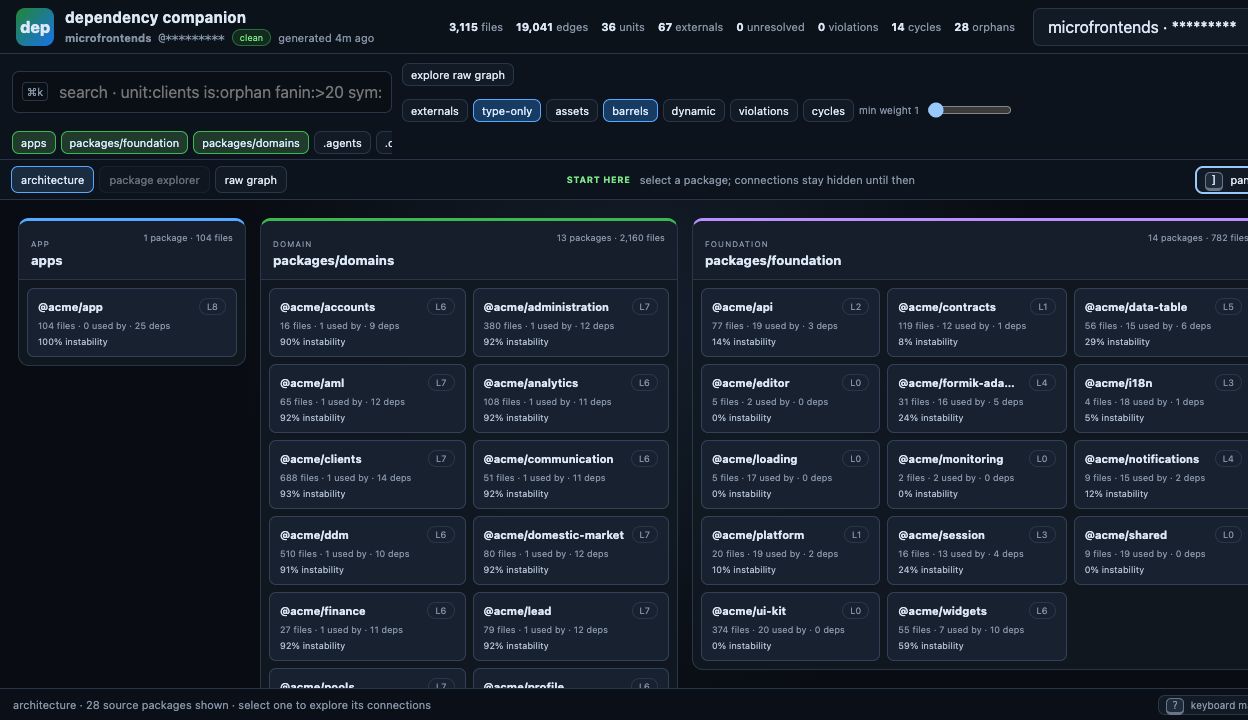
The dashboard provides three graph modes:
- Architecture map — source groups and packages or derived units without rendering a dense edge graph.
- Dependency explorer — direct consumers and dependencies of one selected package or unit.
- Raw graph — expandable groups, units, files, and aggregated edges for detailed inspection.
Additional panels cover:
- graph totals and snapshot metadata;
- cycles, roots, orphans, and violations;
- fan-in, fan-out, instability, reachability, and hotspots;
- package export usage and external dependencies;
- file-level completeness and unresolved-import diagnostics;
- saved ref comparisons;
- file-level pathfinding.
Press ? in the dashboard to open the keyboard map. The header always shows
the analyzed ref, dirty state, dataset age, unresolved count, and self-check
status.
| Command | Purpose |
|---|---|
summary |
Print graph totals, ref information, metrics, and phase timings. |
doctor |
Run completeness, resolution, export, alias, policy, and graph checks. |
violations |
List supported boundary and package self-alias violations. |
consumers <query> |
List external importers of matching files. |
deps <query> |
List dependencies imported by matching files. |
reaches <from> <target> |
Find the shortest path from each source match to a target substring. |
why <from> <to> |
Show up to five dependency paths and a candidate edge cut. |
peelability <query>... |
Report cross-domain blockers for migration candidates. |
cycles |
List non-trivial strongly connected components. |
roots |
List source files with no incoming edge that are not entry points. |
orphans |
List source files unreachable from discovered entry points, or report n/a when no entry point can be derived. |
leaves |
List source files with no outgoing edge. |
externals [package] |
Summarize external package usage and optional matching samples. |
symbols <name> |
Find imported symbol references. |
layers |
Print graph-derived dependency layers. |
hierarchy [group] |
Print discovered groups, units, and role vocabulary. |
snapshot |
Persist a versioned graph dataset. |
progress |
Compare two generated datasets and their Git correspondence. |
dashboard |
Persist the current dataset and open the dashboard. |
| Flag | Meaning |
|---|---|
--root <path> |
Analyze a repository other than the current working directory. |
--ref <ref> |
Analyze a branch, tag, or commit in a temporary worktree. |
--snapshot <file> |
Read a saved snapshot for a supported read-only command. |
--level <level> |
Use file, folder, unit, or group aggregation. |
--limit <n> |
Limit human-readable result rows. The default is 40. |
--json |
Emit machine-readable JSON. |
--no-symbols |
Skip imported-symbol collection. |
--no-policy |
Skip optional boundary-policy loading. |
--fail-on-violations |
Exit 1 when violations finds any. For CI gates. |
--oracles |
Compare the Git inventory with TypeScript and filesystem inventories. |
--verbose |
Include warning and informational details where supported. |
--version |
Print the installed version. |
--help |
Print the command and flag summary. |
Command-specific flags: --twice and --parity for doctor; --before,
--after, --similarity and --map for progress; --out for snapshot;
--port for dashboard; --worktree and --keep-worktree for --ref runs.
dependency-companion selects one of three modes:
| Mode | Discovery rule |
|---|---|
workspaces |
The root package.json contains workspace globs. Matching packages become units and workspace-glob parents become groups. |
monolith |
A root TypeScript configuration includes source directories. First-level source directories become groups and large directory trees are split into derived units. |
flat |
Neither structure is available. The directories that actually contain source files become groups, so health metrics still apply. |
The analyzer reads all matching tsconfig*.json files and resolves path aliases
from the nearest configuration. It recognizes:
- static
importdeclarations; - re-exports with a module specifier;
- TypeScript
import =declarations; - literal dynamic
import()calls; - literal CommonJS
require()calls; - TypeScript import types;
- relative paths,
baseUrl,paths, and workspace package exports; - TypeScript output-extension rewriting, so
./module.jsresolves tomodule.ts,./module.mjstomodule.mts, and.ts,.tsx,.mts,.cts,.js,.jsx,.mjs,.cjsand declaration files are all indexed.
Non-literal dynamic imports and runtime-computed require() paths cannot be
resolved statically and are not included.
Both files are optional and are read from the analyzed repository's root.
Declarative migration signals for the dashboard's burndown panel:
export default [
  { id: "G1", title: "Retire legacy modal", spec: ["@myorg/ui/legacy-modal"] },
  { id: "G2", title: "Replace Yup validation", external: ["yup"] },
  { id: "G3", title: "Drop useAppDispatch", symbol: ["useAppDispatch"] },
  { id: "G4", title: "Normalize page filenames", path: [".page."] },
];
Matchers: spec (import specifier), external (npm package name), symbol
(imported binding), path (file path fragment), and crossGroup (boolean).
A rule that matches nothing is reported as possibly stale rather than as
completed, because zero matches can also mean the specifier was renamed.
{
  "exemptions": ["src/legacy/allowed-escape-hatch.ts"],
  "overrides": [
    { "before": "src/api/http.ts", "after": "packages/api/src/http/HttpClient.ts" }
  ],
  "entries": ["src/main.tsx"],
  "policy": { "elements": [], "allow": {} }
}
policy is described under Boundary policy; entries lists
bundler entry points that no manifest declares, without which everything behind
them looks unreachable. exemptions are files excluded from boundary checks.
overrides pin file
correspondence for progress when Git rename detection cannot recover a move;
an override that no longer resolves on either side fails the run instead of
silently skewing the comparison. A path can also be passed per run with
--map <file>.
Boundary analysis is optional and self-contained: the policy is declared in
dependency-companion.json, so it belongs to the repository rather than to
whichever linter the repository happens to use.
{
  "policy": {
    "default": "disallow",
    "elements": [
      { "type": "shared", "pattern": "packages/shared/**/*" },
      { "type": "ui", "pattern": "packages/ui/**/*" },
      { "type": "domain", "pattern": "packages/domains/([^/]+)/**/*", "capture": ["domainName"] }
    ],
    "allow": {
      "shared": ["shared"],
      "ui": ["ui", "shared"],
      "domain": [{ "type": "domain", "sameCapture": "domainName" }, "ui", "shared"]
    }
  }
}
elements classify files by path. A capture group in pattern can be named in
capture and referenced later. allow lists, per element type, the types it may
import; an entry is either a type name or { "type", "sameCapture" }, where
sameCapture permits the edge only when both sides captured the same value —
that is how sibling domains stay isolated from each other. Element types absent
from allow fall back to default, which is disallow unless set otherwise.
Every type named in allow must be declared in elements, and a sameCapture
must be a capture the target element actually declares. A policy that is present
but malformed fails the run: a typo must never read as zero violations.
Without a policy key the graph, metrics, snapshots, dashboard and every
non-policy diagnostic still work, and violations reports that no policy is
configured. Package self-imports through a package's own public alias are
derived structurally and need no policy at all.
npx dependency-companion violations --fail-on-violationsviolations exits 0 by default so it stays usable for inspection. With
--fail-on-violations it exits 1 when any violation is found. An invalid
policy exits 1 either way.
Snapshots use schema version 1. They contain interned strings, columnar import
edges, hierarchy metadata, graph metrics, external-package usage, public export
usage, optional policy results, and the persisted doctor report.
The snapshot payload contains no generation timestamp, so identical repository content can produce byte-identical output. Timestamps live in the generated manifest sidecar.
See SCHEMA.md for the complete contract.
The package also exports the analysis pipeline:
import { analyze, toSnapshot } from "dependency-companion";

const analysis = await analyze({
  root: "/path/to/repository",
  ref: "main",
});

const snapshot = toSnapshot(analysis);
console.log(snapshot.counts);
The JavaScript API currently ships without TypeScript declaration files.
By default, generated files are written to:
.dependency-companion/
└── data/
    ├── manifest.json
    ├── graph.<ref>.json
    ├── graph.<ref>.js
    ├── align.<before>-<after>.json
    ├── compare.<before>-<after>.json
    └── compare.<before>-<after>.js
These files are local analysis artifacts. They may contain repository structure and symbol information and should normally remain untracked.
This project is licensed under the MIT License.