
Backdrop blur and frosted glass for React Native and Expo, on iOS and Android. Works over expo-video and react-native-video.
Blur what is behind headers, tab bars, cards, popups and buttons while their content stays sharp. Blur a whole screen or a playing video, including expo-video and react-native-video players on Android. Real iOS materials on iOS, and the same materials rebuilt on Android with RenderEffect, matched to iOS colour for colour.


Documentation · Guides · Changelog · npm

Backdrop mode, recorded on the iOS simulator (left) and an Android emulator (right). The button blurs the video under it, the popup blurs the map, and the header blurs the list scrolling beneath it.
Important
Frosted glass now works over a playing video with expo-video (VideoView) and react-native-video (<Video>, SurfaceView and TextureView) on both iOS and Android.
- Backdrop mode over video: headers, controls and cards blur the live video behind them, in sync with it (
syncVideo, defaulttrue). No need to switch the player toTextureView. - Content mode on video: blur a whole player, Android 12 included.
- Light: frame copies run off the UI thread, are shared by every
BlurViewover the same video, and stop while it is paused or off screen.
Android 12 / 12L now gets real backdrop blur, content blur and video blur like Android 13+, with its own renderer: no more frozen backdrop while scrolling, no more black video. Android 11 and below get a readable material plate.
Also new: backdrop inside <Modal> on Android, per-corner radii, any tintColor, and Reanimated intensity. See the changelog.
- 🪟 Backdrop blur (
mode="backdrop"): frosted headers, tab bars, cards, popups and buttons that blur whatever is behind them, with sharp content on top. Works over scrolling lists and playing video. - 🎬 Blurs video from
expo-videoandreact-native-video, in both backdrop and content mode, including theirSurfaceViewplayers on Android (which other blur libraries leave sharp). - 🍎 Real iOS materials. On iOS it is
UIVisualEffectViewwith the system blur styles, not an imitation. - 🤖 Android matched to iOS. A
RenderEffectchain (Gaussian blur, then a colour matrix) per material, calibrated against iOS screenshots: mean error 1.95 / 255 across 187 sampled colours. - ✨ Glass edge. A specular rim highlight gives the "glass has thickness" look.
- 🌗 Light and dark aware. Material tints follow the system appearance on Android.
- 🎚️ One
intensityprop from 0 to 100 drives blur, colour and rim together, and animates with Reanimated on the UI thread. - 🪟 Works inside React Native
<Modal>on Android too: backdrop mode blurs the screen behind the modal. - 🔲 Per-corner radii (
borderTopLeftRadius…) clip the blur, tint and glass rim. - 🌐 Web fallback with CSS
backdrop-filter. - 📦 Works everywhere: a native Fabric component for React Native CLI and Expo apps alike, with no JS dependencies and no Expo requirement.
npm install @nguyenduy1412/react-native-blur
cd ios && pod install
Then rebuild the app (npx react-native run-ios / npx react-native run-android). Autolinking picks the library up; no Expo packages are needed.
npx expo install @nguyenduy1412/react-native-blur
npx expo run:ios
npx expo run:android
It contains native code, so it does not run in Expo Go; use a development build or EAS Build.
yarn, pnpm or bun
yarn add @nguyenduy1412/react-native-blur
pnpm add @nguyenduy1412/react-native-blur
bun add @nguyenduy1412/react-native-blur| Minimum | |
|---|---|
| React Native | 0.76 with the New Architecture (Fabric). Tested with React Native 0.86. |
| iOS | 15.1 |
| Android | API 31 (Android 12) for the blur: Android 12 / 12L (API 31-32) and 13+ (API 33+) get the same blur and video blur. Older versions draw a translucent material plate without blur, so content stays readable. |
| Expo (optional) | Tested with Expo SDK 57 |
BlurView has two modes. Pick the one that matches what you want frosted.
| You want to blur… | Use |
|---|---|
| What is behind the view (overlays: header, tab bar, card, popup, button) | mode="backdrop" |
| What is inside the view (a whole screen, an image, a playing video) | mode="content" (default) |
import BlurView from "@nguyenduy1412/react-native-blur";

<BlurView mode="backdrop" intensity={80} tint="systemThinMaterial" style={{ borderRadius: 24, padding: 16 }}>
  <Text>Frosted card</Text>
</BlurView>

<BlurView style={{ flex: 1 }} intensity={50} tint="systemMaterial">
  <YourContent />
</BlurView><View style={{ flex: 1 }}>
<ScrollView contentContainerStyle={{ paddingTop: 96 }}>{items}</ScrollView>
<BlurView
mode="backdrop"
intensity={85}
tint="systemMaterial"
style={{ position: "absolute", top: 0, left: 0, right: 0, paddingTop: insets.top, paddingBottom: 12 }}
>
<Text>Inbox</Text>
</BlurView>
</View><BlurView
mode="backdrop"
intensity={80}
tint="systemThinMaterial"
style={{ position: "absolute", left: 16, right: 16, bottom: 24, borderRadius: 32, flexDirection: "row" }}
>
{tabs}
</BlurView>Only the button area is blurred and the rest of the video stays sharp. Works with the default SurfaceView on Android; no TextureView needed.
With expo-video:
<View style={{ flex: 1 }}>
  <VideoView player={player} style={StyleSheet.absoluteFill} />

  <BlurView mode="backdrop" intensity={85} tint="dark" style={{ borderRadius: 999, paddingVertical: 12, alignItems: "center" }}>
    <Text style={{ color: "white" }}>Play</Text>
  </BlurView>
</View>
With react-native-video:
import Video from "react-native-video";

<View style={{ flex: 1 }}>
  <Video source={{ uri }} style={StyleSheet.absoluteFill} resizeMode="cover" repeat />

  <BlurView mode="backdrop" intensity={85} tint="dark" style={{ borderRadius: 999, paddingVertical: 12, alignItems: "center" }}>
    <Text style={{ color: "white" }}>Play</Text>
  </BlurView>
</View>On Android a map drawn into a SurfaceView is copied with PixelCopy every frame and blurred like the rest of the backdrop.
<View style={{ flex: 1 }}>
  <MapView style={StyleSheet.absoluteFill} />

  <BlurView mode="backdrop" intensity={75} tint="light" style={{ margin: 16, borderRadius: 18, padding: 16 }}>
    <Text>Café · 300 m away</Text>
  </BlurView>
</View>Render the overlay in the same screen and put a backdrop BlurView behind its content.
{visible && (
  <View style={StyleSheet.absoluteFill}>
    <BlurView mode="backdrop" intensity={60} style={StyleSheet.absoluteFill} />
    <ModalCard />
  </View>
)}Keep the content mounted and drive intensity. 0 turns the effect off completely.
<BlurView style={{ flex: 1 }} intensity={locked ? 60 : 0}>
  <Feed />
</BlurView>Content mode picks up SurfaceView players (expo-video, react-native-video) automatically.
<BlurView style={{ flex: 1 }} intensity={60}>
  <VideoView player={player} style={{ flex: 1 }} />
</BlurView><BlurView intensity={80} tint="dark" tintColor="rgba(10, 20, 40, 0.35)" blurRadius={30} saturation={1.4} style={{ flex: 1 }}>
<Content />
</BlurView>BlurView forwards its ref to the native view, so intensity animates on the UI thread:
import Animated, { useAnimatedProps, useSharedValue, withTiming } from "react-native-reanimated";

const AnimatedBlurView = Animated.createAnimatedComponent(BlurView);

const intensity = useSharedValue(0);
const animatedProps = useAnimatedProps(() => ({ intensity: intensity.value }));

<AnimatedBlurView mode="backdrop" animatedProps={animatedProps} style={StyleSheet.absoluteFill} />;
// intensity.value = withTiming(80);Most blur libraries for React Native look fine over a static screen and break down in three places.
Overlays often don't blur what is behind them on Android. Putting a blur view over content is the most common use, and it is where many Android blur setups break. Backdrop mode records what is drawn behind the view and blurs it, so headers, cards and popups behave the same on Android as on iOS.
Video escapes the blur. On Android, video plays in a SurfaceView, which the system composites directly on top of your app's window. Libraries that blur by taking a snapshot of the view tree never see that layer, so the video stays perfectly sharp behind your "glass".

Left: this library. The video is blurred like everything else. Right: a typical React Native blur library. Blur is on, but the video stays sharp.
Android looks grey and flat. A single Gaussian blur plus a flat tint washes the colour out. Light and shadow merge into one grey smear, and the result looks nothing like the iOS material on the same screen.
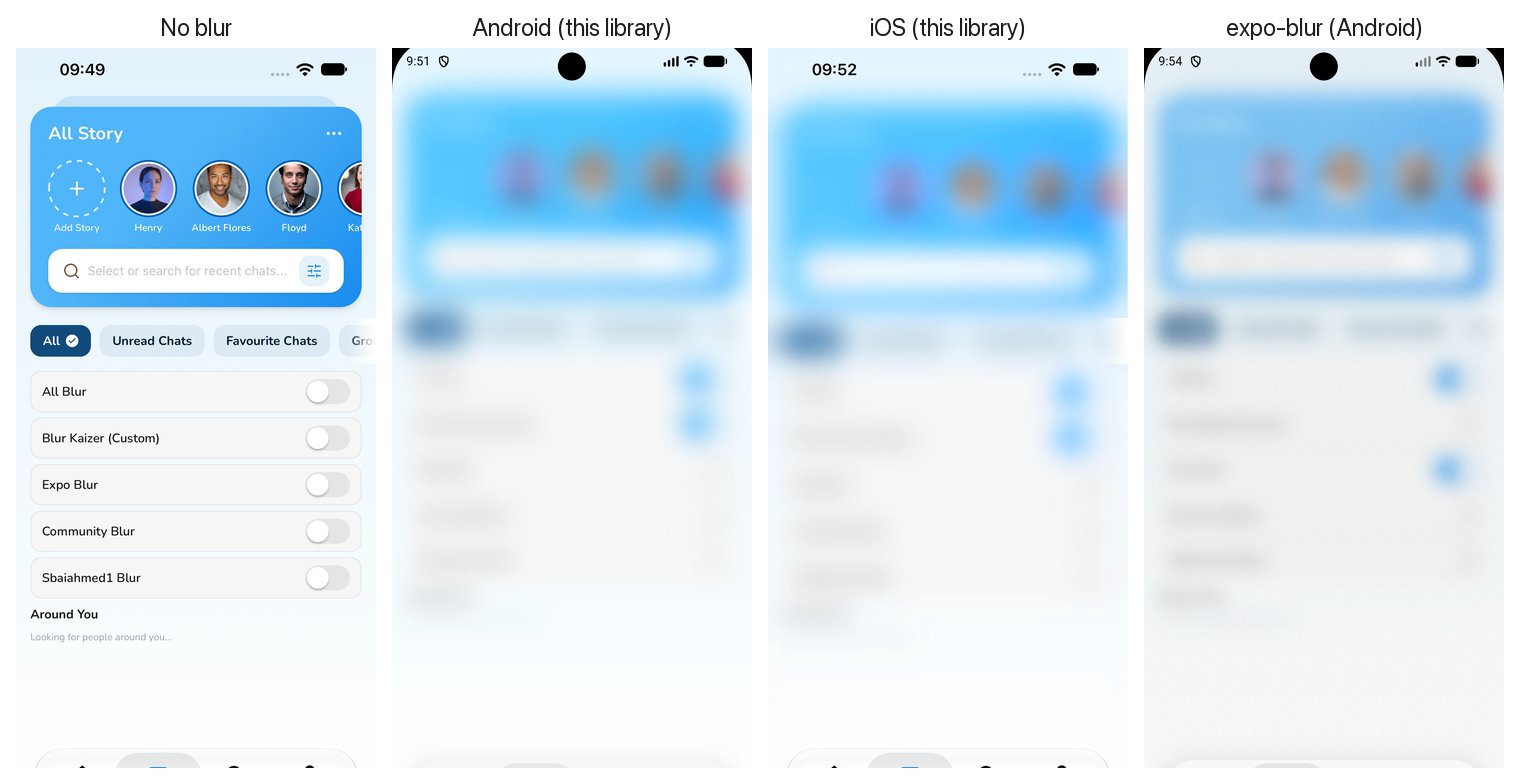
The same screen, four ways. Android and iOS from this library land on the same brightness, saturation and depth. The flat-tint approach (right) turns the same content into a grey wash.
| Feature | @nguyenduy1412/react-native-blur |
expo-blur |
@react-native-community/blur |
|---|---|---|---|
| New Architecture (Fabric) | ✅ Native Fabric Component | ❌ Deprecated / Legacy Bridge | |
| Blurs Playing Video (Android SurfaceView) | ✅ Yes (PixelCopy + RenderEffect) |
❌ Video stays sharp | ❌ Video stays sharp |
| Backdrop Overlays (Headers, Tab Bars, Popups) | ✅ Yes (mode="backdrop") |
||
| iOS Material Match on Android | ✅ Color-calibrated (1.95/255 error) | ❌ Flat grey tint | ❌ Flat grey tint |
| Works with RN CLI & Expo Dev Client | ✅ No Expo packages required |
📖 Guides: frosted header and tab bar · blur video on Android · blurred modal background · expo-blur alternative
📖 Deep dive with video: Kaizer Blur: real blur, even over video (see the Library section).
Accepts every View prop, plus:
| Prop | Type | Default | Platforms | Description |
|---|---|---|---|---|
mode |
'content' | 'backdrop' |
'content' |
iOS, Android | 'backdrop' blurs what is behind the view and keeps its children sharp. 'content' blurs the children. |
intensity |
number |
50 |
iOS, Android, Web | Strength of the whole effect, 0 to 100. Scales blur, colour and rim together. 0 disables it. |
tint |
BlurTint |
'default' |
iOS, Android, Web | Material to use. See the table below. |
tintColor |
ColorValue |
— | iOS, Android, Web | Extra colour layer drawn over the blur. Any React Native colour: 'rgba(0,0,0,0.3)', '#00000040', 'black', PlatformColor(...). |
borderRadius |
number |
style.borderRadius or 0 |
iOS, Android | Corner radius for the blur, tint and rim. Per-corner style radii (borderTopLeftRadius, borderTopStartRadius…) are supported too. |
blurRadius |
number |
from tint |
Android, Web | Overrides the material's blur radius, in dp. |
saturation |
number |
1 |
Android, Web | Multiplier on the material's saturation boost. |
syncVideo |
boolean |
true |
Android | Backdrop over a SurfaceView video: true shows the video from the same copy that is blurred, so sharp and blurred parts match (heavier, capped at the copy rate, about 20-30 fps on emulators). false keeps the live video and blurs a quarter-size copy (lighter, blurred part trails by 1-2 frames). |
children |
ReactNode |
— | all | The content to blur. |
tint |
iOS style | Android |
|---|---|---|
'default' |
.regular |
Light or dark material following the system theme |
'light' |
.light |
Light material |
'extraLight' |
.extraLight |
Extra light material |
'dark' |
.dark |
Dark material |
'prominent' |
.prominent |
Extra light in light mode, dark in dark mode |
'systemUltraThinMaterial' |
.systemUltraThinMaterial |
Ultra-thin material, light or dark |
'systemThinMaterial' |
.systemThinMaterial |
Thin material, light or dark |
'systemMaterial' |
.systemMaterial |
Regular material, light or dark |
'systemThickMaterial' |
.systemThickMaterial |
Thick material, light or dark |
'systemChromeMaterial' |
.systemChromeMaterial |
Chrome material, light or dark |
iOS. A UIVisualEffectView with the matching UIBlurEffect style sits over the children in content mode, and underneath them in backdrop mode. intensity is applied by scrubbing a paused UIViewPropertyAnimator, so every value between 0 and 100 is a real system blur rather than an opacity fade. A specular highlight layer draws the glass edge.
Android (API 31+). In content mode the view applies a RenderEffect chain to its children: a Gaussian blur, then a ColorMatrix that restores the brightness and saturation the blur removes and lays down the material's tint plate. The material numbers come from Apple's own .materialrecipe files in the iOS runtime, and the Android output was checked against colours sampled from iOS screenshots.
Video on Android. A SurfaceView is composited by the system, outside the normal view hierarchy, so no RenderEffect can reach it. The view finds SurfaceViews among its children, copies their frames with PixelCopy (downscaled 4×, every frame) and draws the copy in their place, where the blur applies like it does to everything else.
Backdrop mode. On iOS the effect view is placed underneath the children, so UIVisualEffectView blurs whatever is behind the BlurView. On Android the view records what is drawn behind it (ancestor backgrounds and the sibling views before it, with their scroll offsets and transforms) into a RenderNode, applies the same blur and material chain, and draws the children on top. The recording is refreshed on every frame where something on screen changed, so scrolling lists and playing videos stay in sync.
Web. CSS backdrop-filter: blur() saturate() with a tint background.
- Android 11 and below have no
RenderEffect, so they draw a translucent plate in the material's colour instead of a blur. - 60 fps
SurfaceViewvideo under a backdrop is shown at the copy rate whilesyncVideois on. UsesyncVideo={false}, or aTextureViewplayer (expo-videosurfaceType="textureView", react-native-video 7surfaceType="texture"), which needs no copy at all. blurRadiusandsaturationare ignored on iOS, which uses the system material as is.- Video copies on Android are made at quarter resolution, as fast as
PixelCopyreturns them (usually the video's own frame rate). The blurred video trails the real one by one or two frames, which you can notice where sharp and blurred video sit side by side. - Colour fidelity: Android fits each iOS luminance curve with a single colour matrix, so it averages about 2 / 255 off iOS.
systemChromeMaterialis the outlier, at up to about 23 / 255. - Backdrop inside
<Modal>on Android copies the screen behind the modal withPixelCopyat about 30 fps and half resolution, then blurs it. SurfaceViewbehind a backdrop on Android (video, maps) is copied withPixelCopyevery frame at full resolution. The copy covers the live video, so the sharp part around theBlurViewand the blurred part behind it come from the same frame; the video as a whole runs one or two frames behind its audio. ATextureViewplayer has no such delay.
How do I make a frosted header, tab bar or button over content?
Use mode="backdrop". The content behind the BlurView is blurred and its children stay sharp:
<BlurView mode="backdrop" intensity={80} tint="systemThinMaterial" style={{ borderRadius: 24, padding: 16 }}>
  <Text>Frosted card</Text>
</BlurView>
expo-blur or @react-native-community/blur doesn't blur my video on Android. Why?
Android plays video in a SurfaceView (expo-video, react-native-video and most players do). The system composites a SurfaceView in its own layer, outside your app's view tree, so a blur that works by capturing the view tree never sees the video, and it stays sharp behind the glass.
This library finds SurfaceViews inside the BlurView, copies their frames with PixelCopy and blurs the copy, so the video is blurred like everything else. Wrap the video in BlurView:
<BlurView style={{ flex: 1 }} intensity={60}>
  <VideoView player={player} style={{ flex: 1 }} />
</BlurView>
Blur looks grey and flat on Android compared with iOS. How do I make it match?
A single Gaussian blur plus a flat tint washes out the colours. This library rebuilds each iOS material on Android with a RenderEffect blur followed by a colour matrix that restores the brightness and saturation the blur removes. The numbers come from Apple's own material recipes, and the result lands within about 2 / 255 of iOS on average. Use the same tint on both platforms, for example tint="systemMaterial".
My BlurView shows only a tint on Android, with no blur.
Check two things:
- Use
mode="backdrop"for overlays. The defaultmode="content"blurs the view's own children, so aBlurViewlaid over other views has nothing of its own to blur.mode="backdrop"blurs what is behind it. - The device must run Android 12 (API 31) or later.
RenderEffectdoes not exist on older versions, so they get a translucent material plate instead of a blur.
How do I blur the screen behind a modal or overlay?
Put a backdrop BlurView behind the overlay content, either in an in-screen overlay or inside a transparent React Native <Modal>. The screen underneath is blurred and the overlay content stays sharp.
<View style={{ flex: 1 }}>
  <Screen />
  {visible && (
    <View style={StyleSheet.absoluteFill}>
      <BlurView mode="backdrop" intensity={60} style={StyleSheet.absoluteFill} />
      <ModalCard />
    </View>
  )}
</View>
It also works inside <Modal transparent> on both platforms. Keep the modal's root view transparent so the blur is visible:
<Modal transparent visible={visible}>
  <View style={{ flex: 1 }}>
    <BlurView mode="backdrop" intensity={60} style={StyleSheet.absoluteFill} />
    <ModalCard />
  </View>
</Modal>
Does it work without Expo, in a React Native CLI app?
Yes. Since 2.0 it is a regular React Native library (a Fabric component), so npm install plus pod install is all a React Native CLI app needs. No Expo packages are installed.
Does it work in Expo Go?
No. It contains native code, so you need a development build (npx expo run:ios / npx expo run:android) or EAS Build. Plain React Native CLI apps work out of the box.
Does it support the New Architecture?
Yes, and it requires it. It is a Fabric native component generated with React Native Codegen, tested with React Native 0.86 in both a plain React Native CLI app and an Expo SDK 57 app.
2.0 turns the library from an Expo Module into a plain React Native Fabric component, so it now also works in React Native CLI apps without Expo.
- Rebuild the native app after upgrading (
pod install, then rebuild iOS and Android). The iOS pod is now calledNguyenduyBlur. - New Architecture is required (React Native 0.76+, the default since 0.76).
- Removed: the
CrystalBlurViewalias (useBlurView) and the iOS debug helperdumpGlassInternals. - Fixed:
borderRadiuson Android is now in dp, matching iOS. In 1.x it was applied in pixels, so corners were smaller on Android.
The BlurView props are unchanged.
Issues and pull requests are welcome at github.com/nguyenduy1412/react-native-blur. When reporting a visual issue, include the platform, OS version, the tint and intensity you used, and a screenshot.
⭐ If this library saves you time, a star on GitHub helps other developers find it.