
A native macOS app that turns your disk into an explorable city of files — see what's using space, reclaim it, browse it as a 3D city where git repos are facilities you can put AI agents to work in, and ask a built-in assistant (cloud or on-device) what's safe to delete. At its core it's the GUI equivalent of:
du -h -d1 ~/some/folder…and to permanently delete a folder (rm -rf) right from the results, with a confirmation.

- Pick a folder or file (or type/paste a path).
- See the total size plus every immediate child, sorted largest-first, with a proportion bar. Columns: Name, Size, Kind, Modified, Created (all sortable) and Items (a folder's immediate entry count, filled in the background). A footer shows the on-disk index cache usage with a Clear Cache button.
- Scans once, then browses instantly. One
du -k <path>(no depth limit) walks the whole subtree and records the size of every directory in it — for the same disk cost as a one-level scan, sincedutraverses everything regardless. Those sizes are kept in an index, so drilling into any subfolder or going back up is served from cache with no re-scan. The header shows a ⚡️ "Indexed …" / 🕓 "Scanned …" badge with the scan time. - The index persists across launches. It's saved to
~/Library/Application Support/DiskSize/(one JSON file per scanned root, plus a small manifest). Re-open the app and re-visit a folder you've scanned before and it appears instantly from disk — no waiting for a scan. - The on-disk cache is capped so it can't grow unbounded: least-recently-used indexes are evicted once the cache exceeds 100 MB or 50 roots, and any index unused for 30 days is dropped. Each visit bumps that index's recency so active roots are kept.
- Incremental refresh. After showing the cached result, a background pass stats every indexed directory's modification date, finds the ones that changed, re-
dus only those (the minimal changed subtrees), and propagates the size deltas up their parents. Unchanged subtrees are never re-walked. The header shows "refreshing changed folders…" while this runs. - Cache invalidation: Rescan discards the index and scans fresh; deleting anything rebuilds it; and if a folder's modification date is newer than the scan, the header flags "changed since scan" with a one-click Rescan.
- Sizes come from
du -kand are formatted to human units (KB/MB/GB) in-app, so sorting stays accurate. Individual file sizes come straight from the filesystem (stat) — no recursion needed. - Permission-denied paths (e.g. system folders): the app shows a banner and a one-click "As Admin" rescan that triggers the standard macOS admin-password prompt.
- Delete: the trash button asks for confirmation (showing the full path + size), then lets you Move to Trash (reversible, the safe default) or Delete Permanently with
rm -rf. There's an admin variant of the permanent delete for protected paths, and a hard guardrail that refuses/, your home folder, and top-level system directories.
-
Reclaim graph (offline): every entry is classified — npm packages, Xcode DerivedData, app caches, build output, virtualenvs, package stores, Trash, Docker data, containers, vs. keep-these (documents, photos, apps). The Category column shows a keep/caution/safe dot; the header shows "Reclaimable here". A Reclaim sheet lists everything you can safely clear across the whole tree (with app attribution), lets you Select Safe, and batch Move to Trash / Delete Permanently through the same guarded delete path. All deterministic, no network.
-
Reclaim Assistant (opt-in): ask "what can I safely delete?" or "free 10 GB" in plain English. It reasons over a metadata-only summary of the scan (paths, sizes, ages, categories — never file contents) and answers with specific paths + reasons. Strictly advisory — it never deletes anything; you act via the Reclaim sheet. Two providers, configurable in the sheet:
- Anthropic — default model
claude-sonnet-5, key from console.anthropic.com. - OpenAI-compatible — any Chat Completions endpoint via configurable base URL + model, e.g. OpenRouter (
https://openrouter.ai/api/v1, model likeopenai/gpt-4o-minioranthropic/claude-3.5-sonnet), OpenAI, or a local gateway. - Local (on-device) — runs a small instruct model entirely on your Mac via Apple MLX, downloaded from Hugging Face (
mlx-community, default Llama 3.2 3B 4-bit). No API key, no network at inference — nothing leaves the device. Requires Apple Silicon; first use downloads ~1–2 GB. Pick a model in settings and press Download.
Each cloud provider's API key is stored separately in the macOS Keychain. The chat lives in a resizable right-hand side pane (toggle with the Assistant toolbar button); provider settings are in its gear popover; replies are rendered as Markdown.
- Anthropic — default model
-
Treemap view: a List / Treemap toggle switches the main area to a squarified treemap of the current folder — tile area ∝ size, colored by reclaimability, click a tile to drill in.
-
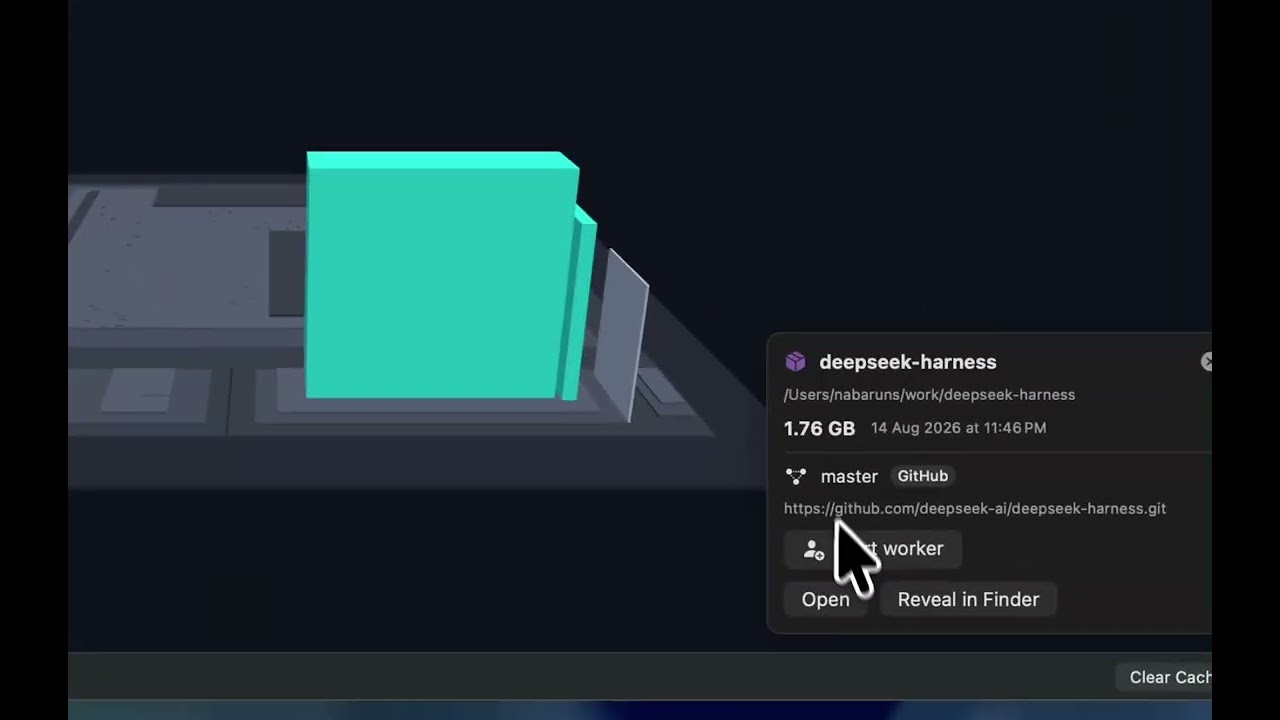
3D city ("software city"): the City view mode renders the folder as an explorable 3D city (SceneKit) — directories are districts, files are buildings whose height ∝ size, colored by reclaimability (files tinted by type); the most-recently-modified items glow with a beacon over the newest; git repos become walled "facilities". Orbit/zoom with the mouse; a left-side "This level" list names the current neighborhoods (click to select); click any node for details, Open, or Reveal.
-
AI workers in a repo facility: select a repo facility → Start worker → pick an agent (Claude Code / Codex, only those actually installed are offered), a mode (Plan = read-only, or Allow edits), and a task. It spawns the agent headlessly (
claude -p … --output-format stream-json/codex exec …) in the repo, streams the output live into a panel, drops a bobbing avatar over that facility, and — when done — summarizes the git changes it made. Stop any time. Nothing runs without you starting it, and edits are surfaced through git so you review before committing.
Grab the latest Bytopolis-<version>.dmg from the Releases page, open it, and drag Bytopolis into Applications.
The build is ad-hoc signed (not notarized), so on first launch macOS Gatekeeper will warn it's from an unidentified developer. Either right-click the app → Open and confirm, or run:
xattr -dr com.apple.quarantine /Applications/Bytopolis.app./scripts/make-dmg.sh # -> dist/Bytopolis-<version>.dmgBuilds the Release configuration and packages the app into a drag-to-install disk image. For a signed build, set CODE_SIGN_IDENTITY="Developer ID Application: …" first. Tagging a commit vX.Y.Z and pushing it runs .github/workflows/release.yml, which builds the DMG on CI and attaches it to a GitHub Release.
- macOS 14 or later
- Full Xcode (not just Command Line Tools) to build/run
- For the on-device model: Apple Silicon and Xcode's Metal Toolchain component (
xcodebuild -downloadComponent MetalToolchain, a one-time ~700 MB download). The MLX Swift package is fetched automatically on first build.
open Bytopolis.xcodeprojThen press ⌘R in Xcode.
The app runs without the App Sandbox (see Bytopolis/Bytopolis.entitlements) because it execs du, rm, and osascript on arbitrary user-chosen paths. It's a local power-tool, not a Mac App Store submission. Xcode signs it "to run locally" — no developer account needed.
Bytopolis/
  BytopolisApp.swift         # @main entry
  ContentView.swift          # the UI + view model
  Models/DiskItem.swift      # one row: url, byteSize, isDirectory
  Services/Shell.swift       # Process runner + admin escalation + quoting
  Services/DiskScanner.swift # builds/parses `du -k -d1`
  Services/Deleter.swift     # rm -rf (user + admin) with guardrails
Incremental refresh detects change by directory modification dates. A directory's
mtime moves when an entry is added, removed, or renamed — but not when an
existing file's contents change in place. So if a file grows without any directory
entry changing, the incremental pass can miss it until you hit Rescan (a full
du, which is always ground truth). This is the standard trade-off incremental
scanners make in exchange for not re-walking the whole tree every time.
Move to Trash is reversible — items go to the Finder Trash and can be restored. Delete Permanently (rm -rf) does not use the Trash and cannot be undone. Either way, the confirmation dialog always names the exact path and its size before anything is removed.
MIT © nabaruns