





A download manager for the terminal. It splits each file across many connections, resumes after you stop it, and survives flaky networks. It is one Python file and needs nothing outside the standard library.
curl -fsSL https://raw.githubusercontent.com/moxart/moxdl/main/mox.py -o ~/.local/bin/mox && chmod +x ~/.local/bin/moxIt needs Python 3.8 or newer. Or install with pipx:
pipx install moxdlOn Android, in Termux: pkg install python, then the curl line above with $PREFIX/bin/mox in place of ~/.local/bin/mox.
The package is called moxdl; the command is mox.
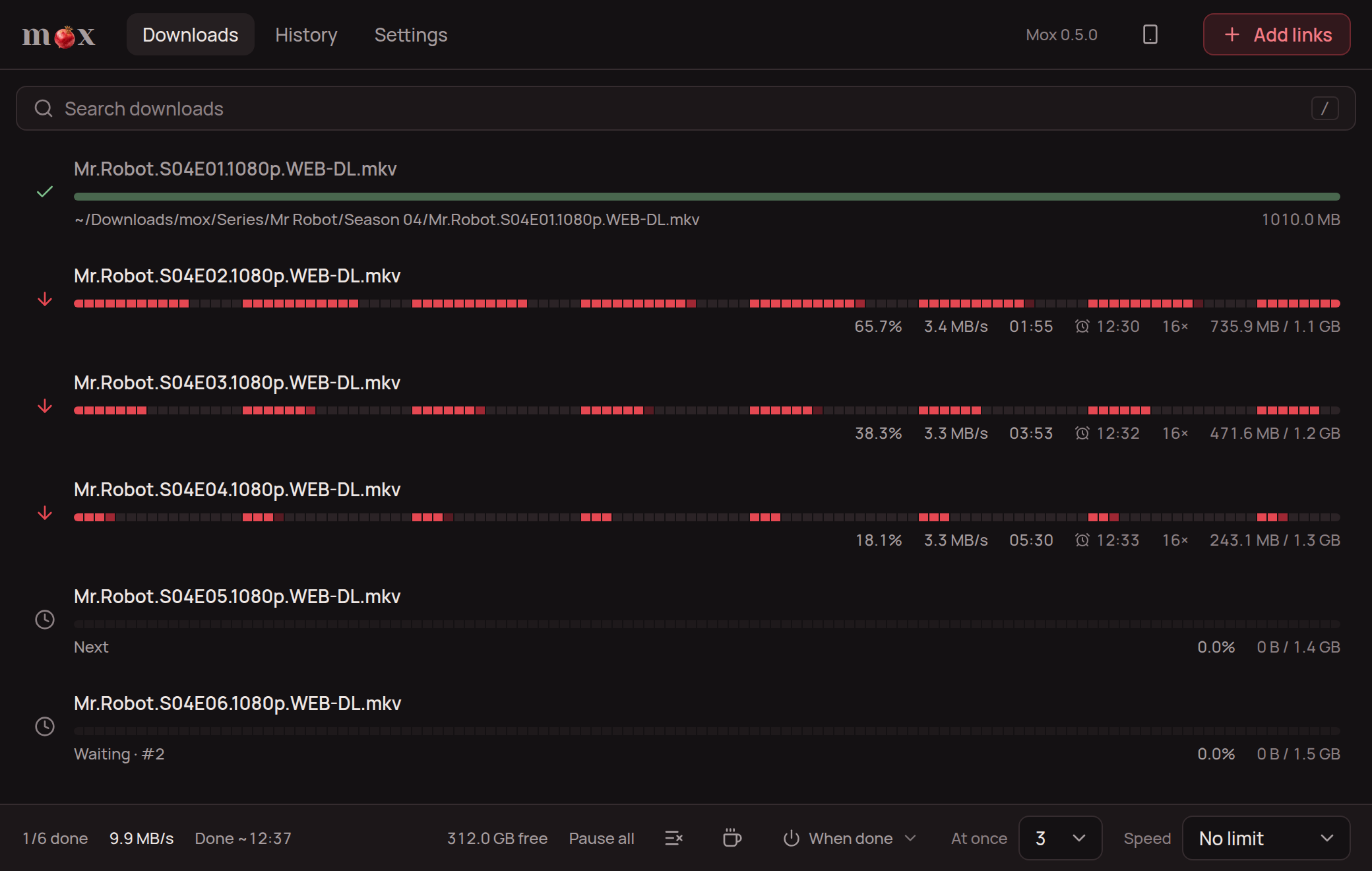
mox desktop puts mox in a window, with mox built in: drag downloads into order, watch one while it downloads, and leave the rest to the icon by the clock. It is a test version, for Linux so far: get the .deb or .AppImage from its releases.
Many servers cap the speed of each connection, so more connections means more speed. A 100 MB file from a local server that caps each connection at 4 MB/s:
| Command | Time | Speed |
|---|---|---|
wget |
24.5 s | 3.9 MB/s |
curl |
24.4 s | 3.9 MB/s |
mox -c 4 |
6.3 s | 15.0 MB/s |
mox (16 connections) |
1.8 s | 51.7 MB/s |
mox -c 32 |
1.1 s | 88.2 MB/s |
Some servers gain nothing or refuse extra connections. mox learns that by itself: it tries a few counts on each server over your downloads (16 first, then 8, 32 and 4), and from then on uses the one that was fastest, now and then trying the others again, as servers change. mox bench URL measures it at once, and suggests a -c value; it downloads nothing to disk. A -c you give, or one in mox config, is used as given.
- Up to 64 connections per file: as many as suit each server, learned from your earlier downloads, or as many as you say.
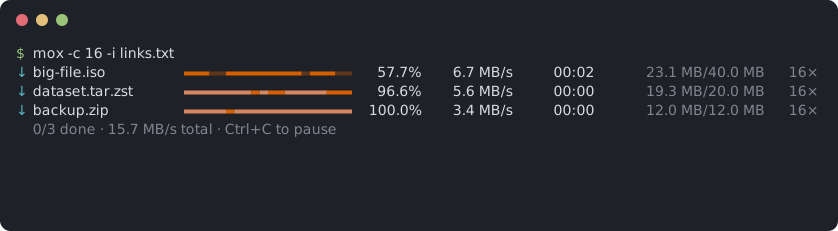
- The progress bar shows which parts of each file are done.
- Fast connections take over work from slow ones.
- Very slow connections are reopened.
- Ctrl+C pauses. Run the same command again, or
mox resume, to continue, even after a reboot. A second Ctrl+C quits without waiting for slow connections to close. - Retries dropped connections, and uses fewer connections when the server refuses more.
- Waits out internet outages, however long, and carries on by itself.
- Checks there is room on the disk before a file starts.
--watchdownloads every file link you copy, and--pastethe links on the clipboard right now, even with text around them.--pagedownloads every file a folder listing links to.- Pick what downloads first with the arrow keys while it runs, and watch a video while it downloads.
- Scheduled downloads, such as 2:00 to 7:00 every night, and shutting down or sleeping when they end.
--sortsaves videos, music, pictures and so on in their own folders, and episodes of a series in a folder per show and season.--quotapauses after a set amount, and the history shows how much was downloaded today and in the last 7 and 30 days.- A desktop notification, a Telegram message or a soft sound when the downloads are done.
- A history of finished downloads, counted by kind: video, audio, images, documents and so on.
- SOCKS5 and HTTP proxies, with user name and password, or a proxy only for the servers that cannot be reached directly.
- An expired link can be replaced with a fresh one without starting over.
- Starts over if the file on the server has changed.
- A total speed limit, SHA-256 verification, several files at once, URLs from a list file.
- Never overwrites an existing file: a second
file.zipbecomesfile (1).zip. - Works as a Python library:
mox.download(url).
The simplest way: copy the links, then run mox on its own. It offers the links on the clipboard, or asks you to paste them:
$ mox
13 links on the clipboard (Mr.Robot.S04E01.1080p.mkv and 12 more). Download? [Y/n]
Or give the links on the command line:
mox https://example.com/file.isoSeveral files, saved to a folder, two at a time:
mox -d ~/Downloads -j 2 https://example.com/a.zip https://example.com/b.zipA list of URLs, one per line. Blank lines and lines starting with # are skipped:
mox -i links.txtLimit the total speed:
mox -l 2M https://example.com/big.mkvA file behind a login, with a cookie from your browser:
mox -H "Cookie: session=abc123" -H "Referer: https://example.com/" https://example.com/private.zipCheck the file against a published checksum:
mox --sha256 9f86d081884c7d65... https://example.com/release.tar.gzSave what you would otherwise type every time, and a plain mox uses it:
mox config dir ~/Downloads
mox config sort on
mox config fallback-proxy auto
mox config lists every setting and its value. mox config --unset sort forgets one. Options on the command line still win over saved settings. The settings live in ~/.config/mox/config (%APPDATA%\mox\config on Windows).
mox doctorChecks this computer and says, for each thing mox uses, whether it works and what to do if not: a newer mox, free disk space, the internet, a system-wide proxy, the clipboard tool, the sound (it plays it), notifications and the keys.
An unfinished download leaves FILE.part and FILE.mox behind. To continue everything unfinished in a folder:
mox resume ~/DownloadsIt takes the same options as a normal download, such as -c, -l or --until.
With several downloads in a run, the arrow keys reorder them while they run:
| Key | Does |
|---|---|
| ↑ ↓ | Select a download |
| Enter | Download it next |
Shift+↑ Shift+↓, or [ ] |
Move it one place up or down |
f |
Only this one, at full speed, until it is done. f again shares the speed again |
w |
Download it from the start onward, to watch while it downloads |
p or Space |
Pause just this one, or let it carry on |
x twice |
Take it off the list. Its .part stays, to continue later |
o |
Open it: a finished file, or one in watch mode in mpv or VLC |
If every slot is taken (-j, 3 by default), the lowest download in the list pauses to make room. It keeps its progress and continues when its turn comes. Waiting downloads show their place in line.
mox normally fetches pieces from all over a file at once, so a video cannot play until it has all arrived. --stream, or w on a selected download, fills the file from the start instead. Its icon turns to ▶, and once the first 32 MB are in, the status line says how far the .part file can be played. Open it in mpv or VLC and watch while the rest comes in. Press f too for all the speed. Seeking ahead of what has arrived does not work, and some files keep their seek index at the end.
mox --video https://www.youtube.com/watch?v=...
mox --video --quality 720 https://www.aparat.com/v/...
mox --video --quality audio https://www.youtube.com/watch?v=...   # the sound alone
yt-dlp reads the page and finds the video's streams, for YouTube and about 1800 other sites; mox downloads each stream over many connections, so it is quicker than a single one, resumes, and keeps to --limit, --at and the rest; then ffmpeg joins the video and the sound into one file. The best quality is taken unless --quality caps it, and H.264 in MP4 is preferred at a given height, as every player plays it. When a stream's link expires part way, as YouTube's do after some hours, mox asks the page again and carries on.
It needs yt-dlp, recent, since sites change often; for YouTube, a JavaScript runtime (Deno or Node); and ffmpeg for anything better than the one stream that has both video and sound, often 360p. mox doctor says what is there and what is old. The desktop app fetches all three in its Settings.
mox --paste -d ~/Downloads--paste downloads every link on the clipboard. They may sit in other text, as in a chat message, even with no space before them. -i reads files and pipes the same way.
mox --watch -d ~/Downloadsmox downloads every file link you copy, and skips links to web pages. Ctrl+C stops it.
On Linux it needs wl-paste, xclip or xsel. On GNOME under Wayland, where wl-paste would flash a window and take the focus every second, mox reads through X11 instead, with xclip, xsel or Python's tkinter. If your clipboard tool isn't supported, set MOX_CLIPBOARD_COMMAND to a command that prints the clipboard.
Every finished download is added to a history. mox history counts them by kind of file:
$ mox history
238 files, 31.4 GB, since 2026-03-02
  image         130    1.2 GB
  video          42   18.3 GB
  ...
It also shows how much was received today and in the last 7 and 30 days, unfinished downloads included, to keep an eye on a data plan. -l also lists the last 20 downloads with where they were saved (-l 50 for more), -k video shows one kind, and --clear erases it all. The history is a text file, ~/.local/share/mox/history.jsonl (%APPDATA%\mox on Windows). Links are saved without their ?query part, where signed links keep their keys.
To leave a download out, use --no-history. To keep no history at all, set MOX_NO_HISTORY=1. What mox learns, the connections that suit each server and how fast the internet usually is at each hour, sits beside it in learned.json, follows the same switches, and stays on your computer.
Download between 2:00 and 7:00 every night until everything is done:
mox --at 02:00 --until 07:00 -i links.txtLeave the terminal open and the computer awake. With only --until, mox stops at that time; run the same command later to continue. With only --at, it waits and then runs to the end.
Add --then shutdown or --then sleep to turn the computer off when everything is done. mox counts down a minute first, so Ctrl+C can still cancel it.
If the internet goes down, mox waits for it as long as it takes, without using up its retries, and continues by itself. It tells an outage from a dead server by also trying 1.1.1.1 and 8.8.8.8. Where those are blocked, set MOX_ONLINE_CHECK to other servers that are normally reachable, such as MOX_ONLINE_CHECK=host1.example:443,host2.example:443. Through a SOCKS5 proxy the check goes through the proxy; through an HTTP proxy only the proxy itself can be checked, so prefer SOCKS5 if your proxy offers both.
mox --quota 5G -i links.txtPauses once 5 GB has come in during this run. Run the same command again to continue. mox history shows what you used today and in the last 7 and 30 days.
mox --sort -d ~/Downloads -i links.txtPuts each file in a folder for its kind, inside a mox folder in --dir: Videos, Music, Pictures, Documents, Archives, Programs, Disk images or Subtitles. Files of no known kind stay in --dir. The mox folder keeps these apart from any Series or Videos folder of your own; --sort-root NAME picks another name, and --sort-root . sorts straight into --dir.
Episodes of a series go to mox/Series/<show>/Season NN, with their subtitles, the layout Plex, Jellyfin and Kodi expect. mox reads the show and season from the file name: Breaking.Bad.S02E05.720p.mkv goes to mox/Series/Breaking Bad/Season 02. It understands S02E05, 2x05, Season 2 Episode 5, and the Persian فصل ۲ قسمت ۵.
mox resume ~/Downloads finds unfinished downloads in all these folders too. Ones that 1.7 or older left in --dir itself carry on there.
mox never writes over a file. A name that is taken, by a file or by another program's .part (Firefox names its downloads in progress that way), makes it save as name (1).ext.
mox --notify --at 02:00 --until 07:00 -i links.txt--notify sends a desktop notification when the downloads end. For a Telegram message too, make a bot with @BotFather, send it any message, and set:
export MOX_TELEGRAM_TOKEN=123456:ABC...   # from BotFather
export MOX_TELEGRAM_CHAT=987654321        # your chat id, e.g. from @userinfobot
MOX_TELEGRAM_API sets a self-hosted Bot API server instead of api.telegram.org.
mox plays a short, low, quiet sound when the downloads end, if at least one finished. In --watch mode it plays after each file. --no-sound turns it off for one run, and MOX_SOUND=0 for good. It plays through pw-play, paplay, aplay or afplay, whichever is installed, and winsound on Windows.
mox --proxy socks5://127.0.0.1:1080 https://example.com/file.iso
mox --proxy socks5h://user:pass@proxy.example:1080 https://example.com/file.iso
mox --proxy http://127.0.0.1:8080 https://example.com/file.iso
With SOCKS5, the proxy resolves host names. Without --proxy, the http_proxy and https_proxy environment variables apply.
To go direct and use a proxy only for the servers that cannot be reached directly:
mox --fallback-proxy auto -i links.txt
mox --fallback-proxy socks5://127.0.0.1:1080 -i links.txt
auto looks for a SOCKS5 proxy on this computer, on the ports v2rayN, xray, Clash, NekoRay and Tor use. Direct here really means direct: the http_proxy variables, which proxy apps often set for the whole system, are ignored, and a server switches to the proxy after its first failed connection.
mox engine, which the desktop app runs, does this by itself when no proxy is set: a blocked site, YouTube among them, works without a setting, and a proxy app started later is found on the next failure.
mox --page 'https://files.example/series/s04/' --match 1080p--page downloads every file a web page links to, such as a server's folder listing, skipping subfolders and other pages. --match keeps the names that contain its text, or that match it when it has * or ?. Many download sites turn their listings off, and then the page answers 403.
If a link expires mid-download, mox prints the command to continue. Get a fresh link and pass the same file name:
mox -d ~/Downloads -o big-file.iso 'https://host.example/new-signed-link'A fresh list of links for the same files needs no names: when the file name in each link is the same, every unfinished file continues where it stopped.
pip install moxdl, or drop mox.py next to your script:
import mox

path = mox.download("https://example.com/big.iso", "downloads",
                    progress=lambda done, total: print(f"{done}/{total}"))
Keyword arguments: name, connections, limit (bytes per second, or text such as "2M"), retries, timeout, headers, sha256 and proxy. It returns the saved file's path and raises mox.DownloadError on failure.
| Option | Default | Meaning |
|---|---|---|
-d, --dir DIR |
current directory | Where to save files |
-o, --output NAME |
from the server | File name, single URL only |
-i, --input FILE |
Read URLs from a file, - for stdin |
|
-p, --paste |
Download the links on the clipboard | |
--page URL |
Download the files a page links to, repeatable | |
--match TEXT |
With --page, only names containing TEXT or matching it |
|
-c, --connections N |
learned | Connections per file, 1 to 64. Without it, what suits each server, learned from earlier downloads (16 for a server not seen yet) |
-j, --jobs N |
3 | Files downloaded at the same time |
-l, --limit RATE |
none | Total speed limit, such as 500K or 2M |
-r, --retries N |
10 | Retries per connection before giving up |
-t, --timeout SEC |
30 | Network timeout |
-H, --header 'K: V' |
Extra request header, repeatable | |
--sha256 HEX |
Verify the finished file, single URL only | |
-x, --proxy URL |
environment | socks5://, socks5h:// or http:// proxy |
--fallback-proxy URL |
SOCKS5 proxy only for servers unreachable directly, auto to find one |
|
--at HH:MM |
Wait until this time of day before starting | |
--until HH:MM |
Pause at this time of day | |
-w, --watch |
Download every file link copied to the clipboard | |
-s, --sort |
Save each kind of file in its own folder | |
--sort-root NAME |
mox | The folder in --dir that --sort fills, . for --dir itself |
--stream |
Fill files from the start, to watch while they download | |
--video |
The links are pages of a video site, such as YouTube: download the video, through yt-dlp and ffmpeg | |
--quality Q |
best | With --video: 2160, 1440, 1080, 720, 480, 360, best, or audio for the sound alone |
-q, --quota SIZE |
none | Pause after this much, such as 5G |
--then ACTION |
shutdown or sleep when the downloads end |
|
-n, --notify |
Desktop or Telegram notification when done | |
--no-sound |
No sound when done, MOX_SOUND=0 for never |
|
--no-history |
Leave these downloads out of mox history |
Other commands: mox resume [DIR] takes the download options above, except -s. mox history takes -l [N], -k KIND and --clear. mox config [SETTING [VALUE]] takes --unset. mox doctor takes nothing. mox bench URL takes -s SECONDS per round, -c for the most connections to try, and -t, -H, -x and --fallback-proxy.
Exit codes are 0 when everything finished, 1 when any download failed, 2 for a usage error, 3 when --until or --quota stopped unfinished downloads, and 130 when you pressed Ctrl+C.
- HTTP and HTTPS only. No FTP, BitTorrent or Metalink.
- If a server does not support range requests, mox falls back to one connection, and an interrupted download starts over.
- Servers that allow only a few connections waste the first seconds on refusals. Use
mox benchto find the right-c. - HTTP proxies are slower than SOCKS5.
- The schedule only works while mox is running and the computer is awake.
- An existing file with the same name and size counts as already downloaded.
- Not yet tested in Termux or on Windows.
python3 -m unittest discover -s tests -vMIT. See LICENSE.