

DDBmeme is an internet meme generator based on images from the Deutsche Digitale Bibliothek, Germany's central national portal for culture and science. To create a meme, paste the URL of a DDB object such as https://www.deutsche-digitale-bibliothek.de/item/CRHMM44XWLG7ZNH55BQ5GSAHTYLXJ7Z4 into the generator and add your text.
Try it here: https://labs.ddb.de/app/ddbmeme
You can find suitable source images in the DDB search results.
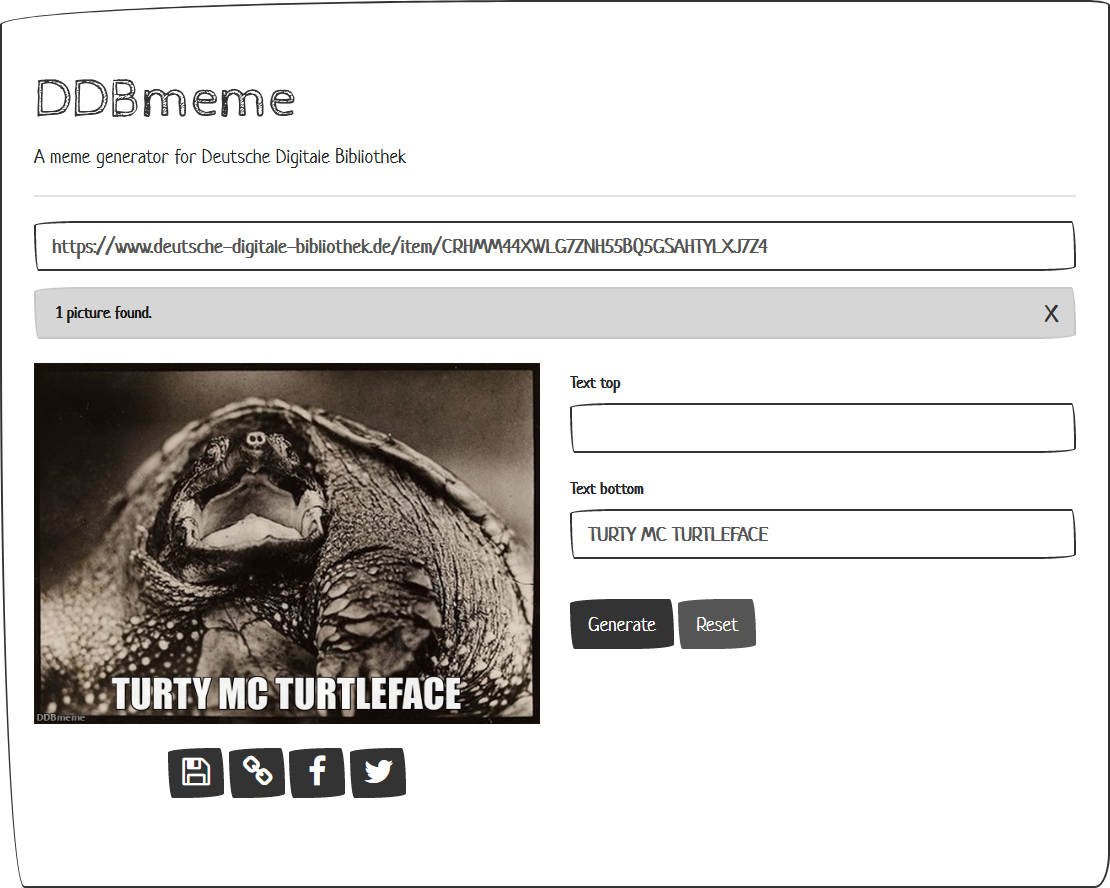
DDBmeme is published as a container image at:
https://github.com/mbuechner/ddbmeme/pkgs/container/ddbmeme%2Fddbmeme
Run it locally with:
docker run -d -p 8080:8080 -P \
  --env "SECRET_KEY=myverysecretsecretkey" \
  --env "USE_X_FORWARDED_HOST=0" \
  --env "ALLOWED_HOSTS=127.0.0.1,localhost" \
ghcr.io/mbuechner/ddbmeme/ddbmeme:latest
Open http://localhost:8080/ in your browser.
| Variable | Description |
|---|---|
| SECRET_KEY | Secret string for Django. Set this explicitly in every non-local deployment. |
| USE_X_FORWARDED_HOST | Set to 1 when DDBmeme runs behind a reverse proxy or OpenShift route. |
| ALLOWED_HOSTS | Comma-separated list of allowed hosts such as ddbmeme.example.org or localhost. |
| PATH_PREFIX | Optional URL prefix such as foo/bar/. The UI is then available at http://localhost:8080/foo/bar/. |
| GUNICORN_WORKERS | Optional number of Gunicorn worker processes for the Django app. Default: 1 (safer for single-container memory pressure). |
| GUNICORN_THREADS | Optional number of Gunicorn threads per worker. Default: 2. |
| GUNICORN_TIMEOUT | Optional Gunicorn request timeout in seconds. Default: 180. |
| MEMEGEN_BASE_URL | Optional base URL for the local meme generation service. Default: http://localhost:5001. |
| MEMEGEN_TIMEOUT | Optional memegen connect/read timeout as connect,read in seconds. Default: 5,180. |
| MEMEGEN_RETRY_TOTAL | Optional retry count for memegen GET requests. Default: 0 to avoid duplicate long-running requests under load. |
| MEMEGEN_MAX_CONCURRENCY | Max concurrent requests from Django to memegen. Default: 2. |
| MEMEGEN_QUEUE_WAIT_SECONDS | Max wait time in seconds for a free memegen slot before returning 503. Default: 30. |
| MEMEGEN_GUNICORN_TIMEOUT | Memegen gunicorn worker timeout in seconds. Default: 180. |
| MEMEGEN_WORKERS | Number of memegen gunicorn workers. Default: 1. |
| MEMEGEN_MAX_REQUESTS | Restart memegen worker after this many requests to limit long-term memory growth. Default: 200. |
| MEMEGEN_MAX_REQUESTS_JITTER | Random jitter for memegen worker recycling. Default: 30. |
| WEB_CONCURRENCY | Upstream memegen worker setting. In this deployment mapped to memegen gunicorn workers. Recommended upstream baseline: 2; current robust default here: 1. |
| MAX_REQUESTS | Upstream memegen worker recycle setting. Upstream default: 0 (disabled); current robust default here: 200. |
| MAX_REQUESTS_JITTER | Upstream memegen recycle jitter setting. Upstream default: 0; current robust default here: 30. |
| TIMEOUT | Upstream memegen gunicorn timeout. Upstream container default: 20; for slow custom backgrounds current robust default here: 180. |
No DDB API key is required.
The container exposes a lightweight health endpoint at http://localhost:8080/healthz.
It does not render templates and does not depend on external APIs, which makes it suitable for Kubernetes and OpenShift probes.
A sample OpenShift manifest is available at openshift/ddbmeme.yaml.
It includes:
- a
SecretforSECRET_KEY - a
DeploymentwithstartupProbe,readinessProbe, andlivenessProbeagainst/healthz - a
Service - a TLS-terminated
Route
Apply it with:
oc apply -f openshift/ddbmeme.yaml
The Django app is now served by Gunicorn instead of Django's development server.
Supervisor retries both application processes before the container is treated as failed.
This reduces unnecessary pod restarts for short-lived child process failures while still allowing OpenShift to restart the pod if a process reaches the FATAL state.
When downstream image generation is slow, DDBmeme now applies controlled backpressure:
- requests to the local memegen service are concurrency-limited
- excess requests wait briefly in-process and return
503if the service stays saturated - memegen worker timeouts are aligned with Django request timeouts
Upstream memegen baseline (from the project deployment defaults) is typically WEB_CONCURRENCY=2, MAX_REQUESTS=0, MAX_REQUESTS_JITTER=0, and a relatively short TIMEOUT around 20 seconds.
For this combined-container OpenShift setup with external background images, more conservative and slower-timeout values are usually more stable.
To avoid a first-request cold start, this setup uses a built-in zero-config startup sequence:
- wait for memegen readiness on
http://127.0.0.1:5001/test - send one internal prewarm request to
/images/fry/warmup/_.jpg - start Django afterwards
Startup logs include explicit "[Startup] ..." messages so readiness and prewarm behavior are visible in container logs.
- Clone the repository:
git clone https://github.com/mbuechner/ddbmeme - Change into the project directory:
cd ddbmeme - Run
docker build -t ddbmeme . - Start the container:
docker run -d -p 8080:8080 -P \
  --env "SECRET_KEY=myverysecretsecretkey" \
  --env "USE_X_FORWARDED_HOST=0" \
  --env "ALLOWED_HOSTS=127.0.0.1,localhost" \
ddbmeme
- Open http://localhost:8080/ in your browser.
version: '2'
services:
  ddbmeme:
    image: ghcr.io/mbuechner/ddbmeme/ddbmeme:latest
    environment:
      SECRET_KEY: myverysecretsecretkey
      USE_X_FORWARDED_HOST: 0
      ALLOWED_HOSTS: 127.0.0.1,localhost
    ports:
      - "8080"
    restart: always