

A native Kubernetes desktop manager for Windows, macOS and Linux. Browse clusters, workloads, nodes and custom resources; read logs; open shells; scale, cordon and drain, all from one window.
Built with Python, PySide6 (Qt Widgets) and the official Kubernetes Python client. It uses your existing kubeconfig and authentication helpers, so there is nothing to sign in to and no server component.
Status: early. Automated tests cover the UI and service behavior with fake data; live-cluster coverage varies by feature. See LIVE_TESTING.md for what has been tried and what remains unverified. View → Read-only mode refuses changes per cluster.
- Multiple clusters. Open contexts from your existing kubeconfig in separate tabs, organise them into nested groups, and suggest groups from name prefixes or a regular expression. Nothing connects on first start; when you exit, choose whether to restore your open clusters next time. View → Several clusters… combines one resource kind from several open clusters in a single list. Select two objects there to compare their YAML across clusters; right-click one object to open it in its cluster. Open pod logs for selected Deployments, StatefulSets, DaemonSets, ReplicaSets, Jobs or Services across clusters. Restart selected Deployments, StatefulSets and DaemonSets with a separate confirmation for each cluster.
- Resources and details. Browse workloads, nodes, networking, storage, RBAC, Helm releases and custom resources, with CRDs grouped by API group. Karpenter, Gateway API and cert-manager views appear when available. Details include YAML, Events and linked Related objects. Secret values stay masked until you choose keys to decode; TLS Secrets also show the public certificate's subject and expiry.
- Find your place. Search across resource kinds, jump to views, namespaces, clusters and actions with the
Ctrl+K command palette, and pin frequently used namespaces. Lists support plain-text filters and expressions
such as
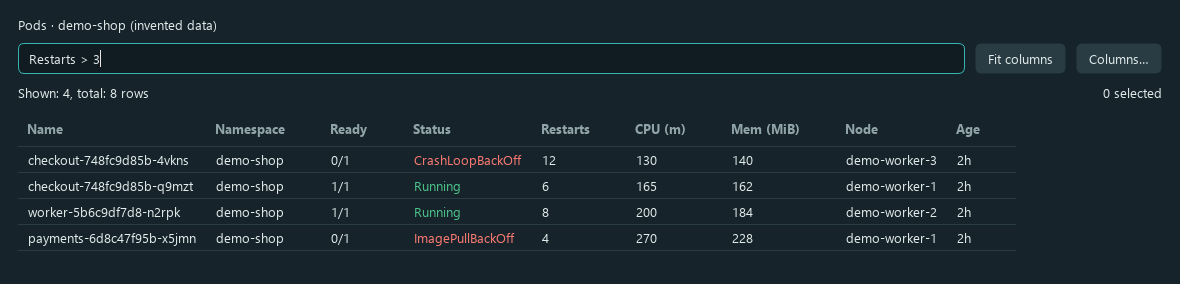
Restarts > 3orCPULim = 2*CPUReq, plus named saved filters. Hide, reorder and add label columns with Columns…; choices are saved per resource kind. - Refresh. Workloads and nodes refresh every 10 seconds and when the cluster reports a change. Other lists load when opened or refreshed manually. Set the interval in the toolbar or change a list's automatic refresh from its right-click menu. Hidden tabs and clusters are not polled; refresh preserves selection and scroll position.
- Pods and logs. Open a pod's own tab for regular, init and ephemeral containers. Stream logs from one container, selected pods, a workload or a label selector, with follow, time range, regex filters and Save. Open Shell or Attach sessions, add a debug container, or copy files. Browse files… lists a pod's files; a PVC can be browsed through a running pod that already mounts it.
- Nodes and bulk actions. Cordon, uncordon, preview a drain, drain, open a privileged node shell or delete.
Double-click a node to see its pods. Select several rows to scale, restart, terminate, cordon or delete them in
one confirmed step. Scale accepts a number or a relative change such as
*2,/2,+1,-1. - Editing and review. Form editors cover common workloads, networking and RBAC objects, ConfigMaps and Secrets; a YAML editor handles the rest. Cluster OpenAPI schema help follows the YAML cursor and Ctrl+Space completes fields and enum values. View → Review changes before saving adds a server dry run and diff to editor saves. File → Apply YAML… dry-runs and applies manifests. Compare two objects, Copy as new…, restart workloads, inspect Deployment rollout history and undo a rollout, or run and suspend CronJobs.
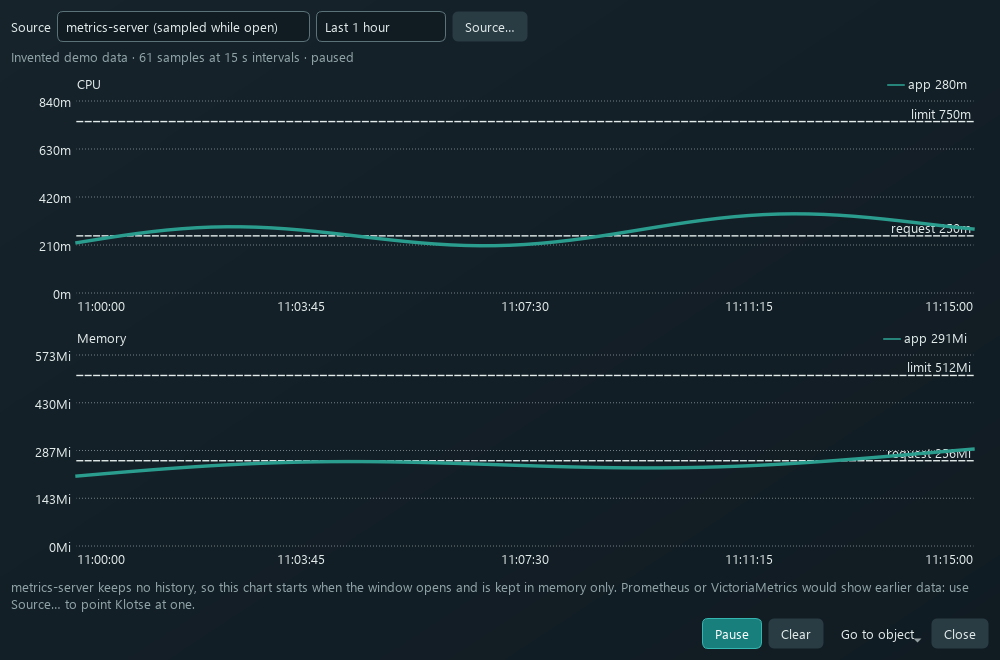
- Usage charts. CPU and memory usage, requests and limits appear in resource columns. Usage history… charts Pods, Nodes and workloads: metrics-server is sampled every 15 seconds while the window is open, with no earlier history. Source… can read real history from a Prometheus or VictoriaMetrics service through the Kubernetes API server, or through a port-forward that Klotse starts when the API server proxy is refused (plain HTTP or HTTPS, with certificate options and a Test button). Select up to 12 objects of one kind to chart them together with metrics-server. For Deployments, StatefulSets and DaemonSets, Metrics query… runs quick PromQL presets (replicas, pod CPU and memory, network, restarts) against the same source; it is read-only.
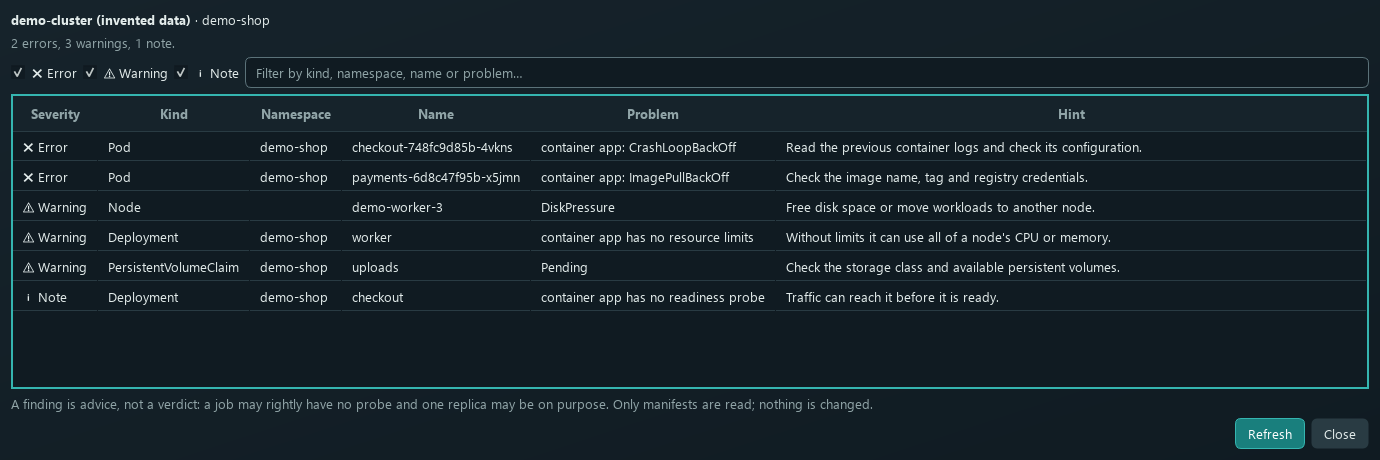
- Cluster analysis. View includes Capacity, Health check, Right-sizing, Unused objects, Upgrade preflight, Pod security, RBAC lookup and Trivy Operator reports. These views inspect data without changing the cluster. Right-sizing advice uses a single current usage sample; compare it with real history before changing requests.
- Permissions and change log. Read-only mode is remembered per cluster. My permissions… lists your namespace permissions and answers "Can I…?"; action menus flag permissions your rules forbid. The local Change log… records changes made through Klotse, without resource bodies or Secret values. It does not record commands typed in shells.
- Port-forward and Helm. Forward a Pod or Service port, manage active forwards in the Port forwards tab, and save
a forward (including one that is running) to start again later. Helm releases show history and values (hidden until requested); uninstalling needs the
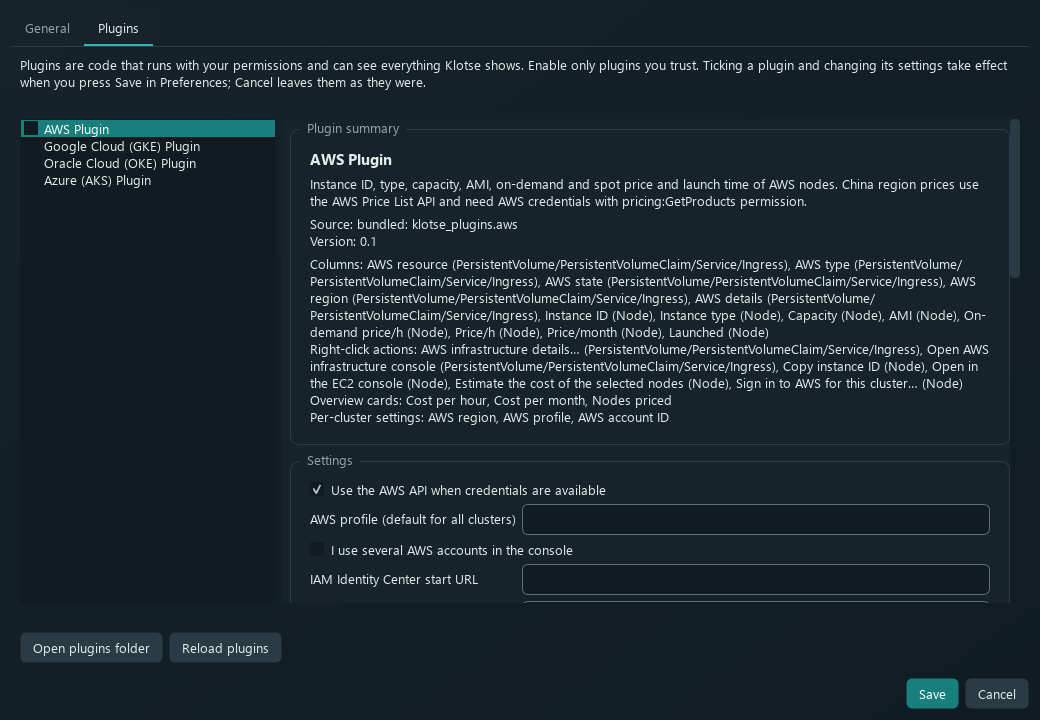
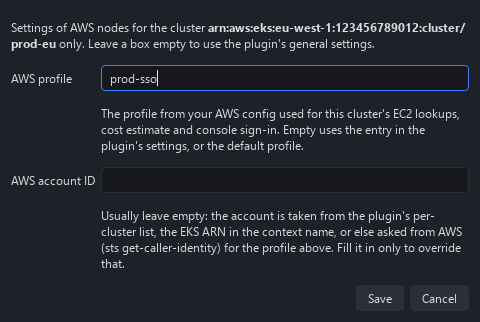
helmcommand. - Plugins. Add columns, resource actions, Overview cards and settings. The bundled AWS plugin shows instance details, on-demand and spot prices, and cluster cost estimates. Plugins are off until enabled in Preferences → Plugins; discovery reads JSON manifests without importing their Python code. Per-cluster settings, such as the AWS profile, are in the Plugins menu and a connected cluster's right-click menu. Write your own Python plugin with a JSON manifest: see PLUGINS.md.
- Preferences and terminals. Choose a kubeconfig, built-in light or dark theme, or a custom INI theme; open the settings folder and choose a terminal. On macOS, choose Terminal or iTerm2. Opt into Terminal → Open shells in → Inside Klotse for pod shells, attach and node shells in windows that can dock into Klotse. The embedded terminal uses bundled xterm.js and QtWebEngine; an external terminal is used if it cannot start.
A static user guide with screenshots is in web/:
open web/index.html in a browser, or read the GitHub Pages site published from that folder.
These captures use the current Qt widgets with invented demo data. No real cluster, credentials or AWS account was used. The charts contain generated samples, not a recording from metrics-server.
Pod filters. An expression such as Restarts > 3 narrows the list to pods that need a closer look.
Usage history. CPU and memory charts show samples collected while the window is open, with request and limit reference lines. Real history can also come from Prometheus or VictoriaMetrics through the API server, or, when the API server cannot reach it, through a port-forward that Source… starts for you.
Health check. Findings name the affected object, explain the problem and suggest what to inspect. Checking reads manifests and changes nothing in the cluster.
Preferences → Plugins. Inspect a plugin's declared features and settings before enabling it. Discovery reads its JSON manifest; Python code loads only after enablement. Only enable plugins you trust.
AWS plugin examples
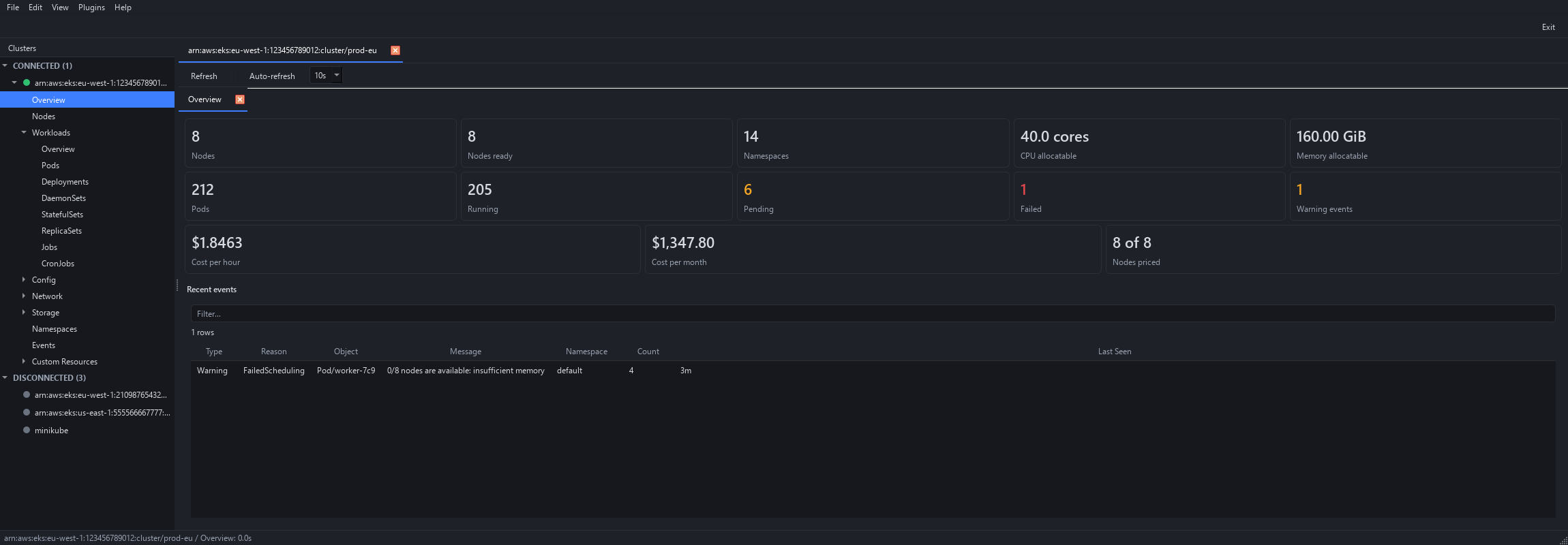
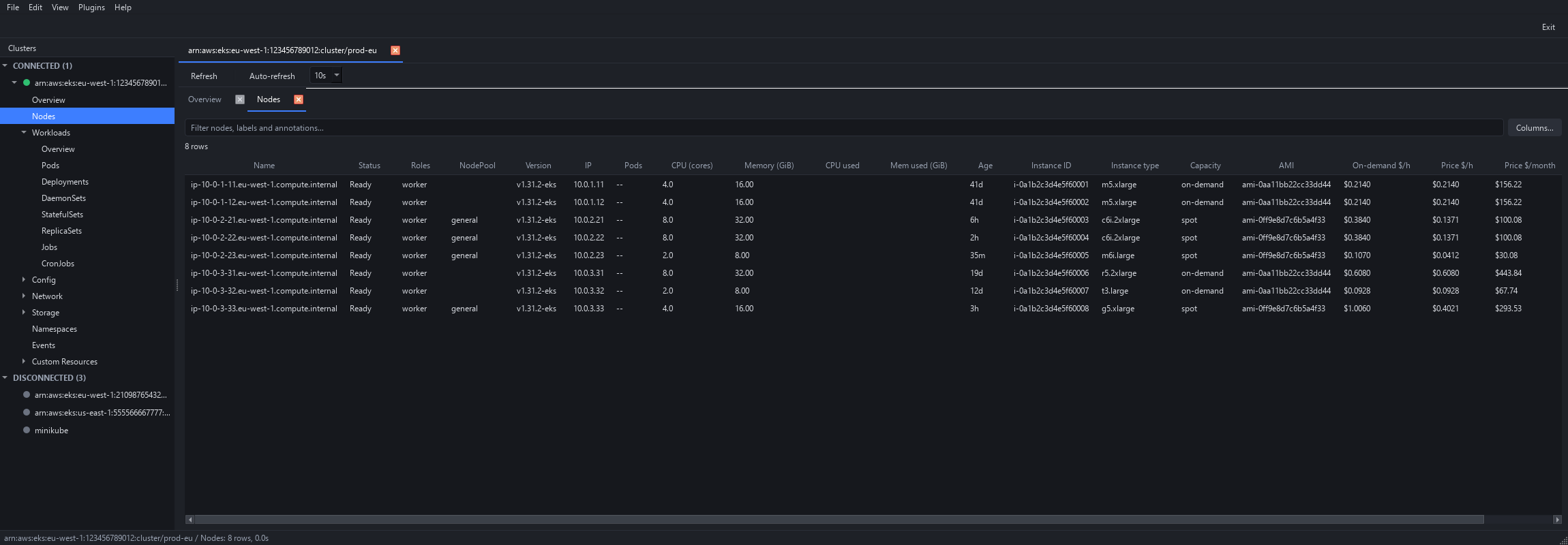
These earlier captures use a made-up eight-node EKS cluster with fake prices and instance IDs. The AWS plugin is off until enabled in Preferences → Plugins.
Cluster Overview. The plugin adds cost-per-hour, cost-per-month and priced-node cards.
Nodes with plugin columns. Instance IDs, types, AMIs and estimated prices alongside built-in node columns.
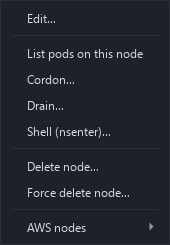
Node actions and per-cluster settings. The plugin's node submenu includes instance and console actions. Open per-cluster settings from the Plugins menu or a connected cluster's right-click menu.
- Python 3.10 or newer
- A kubeconfig with at least one context (or pick one in Edit → Preferences)
kubectlon yourPATH, for drain, shells, attach and port-forwardhelmon yourPATH, only to uninstall a Helm release- Python dependencies (installed by the launchers):
PySide6-Essentials,PySide6-Addons,PySide6-WebEngine(for the embedded terminal),kubernetes,PyYAML, andpywinptyon Windows
Native packages are built for Windows (an installer and a portable .zip) and macOS (a .dmg for Apple Silicon and
one for Intel). Downloads are on the project's Releases page, with
a SHA256SUMS.txt to check the downloads against. You can also run Klotse from source (below) or build the packages
yourself (see Development).
- The Windows installer has been tested (install, run, uninstall). The macOS apps are built and self-tested in CI, and the 0.1.0 release has been tested on an Apple Silicon Mac (M3 Pro, macOS 26.7.1). The Intel build has not been run on an Intel Mac.
- The packages are not signed yet, so expect a warning on first start: on Windows choose More info → Run anyway, on macOS right-click the app and choose Open.
- On macOS, if Klotse is reported as "damaged" or cannot be opened, the downloaded app still carries the quarantine flag that
Gatekeeper checks. After moving
Klotse.appto Applications, remove the flag once in Terminal:xattr -dr com.apple.quarantine /Applications/Klotse.appThe packages are not notarized by Apple, so this is needed on Macs other than the one that built them. kubectlis not included and has to be installed separately.
There is no native Linux package yet. Install with pipx, which keeps Klotse and its
dependencies in their own environment and puts a klotse command on your PATH:
pipx install klotse                                # released version from PyPI
# Or install the current development version:
pipx install git+https://github.com/mbartsch/klotse
klotse --install-desktop-entry                        # optional, Linux: add Klotse to the application menu
klotse --uninstall-desktop-entry removes the menu entry again. On a minimal Debian/Ubuntu install Qt may also need
these libraries for its X11 support (the project's CI installs exactly this list on Ubuntu and starts Klotse under
X11); most desktops already have them:
sudo apt install libegl1 libxkbcommon-x11-0 libxcb-cursor0 libxcb-icccm4 libxcb-image0 libxcb-keysyms1 \
  libxcb-randr0 libxcb-render-util0 libxcb-shape0 libxcb-xinerama0 libxcb-xkb1
On other distributions install the equivalent packages. If Klotse stops with "could not load the Qt platform plugin
xcb", run QT_DEBUG_PLUGINS=1 klotse to see which library is missing.
macOS / Linux:
./run.sh              # creates .venv and installs dependencies on first run
./run.sh --check      # check that the imports work, without opening the window
./run.sh --install    # reinstall dependencies
Windows:
run.bat               # starts without a console window
run.bat --console     # keeps tracebacks visible
run.bat --check
run.bat --install
Or, in an existing environment:
pip install -r requirements.txt
PYTHONPATH=src python -m klotseSettings are stored as a plain INI file, one section per resource kind and one entry per line:
[columns.Pod]
order.0=name
order.1=namespace
order.2=ready
hidden.0=cpu_req
hidden.1=cpu_lim
labels.0=app.kubernetes.io/name
labels_name.0=App
labels.1=example.com/team
order is the order of the built-in columns, hidden lists the ones that are hidden, and labels the label
columns; labels_name.N gives labels.N a short heading. A key that is missing means the default; an empty key
(hidden=) means none. You can edit the file by hand while Klotse is closed.
The same file keeps which clusters are read-only ([readonly] contexts.N) and the lists whose automatic refresh you
changed ([refresh] manual.N / auto.N, only entries that differ from the defaults).
Open its folder from Edit → Preferences… → Open config folder. The same file holds the custom kubeconfig path
and the macOS terminal choice. A custom kubeconfig is passed both to the Kubernetes client and, as --kubeconfig,
to every kubectl command Klotse starts.
Settings from the earlier name of the project (Kubeman) are copied over on the first start.
pip install -r requirements-dev.txt
PYTHONPATH=src QT_QPA_PLATFORM=offscreen python -m pytest -q
Tests run offscreen with fake services and synthetic Kubernetes objects; they never touch a real cluster or your
real settings. run_tests.sh / run_tests.bat wrap the same command.
On Linux, a real display server is optional. For a full Qt-backed run, install Xvfb and use
xvfb-run -a env PYTHONPATH=src python -m pytest -q; otherwise keep QT_QPA_PLATFORM=offscreen.
The loading-clock tests verify timer and hide/show state without calling QWidget.grab(): Qt 6.12 can
segfault while rendering an offscreen widget under both the offscreen and Xvfb backends, even though the
application's normal paint path remains unchanged.
Recreate the four current demo screenshots without connecting to a cluster:
PYTHONPATH=src python scripts/capture_screenshots.pyThe helper renders offscreen, uses temporary settings and writes screens/08-11. Fonts and spacing may
differ between operating systems. The older AWS examples are retained separately.
After all tests pass the pytest process can still exit non-zero (a crash during Qt teardown in some test orders). This is a known, unresolved issue that predates recent work, so check the pass count and the exit status separately.
To build the native packages (details, signing and releases in packaging/README.md):
powershell -ExecutionPolicy Bypass -File packaging\windows\build.ps1   # Windows: zip, plus installer if Inno Setup is installed
packaging/macos/build.sh                                               # macOS: Klotse.app and a .dmg
A packaged app can check itself: Klotse --version and Klotse --self-test [REPORT_FILE]. GitHub Actions builds
the native packages on a version tag (made by the Release workflow) or on demand; tagged builds draft a release.
AGENTS.md documents the architecture, file map and behavior to preserve; read it before larger
changes. Work goes through pull requests from a branch; do not commit to master directly.
Klotse is written in Python with PySide6 today. The idea is to move to Qt/C++ (or a similar language) at some point. Nothing is decided and there is no timeline; the Python version is the one being developed in the meantime.
Klotse is released under the Apache License 2.0.
Kubernetes is a registered trademark of The Linux Foundation. Klotse is an independent project and is not affiliated with or endorsed by The Linux Foundation or the Kubernetes project.
Marcelo H. Bartsch · https://github.com/mbartsch/klotse