
Open-source AI SDR for B2B outreach. LinkedIn sequences, cold email, and lead enrichment — self-hosted, no per-seat pricing.


▶ Full demo | https://youtu.be/S6n4RHULq3E
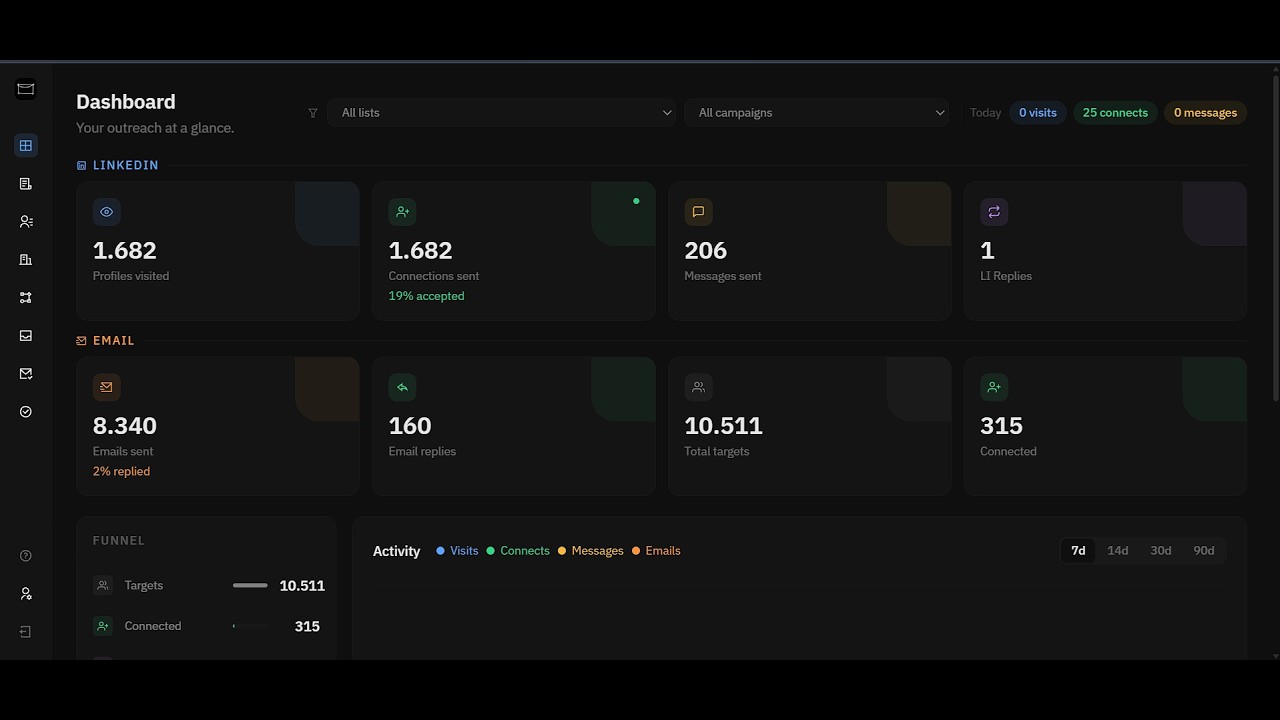
Linki is an open-source AI SDR built for B2B founders and sales teams who want full control over their outreach. You build multichannel campaigns — LinkedIn sequences, cold email, or both — enrich your leads, and run everything on your own server. Your data never leaves your machine.
No SaaS middleman. No per-seat pricing. No black box.
- LinkedIn + email in one campaign: run LinkedIn actions (visit, connect, message) and email actions in parallel within a single campaign sequence
- Flexible step builder: chain visit → connect → delay → message → cold email in any order, with configurable delays between steps
- Per-lead state tracking: see exactly where every lead is across both channels, with a live pipeline view broken down by step and status
- A/B template pools: assign multiple message templates to a step and rotate them automatically
- Headless server-side authentication: log in to LinkedIn directly on your server — no cookie-pasting — so the session is born under the exact browser fingerprint the automation runs with
- Handles LinkedIn's real challenges: email/SMS codes and mobile-app device approval, plus LinkedIn's dynamic React login fields
- Longer, more stable sessions: a pinned browser fingerprint keeps sessions alive far longer, enabling more complex and more frequent LinkedIn activity without forced logouts
- Captures the full session: including the httpOnly Sales Navigator seat cookie that cookie-paste can't reach — so Sales Nav import and enrichment just work
- Sales Navigator import: paste a list URL and Linki pulls in all leads with name, title, company, location, seniority, and LinkedIn URL
- CSV import: bring in leads from anywhere else — a downloadable template covers LinkedIn URL, Sales Nav URL, email, and every contact field; each row just needs a LinkedIn URL and/or an email, so LinkedIn-only, email-only, and mixed lists all work
- Batched & scheduled imports: large lists split across days automatically under a global daily cap, with human-like pacing so imports never look like a bot burst
- Apollo.io enrichment: connect your Apollo API key and enrich any list with verified email addresses, company data, and seniority in one click
- Sales Nav profile enrichment: pull richer profile data (headline, positions) for better targeting, gathered at runner time to stay under the radar
- Company model: enriched company records (description, headcount, industry, location) linked from contacts; never duplicated across leads
- Contact detail pages: full profile view with outreach history, enrichment status, and all campaign activity per contact
- Aggregated reply feed: all email replies from active campaigns surface in one inbox regardless of which email account received them
- Email + LinkedIn reply detection: the runner passively monitors both email and LinkedIn conversations and flags contacts who replied
- Reply filtering: only shows contacts who actually replied; noise-free by design
- Inline reply composer: read the full email thread and reply without leaving Linki
- Pinned browser fingerprint: Chromium and its base image are version-pinned so a rebuild never changes the fingerprint LinkedIn sees — the single biggest cause of forced logouts, eliminated
- 63% improvement in connection reliability: rewritten LinkedIn automation with smarter DOM targeting, clipboard-based message delivery, and graceful handling of LinkedIn's UI variants
- Human-like import behavior: lead list imports use randomized delays and pacing patterns to avoid triggering LinkedIn's bot detection
- Email account ramp-up: gradually increase sending volume on new email accounts to build sender reputation safely
- Multiple accounts: connect as many SMTP/IMAP email accounts and LinkedIn accounts as you need, each with its own daily limits
- Daily limits & auto-reschedule: set max connections and messages per day; when a limit is hit the runner reschedules work for the next day automatically instead of stopping the campaign
- Campaign pipeline view: funnel breakdown by step with prospect counts per stage; click any step to drill into the exact contacts at that point
- Stats bar: live counts for total prospects, in progress, completed, failed/skipped, connections sent, accepted, and messages sent
- Acceptance rate: tracks connection request → acceptance ratio per campaign
- Dashboard overview: cross-campaign summary of active runs, total contacts, recent activity
- CSV import — bring your own leads from any source (a prior export, a website scrape, another tool). One template covers everything: LinkedIn URL, Sales Navigator URL, email, and every contact field — each row just needs a LinkedIn URL and/or an email
- Generic inboxes supported — role-based addresses (
info@,contact@,sales@…) import as regular contacts, ready for email-only campaigns - Phone number field — track a contact's phone alongside email and LinkedIn, editable inline on the contact page or via CSV/API
- Bulk contact deletion — permanently delete contacts (and their run history) from the Contacts page, with a confirmation step
- Server-side headless LinkedIn login — logs in on your server (email/SMS code or mobile-app approval), captures the full session incl. the Sales Navigator seat cookie, and unlocks longer, more frequent, more complex LinkedIn sessions
- Pinned browser fingerprint — Chromium + base image are version-pinned so rebuilds never trigger a forced logout
- Batched & scheduled imports — big Sales Nav lists split across days under a global daily cap with human-like pacing
- Better reply sync — reply detection for both email and LinkedIn, with accurate accepted-connection sync via LinkedIn's own APIs
- Lead enrichment built in — Apollo.io + Sales Nav profile enrichment, one-click on any list
Opsily is the easiest way to run Linki. Create a server, deploy Linki from the app store, and you get a live URL in under a minute: no terminal required.
1. Create your environment file
cp .env.example .env.localFill in .env.local:
# Public URL of the app (e.g. https://linki.yourdomain.com or http://localhost:3456)
NEXTAUTH_URL=http://localhost:3456

# Random secret: generate with: openssl rand -base64 32
NEXTAUTH_SECRET=your_random_secret_here

# Password to log in to the Linki UI
AUTH_PASSWORD=your_password_here
2. Start the container
docker compose up -dOr pull the image directly:
docker run -d -p 3456:3000 \
  -e NEXTAUTH_URL=http://localhost:3456 \
  -e NEXTAUTH_SECRET=your_random_secret_here \
  -e AUTH_PASSWORD=your_password_here \
  -v $(pwd)/data:/data \
  moaljumaa/linki:latest
Linki is now running at http://localhost:3456. The SQLite database is persisted in ./data/linki.db on your host machine.
Requires Node.js 22+.
npm install
npm run build
npm startGo to Settings → LinkedIn and add your account. Set conservative daily limits to start (recommended: 20 connections/day, 30 messages/day).
Click Authenticate and use Server login — Linki logs in on the server and walks you through LinkedIn's verification (email/SMS code or a tap in the LinkedIn mobile app). This captures a full, long-lived session, including the Sales Navigator seat needed for imports.
Go to Settings → Email and add your SMTP/IMAP accounts. You can add as many as you need. Enable ramp-up on new accounts to build sender reputation gradually.
Go to Settings → Integrations and add your Apollo API key. Once connected, open any lead list and click Enrich to pull in verified emails and company data.
Go to Lists → New list and paste a LinkedIn Sales Navigator list URL. Linki imports all leads with human-like pacing to avoid detection.
Note: A LinkedIn Sales Navigator subscription is required to import leads.
Go to Workflows → New workflow. Add your steps — LinkedIn actions, email steps, delays — write your messages (or use templates and A/B pools), then create a run and launch.
Everything above is open-source and runs standalone. If you'd rather not manage servers — or want the AI features on top — the fully-managed edition on Opsily adds an AI agent that writes every message per-lead (any model via OpenRouter), a hosted MCP endpoint to drive Linki from Claude / Cursor, automatic AI reply handling, and Sales Navigator InMail. Deploy in a minute →
Linki is source-available under the Linki Sustainable Use License.
You can: use it personally, use it for your business, self-host it on your own VPS or laptop, modify it, contribute to it.