


Machai is a multi-module Java toolkit for GenAI-enabled developer automation, bringing together provider-neutral AI access, embeddings, Bindex library discovery, MCP servers, Maven integrations, and Ghostwriter workflows.
To clone and set up this project locally, follow these steps:
- Clone the repository:
git clone --recurse-submodules https://github.com/machanism-org/machai.git cd machai - Build the project using Maven:
mvn clean install
| Name | Description |
|---|---|
| Project Layout | Java library that provides a shared API for discovering project roots, source, test, resource, and documentation paths, and modules. It detects Maven, Gradle, JavaScript/TypeScript, Python, and MS Access layouts, with a filesystem fallback, and supports recursive module processing for build tools, scanners, generators, validators, and other repository tooling. |
| GenAI Client | Provider-neutral Java library for generative-AI integrations. It supports prompt execution, embeddings, provider resolution, usage tracking, web search, MCP servers, and registration of Java methods as AI-callable tools, prompts, and resources. |
| Machai MCP Server | Java 17 Model Context Protocol server runtime that exposes functional tools and prompts through STDIO or HTTP, including stateless and streamable HTTP modes; domain-specific tools remain in separate runtime libraries. |
| MCP Server Maven Plugin | Maven plugin that starts the Machai MCP Server for a Maven project over HTTP. Its aggregator goals provide stateless or streamable transport and supply project metadata, parameters, tools, and project-directory context. |
| Bindex Core | Core services for Bindex metadata retrieval, registration, semantic library recommendation, classification, embeddings, and MongoDB-backed persistence. It supports Ghostwriter, Maven plugins, MCP workflows, and AI-assisted project assembly. |
| Ghostwriter | AI-powered project-wide processing engine and command-line tool for source code, tests, documentation, site content, configuration, diagrams, and other project files. It uses embedded guidance and reusable Acts for repeatable AI-assisted automation. |
| Ghostwriter-Py (mgw) | Python API and command-line wrapper around Ghostwriter. It bundles the Java runtime with mgw, validates JAVA_HOME, and starts JPype lazily. Its gw, gdp, and adw functions support CLI invocation, guidance processing, and Act execution; direct processor calls can resolve local JARs or Maven coordinates through jgo and return ordinary Python results. The package metadata allows Python 3.9+, though the current implementation needs Python 3.10+ at import time. |
| GW Maven Plugin | Primary Maven adapter for Ghostwriter. It runs guidance-driven processing or named and prompt-based Acts over selected project files, with project-wide and per-module goals, Maven settings integration, and Java class-introspection tools. |
| Ghostwriter MCP Server | Runnable Java 17 MCP server that packages Ghostwriter workflows, Bindex metadata services, and the Machai MCP runtime. It exposes project-assistance, metadata retrieval, registration, and library-recommendation capabilities through STDIO or HTTP. |
| Bindex Maven Plugin | Maven plugin that generates and registers Bindex metadata for Maven projects and reactor builds. It provides reactor-wide and per-module goals that delegate generation and registration to Ghostwriter and Bindex Core workflows. |
| Bindex MCP Server | Standalone Java 17 distribution packaging Bindex Core with the Machai MCP runtime. It exposes complete or GraphQL-filtered metadata retrieval, validation and registration from JSON, files, or URLs, schema access, and natural-language library recommendations through STDIO or HTTP. Recommendations use classification, embeddings, and MongoDB-backed search with language, layer, score, and version filters. |
Machai is a Maven parent project coordinating eleven modules. Project Layout provides shared directory resolution, and GenAI Client provides provider-neutral prompts, embeddings, and tool abstractions. Ghostwriter uses both foundation libraries for guidance-driven repository automation; Bindex Core uses GenAI Client for metadata classification and semantic library discovery. Machai MCP Server supplies the reusable HTTP and STDIO runtime.
The architecture groups the modules into foundation libraries, core services, language integrations, Maven build integration, and ready-to-run MCP server distributions. Ghostwriter-Py embeds Ghostwriter for Python callers. GW Maven Plugin runs Ghostwriter, Bindex Maven Plugin uses GW Maven Plugin and Bindex Core, and MCP Server Maven Plugin starts the MCP runtime. Ghostwriter's packaging profile includes Bindex tools, also packaged transitively by the Python integration. Ghostwriter MCP Server publishes Ghostwriter and Bindex capabilities; Bindex MCP Server publishes Bindex capabilities. External AI providers supply model and embedding APIs, Maven invokes the plugins, and MCP clients consume the packaged server tools.
The parent build declares eleven modules, and all eleven are Git submodules pinned to specific commits. The parent repository tracks each module as a submodule and configures its remote; each module link above points to that remote rather than to a relative path in the parent repository. Use git submodule update --init --recursive in an existing checkout to populate or synchronize the modules.
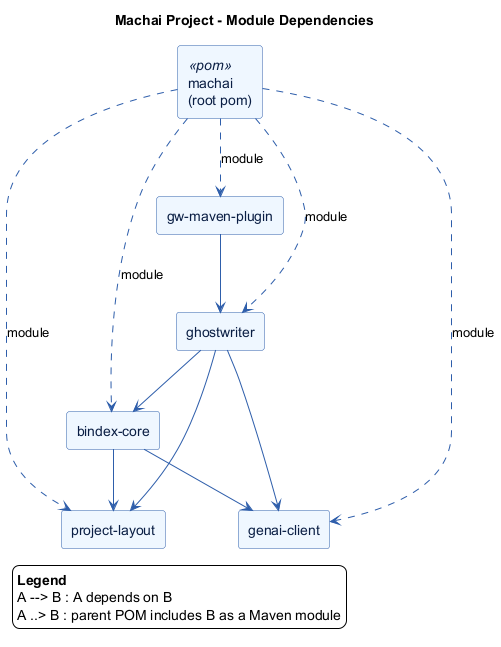
Applications can use the GenAI client directly, expose tools through MCP, discover reusable libraries through Bindex, or automate repository-wide updates to source code, tests, documentation, configuration, diagrams, and other project files with the Ghostwriter command line and Maven plugin. The modules are designed to work independently where appropriate and together for end-to-end AI-assisted development workflows.
- JDK 17 or newer is required to build the complete reactor. Several libraries target Java 8 bytecode, while the MCP server components and Bindex Core require Java 17.
- Apache Maven 3.8.1 or newer.
- Git and network access to download dependencies.
- Provider credentials and service configuration when running GenAI, Bindex, or custom functional-tool workflows.
Run the full verification suite with:
mvn clean verifyTo build and stage the project site, first set MACHAI_SITE to a writable staging directory used by the site's post-processing configuration:
mvn clean install site site:stageSet MACHANISM_PACK_DIR before running mvn -Ppack install when a packaging profile needs to create a CLI or server distribution. Reactor-wide packaging also builds the Python wrapper and requires Python 3.9 or newer with the build package installed (python -m pip install build). Running the current wrapper requires Python 3.10 or newer despite its declared Python 3.9 minimum. Set JAVA_HOME before using the Python wrapper.
Add a published module to your Maven project, selecting the version you require:
<dependency>
  <groupId>org.machanism.machai</groupId>
  <artifactId>genai-client</artifactId>
  <version>1.4.2</version>
</dependency>
See the selected module's documentation for provider configuration, API details, and workflow examples.
Build the Machai MCP server with its packaging profile, add functional-tool libraries to the runtime classpath, and start it in STDIO mode:
mvn -pl machai-mcp-server -Ppack install
java -cp path/to/machai-mcp-server.jar:path/to/functional-tools.jar org.machanism.machai.mcp.server.McpServer
Start HTTP mode on port 45000:
java -cp path/to/machai-mcp-server.jar:path/to/functional-tools.jar org.machanism.machai.mcp.server.McpServer --port 45000These commands require the assembled JAR containing runtime dependencies; substitute its actual output path and your tool library paths. On Windows, quote the classpath and separate entries with ; instead of :, for example java -cp "path/to/machai-mcp-server.jar;path/to/functional-tools.jar" org.machanism.machai.mcp.server.McpServer --port 45000. Connect an HTTP MCP client to http://localhost:45000/mcp; add --session for streamable HTTP sessions.
Process guidance-tagged files:
mvn org.machanism.machai:gw-maven-plugin:gwRun an Act or direct prompt for a selected path:
mvn org.machanism.machai:gw-maven-plugin:act -Dgw.act="review Focus on public APIs" -Dgw.path=src/main/javaConfigure the required AI provider, model, credentials, Bindex repository, and tool-specific settings before running AI-backed workflows.
From an unpacked Ghostwriter delivery pack, inspect the CLI options or process a selected path:
java -jar gw.jar --help
java -jar gw.jar src --projectDir .
With Python 3.10 or newer and JAVA_HOME configured, install the wrapper and inspect its CLI:
python -m pip install mgw
python -m mgw --help
The wrapper exposes gw, gdp, and adw for Python applications. Use Bindex Maven Plugin's bindex and register goals to generate and publish metadata, or their -per-module variants for reactor module processing. MCP Server Maven Plugin's stateless and streamable goals launch an HTTP endpoint from Maven with -Dmcp.port=45000 -Dmcp.config=gw.properties. The Ghostwriter and Bindex MCP distributions package their respective tools for MCP clients; consult the linked module documentation for service configuration and packaging details.
Modules that include the SLF4J SimpleLogger binding can be configured with simplelogger.properties on the runtime classpath, commonly in src/main/resources. This example enables a global level and package-specific levels, writes to standard output, and configures the log layout:
org.slf4j.simpleLogger.defaultLogLevel=info
org.slf4j.simpleLogger.log.org.machanism=debug
org.slf4j.simpleLogger.log.org.machanism.machai=trace
org.slf4j.simpleLogger.logFile=System.out
org.slf4j.simpleLogger.showThreadName=true
org.slf4j.simpleLogger.showLogName=true
org.slf4j.simpleLogger.showShortLogName=true
org.slf4j.simpleLogger.levelInBrackets=true
org.slf4j.simpleLogger.showDateTime=true
org.slf4j.simpleLogger.dateTimeFormat=yyyy-MM-dd HH:mm:ss.SSS
Set org.slf4j.simpleLogger.logFile=System.err for standard error, or set it to a writable file path such as logs/machai.log; its parent directory must exist. For STDIO MCP servers, use standard error or a file because standard output is reserved for protocol messages. Package-specific settings override the default level. Valid levels are trace, debug, info, warn, error, and off.
Override the same properties at launch without changing classpath resources:
java -Dorg.slf4j.simpleLogger.defaultLogLevel=debug -Dorg.slf4j.simpleLogger.log.org.machanism.machai=trace -Dorg.slf4j.simpleLogger.logFile=System.err -Dorg.slf4j.simpleLogger.showDateTime=true -jar machai-mcp-server.jarPlace JVM properties before -jar. If a change does not take effect, confirm that slf4j-simple is present at runtime, simplelogger.properties is on the effective classpath, and another SLF4J provider has not been selected.
- Open an issue for a bug, documentation gap, feature proposal, or design question.
- Create a focused branch from
mainand keep changes limited to the stated problem. - Follow the existing Java and Markdown style, preserve guidance comments, and update relevant documentation when behavior changes.
- Add or update tests, run
mvn clean verify, and submit a pull request with a clear summary, testing details, and configuration or compatibility impact. - Address review feedback and keep the branch synchronized with the target branch.
Machai is distributed under the Apache License, Version 2.0.
- Machai project site
- GitHub repository
- GitHub issue tracker
- Machanism organization
- Maintainer: Viktor Tovstyi, viktor.tovstyi@gmail.com