
Access your DeepSeek Harness (dsh) workspace from your phone, your iPad, or any browser — over a secure, temporary public tunnel that exists only while you use it.
dsh-share is built for you to reach your own DeepSeek Harness from your own devices. It's not a sharing tool: the URL and the generated password are meant for you, not to hand out.
Free, no account, no signup. dsh-share uses a Cloudflare quick tunnel
(cloudflared) to expose your local dsh web server over HTTPS. No Cloudflare
account, no API token, no ngrok authtoken — just click Start and you get a
public https://*.trycloudflare.com URL you can open on any device.
Built with DeepSeek v4 Flash. The code in this repository was written by the DeepSeek v4 Flash model.
⭐ If dsh-share saves you an hour, star the repo — it helps others find it.

Grab the latest installer for your platform from the releases page:
| Platform | Format |
|---|---|
| macOS | DMG / zip |
| Windows | NSIS installer |
| Linux | AppImage |
┌───────────────────────────────  Your desktop  ───────────────────────────────┐
│                                                                              │
│   dsh-share (Electron app)                                                   │
│     │                                                                        │
│     ├─ 1. starts dsh web  ──────────────►  dsh web server                    │
│     │        (--trusted-host <public>)     127.0.0.1:<dshPort>              │
│     │                                                                        │
│     ├─ 2. local basic-auth proxy ───────►  forwards HTTP + WebSocket         │
│     │        (username / password)          to dsh on loopback               │
│     │                                                                        │
│     └─ 3. cloudflared quick tunnel ─────►  https://<host>.trycloudflare.com │
│              (no account / token)                                            │
│                                                                              │
└──────────────────────────────────────────────────────────────────────────────┘
                              │
                              │  HTTPS (Cloudflare edge)
                              ▼
┌───────────────────────────────  Cloudflare  ──────────────────────────────────┐
│   Free quick tunnel — terminates TLS, routes to your machine                 │
└──────────────────────────────────────────────────────────────────────────────┘
                              │
                              ▼
┌───────────────────────────────  Any device  ─────────────────────────────────┐
│   Phone / laptop / remote browser                                            │
│     • open the public URL, or                                                 │
│     • scan the QR code with the dsh-mobile app                               │
│     • authenticate with the generated username / password                    │
└──────────────────────────────────────────────────────────────────────────────┘
The app bundles the pieces you'd otherwise wire by hand:
- Starts a Cloudflare quick tunnel (
cloudflared) to dsh's web server — no account, no token, no signup. - Puts a small local basic-auth proxy in front of dsh (quick tunnels don't provide auth themselves).
- Starts dsh web with the public URL as a
--trusted-host, so the browser-trust fence accepts/apicalls through the tunnel. - Shows you the public URL, credentials, and a QR code in a control window.
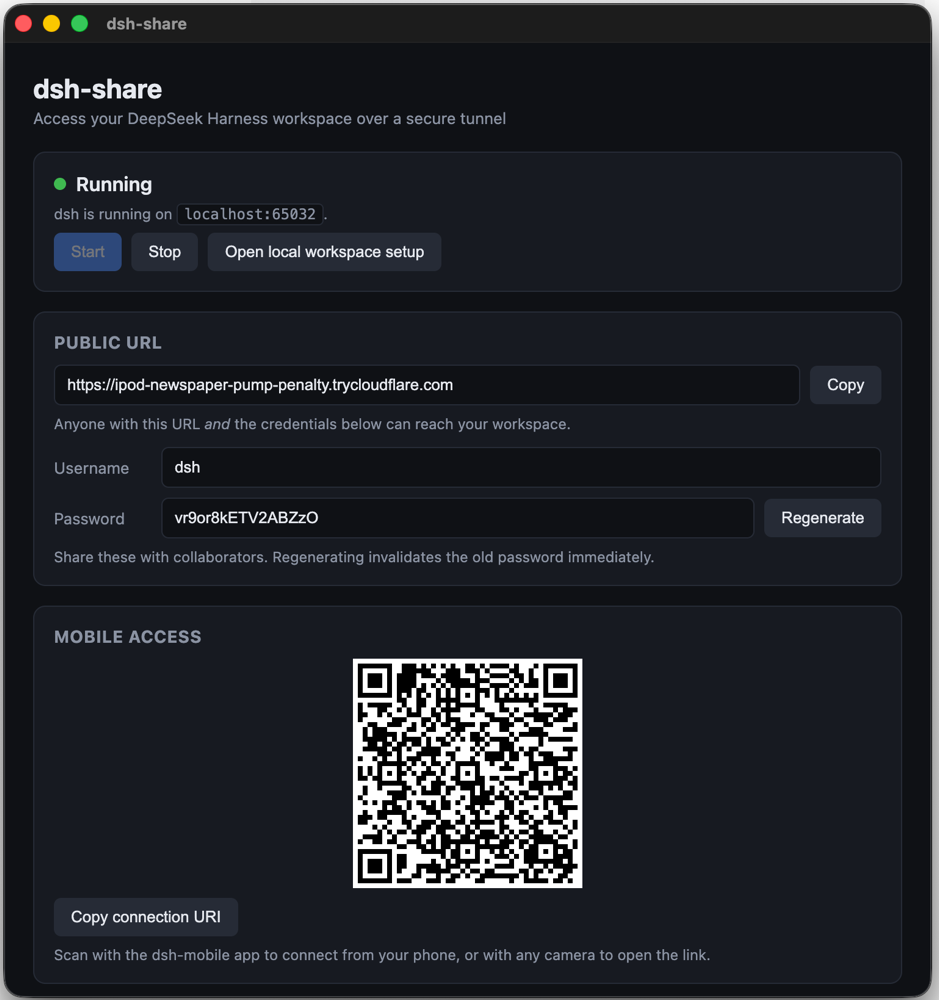
- Zero-friction start — just click Start. No ngrok account, no authtoken, no Settings to configure.
- Free Cloudflare quick tunnels — no account, token, or signup required.
- First-run security warning — a modal you must acknowledge before the tunnel can be started.
- Auto-generated credentials — stored in
~/.config/dsh-share/auth.json, regenerable from the UI. - Mobile access — a QR code in the control window; scan it with the dsh-mobile app to connect from your phone.
- Cross-platform builds — DMG/zip (macOS), NSIS (Windows), AppImage (Linux), with optional code signing + notarization.
- Automatic app updates — checks GitHub releases on launch, downloads the new version in the background, and installs on quit or with one click.
- GitHub Actions CI — builds all three platforms and attaches artifacts to
releases on
v*tags.
dsh web only trusts loopback by default. To reach it from another device you
must pass the current tunnel domain as --trusted-host — and the free-tier
domain rotates on every restart. This app automates that whole dance.
npm install
npm startnpm run dist # current platform
npm run dist:mac # macOS (DMG + zip)
npm run dist:win # Windows (NSIS)
npm run dist:linux # Linux (AppImage)Produces installers in dist/. The app icon is generated by
node scripts/generate-icon.js (no image tools needed).
Signing is optional and driven by environment variables, so unsigned builds work out of the box:
| Platform | Env vars | Effect |
|---|---|---|
| macOS | CSC_LINK, CSC_KEY_PASSWORD |
signs the app |
| macOS | APPLE_ID, APPLE_APP_SPECIFIC_PASSWORD, APPLE_TEAM_ID |
notarizes (via scripts/notarize.js) |
| Windows | CSC_LINK, CSC_KEY_PASSWORD |
signs the installer |
.github/workflows/build.yml builds macOS, Windows, and Linux (AppImage) on
every push/PR, and creates a GitHub release with all artifacts when you push a
v* tag. Add the signing secrets above to the repo's Actions secrets to get
signed/notarized builds.
.github/workflows/update-dsh.yml runs daily (and on manual dispatch) and keeps
the bundled DeepSeek Harness current with no manual steps:
scripts/update-dsh.jschecks npm for the latest@deepseek-ai/dsh. If a new version exists, it bumps every@deepseek-ai/*dependency, adds any new harness packages as direct dependencies (electron-builder drops peerDependencies, so they must be direct deps to hoist), and bumps the app version to the next patch after the latestv*tag.- It opens a PR;
build.ymlbuilds all three platforms on it. - When the build passes, the PR is auto-merged, a
v*release tag is cut (which triggers the release job), and the gh-pages download buttons and the "Bundled DeepSeek Harness" version note are updated.
If a previous run merged the PR but failed to cut the release, the next run detects the missing tag and cuts it without a new PR. Run it manually anytime with Actions → update-dsh → Run workflow.
Installed copies of dsh-share update themselves via
electron-updater. On launch the app
checks the GitHub releases page; when a newer version exists it downloads it in
the background and installs it on quit — or immediately via the Restart &
install button in the control window. Updates are signed and notarized like
the initial install, so Gatekeeper accepts them. The latest*.yml manifests
electron-updater reads are uploaded to each release by build.yml.
Electron main
 ├─ pick a free port for dsh (never collides with a dsh already on 3080)
 ├─ createAuthProxy(port, user, pass)  → local basic-auth reverse proxy
 │    └─ forwards to the app's dsh on 127.0.0.1:<dshPort> (HTTP + WebSocket)
 ├─ startTunnel(proxyPort)            → cloudflared tunnel --url http://127.0.0.1:<proxyPort>
 │    └─ parses the https://*.trycloudflare.com URL from cloudflared's log
 ├─ startDsh(host, dshPort)           → node @deepseek-ai/dsh web --trusted-host <host> --port <dshPort>
 └─ control window shows URL + credentials + the local dsh port + logs
Credentials are generated on first launch, stored in
~/.config/dsh-share/auth.json, and can be regenerated from the UI.
- The tunnel uses HTTPS (Cloudflare) and basic auth (the local proxy).
- Regenerating credentials invalidates the old password immediately.
- The URL and password let you reach your machine from your phone or iPad. dsh-share is designed for you to access your own DeepSeek Harness, not for sharing — keep the link and credentials to yourself. The tunnel is temporary: it's destroyed the moment you stop, so there's no permanent public endpoint. Stop the tunnel when you're done.
- Add workspaces on
http://localhost:3080first — the file picker (host.pickDirectory) is loopback-only by design. - Stop any dsh you already have running before using the app. The app runs
its own dsh against the same
~/.dshconfig; if your dsh is already up, the two conflict (EPERM / 502). The app detects a dsh on port 3080 and warns you.
| Env var | Purpose |
|---|---|
DSH_BIN |
Path to @deepseek-ai/dsh/lib/bin.js (overrides auto-detection) |
CLOUDFLARED_BIN |
Path to the cloudflared binary (overrides bundled/PATH) |
DSH_SHARE_CONFIG_DIR |
Override the config dir (default ~/.config/dsh-share) |
MIT