A production-quality MCP server and interactive TUI that maps, analyzes, and guards environment variables across your entire codebase.


Features • Installation • TUI Mode • MCP Tools • Languages
Environment variables are the silent killers of production deployments:
- 💥 Runtime crashes from undefined variables with no defaults
- 🔓 Security leaks from secrets committed in the wrong files
- 📉 Configuration drift when .env files diverge across environments
- 😤 Onboarding friction when new devs don't know which vars to set
- 🗑️ Dead code from variables defined but never used
Envark catches these issues before they hit production.
| Feature | Description |
|---|---|
| 🔍 Multi-language parsing | JavaScript, TypeScript, Python, Go, Rust, Shell, Docker |
| 🎯 Risk scoring | Critical, High, Medium, Low, Info classifications |
| 📊 Dependency graphs | Understand which vars cluster together |
| ✅ Validation | Check .env files against actual code requirements |
| 📝 Template generation | Auto-generate .env.example from your codebase |
| ⚡ Fast | Caches results, targets < 2s for 500-file projects |
| 🔒 Private | Pure static analysis, no data leaves your machine |
| 🖥️ Interactive TUI | Beautiful terminal interface with dropdown menus |
| 🤖 MCP Server | Integrates with Claude, Cursor, VS Code, Windsurf |
| 🧠 AI Assistant | OpenAI, Anthropic, Ollama for smart analysis & recommendations |
Envark includes a beautiful interactive terminal interface inspired by modern security tools.
npm install -g envark
# or
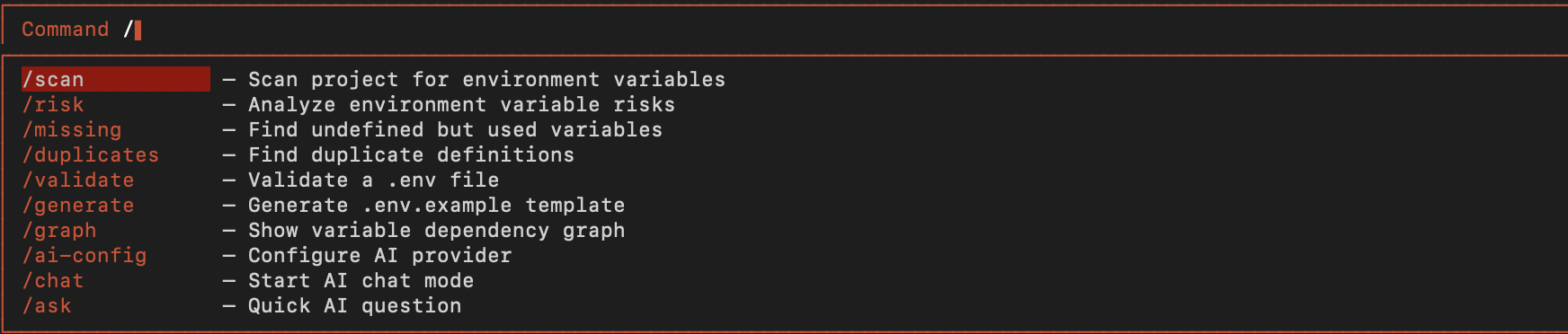
npx envarkType / to open the command dropdown with all available commands:
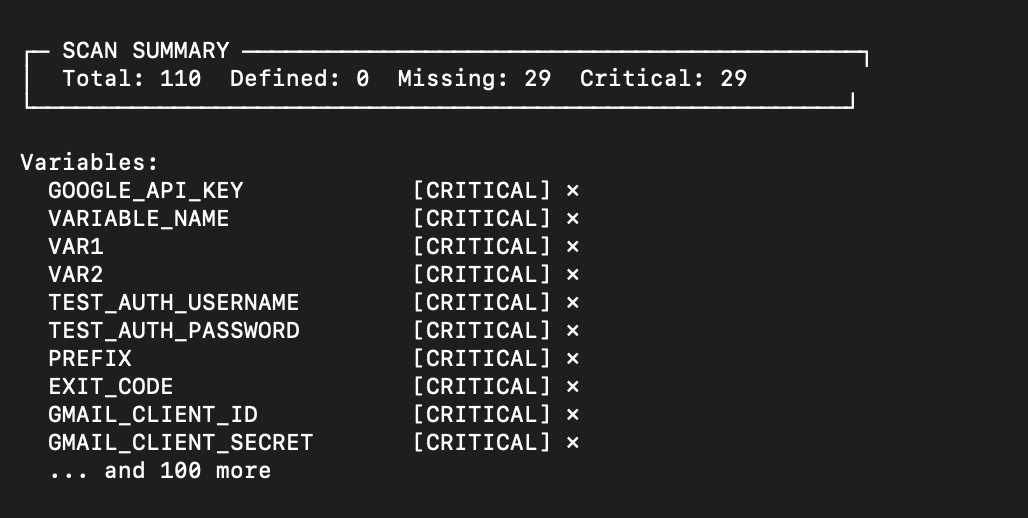
Run /scan to analyze your project's environment variables:
| Command | Shortcut | Description |
|---|---|---|
/scan |
s |
Scan project for environment variables |
/risk |
r |
Analyze environment variable risks |
/missing |
m |
Find undefined but used variables |
/duplicates |
d |
Find duplicate definitions |
/validate |
v |
Validate a .env file |
/generate |
g |
Generate .env.example template |
/graph |
gr |
Show variable dependency graph |
/help |
h |
Show help dialog |
/clear |
c |
Clear the output |
/exit |
q |
Exit Envark |
Envark includes a powerful AI assistant that can analyze, explain, and generate environment configurations.
| Command | Shortcut | Description |
|---|---|---|
/ask |
a |
Ask AI about environment variables |
/analyze |
an |
AI security analysis of your project |
/suggest |
su |
Get AI suggestions for a variable |
/explain |
ex |
AI explains a variable's purpose |
/template |
tpl |
AI generates .env for project type |
/config |
cfg |
Configure AI provider |
/history |
hist |
Show AI conversation history |
Configure your preferred AI provider:
# OpenAI (recommended)
/config openai sk-your-api-key gpt-4o

# Anthropic Claude
/config anthropic sk-ant-your-api-key claude-sonnet-4-20250514

# Google Gemini
/config gemini your-api-key gemini-1.5-pro

# Ollama (local, free)
/config ollama llama3.2
Or set environment variables:
export OPENAI_API_KEY="sk-..."        # OpenAI
export ANTHROPIC_API_KEY="sk-ant-..." # Anthropic
export GEMINI_API_KEY="..."           # Google Gemini
export OLLAMA_MODEL="llama3.2" # Ollama model- Type
/— Open command menu - Arrow ↓↑ — Navigate dropdown
- Tab — Autocomplete selected command
- Enter — Execute command
- Ctrl+C — Clear output or exit
# Interactive TUI
npx envark

# Or with bun
bunx envarknpm install -g envark
envarkgit clone https://github.com/yourusername/envark.git
cd envark
npm install
npm run build
npm startEnvark works as an MCP (Model Context Protocol) server, giving AI assistants deep visibility into your environment configuration.
Create .vscode/mcp.json:
{
  "servers": {
    "envark": {
      "type": "stdio",
      "command": "npx",
      "args": ["-y", "envark"]
    }
  }
}Add to your MCP configuration:
{
  "mcpServers": {
    "envark": {
      "command": "npx",
      "args": ["-y", "envark"]
    }
  }
}envark init vscode # VS Code
envark init claude # Claude Code
envark init cursor # Cursor
envark init windsurf # WindsurfWhen used as an MCP server, Envark exposes these tools to AI assistants:
Returns the complete environment variable map for your project.
{
  "summary": {
    "totalEnvVars": 24,
    "defined": 20,
    "missing": 3,
    "critical": 2
  },
  "variables": [...]
}Analyzes all variables and returns risk assessments:
{
  "summary": { "critical": 2, "high": 1, "medium": 5 },
  "riskReport": [
    {
      "name": "STRIPE_SECRET_KEY",
      "riskLevel": "critical",
      "issues": [{ "message": "Used but not defined" }]
    }
  ]
}Find variables that will cause runtime crashes:
{
  "missing": [
    { "name": "API_SECRET", "usageCount": 3, "dangerLevel": "critical" }
  ],
  "willCauseRuntimeCrash": 2
}Validate a .env file against code requirements:
{
  "valid": false,
  "results": {
    "passed": [{ "variable": "PORT" }],
    "failed": [{ "variable": "JWT_SECRET", "issue": "Missing" }]
  }
}Auto-generate .env.example from your codebase:
{
  "content": "# Database\nDATABASE_URL=your-secret-here\n...",
  "variableCount": 18,
  "requiredCount": 5
}
Additional tools: get_duplicates, get_undocumented, get_env_usage, get_env_graph
| Language | Extensions | Env Access Patterns |
|---|---|---|
| JavaScript | .js, .jsx, .mjs | process.env.VAR, import.meta.env.VAR |
| TypeScript | .ts, .tsx, .mts | process.env.VAR, import.meta.env.VAR |
| Python | .py | os.environ['VAR'], os.getenv('VAR') |
| Go | .go | os.Getenv("VAR"), os.LookupEnv("VAR") |
| Rust | .rs | env::var("VAR"), std::env::var("VAR") |
| Shell | .sh, .bash, .zsh | $VAR, ${VAR}, ${VAR:-default} |
| Docker | Dockerfile | ENV VAR=value, ARG VAR |
| Env Files | .env* | KEY=VALUE |
Recursively walks your project with intelligent filtering (respects .gitignore, skips node_modules).
Extracts environment variable usages using language-specific patterns.
Links definitions (.env files) with usages (code) and documentation (.env.example).
Assigns risk scores based on:
- Critical — Used but never defined, no default
- High — Secret-like name in committed file
- Medium — Multiple usages, no default
- Low — Undocumented or unused
- Info — Fully configured
Results cached to .envark/cache.json with smart invalidation.
envark                     # Launch interactive TUI
envark scan                # Scan and show results
envark risk                # Show risk analysis
envark missing             # Show missing variables
envark validate .env       # Validate env file
envark generate            # Generate .env.example
envark init <ide>          # Configure for IDE
envark help                # Show help
envark --version # Show versionContributions welcome! Please read our contributing guidelines.
git clone https://github.com/yourusername/envark.git
cd envark
npm install
npm run build
npm testMIT License - see LICENSE for details.
Built with ❤️ for developers who are tired of production env var bugs.