WebSocket frame tracing for Playwright - see every WebSocket message in your traces!


This package implements the long-requested feature from Issue #10996 (👍 49+ upvotes since 2021). Microsoft rejected our PR #38427, so we made it ourselves. 💪
- 📡 Record WebSocket frames - Captures all sent and received frames during test execution
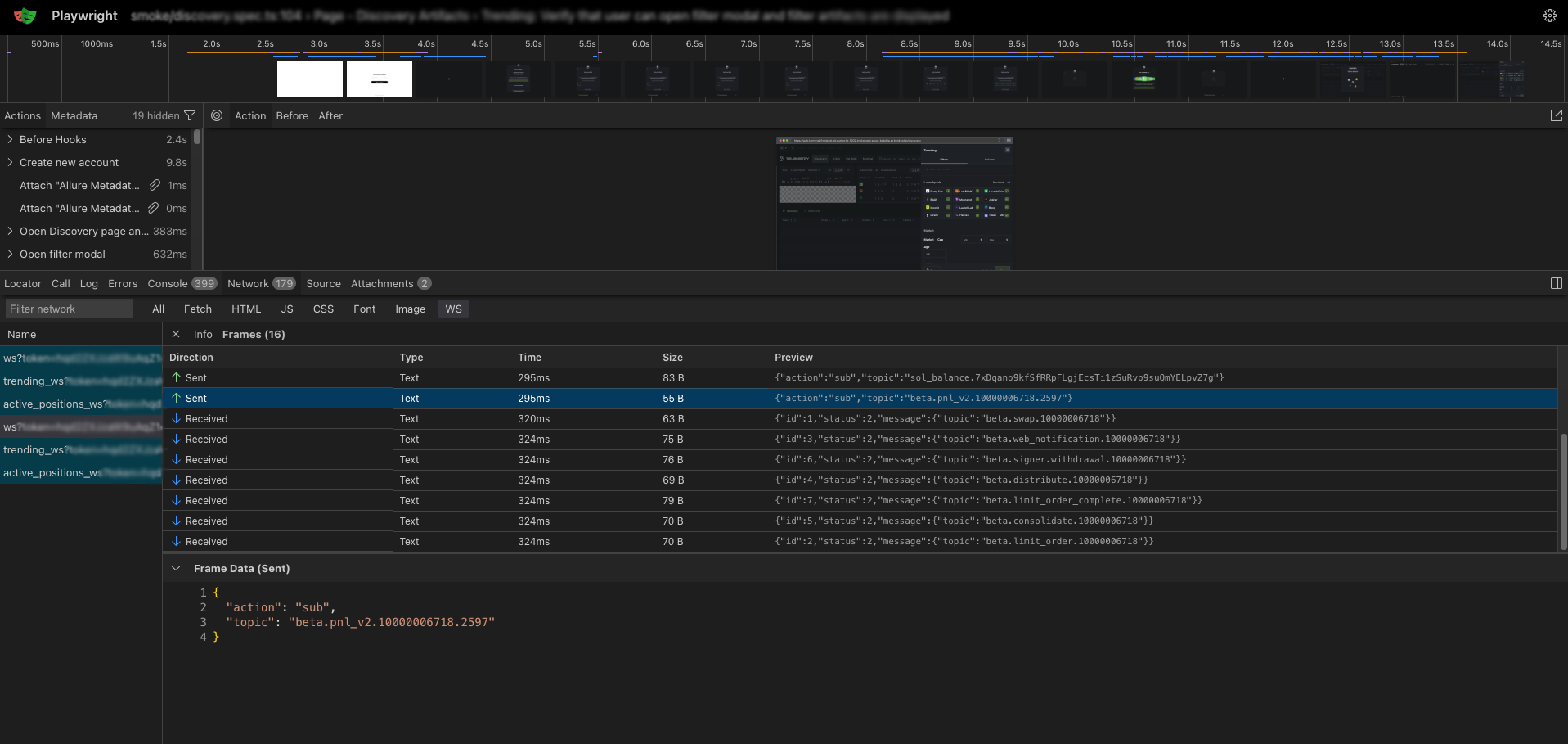
- 🔍 View in trace viewer - Browse WebSocket connections and frames in the standard Playwright trace viewer
- 🎯 Filter by type - New "WS" filter in the Network tab to show only WebSocket traffic
- 📊 Frame details - See direction (sent/received), timestamps, and payload data
- 📝 JSON formatting - Automatically formats JSON payloads for readability
npm install playwright-ws-trace
# or
yarn add playwright-ws-trace
# or
pnpm add playwright-ws-trace
# or
bun add playwright-ws-trace
The package automatically patches your Playwright installation on install. That's it!
Bun doesn't run postinstall scripts by default for security. Add playwright-ws-trace to trustedDependencies in your package.json:
{
  "trustedDependencies": [
    "playwright-ws-trace"
  ]
}
Then reinstall:
bun installConfigure in playwright.config.ts:
import { defineConfig } from '@playwright/test';

export default defineConfig({
  use: {
    trace: 'on', // or 'on-first-retry', 'retain-on-failure'
  },
});
Or start tracing manually:
import { test } from '@playwright/test';

test('websocket test', async ({ page, context }) => {
  await context.tracing.start({ snapshots: true, screenshots: true });

  await page.goto('https://your-websocket-app.com');
  // Your test actions...

  await context.tracing.stop({ path: 'trace.zip' });
});Use the standard Playwright trace viewer:
npx playwright show-trace ./test-results/my-test/trace.zipOr open from HTML report - click "View Trace" on any test.
In the trace viewer:
- Click the Network tab
- Click the WS filter to show only WebSocket traffic
- Click on a WebSocket connection to see frames
- View sent (↑) and received (↓) frames with full payload data
This package patches Playwright on install:
-
Recording (
tracing.js) - Hooks into CDP events to capture:webSocketCreated- Connection openedwebSocketFrameSent- Frame sent to serverwebSocketFrameReceived- Frame received from serverwebSocketClosed- Connection closedwebSocketError- Connection error
-
Trace Viewer - Replaces the bundled viewer with a patched version that:
- Adds "WS" filter to Network tab
- Displays WebSocket connections and frames
- Shows frame direction, timestamp, and payload
| Playwright | Status |
|---|---|
| 1.50.x - 1.58.x | ✅ Tested |
| 1.40.0+ |
When you update Playwright, the patches need to be reapplied:
# Reinstall to reapply patches
npm uninstall playwright-ws-trace && npm install playwright-ws-trace

# Or run postinstall manually
node node_modules/playwright-ws-trace/scripts/postinstall.js --forceBun doesn't run postinstall scripts by default. Add to package.json:
{
  "trustedDependencies": ["playwright-ws-trace"]
}
Then run bun install again.
Run the postinstall script with --force:
node node_modules/playwright-ws-trace/scripts/postinstall.js --forceMake sure the patched trace viewer was installed. Check that:
ls node_modules/playwright-core/lib/vite/traceViewer/Contains files from this package.
Ensure tracing is enabled in your config with trace: 'on' or similar.
PRs welcome! The original PR to Playwright is at #38427.
If Microsoft ever accepts WebSocket tracing into Playwright core, this package will become obsolete - and that's a good thing! 🎉
MIT - do whatever you want with it.
Made with ❤️ because Microsoft said no.