

See every agent. Know what needs you.
Corral is a read-only fleet board for herdr agents, on your iPhone. It shows everything your fleet is doing — every agent's state, repo, branch, and time-in-state, grouped by repo, with blocked agents pinned to the top — plus bounded recent output per agent and optional state-change notifications. Corral only watches: there are no drive controls (no prompt / approve / interrupt / kill), by design.
iOS-only product. Corral is the FleetNotifier iOS app plus corrald, a small Rust daemon that runs on the same machine as herdr and collapses the fleet into a live snapshot served over HTTP + SSE. corrald reads the herdr unix socket (~/.config/herdr/herdr.sock) and binds loopback by default (127.0.0.1:8474); public addresses are refused.
herdr socket ─→ corrald (daemon) ─→ iOS app: board · recents · notifications
Checksummed prebuilt daemon bundles are published per release — no Rust toolchain, GitHub login, or gh needed. Use the explicit bundle URL (macOS example):
bash <(curl -fsSL https://raw.githubusercontent.com/jirathip-dev/corral/main/scripts/install-corral.sh) \
  --url https://github.com/jirathip-dev/corral/releases/download/v0.4.2/corral-v0.4.2-macos.tar.gz
For Linux x86_64, replace macos with linux-x86_64 in that bundle URL. From a checkout you can also resolve a release tag using the optional gh CLI:
bash scripts/install-corral.sh --release v0.4.2The installer resolves the bundle for your platform, verifies it against the published .sha256 (a mismatch is refused before any install state exists), swaps it into ~/.local/share/corral/release, and starts corrald as a per-user managed service on loopback (127.0.0.1:8474, reading the local herdr socket): launchd (com.corral.corrald, KeepAlive) on macOS, hardened systemd --user on Linux. It health-checks the running service, and keys/device registry in ~/.config/corral are never touched by install, update, or uninstall.
Verify it is up (the installer already health-checks):
curl -s http://127.0.0.1:8474/healthz # → okPublished artifacts: corral-<tag>-macos.tar.gz (+.sha256) and, since v0.4.2, corral-<tag>-linux-x86_64.tar.gz (+.sha256). Other platforms and architectures (for example Linux aarch64) have no published bundle — the installer refuses them up front rather than relabel another platform's artifact or fall back to a source build. Linux specifics: docs/LINUX.md.
GitHub PR numbers, CI verdicts, and linked issues are optional, host-configured features. The daemon defaults to no GitHub traffic without a token; the phone never asks for one. See optional GitHub configuration.
- Install the TestFlight build of FleetNotifier.
- Open the app → Settings (gear, top right) → Host: your Tailscale hostname (
https://<host>.<tailnet>.ts.net) or127.0.0.1:8474for a same-LAN/dev setup. - Register / pair this device with the daemon's registration token (in the daemon config dir or out-of-band). A fresh device is read-only: zero grants.
- (Optional) Notifications for state-change alerts (start / blocked / done). The board and recents work without granting notification permission and need no APNs credentials — and nothing asks for them on its own: the app never prompts and never registers for push at install, pairing, or first live board. Turning State-change notifications on in Settings is the only trigger (then the OS permission prompt appears, and only a grant enables). Onboarding completes without ever visiting it. Background APNs delivery awaits the host-side provisioning checkpoint (an APNs
.p8auth key +CORRAL_APNS_*env, see docs/PUSH.md); simulator and DEBUG builds use the local notification bridge. - Recents (
read_tail) needs the host-side signed read grant, provisioned out-of-band today — there is no grant UI or admin surface in the app or over HTTP. Host-approved enrollment without registry edits is follow-up #485; QR pairing is #486.
Remote access note: the app talks plain HTTP only on loopback — point it at a Tailscale-hosted https:// origin (Tailscale Serve fronting the loopback daemon), never at a tailnet IP bind. Details in docs/OPERATIONS.md.
Rust toolchain pinned by rust-toolchain.toml. From a checkout, build and run:
cargo build --release -p corrald
./target/release/corrald --socket ~/.config/herdr/herdr.sock
To keep a source build running at login, scripts/setup-corrald.sh builds, installs the com.corral.corrald agent (KeepAlive, port 8474), and is idempotent:
bash scripts/setup-corrald.shStep-by-step source run: docs/QUICKSTART.md §9. Workspace layout and gates: docs/DEVELOPING.md.
The iOS showcase is a Simulator demo from the TestFlight source revision:
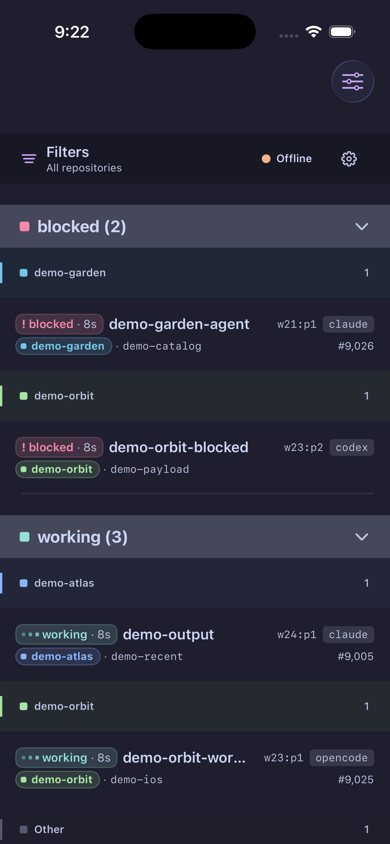
A static board snapshot (phone + wide layouts, fully fictional sample data) is kept in docs/demo/.
- docs/QUICKSTART.md — run the daemon, register a device, grant
read_tail, read the fleet - docs/OPERATIONS.md — device lifecycle, out-of-band grants, remote access from iOS (Tailscale Serve), troubleshooting
- docs/LINUX.md — Linux x86_64 release bundle + rootless
systemd --userinstall (Bazzite) - docs/PUSH.md — push architecture (Tailscale reachability vs APNs delivery),
.p8provisioning + launchd wiring - docs/ARCHITECTURE.md — the read model, signed read plane, security boundaries
- docs/DEVELOPING.md — workspace layout, quality gates
Dual-licensed under MIT OR Apache-2.0.