






A private, on-device "rewind" for your Mac or Windows PC. Retrace quietly captures what's on your screen, extracts the text and context, and lets you search and scrub back through your day — plus time/usage analytics. Everything runs 100% on your machine. No data ever leaves it. No accounts. No telemetry.
On-device only, on macOS and Windows. Retrace leans on each OS's own frameworks. On macOS: ScreenCaptureKit, Accessibility, Vision, Foundation Models (the on-device LLM), NaturalLanguage embeddings, SensitiveContentAnalysis, and EventKit. On Windows: the Win32 desktop APIs, UI Automation, and the built-in Windows OCR engine. There is no cloud component, by design. See Windows for what differs.
These are hard invariants, enforced in code and covered by tests — not preferences:
- Raw screenshots are never retained. Each frame goes to a private temp file,
is processed (text + a small thumbnail), then deleted in a
finallyblock — removed even if anything errors. Only extracted text, a short caption, a downscaled JPEG thumbnail, and metadata persist. (verified:tests/test_pipeline.pyasserts the frame is gone on success, capture failure, and exceptions.) - On-device only. No network calls for capture, OCR, captioning, embeddings, or search.
- Off by default. Capture is disabled until you turn it on, and that choice persists across restarts.
- Away = paused. When you're idle, the screen is locked, or the display is asleep, Retrace stops capturing and stops counting time — a machine left on and logged in never looks "active."
- Blocks what it shouldn't see. A password-manager denylist, incognito/private windows, and adult/sensitive content (URL/keyword rules and an on-device image scan) are all skipped before anything is stored.
- Hidden mode. One click pauses all recording (optionally for a set time).
- Bounded retention. Rows + thumbnails older than your window (default 30 days) are purged automatically, with a manual purge too. Ageing thumbnails are shrunk in place on-device (see Storage).
- Local bind only. API and MCP listen on
127.0.0.1. - No telemetry. Zero analytics, zero phone-home.
| Menu bar | A native status-bar item (retrace menubar; a tray icon on Windows) to see live state and counters, capture now, pause, toggle Hidden mode, and open the dashboard. |
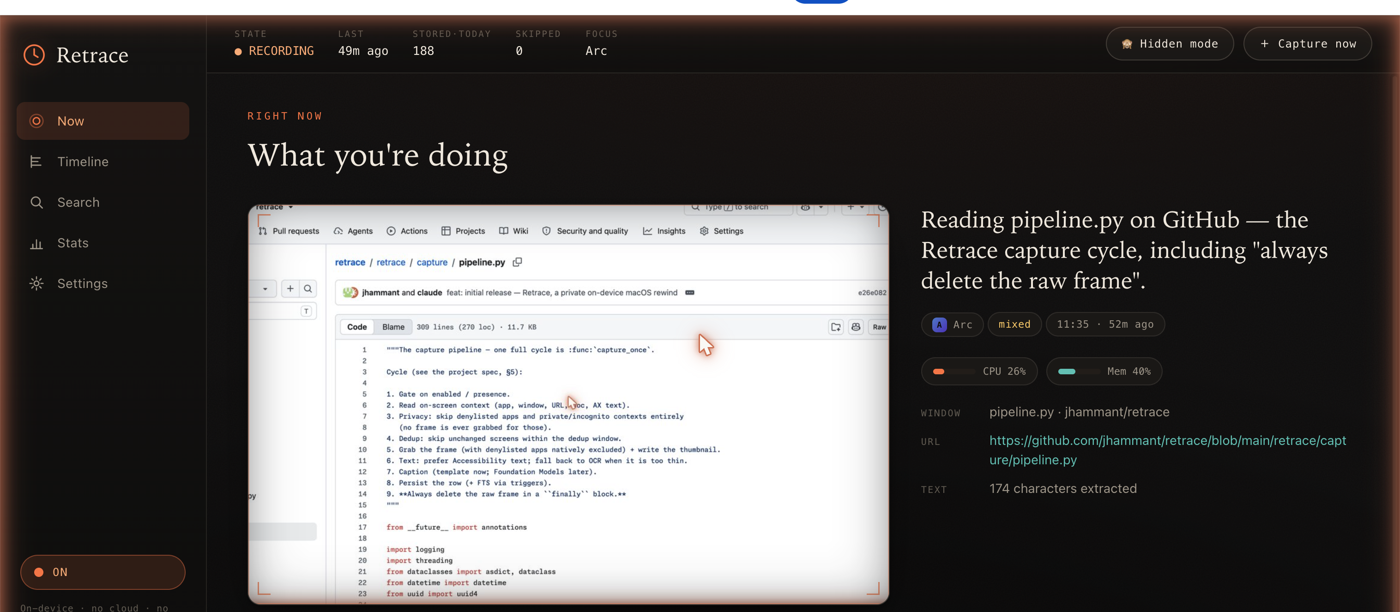
| Now | The latest capture, framed like a film cell, with a one-line on-device LLM caption. |
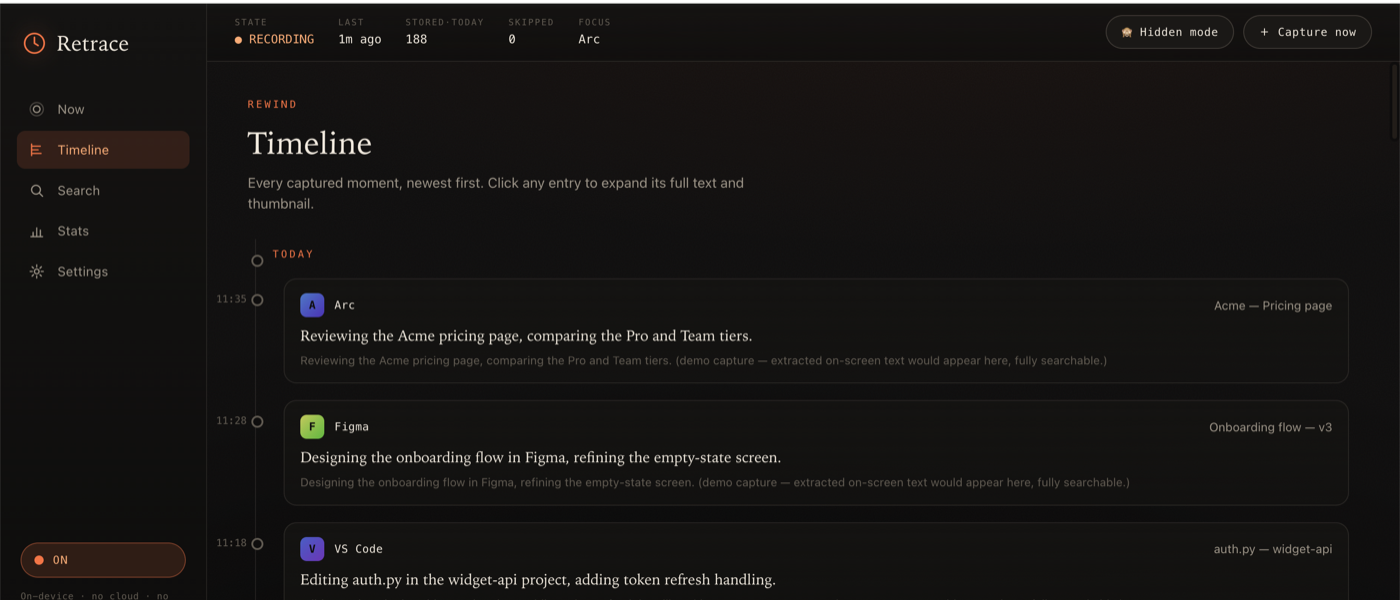
| Timeline | Reverse-chronological, infinite-scroll history. Click any moment to expand its full text + thumbnail. |
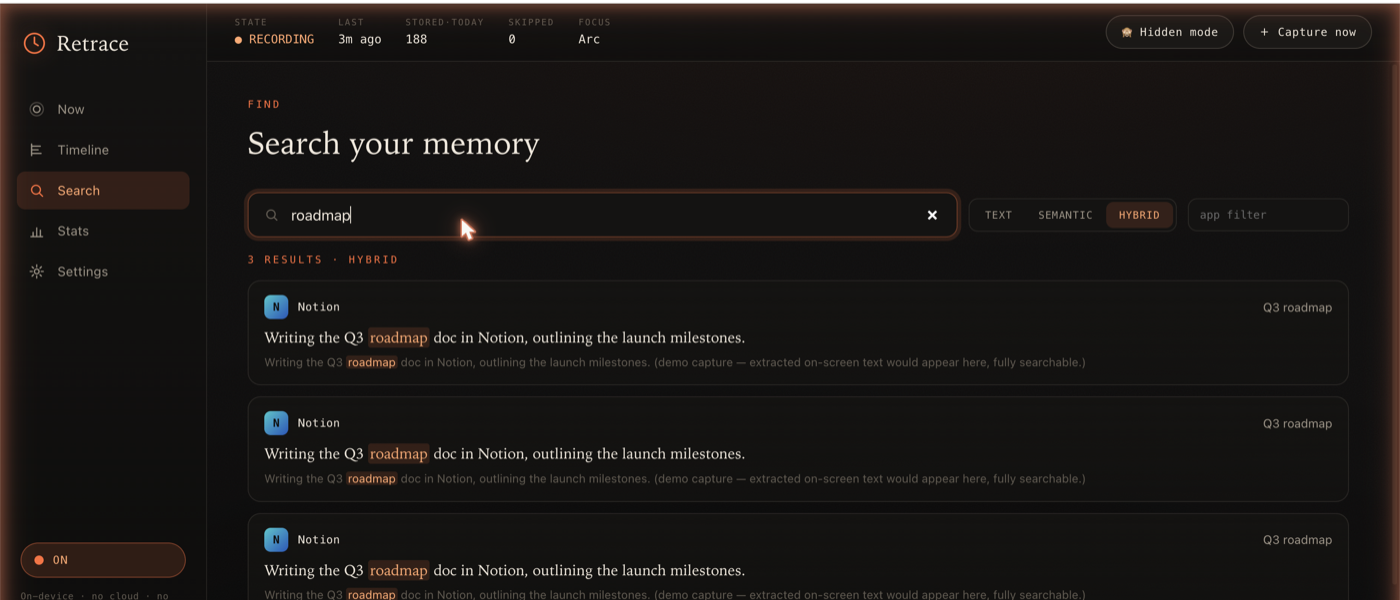
| Search | One box, three modes — text (FTS5), semantic (NaturalLanguage embeddings, fully local), and hybrid. |
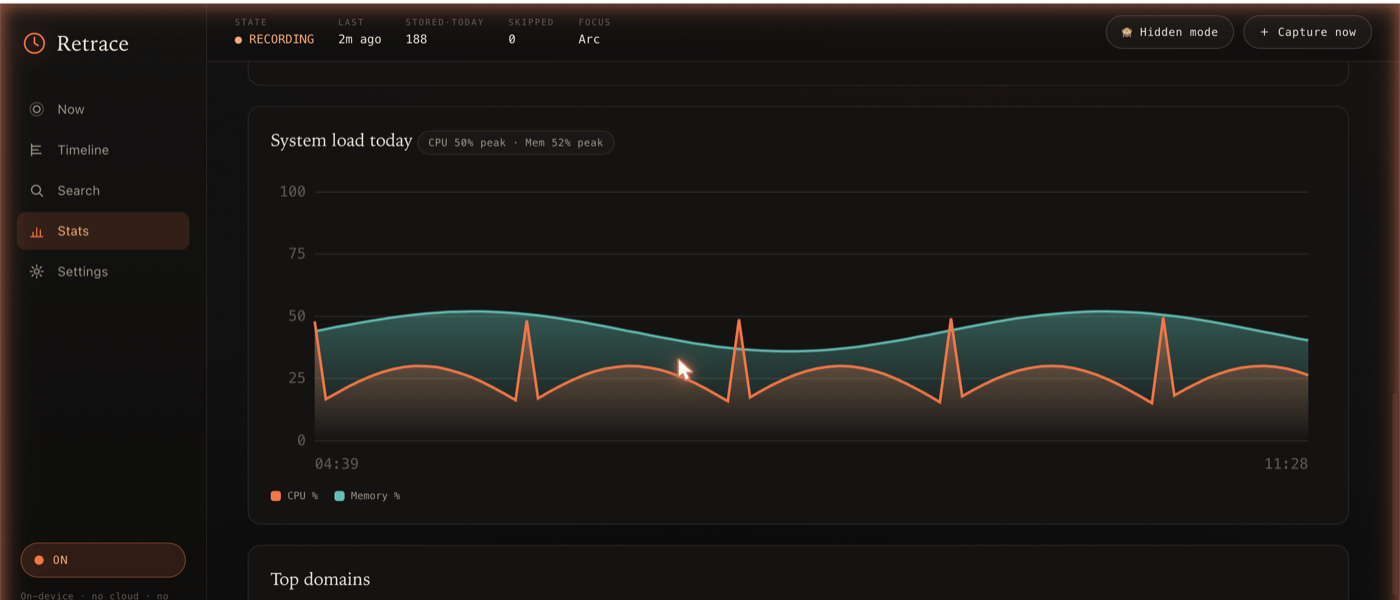
| Stats | Time-by-app, top domains, daily/weekly totals, and CPU/memory charts — AFK-aware so idle time isn't counted. Hand-rolled offline SVG, no chart library. |
| Settings | Enable/disable, retention, denylist, sensitive-content + page-capture controls, permission status. |
| MCP | A read-only server so other agents/assistants can query your timeline, search, and stats. |
| Plugins | Per-app collectors / enrichers / pollers. Ships with Claude Code, Spotify, Apple Music, system stats, calendar, notifications, git commits, Apple Mail, browser downloads, recent files, clipboard, and shell history. Drop your own in ~/.retrace/plugins/. |
Now — the latest capture with an on-device caption, the now-playing track, and live CPU/memory:
Stats — time-by-app, weekly activity, and a CPU/memory chart (hand-rolled offline SVG):
Timeline — every captured moment, searchable, with expandable full text:
Search — one box, three modes (text · semantic · hybrid), with highlighted matches:
Screenshots use demo data. A short demo video lives in
demo/(Remotion).
Requires macOS 14+ (built/tested on macOS 26), the Xcode command-line tools
(swiftc), and uv.
make setup            # create the venv (Python 3.13) + install Retrace
make build-helpers    # compile the native Swift helpers into ~/.retrace/bin
uv run retrace init   # create ~/.retrace (config + database). Capture is OFF.
uv run retrace doctor # check permissions + capabilities

uv run retrace start    # enable capture
uv run retrace tick --force   # take one capture right now
uv run retrace serve    # open http://127.0.0.1:8765
uv run retrace menubar  # add the menu bar icon (starts the server if needed)
On a notched Mac with a crowded menu bar, the icon can hide behind the notch — a menu bar manager (Ice / Bartender) or quitting a few menu bar apps reveals it.
The first capture triggers macOS permission prompts (Screen Recording,
Accessibility). retrace doctor tells you exactly what's missing and how to grant it.
Requires Windows 10 or 11 and uv. Nothing is compiled
and no admin rights are needed. In PowerShell:
uv venv --python 3.13
uv pip install -e ".[dev]"
uv run retrace init       # create ~/.retrace (config + database). Capture is OFF.
uv run retrace doctor     # check the OCR language, UI Automation and tray
uv run retrace start      # enable capture
uv run retrace tick --force
uv run retrace menubar    # tray icon (starts the server on http://127.0.0.1:8765)
uv run retrace autostart install   # optional: start at sign-in
On-screen text comes from the Windows OCR engine, which needs an OCR language pack.
Most installs already have one; if retrace doctor says otherwise, add a language under
Settings > Time & language > Language & region.
┌──────────────────────────────────────────────────────────────────┐
│  Python core (FastAPI)                                            │
│   capture pipeline · daemon · activity · stats · search · plugins │
│   HTTP API + web UI  ·  read-only MCP server                      │
│        │  invokes (subprocess, JSON on stdout)                    │
│        ▼                                                          │
│  Swift helper binaries  (compile-on-first-use, cached in ~/.retrace/bin)
│   retrace-capture      ScreenCaptureKit frame + thumbnail (denylist excluded)
│   retrace-context      Accessibility: text / window / URL / doc / page text
│   retrace-ocr          Vision OCR fallback
│   retrace-present      idle / screen-lock / display-sleep + permission preflight
│   retrace-watch        NSWorkspace app-switch event stream (event-driven capture)
│   retrace-embed        NaturalLanguage sentence embedding
│   retrace-caption      Foundation Models text → 1-2 sentence caption
│   retrace-sensitivity  SensitiveContentAnalysis adult/NSFW image scan
└──────────────────────────────────────────────────────────────────┘
        All data under ~/.retrace  (SQLite + thumbnails). knowledgeC /
        Safari / Chrome history are read directly for time analytics.
On Windows nothing is compiled: retrace/native/win serves the same JSON in-process
(see Windows).
The capture cycle: gate (enabled / present / hidden) → context (app, window, URL, text) → privacy (denylist / incognito / sensitive) → dedup → frame + thumbnail → on-device sensitivity scan → text (Accessibility, else OCR) → caption → embed → persist → delete the raw frame, always.
retrace doctor reports each of these; Retrace degrades gracefully when one is missing.
| Permission | Needed for | Where to grant |
|---|---|---|
| Screen Recording (required) | capturing frames | Privacy & Security → Screen & System Audio Recording |
| Accessibility (required) | real on-screen text, window titles, URLs | Privacy & Security → Accessibility |
| Automation | browser URL + incognito detection, full page text | prompted on first use (per browser) |
| Full Disk Access | knowledgeC focus history + Safari history (time analytics) | Privacy & Security → Full Disk Access |
| Calendar | correlating captures with events | Privacy & Security → Calendars |
For full-page text capture, also enable "Allow JavaScript from Apple Events" in your browser (Safari: Develop menu; Chrome: View → Developer).
Windows has no per-app grants for screen capture or UI Automation, so the only thing
retrace doctor can flag there is a missing OCR language pack (or a missing optional
package such as the tray icon's).
The Python core (pipeline, daemon, API, web UI, search, MCP, plugins) is the same on
both systems. Each macOS helper has a Windows counterpart in retrace/native/win:
| macOS | Windows |
|---|---|
| ScreenCaptureKit frame | primary display via GDI; denylisted apps' windows are painted black before the frame or thumbnail is written |
| Accessibility text | Windows OCR on every frame (UI Automation text is not read) |
| browser URL + incognito (AppleScript) | address bar via UI Automation; private windows recognised from the window title and the toolbar's profile button |
| idle / lock / display sleep | idle time + session lock (display sleep is covered by the idle gate) |
| app-switch events (NSWorkspace) | foreground-window events (SetWinEventHook) |
| NaturalLanguage embeddings | hashed word + trigram vectors: lexical, so "semantic" search finds typos and word forms, not synonyms |
| menu bar item | notification-area (tray) icon |
| launchd agent | retrace autostart install: a shortcut in your Startup folder |
App ids on Windows are executable names (chrome.exe, 1password.exe); the default
denylist covers the common password managers in both forms.
Not available on Windows: Foundation Models captions (a template caption is used), the SensitiveContentAnalysis image scan (domain/keyword blocking still runs), full-page text and raw HTML capture, and the Calendar, Apple Music, Mail, Safari history and Reading List plugins. Spotify, clipboard, recent files, notifications and downloads read their Windows sources; activity ingest reads Chrome, Edge and Brave history.
Privacy notes specific to Windows:
- Private windows are recognised from the browser's own markers: Edge and Firefox put
"InPrivate" / "Private Browsing" in the window title, and Chrome, Edge and Brave label
the toolbar's profile button "Incognito", "InPrivate" or "Private", which Retrace
reads via UI Automation. CI checks this against real Edge and Chrome windows. Leave
capture_private_browsingoff (the default); other browsers may not mark their private windows at all. - Clipboard logging (off by default) never reads copies that a password manager marks as excluded from clipboard monitoring.
- Asking Chromium browsers for their address bar over UI Automation can switch on their accessibility support, which costs some memory and CPU on heavy pages.
- Hidden mode — the
🙈 Hidden modebutton (orPOST /capture/pause?minutes=N) stops all recording until you resume. - Away handling — "Pause when away" (on by default) plus an adjustable idle
threshold; the header shows
◌ AWAY/◍ LOCKED/◍ DISPLAY OFF. - Sensitive content — two layers, both on by default: an editable domain/keyword blocklist, and an on-device SensitiveContentAnalysis image scan that drops flagged frames (activates once you enable "Sensitive Content Warning" in System Settings).
- Incognito — Chrome-family private windows are detected and never captured.
- Denylist — password managers and other apps you list are never captured (and are natively excluded from the frame via ScreenCaptureKit).
Plugins extend Retrace per-app. A plugin can enrich a capture (when a matching app is frontmost), collect an app's own data on a schedule, and/or poll for lightweight periodic sampling (every ~capture interval). Built-ins cover Claude Code transcripts, Spotify + Apple Music now-playing, system CPU/memory, calendar (EventKit), macOS notifications, git commits across your repos, Apple Mail subjects, browser downloads, recently-opened files, clipboard, shell history, Safari history (incl. iPhone visits via iCloud) and Safari Reading List — all on-device.
# ~/.retrace/plugins/my_app.py
from retrace.plugins import RetracePlugin

class MyApp(RetracePlugin):
    name = "my-app"
    bundle_ids = ("com.example.myapp",)

    def enrich(self, context, settings):
        return {"caption": "Doing the thing in MyApp", "text_append": "extra context"}

    def collect(self, settings):
        # read the app's data store, write captures, return a summary
        return {"name": self.name, "ingested": 0}

PLUGIN = MyApp()
Run collectors with uv run retrace collect (also runs daily in the daemon, and from
the Settings → "Collect app history" button). The built-in Claude Code plugin
ingests ~/.claude/projects/*.jsonl session transcripts into your timeline, fully
searchable.
iOS forbids third-party background screen capture, so there's no iPhone agent — but your phone's browsing still reaches Retrace on-device, three ways:
| Plugin | Source | Network | Gets |
|---|---|---|---|
safari-history |
~/Library/Safari/History.db (iPhone visits land here via iCloud Safari sync) |
none | URLs, titles, timestamps |
reading-list |
Bookmarks.plist + offline ReadingListArchives/*.webarchive |
none | saved articles with full text |
page-backfill |
re-fetches eligible history URLs | outbound | full page text for public pages |
page-backfill is the only feature in Retrace that makes outbound requests, so it
is off by default (backfill_page_content). When enabled it re-fetches history URLs
to capture their text, under strict guardrails: https + GET only; loopback/LAN hosts
blocked; authenticated/personal domains skipped (a cookie-less fetch only hits a login
wall); action/token-shaped URLs skipped so it never re-triggers a logout/unsubscribe/
magic link; the same sensitive-content gate as live capture; login-wall and empty
responses discarded; bounded per run; and every URL is attempted at most once. Install
the better extractor with pip install 'retrace-cli[backfill]' (else a stdlib stripper
is used). Pushing page content from the phone in real time instead needs a Safari Web
Extension over Tailscale — see the roadmap.
Retrace can tell you what you keep doing by hand. retrace patterns mines the last few
weeks, on-device, and ranks what it finds by an estimated cost in minutes a week:
| Pattern | What it means | Usually fixed by |
|---|---|---|
| loop | flipping back and forth between two things (a terminal session and a web page) | bringing one into the other |
| habit | a site you check on most days, usually at the same hours | a digest that checks it for you |
| carry | copying in one app, then switching straight to another | the two apps talking directly |
| search | the same web search on different days | a saved search or a watch |
| ask | what you keep typing to AI assistants ("keep going", "what's next", the same request again) | autopilot, a status digest, a command or skill |
retrace patterns              # top candidates for the last 28 days
retrace patterns --text       # include example prompts, copies and searches
retrace steps --last 30m      # replay the last half hour as steps: capture a workflow
retrace steps --since 14:05 --until 14:40 --json
steps folds consecutive captures of the same site, session or app into one step with
its duration, titles, URLs and documents, with copies and prompts in between. Pipe it to
an assistant to turn something you just did into a script or a skill. Both commands
are also MCP tools (retrace_patterns, retrace_steps). Reports hold counts, apps,
sites and session names; the text you typed or copied only appears with --text /
include_text.
A project is a folder you work in with Claude Code (~/dev/acme is acme). Retrace counts
your hands-on time on it in 5-minute blocks: a prompt in that folder, a terminal tab showing
one of its sessions, its GitHub repository, or a file under its folder. That's your own time
(prompting, reading, reviewing), not how long an agent ran by itself. A project takes in its
subfolders, so acme includes acme/worker. Over HTTP:
GET /insights/projects?days=7: every folder you worked in, most time firstGET /insights/projects/acme: one project, last 7 and 28 days, and when you last touched itGET /insights/projects/acme/patterns: what you keep asking for in that project
taxi/ describes these endpoints in Taxi, so an
Orbital running on the same machine can query your time per project
and what you repeat, and join them with your other data. Projects are keyed by
retrace.ProjectName, the folder name; to join another schema's projects, give your Orbital an
operation that takes that schema's folder-name type and calls the same URL. Map the
retraceApi placeholder to retrace serve in Orbital's services.conf
(http://host.docker.internal:8765 from Docker). It describes only read-only, metadata-only
endpoints; taxi/queries/ has examples.
// Where your hands-on time went this week, folder by folder.
find { retrace.WeekByProject } as { projects : retrace.ProjectTime[] }
Other agents can query Retrace over MCP. It exposes only read/search tools — no start/stop, no purge, no config changes:
retrace_search · retrace_timeline · retrace_get_capture ·
retrace_what_was_i_doing · retrace_stats · retrace_now · retrace_list_apps ·
retrace_patterns · retrace_steps
Register it (e.g. in claude_desktop_config.json or .mcp.json):
{
  "mcpServers": {
    "retrace": {
      "command": "uv",
      "args": ["run", "--directory", "/ABSOLUTE/PATH/TO/retrace", "retrace", "mcp"]
    }
  }
}Bound to 127.0.0.1. Highlights:
GET /capture/status·POST /capture/start|stop|tick|pause|resumeGET /capture/recent·GET /capture/{id}·GET /capture/{id}/image·GET /capture/{id}/htmlPOST /capture/purge?days=GET /search?q=&mode=text|semantic|hybridPOST /activity/scan·GET /activity/apps|domains|statusGET /stats/daily|weekly|topGET /insights/patterns·GET /insights/steps?last_minutes=·GET /insights/projects[/{name}[/patterns]](metadata only: there is no option to include typed or copied text over HTTP)GET /permissions·GET|POST /config·GET /plugins·POST /plugins/collect
~/.retrace/config.toml (env vars RETRACE_* override it; both override defaults).
Edit the common ones in the Settings panel. Keys include: capture_interval_s,
dedup_window_s, idle_threshold_s, pause_when_away, retention_days,
thumb_max_edge, enable_semantic_search, enable_caption, denylist_bundle_ids,
capture_private_browsing, block_sensitive_content, block_sensitive_images,
sensitive_domains, sensitive_keywords, capture_page_text, capture_page_html,
enable_plugins, disabled_plugins, auto_optimize, compact_after_days,
deep_compact_after_days, max_storage_mb, thin_schedule.
Frames are written as ~250 KB JPEGs (1280 px). Recent days stay exactly as captured; once a day the daemon re-encodes older days in place, then never touches them again:
| Tier | Default | What happens | Typical size |
|---|---|---|---|
compact |
after 3 days | same 1280 px, JPEG quality 60 | ~45% of original |
deep |
after 14 days | 960 px, JPEG quality 55 | ~25% of original |
To capture often without filling the disk, let frames degrade with age.
thin_schedule = "1:60,3:120,14:300" keeps at most one frame a minute once a day old, one per
2 minutes after 3 days and one per 5 minutes after 14, always keeping the frame at each
app/window switch. Thinned frames lose only their image: their text stays searchable.
Text, OCR, captions and embeddings are untouched, so search is unaffected. Set
max_storage_mb for a hard ceiling: the oldest days lose their thumbnails first and keep
their searchable text. Each daily pass is time-boxed (optimize_max_seconds, default 300)
and resumes where it stopped.
retrace optimize --dry-run   # what would be saved, changes nothing
retrace optimize             # run a pass now
On a month of real use this projected 2.1 GB down to about 1.1 GB (0.95 GB with the thinning
schedule above). That headroom is what makes a short capture_interval_s (10-20 s) practical.
A launchd user-agent template lives at scripts/com.retrace.daemon.plist (edit the
two absolute paths, then launchctl load -w ~/Library/LaunchAgents/...). See the
comments in that file for install/uninstall.
On Windows, retrace autostart install adds a Startup-folder shortcut that opens the
tray icon (which starts the server) at sign-in; retrace autostart remove undoes it.
When started without a console, the server logs to ~/.retrace/server.log.
make test            # run the test suite (isolated temp DB; never touches ~/.retrace)
make build-helpers   # (re)compile the Swift helpers
make run             # retrace serve
Tests use a throwaway RETRACE_HOME and refuse to run against your real database.
Native helpers are stubbed by default so the suite is fast and needs no Swift toolchain.
| Path | Purpose |
|---|---|
~/.retrace/retrace.db |
SQLite: captures, activity, FTS5, embeddings |
~/.retrace/thumbs/YYYY-MM-DD/*.jpg |
downscaled thumbnails |
~/.retrace/tmp/ |
transient raw frames (deleted every cycle) |
~/.retrace/status.json |
capture ledger |
~/.retrace/config.toml |
user config |
~/.retrace/bin/ |
compiled Swift helpers (cache, macOS) |
~/.retrace/plugins/ |
your custom app plugins |
Screenshots of the UI live in docs/screenshots/.
Apache-2.0. Built only on third-party and OS frameworks. No telemetry, ever.