
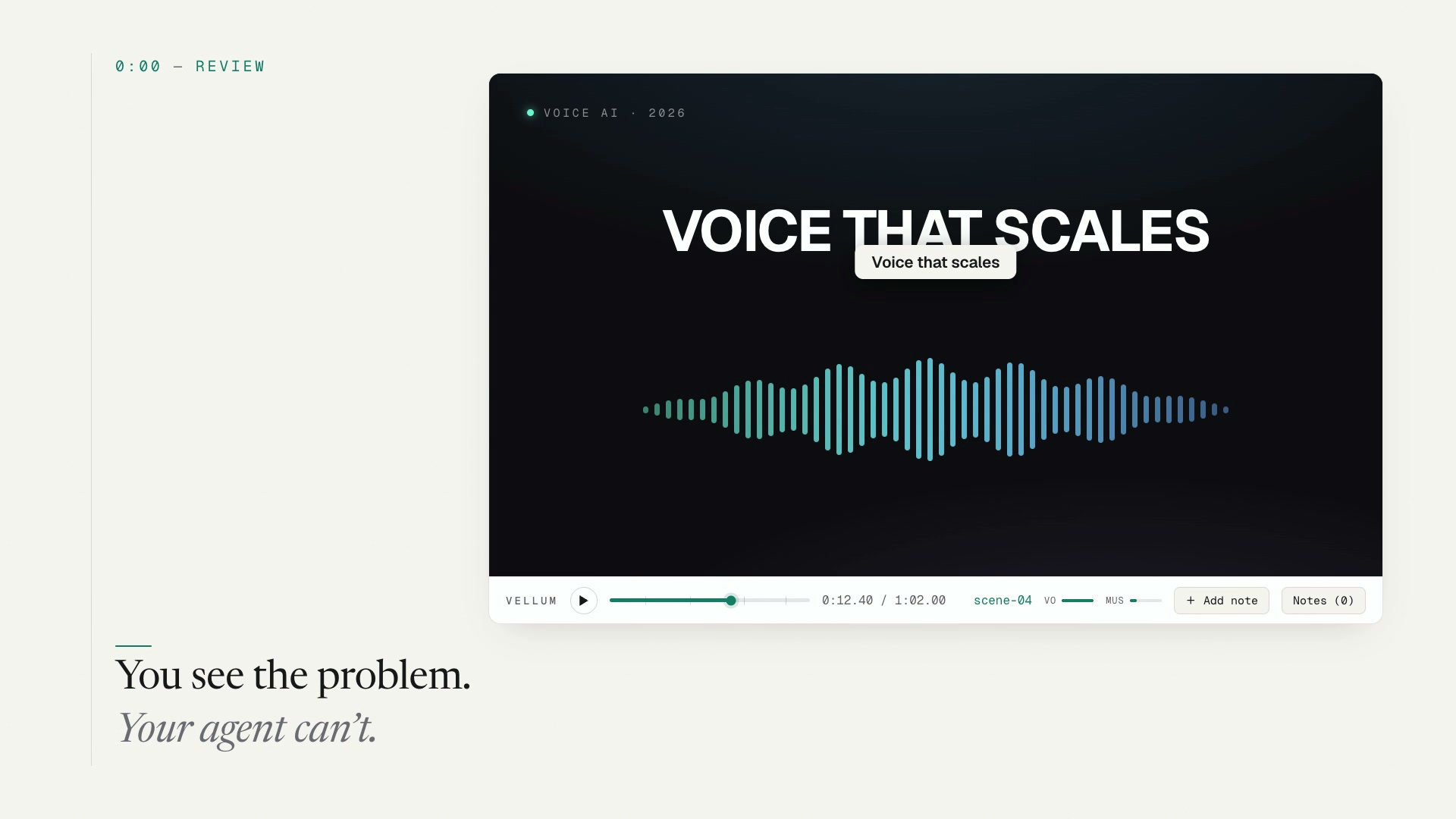
Vellum is a visual feedback interface for AI-edited video — pin time-coded notes onto any HyperFrames frame, and your coding agent reads them back and makes the edits.



Install · Use · Agent handoff · Demo

Run vellum · pin point or region notes in the browser · your agent reads them back
curl -fsSL https://tryvellum.vercel.app/install | sh
vellum
Pin your notes, then tell your agent: “Address my Vellum review notes.”
You watch the video and spot it instantly — "this caption lands late," "make this bubble bigger," "cut two seconds here." Typed into a chat box, that feedback loses where on the frame and when in the timeline.
Vellum closes the loop. It layers over your real index.html (HyperFrames runtime, not a render). You scrub, pin, type. Vellum records composition time, the element under your cursor, and pin/box coordinates — then writes files your agent reads.
| Step | What happens |
|---|---|
| 1 · Review | Open the player, scrub to the moment, drop a pin or region note |
| 2 · Persist | Notes land in notes/annotations.md (+ JSON, optional mix levels) |
| 3 · Hand off | Your coding agent reads the notes and edits the composition |
flowchart LR
  A["You<br/>pin notes"] --> B["Vellum<br/>notes/"]
  B --> C["Agent<br/>edits HF"]
Works on any HyperFrames project — scenes come from the data-start attributes every composition already has. No per-project configuration.
From the root of your HyperFrames project:
curl -fsSL https://tryvellum.vercel.app/install | sh
vellum
The installer drops the review tool into scripts/, adds a global vellum command to ~/.local/bin, wires npm scripts when you have a package.json, and installs the agent skill to .agents/skills/vellum/. Pick Claude Code during install and .claude/skills/vellum/ becomes a symlink to the same skill — one copy, both agents stay in sync.
No HyperFrames project yet? Run the installer in an empty folder and it offers to scaffold one in place — hyperframes init for the composition, the full /hyperframes + GSAP agent skill set, and npm install — then layers Vellum on top. Force it with --init (or VELLUM_INIT=1), skip it with --no-init.
Composition in a subfolder? Pass --dir during install:
curl -fsSL https://tryvellum.vercel.app/install | sh -s -- --dir compositions/heroRequirements: a HyperFrames project (an
index.htmlcomposition) and Node ≥ 18. The HyperFrames runtime is resolved automatically — from a localnode_modules/hyperframesif present, otherwise the npx cache or the CDN — sonpx-style projects work without a local install.ffmpegand thehyperframesCLI are only needed for the optional visual review packet.
Installer flags & other install paths
Flags: --dir <path> · --port <number> · --init · --no-init · --start · --tool-only · --skill-only · --no-bin · --no-prompt · --no-package
npm
npm i -g vellum-hf   # global vellum + vellum-review commands
npx vellum-hf        # one-off, no install — run in a HyperFrames project
Installs the commands only. The curl installer above also sets up the agent skill, npm scripts, and (in an empty folder) a fresh HyperFrames project — so it's still the recommended path for the full loop. Need just the skill? curl -fsSL https://tryvellum.vercel.app/install | sh -s -- --skill-only.
Clone & run
git clone https://github.com/jakeat11labs/vellum.git
node /path/to/vellum/scripts/vellum-server.mjs   # from your HF project root
Or copy scripts/ (+ skills/vellum/ for the agent). Prefer a package manager? npm i -g vellum-hf (see npm above) ships the vellum and vellum-review bins.
shadcn registry (projects already using shadcn/ui):
npx shadcn@latest add jakeat11labs/vellum/vellum
npx shadcn@latest add jakeat11labs/vellum/vellum-skill
Registry install copies files only — add npm scripts yourself, or run node scripts/vellum-server.mjs directly. On plain HTML projects without shadcn, the curl installer is simpler.
See install.sh for the full script.
From your HyperFrames project (any subfolder, after install):
vellum          # opens the review player in your browser
vellum-review   # optional visual packet for your agent
Subfolder compositions: the installer writes .vellum.env with your default VELLUM_DIR. Override anytime — VELLUM_DIR=compositions/hero vellum.
Skipped the global command (--no-bin)? Use npm run vellum or ./scripts/vellum. Disable auto-open with --no-open or VELLUM_OPEN=0.
Keyboard shortcuts & player controls
| Action | How |
|---|---|
| Play / pause | Space or ▶ |
| Scrub in 0.1s steps | ← / → (hold Shift for 1s) |
| Jump between scenes | ↑ / ↓ |
| Add a note | N or + Add note → click (pin) or drag (region) → type |
| Balance the mix | 🎙 / 🎵 sliders → Save mix |
| Review notes | Notes drawer → click to jump; edit inline or cycle status |
| Hand off | Copy prompt → paste into your coding agent |
Every pin becomes a line in notes/annotations.md — time, scene, coordinates, target element, and your feedback:
# Review notes

3 note(s). Times are composition-time (M:SS.ss).

- **note-1** · **0:02.40** `title` — Hold this a beat longer before the crossfade  _(pin 50.0%, 41.2%)_ · on `div.title` “Build it once. Ship everywhere.”
- **note-2** · **0:08.10** `features` — “Reliable” lands late — bring this card in 0.5s earlier  _(pin 74.6%, 52.3%)_ · on `div.card` “Reliable”
- **note-3** · **0:13.90** `stat` — make this number count up instead of fading in  _(box 24.1 × 30.0%)_ · on `div.stat` “10×”
Also written: annotations.json (structured) and mix.json (if you saved mix levels).
When you're done reviewing:
"Address my Vellum review notes."
The agent then:
- Reads
notes/annotations.md— eachnote-<id>links time, scene, and DOM target. - Sees what you saw (optional) —
vellum-reviewrenders each frame with pins (and any desired-state ghost box / arrow) drawn on:notes/review/note-<id>.png+INDEX.md. Run it before editing and it caches a baseline frame per note, so a re-run after the edit pairs before · after inINDEX.mdfor self-checking. - Edits the composition, snapshots to verify, and reports back note by note.
| Skill / tool | Owns |
|---|---|
hyperframes |
building & editing the composition |
hyperframes-cli |
lint · preview · snapshot · render |
vellum |
turning human review notes into those edits |
Self-contained composition:
git clone https://github.com/jakeat11labs/vellum.git && cd vellum
npm i && VELLUM_DIR=examples/demo vellum
Under the hood
Vellum never modifies your composition. It loads your real index.html in an iframe, injects the HyperFrames runtime, and floats a pin layer on top:
        ┌───────────────────────────────────────┐
        │   PIN LAYER  (transparent overlay)     │  ← Vellum
        │     • click = pin   • drag = region    │
        │   ┌───────────────────────────────┐   │
        │   │  your index.html + HF runtime  │   │  ← unmodified
        │   └───────────────────────────────┘   │
        └───────────────────────────────────────┘
- Zero server dependencies — pure Node built-ins; the player uses your project's HyperFrames runtime.
- Local-only — binds
127.0.0.1, no CORS, path-traversal guards on the notes API. - Faithful playback — HTTP Range requests for media seek; audio state re-asserted every frame.
- Scene-aware markers — pins only show while their scene is on screen.
Review packet caveat: vellum-review uses hyperframes snapshot, which drives the GSAP timeline but does not toggle data-start clip visibility. Compositions that change scenes only via clip toggling (not timeline opacity) may show stacked scenes in packet frames. Timeline-driven transitions — like examples/demo — render correctly.

MIT © Jake Rains