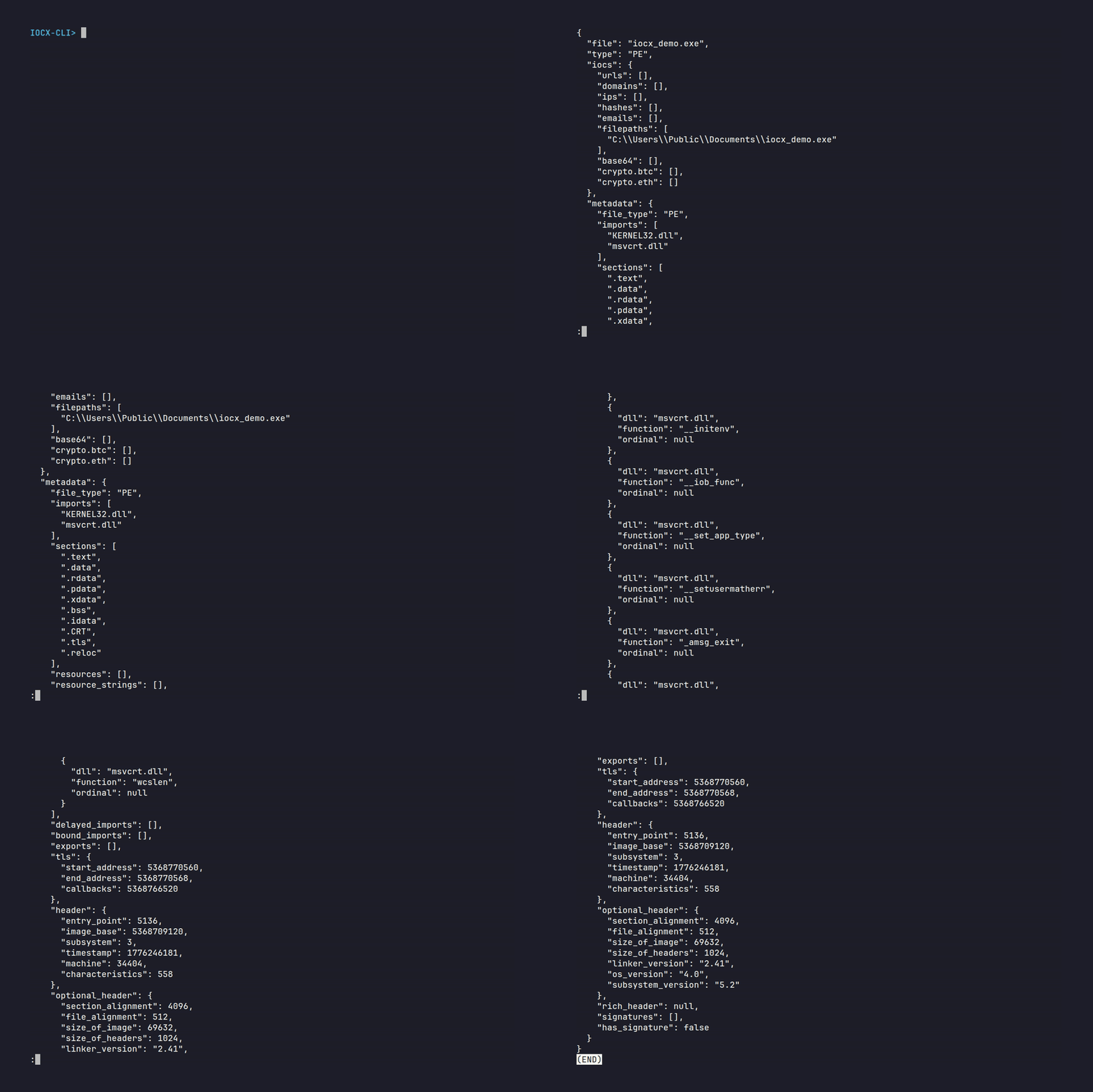
Static IOC extraction from a PE file using the IOCX CLI





This is the original IOCX engine for deterministic static IOC extraction and PE analysis. Any other repositories using the name "iocx" are not affiliated with this project.
Official links:
- PyPI: https://pypi.org/project/iocx/
- Github: https://github.com/iocx-dev/iocx
- Website: https://iocx.dev/
Modern malware is adversarial by default — malformed, evasive, and engineered to break naive extractors.
- Binary‑unaware tools collapse under malformed PEs
- Sandboxes are unsafe and unusable in CI/CD
- Reproducibility is essential for automated pipelines
IOCX is built for environments where correctness and determinism actually matter.
IOCX is the official static IOC extraction engine — a deterministic, binary‑aware system built for DFIR, SOC automation, CI/CD security, and large‑scale threat‑intel pipelines.
Unlike regex‑only extractors or sandbox‑dependent tools, IOCX performs:
- pure static analysis
- zero execution risk
- stable, deterministic output
- adversarial‑tested heuristics
It is a core component of the MalX Labs ecosystem for scalable, modern threat analysis.
echo "http://malicious.example" | iocx -Or scan a PE file safely:
iocx suspicious.exe -a deepSecurity teams face three persistent problems:
- Regex extractors break under adversarial input
- Sandboxing is unsafe, slow, and unsuitable for automation
- Most IOC tools are inconsistent, slow, or produce subtly different output between runs
IOCX solves this with a deterministic, static‑only engine designed for automation, safety, and scale.
IOCX is intentionally not:
- a sandbox
- a behavioural analysis tool
- an emulator
- an enrichment engine
It never executes untrusted code. It never performs dynamic analysis. It is static‑only by design — for safety, determinism, and CI/CD compatibility.
IOCX is engineered for the realities of modern malware, not the assumptions of legacy tools.
Stable, reproducible output — no randomness, no volatility.
Execution is unsafe. Static analysis is predictable, scalable, and CI‑friendly.
Malformed PEs, corrupted RVAs, hostile strings — IOCX treats them as normal input.
Downstream systems should never break on upgrade.
150–300 MB/s on raw text. 6–15 MB/s on typical PEs. Predictable even under worst‑case adversarial load.
| Capability | IOCX | Typical IOC Extractors | Sandbox / Dynamic Tools |
|---|---|---|---|
| Safety | Zero‑execution, static‑only | Regex‑only, no binary safety | Executes untrusted code (high‑risk) |
| Determinism | Fully deterministic output | Non‑deterministic under noise | Non‑deterministic by design |
| Binary Awareness | Full PE parsing, heuristics | No binary support | Yes, but unsafe + slow |
| Adversarial Resilience | Tested against malformed PEs, hostile strings | Easily bypassed | Often crashes or misclassifies |
| Performance | 150–300 MB/s (text), 6–15 MB/s (PE) | Highly variable | Extremely slow |
| CI/CD Friendly | Yes — safe, deterministic, fast | Partial | No — unsafe for pipelines |
| Schema Stability | Guaranteed | Rare | None |
In short: IOCX is built for real adversarial reality, not idealized input.
- Scan binaries before release
- Detect accidental URLs, IPs, or secrets in builds
- Enforce security gates with zero execution risk
- Extract indicators from alerts or analyst clipboard text
- Safely inspect malware samples without execution
- Normalize IOCs into structured JSON
- Process feeds at scale
- Parse unstructured reports
- Build enrichment pipelines on deterministic output
- Pipe logs or artifacts through IOCX
- Use the Python API for ETL or batch workflows
- Extend with custom detectors
150–300 MB/s sustained throughput Fast path — no PE parsing.
| Detector | 1 MB Time | Throughput |
|---|---|---|
| Crypto | 0.0037 s | ~270 MB/s |
| Filepaths | 0.0040 s | ~250 MB/s |
| IP | 0.0064 s | ~156 MB/s |
| Domains | 0.0033 s | ~300 MB/s |
- 0.0132 s (typical)
- 0.0153 s (with heuristics)
- 6–15 MB/s throughput
- 0.1977 s
- ~7.6 MB/s throughput
- Triggers TLS anomalies, structural anomalies, anti‑debug patterns
- 1 MB: 0.0411 s
Show Version History
- Major hardening of all PE structural validators
- Deterministic, snapshot‑stable behaviour
- Clear, consistent ReasonCodes
- Stronger heuristics built on structural truth
- Added missing
idnadependency - No behavioural or schema changes
- Six new PE heuristics
- Expanded adversarial PE corpus
- Hardened domain/URL/crypto/hash extractors
- Deterministic snapshot‑validated output
- Deterministic heuristics
- Layer‑3 adversarial samples
- Snapshot‑contract tests
- Rich Header crash fix
- Fully stable JSON schema
- Normalised PE metadata
- Formalised analysis levels
- New analysis‑level system
- PE structural analysis
- Obfuscation heuristics
- Plugin‑ready rule engine
- Unified detection flow
- Ethereum & Bitcoin wallet detection
- Major IPv4/IPv6 improvements
pip install iocxiocx suspicious.exeecho "Visit http://bad.example.com" | iocx -iocx suspicious.exe -afrom iocx.engine import Engine
engine = Engine()
results = engine.extract("suspicious.exe")
print(results)IOCX produces structured, deterministic JSON that includes IOCs, PE metadata, section analysis, heuristics, and obfuscation indicators.
The example below is an abridged output from a real adversarial PE sample. It demonstrates the shape and depth of the schema while keeping the size manageable for documentation purposes.
Show Example JSON Output
{
    "file": "heuristic_rich.full.exe",
    "type": "PE",
    "iocs": {
        "urls": ["http://not-a-real-domain.test/payload"],
        "domains": ["example-malware.com"],
        "ips": ["192.0.2.123"],
        "hashes": [
            "abcd1234ef567890abcd1234ef567890",
            "1234567890",
            "3333333333333333"
        ],
        "filepaths": [
            "/usr/src/mingw-w64-11.0.1-3build1/mingw-w64-crt/crt/crtexe.c",
            "/usr/x86_64-w64-mingw32/include",
            "/usr/src/mingw-w64-11.0.1-3build1/mingw-w64-crt/crt/pseudo-reloc.c"
        ]
    },
    "metadata": {
        "file_type": "PE",
        "imports": ["KERNEL32.dll", "msvcrt.dll", "USER32.dll"],
        "sections": [
            ".text", ".data", ".rwx", ".rdata",
            "UPX0", ".pdata", ".xdata", ".tls"
        ],
        "resources": [],
        "resource_strings": [],
        "delayed_imports": [],
        "bound_imports": [],
        "exports": [],
        "signatures": [],
        "has_signature": false,
        "tls": {
            "start_address": 5368758272,
            "end_address": 5368758280,
            "callbacks": 5368754232
        },
        "header": {
            "entry_point": 5088,
            "image_base": 5368709120,
            "machine": "AMD64",
            "subsystem": "Windows GUI"
        },
        "optional_header": {
            "section_alignment": 4096,
            "file_alignment": 512,
            "size_of_image": 155648
        }
    },
    "analysis": {
        "sections": [
            { "name": ".text", "entropy": 5.92 },
            { "name": ".rwx", "entropy": 0 },
            { "name": "UPX0", "entropy": 0.34 },
            { "name": ".rdata", "entropy": 4.03 }
        ],
        "obfuscation": [
            {
                "value": "abnormal_section_layout_virtual_only",
                "category": "obfuscation_hint",
                "metadata": {
                    "section": ".bss",
                    "raw_size": 0,
                    "virtual_size": 384
                }
            }
        ],
        "extended": [
            {
                "value": "summary",
                "category": "pe_metadata",
                "metadata": {
                    "dll_count": 3,
                    "import_count": 45,
                    "resource_count": 0,
                    "has_tls": true,
                    "has_signature": false
                }
            }
        ],
        "heuristics": [
            {
                "value": "packer_suspected",
                "metadata": {
                    "reason": "packer_section_name",
                    "section": "UPX0"
                }
            },
            {
                "value": "anti_debug_heuristic",
                "metadata": {
                    "reason": "anti_debug_api_import",
                    "dll": "kernel32.dll",
                    "function": "CheckRemoteDebuggerPresent"
                }
            },
            {
                "value": "anti_debug_heuristic",
                "metadata": {
                    "reason": "timing_api_import",
                    "dll": "kernel32.dll",
                    "function": "GetTickCount"
                }
            },
            {
                "value": "pe_structure_anomaly",
                "metadata": {
                    "reason": "section_overlaps_headers",
                    "section": ".bss",
                    "raw_address": 0,
                    "size_of_headers": 1536
                }
            },
            {
                "value": "pe_structure_anomaly",
                "metadata": {
                    "reason": "data_directory_overlap",
                    "directory_a": "IMAGE_DIRECTORY_ENTRY_IMPORT",
                    "directory_b": "IMAGE_DIRECTORY_ENTRY_IAT"
                }
            }
        ]
    }
}iocx/
├── examples/
├── docs/
├── tests/
└── iocx
├── detectors/
├── parsers/
├── plugins/
├── cli/
└── analysis/
IOCX is designed to be extended safely and predictably. Plugins are first‑class citizens, validated by the same deterministic snapshot tests as the core engine.
You can build:
- custom IOC detectors
- custom regex rules
- binary‑aware plugins
- internal heuristics
- pipeline‑specific extractors
See:
docs/specs/overlap-suppression.mddocs/specs/plugin-authoring-guidelines.md
IOCX is more than a single binary — it’s a modular ecosystem:
- Core Engine — deterministic IOC extraction + PE analysis
- Plugin System — custom detectors and analysis modules
- Adversarial Corpus — malformed PEs, hostile strings, fuzz samples
- Snapshot Testing Framework — ensures deterministic output
- Performance Benchmarks — enforced in CI
- Documentation Suite — specs, contracts, and plugin guides
IOCX is used across:
- DFIR teams
- SOC automation pipelines
- CI/CD security gates
- Threat‑intel platforms
- Malware research labs
- Security engineering teams
Anywhere indicators need to be extracted safely, deterministically, and at scale, IOCX fits.
All test samples are:
- Synthetic
- Benign
- Publicly safe (EICAR, GTUBE)
- Designed to avoid accidental malware handling
IOCX enforces strict performance thresholds in CI to ensure:
- No regex backtracking stalls
- No pathological slowdowns
- Stable performance across releases
See:
docs/performance.md
The name IOCX refers exclusively to the official engine published on:
- Repositories named
iocx - Tools named “iocx” not part of this project
- Implying affiliation without permission
iocx-<plugin>iocx-extension-<name>iocx-detector-<feature>
- Core Engine: https://github.com/iocx-dev/iocx
- Plugins Meta‑Repo: https://github.com/iocx-dev/iocx-plugins
- Documentation: https://github.com/iocx-dev/iocx/tree/main/docs/specs
- PyPI Package: https://pypi.org/project/iocx/
IOCX development focuses on stability, extensibility, and deeper static‑analysis coverage. The items below represent ongoing areas of work and exploration.
- Extended PE heuristics (delay‑load behaviour, structural anomalies, relocation patterns)
- Selective suppression rules for OSINT, DFIR, and threat‑intel workflows
- ELF and Mach‑O metadata extraction
- Batch analysis mode for multi‑artifact workflows
- YARA‑style output modes and enrichment hooks
- Binary‑agnostic static analysis
- Cross‑platform plugin ecosystem
- Language bindings for Rust, Go, and Node.js
We welcome:
- New detectors
- Parser improvements
- Documentation updates
- Synthetic adversarial samples
See CONTRIBUTING.md for guidelines.
If you discover a security issue, do not open a GitHub issue.
Follow the instructions in SECURITY.md.
MPL‑2.0 License — see LICENSE.