




JSignPdf is a Java desktop application for adding digital signatures to PDF documents. It supports both software keystores (PKCS#12) and hardware tokens / smartcards (PKCS#11), RFC 3161 timestamping (TSA), OCSP and CRL embedding for long-term validation (LTV), drag-to-place visible signatures, and a scriptable command-line / batch mode.
Project home page: intoolswetrust.github.io/jsignpdf
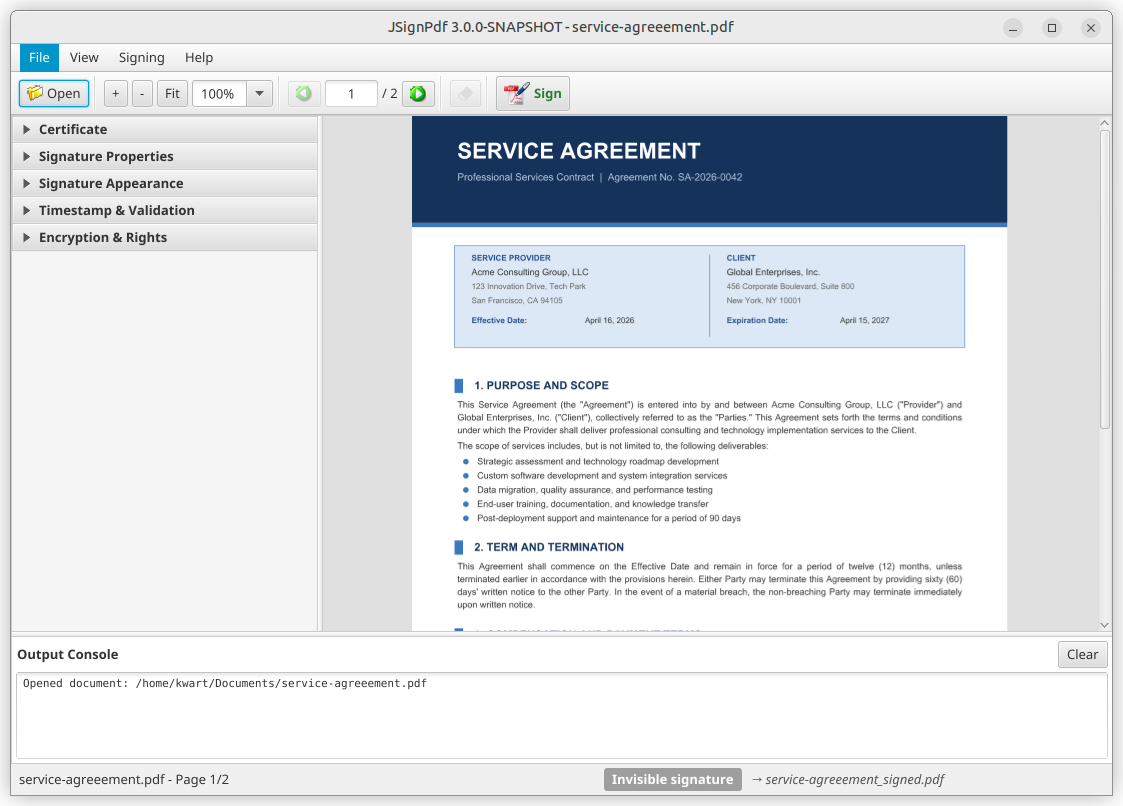
- JavaFX desktop UI — PDF preview, drag-to-place visible signatures, zoom / page navigation, drag-and-drop document loading, collapsible options panel. Legacy Swing UI remains available via
-Djsignpdf.swing=true. - Command-line / batch mode — sign many PDFs non-interactively; full CLI parity with the GUI.
- Keystores: PKCS#12, Java keystore, and PKCS#11 (hardware tokens, smartcards, HSMs via
conf/pkcs11.cfg). - Timestamping: RFC 3161 TSA with optional user/password authentication.
- Revocation info: CRL and OCSP embedding for LTV workflows.
- Visible signatures: customizable layout with
${signer},${timestamp}, and other placeholders. - Internationalization: maintained via Weblate (15+ languages).
Requires a Java 21 (or newer) JRE unless you use an installer that bundles its own runtime.
| Platform | Artifact | Notes |
|---|---|---|
| Windows | EXE / MSI / portable ZIP from GitHub Releases | Built with jpackage, ships a bundled Java 21 runtime. 64-bit only. |
| Linux | Flatpak (Flathub submission in progress — tracked in #307) or cross-platform ZIP | Flatpak bundles its own Java runtime. |
| macOS | Cross-platform ZIP | Requires Java 21 on PATH. |
| Any OS with Java 21 | jsignpdf-<version>.zip |
Run JSignPdf.sh / JSignPdf.bat from the extracted folder. |
| Mirror | SourceForge | Same artifacts as GitHub Releases. |
Maven-Central-published artifacts (for embedding the signing engine in your own project) live under com.github.kwart.jsign.
Passing a password on the command line exposes it to every local process that can read
/proc/<pid>/cmdline (or to shell history). To avoid that, JSignPdf can read password values
from standard input (or from an interactive console) instead.
Opt in with --enable-stdin-passwords and use - as the value of any password option:
# Keystore password, piped in
printf '%s\n' "$KS_PASSWORD" \
  | java -jar JSignPdf.jar --enable-stdin-passwords \
      -kst PKCS12 -ksf keystore.p12 -ksp - -ka mykey \
      -d out/ input.pdf
You can combine several password options in one invocation. When multiple options use -, the
values are consumed from stdin in a fixed canonical order regardless of the order in which
they appear on the command line:
--keystore-password(-ksp)--key-password(-kp)--owner-password(-opwd)--user-password(-upwd)--tsa-cert-password(-tscp)--tsa-password(-tsp)
# Keystore password first, TSA password second — even though the CLI lists them in the other order.
{ printf '%s\n' "$KS_PASSWORD"; printf '%s\n' "$TSA_PASSWORD"; } \
  | java -jar JSignPdf.jar --enable-stdin-passwords \
      -kst PKCS12 -ksf keystore.p12 -ksp - -ka mykey \
      -ts https://tsa.example/ -tsu tsauser -tsp - \
      -d out/ input.pdf
Before blocking on each read, JSignPdf prints a progress line such as
[jsignpdf] Reading password for --keystore-password (1/2) from stdin... to stderr so you can
verify the order matches what your pipe is feeding. Use -q (--quiet) to suppress it.
When a console is attached (an interactive terminal), - switches to a prompted,
no-echo read via java.io.Console.readPassword.
Backwards compatibility: without --enable-stdin-passwords, a literal - is still accepted
as a password value exactly as before. JSignPdf will emit a one-time warning naming the flag, so
a typo does not silently turn into a - password.
- User guide: https://intoolswetrust.github.io/jsignpdf/
- Release notes:
distribution/doc/release-notes/ - Developer / architecture guide: AGENTS.md
- Design notes:
design-doc/ - Issue tracker: https://github.com/intoolswetrust/jsignpdf/issues
Help translate JSignPdf on Weblate: https://hosted.weblate.org/projects/jsignpdf/messages/
Requires Java 21 and Apache Maven.
mvn clean installThe resulting artifacts are produced under distribution/target/. See AGENTS.md for module layout, source-tree overview, and test commands.
Windows installers are built with jpackage as part of the release workflow
(.github/workflows/do-release.yml) and produce three artifacts:
JSignPdf-<version>.exe— EXE installer with bundled Java 21 runtimeJSignPdf-<version>.msi— MSI installer with bundled Java 21 runtimeJSignPdf-<version>-win-x64.zip— portable ZIP with bundled Java 21 runtime
For a local experiment on Linux, cross-building requires a Windows JDK + WiX; the supported path is to let the release workflow build the installers.
Flatpak packaging lives under distribution/linux/flatpak/.
Maven dependencies for the Flatpak build are captured in maven-dependencies.json
and regenerated by generate-dependencies.sh (run by the
refresh-flatpak-deps.yml workflow).
Releases are workflow-driven via .github/workflows/do-release.yml:
- Add release notes for the new version as
distribution/doc/release-notes/<version>.md. The release workflow uses this file as both the bundled README and the GitHub Release body. - Trigger the
do-releaseworkflow manually, supplying the target version. - SNAPSHOT builds are published to Maven Central on every push to
masterviapush-snapshots.yaml.
Dual-licensed under MPL 2.0 and LGPL 2.1 — see License.md.
A minimal way to exercise the PKCS#11 code path without real hardware is to
back SunPKCS11 with a software NSS database.
Note: this only works with the
PKCS11keystore type.JSignPKCS11does not support NSS keystores.
echo "pass123+" > /tmp/newpass.txt
echo "dsadasdasdasdadasdasdasdasdsadfwerwerjfdksdjfksdlfhjsdk" > /tmp/noise.txt
mkdir /tmp/nssdb

MODUTIL_CMD="modutil -force -dbdir /tmp/nssdb"
$MODUTIL_CMD -create
$MODUTIL_CMD -changepw "NSS Certificate DB" -newpwfile /tmp/newpass.txt

certutil -S -v 240 -k rsa -n "CN=localhost" -t "u,u,u" -x \
         -s "CN=localhost" -d /tmp/nssdb \
         -f /tmp/newpass.txt -z /tmp/noise.txt

# Workaround for https://bugzilla.redhat.com/show_bug.cgi?id=1760437
touch /tmp/nssdb/secmod.db

cat <<EOT > conf/pkcs11.cfg
name=testPkcs11
nssLibraryDirectory=/usr/lib/x86_64-linux-gnu
nssSecmodDirectory=/tmp/nssdb
nssModule=keystore
EOT
Then select the PKCS11 keystore type in JSignPdf and use pass123+ as the token PIN.