
Allows you to model how much energy you would save with a home battery if you currently export energy to the grid e.g. from solar panels. Requires an energy monitor that can measure import and export energy. Whenever you are exporting energy your simulated battery will charge up and whenevery you are importing it will discharge. Battery charge percentage and total energy saved are in the attributes.
Please note this is a simulation and a real battery may behave differently and not all batteries will support all the features available in this simulation. In particular battery_sim allows you to simulate batteries that charge and discharge across multiple phases and various modes including charge_only, discharge_only etc that may not be available in all real world batteries.
The easiest way to get battery_sim is to use HACS to add it as an integration. If you do not want to use HACS, copy this repository into the custom_components folder in your Home Assistant configuration directory.
After installation, create one or more batteries. The recommended approach is to go to Settings > Devices & Services, click Add Integration, search for Battery Simulation, and work through the dialog for each battery you want to simulate.
You can also define batteries in configuration.yaml. Each battery is created under battery_sim: using a unique slug key. All YAML parameters currently supported by the integration are listed below.
| Parameter | Required | Description |
|---|---|---|
import_sensor |
Yes | Entity ID of the cumulative energy-import sensor in kWh, for example the output of a utility_meter. |
export_sensor |
Yes | Entity ID of the cumulative energy-export sensor in kWh. |
size_kwh |
Yes | Usable battery capacity in kWh. Use a floating-point value such as 13.5. |
max_discharge_rate_kw |
Yes | Maximum rated discharge power in kW. Use a floating-point value such as 5.0. The user can limit if further using a field in the device page. |
max_charge_rate_kw |
No | Maximum rated charge power in kW. Defaults to 1.0 if omitted. The user can limit if further using a field in the device page. |
discharge_efficiency |
No | Battery discharge efficiency from 0 to 1. If omitted, the integration falls back to efficiency when that legacy key is present, otherwise 1.0. You can enter either a single value between 0 and 1, or a power curve such as 0:0.90, 2.5:0.94, 5:0.95. |
charge_efficiency |
No | Battery charge efficiency from 0 to 1. Defaults to 1.0 if omitted. You can enter either a single value between 0 and 1, or a power curve such as 0:0.90, 2.5:0.94, 5:0.95. |
efficiency |
No | Legacy single-value efficiency key kept for backward compatibility. It is used as the default for discharge_efficiency when the newer split efficiency keys are not set. |
energy_tariff |
No | Entity ID of a tariff sensor. For backward-compatible YAML setups this populates the import tariff input. |
energy_import_tariff |
No | Entity ID of an import tariff sensor. |
energy_export_tariff |
No | Entity ID of an export tariff sensor. |
solar_energy_sensor |
No | Entity ID of a cumulative solar energy production sensor in kWh. When configured, the maximum charge power is capped by the solar production rate during each update interval. Seldomly needed, see below. |
nominal_inverter_power_kw |
No | Nominal inverter AC power limit in kW. Used together with solar_energy_sensor to cap battery discharge to max(0, nominal_inverter_power_kw - current_solar_power_kw) each update interval. |
name |
No | Friendly name shown in Home Assistant. If omitted, the YAML object key is used. |
rated_battery_cycles |
No | Number of full cycles at which end-of-life degradation is reached. Defaults to 6000. |
end_of_life_degradation |
No | Remaining usable capacity at rated_battery_cycles, expressed from 0 to 1. Defaults to 0.8. |
update_frequency |
No | Maximum interval between updates in seconds. Defaults to 60, which is also the recommended value. Faster updates do not improve accuracy. |
battery_sim:
  tesla_powerwall:
    name: Tesla Powerwall
    import_sensor: sensor.circuitsetup_cumulative_import_energy_kwh
    export_sensor: sensor.circuitsetup_cumulative_export_energy_kwh
    size_kwh: 13.5
    max_discharge_rate_kw: 5.0
    max_charge_rate_kw: 3.68
    discharge_efficiency: 0:0.92, 2.5:0.95, 5:0.95
    charge_efficiency: 0:0.90, 2:0.94, 3.68:0.95
    solar_energy_sensor: sensor.solar_generation_energy_kwh
    nominal_inverter_power_kw: 5.0
    rated_battery_cycles: 6000
    end_of_life_degradation: 0.8
    update_frequency: 60
    energy_tariff: sensor.energy_tariff
  lg_chem_resu10h:
    name: LG Chem
    import_sensor: sensor.circuitsetup_cumulative_import_energy_kwh
    export_sensor: sensor.circuitsetup_cumulative_export_energy_kwh
    size_kwh: 9.3
    max_discharge_rate_kw: 5.0
    max_charge_rate_kw: 3.3
    discharge_efficiency: 0.975
    charge_efficiency: 0.975
    energy_import_tariff: sensor.grid_import_tariff
energy_export_tariff: sensor.grid_export_tariffThe integration creates the following sensors for each battery:
| Sensor | Description | Unit |
|---|---|---|
current charging rate |
Real-time charging power based on the energy transferred during the last update interval. | kW |
current discharging rate |
Real-time discharging power based on the energy transferred during the last update interval. | kW |
solar power cap |
Average power corresponding to the solar generation cap, updated each interval. Only available when a solar energy sensor is configured. | kW |
battery_energy_in |
Cumulative energy charged into the battery since initialization or last reset. | kWh |
battery_energy_out |
Cumulative energy discharged from the battery since initialization or last reset. | kWh |
total energy saved |
Total energy saved compared to direct grid use. | kWh |
total_money_saved |
Total money saved by the battery operation. | Currency |
money_saved_on_imports |
Money saved by reducing energy imports from the grid. | Currency |
extra_money_earned_on_exports |
Extra revenue earned by exporting energy to the grid. | Currency |
last charge efficiency |
Charge efficiency used in the most recent update. | Ratio |
last discharge efficiency |
Discharge efficiency used in the most recent update. | Ratio |
battery_cycles |
Number of full charge/discharge cycles accumulated. | Cycles |
battery_degradation |
Current degradation factor (1.0 = no degradation). | Ratio |
Battery_mode_now |
Current operating mode (Charging, Discharging, Idle, etc.). | State |
percentage |
Current charge level as a percentage. | % |
status |
Status indicator showing if battery is Full, Empty, or Normal. | State |
When a solar energy sensor is configured via the solar_energy_sensor parameter, the integration uses solar generation data to cap the maximum charging power during each update interval.
For this feature to work, it is essential that the entity tracking the solar energy production gets updated more often than the battery simulator, which is by default once per 60 seconds. If thats not the case, the battery simulator would not detect any energy generation for some of the update intervals and incorrectly pause the battery. A practical example: APsystems' microinverters communicate via ZigBee and publish power and energy updates every 5 minutes. They are therefore incompatible with this feature.
If nominal_inverter_power_kw is also configured, discharge is additionally capped to the inverter headroom, taking into account the solar energy sensor change over the current update interval.
This is useful only in the scenario in which batteries are connected to inverters which are "one way", meaning these inverters can use energy from the panels to charge the battery and use the battery to provide power to the rest of the network, but which cannot use energy from the grid to charge the batteries.
This parameter is needed also2 when there are more batteries (and inverters) than the available energy readings (which typically means two of such batteries and inverters), because if there is only one of such batteries and inverters, the only excess power seen by the smart meter is inevitably the power from the only inverter, and this parameter is not needed.
In such a scenario the simulator would not be able to know whether the excess energy (the one normally exported to the grid) come from one or the other inverter, so it would potentially use excess production from one inverter to charge a battery connected behind the other inverter.
In such an unusual scenario this parameter fixes the issue.
To be clear: do NOT set the charge cap to the smart meter energy production: it does not represent how the battery or inverter behave and it will cause undesired (and unrealistic) results.
This integration supports separate charge_efficiency and discharge_efficiency values because battery efficiency is not flat across the full operating range. In practice, manufacturers often publish an efficiency curve: efficiency changes with charge or discharge power, and lower power levels typically produce worse results than the headline datasheet number.
You can configure each efficiency either as:
- a single value, for example
0.95 - or a power curve, for example
0:0.88, 0.5:0.90, 2.5:0.94, 5:0.95
The power values are in kW. During each battery update, the integration computes the average charging or discharging power as:
energy transferred during the interval / interval duration
It then linearly interpolates the efficiency from the configured points and uses that value for the update. Two extra sensors report the charge and discharge efficiency used for the most recent update.
A simplified efficiency curve usually looks something like this:
| Charge/discharge power | Typical behavior |
|---|---|
| Very low power | Efficiency drops because fixed inverter and standby losses dominate. |
| Medium power | Efficiency is usually at or near the best point on the curve. |
| Very high power | Efficiency can taper off again because of conversion and thermal losses. |
If you use fixed efficiencies rather than an efficiency curve, the best approach is to choose values that represent your most common operating range. If most of your simulated battery activity happens at low power, set lower charge_efficiency and discharge_efficiency values to approximate that part of the curve and choose more conservative efficiency values than the best-case number in the datasheet.
When reading a datasheet, make sure the quoted efficiency covers the whole path you care about. Some manufacturers quote inverter efficiency only, which may describe battery-to-AC conversion while excluding charging losses into the battery. In those cases, use conservative values for both charge and discharge.
This integration models the degradation of the battery linearly, from 100% usable capacity (no degradation) at 0 cycles and (by default) 80% usable capacity at 6000 cycles. The values can be provided in the settings.
The state of charge (SOC) is not limited progressively, the capacity associated with 100% SOC simply decreases over time.
A new action is provided to manually set the current number of battery cycles, to simulate immediately old batteries.
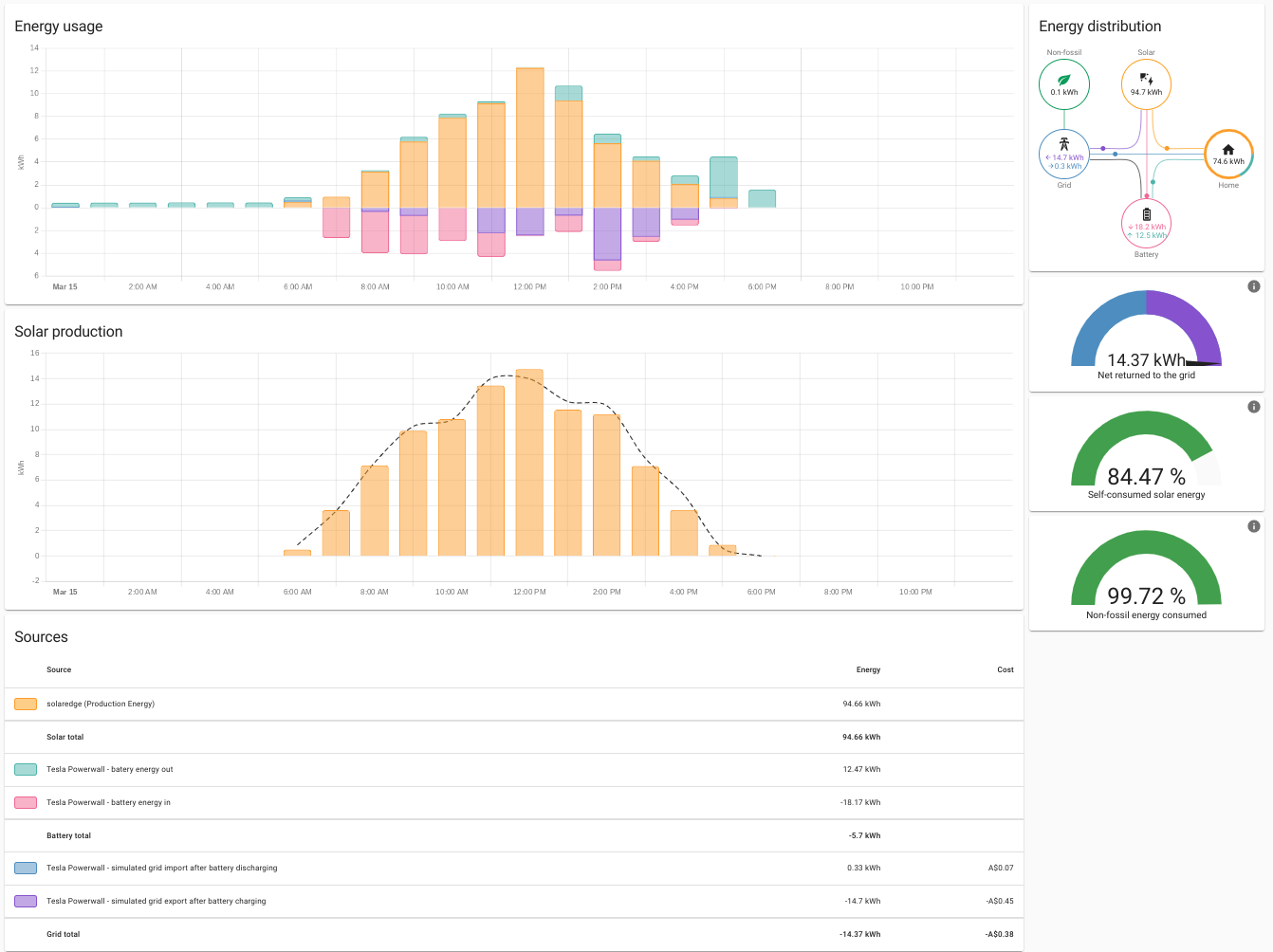
You can configure battery_sim to display your simulated battery on your Energy Dashboard:

If you are having problems it is helpful to get the debug log for the battery by adding:
logger:
  default: critical
  logs:
    custom_components.battery_sim: debug
to your configuration.yaml and then restarting. If you leave it to run for a few minutes go to logs then and click "load full log" you should see entries from the battery saying it's been set up and then each time it receives an update. If you need to raise an issue then including this code is helpful.
Original idea and integration developed by hif2k1. Further work in cooperation with dewi-ny-je.