

One app for gaming mice and keyboards across brands
Open source, on Windows and Linux, instead of Logitech G HUB, SteelSeries GG, Corsair iCUE and Razer Synapse.





⬇️ Download · 🌐 Website · 🖱️ Devices · 💡 Ideas · 💬 Discussions
- 🆓 Free and open source: no account, no ads, no telemetry.
- 🪶 Small: an installer under 5 MB, about 4 MB of memory while it waits in the tray.
- 💾 Settings stay in your devices: key mapping, mouse profiles, DPI and macros keep working with PeriHub closed, on any PC.
- 🛡️ Careful with your devices: only known commands, a backup before every write, and every write read back (how).
- 🧩 Many brands in one app: Logitech, SteelSeries, Corsair, Razer, ASUS and more (devices).
- 🎮 App profiles: the lighting and the mouse profile follow the game or app in focus.
- 🚀 Quick start
- 🖱️ Devices
- ✨ What PeriHub can do
- 🧪 Experimental features
- ⬇️ Download and install
- 🕹️ Using PeriHub
- 🛡️ Safety
- ⚡ Performance
- ❓ FAQ
⚠️ Known limitations- 🤝 Help and contributing
- 📜 Credits and license
- Download the file for your system from the latest release: the
setup.exeon Windows; the.deb,.rpm, Flatpak or AppImage on Linux (which one). - Quit the maker's app (G HUB, GG, iCUE, Synapse…) and turn off its autostart: two programs talking to the same device get in each other's way.
- Open PeriHub: your devices appear in the sidebar. Not there? Its Send a report page helps you ask for them.
✅ Supported: tested on real hardware · 🧪 Experimental: recognized, changes at your own risk · 👁 Read-only: recognized and read
| Device | What works |
|---|---|
| SteelSeries Apex 3 TKL keyboard | ✅ Everything: lighting, brightness, key remapping on both layers, software macros |
| Logitech G502 HERO mouse | ✅ Everything: profiles, DPI, polling rate, buttons, G-Shift, macros, lighting |
| Logitech G502 X Wireless mouse | ✅ Profiles, DPI, buttons and macros, confirmed by a user on a real mouse |
| Logitech G300 mouse | ✅ Its three profiles, read and edited, confirmed by a user on a real G300 |
| Devices | Level and what PeriHub can do |
|---|---|
| 28 more Logitech G mice (G Pro, G403, G703, G903, G305…) | Depends on the memory format each mouse reports: ✅ supported if that format was tested on another mouse, 🧪 experimental if PeriHub can write it but nobody has tried yet, 👁 read-only otherwise (how it works) |
| Logitech devices on a Logi Bolt or Unifying receiver (MX Master, MX Anywhere, MX Keys…) | 🧪 Recognized by the features they report; the DPI of those without onboard memory can be changed, everything else is read |
| Logitech G600 | 🧪 Read; DPI, polling rate and lighting of the profile in use can be saved at your own risk |
| Logitech G500s, G700s with a cable, whose software Logitech no longer offers | 🧪 Read the profile in use; the DPI in use can be changed, not saved; their memory is never written |
| Logitech G9, G9x, G500, G700 with a cable | 👁 Profile in use, DPI, polling rate and buttons |
| 26 Corsair mice and 23 Corsair keyboards (KATAR, M65, M75, SCIMITAR, DARK CORE, K55, K70, K100…) | 🧪 Read, and one colour of lighting for the session, at your own risk |
| 74 Razer mice (DeathAdder, Viper, Basilisk, Naga, Orochi…) on their USB cable | 🧪 Read; DPI, polling rate and the brightness of the lights can be saved at your own risk, and on 27 of them one colour can be sent without saving it |
| 33 SteelSeries mice (Rival, Sensei, Aerox, Prime, Kana, Kinzu) | 🧪 They cannot report their settings: DPI, polling rate, colours and effects are sent one at a time, never saved to the mouse |
| 21 ASUS ROG and TUF mice (Chakram, Gladius II, Keris, Spatha X, Strix Impact, TUF Gaming M3…) | 🧪 Read; DPI, polling rate, button response, angle snapping and lighting can be changed at your own risk |
| 3 Glorious mice (Model O/O-, Model D, Model O Eternal) with a cable | 🧪 Read; on Linux DPI and polling rate can be saved at your own risk, on Windows read-only for now |
| 7 Pulsar mice (Xlite, X2, X2H, X2A, Xlite v4, X3, X3 LHD) on their USB cable | 🧪 Read; DPI, polling rate, debounce time, angle snapping, ripple control and motion sync can be saved at your own risk |
| Pulsar X2 CrazyLight, X3 LHD CrazyLight on their USB cable | 🧪 Read; DPI, polling rate, lift-off, debounce, motion sync, angle snapping and ripple control can be saved at your own risk |
| Lamzu Atlantis on its USB cable | 👁 Read-only |
| 4 Cooler Master mice (MM530, MM711, MM720, MM730) | 🧪 Lighting only: colour, brightness and mode can be saved at your own risk |
| EVGA X12, X20 with a cable | 🧪 Lighting only: on the X12 colour, brightness and off can be saved at your own risk; the X20 is read-only |
| Roccat Kone Pure, Kone XTD, Kone EMP | 👁 Profile in use, DPI levels and polling rate |
| Keyboards with QMK firmware: every Vial keyboard, and VIA keyboards you turn on | 🧪 Read; lighting can be changed at your own risk, keymaps are left to VIA and Vial |
How PeriHub changes the devices of each brand: Mice and keyboards of other brands.
The full list, with USB IDs, is in docs/devices.md. A device becomes fully supported once someone with it sends a test report: see Help test your device.
Not on the list? Open a device request: any brand can be asked for. PeriHub fills one in for you: with no supported device connected its sidebar shows Send a report, which lists your USB and Bluetooth devices with their USB ids (Settings → Devices links to it too).
| Feature | Details | Saved in |
|---|---|---|
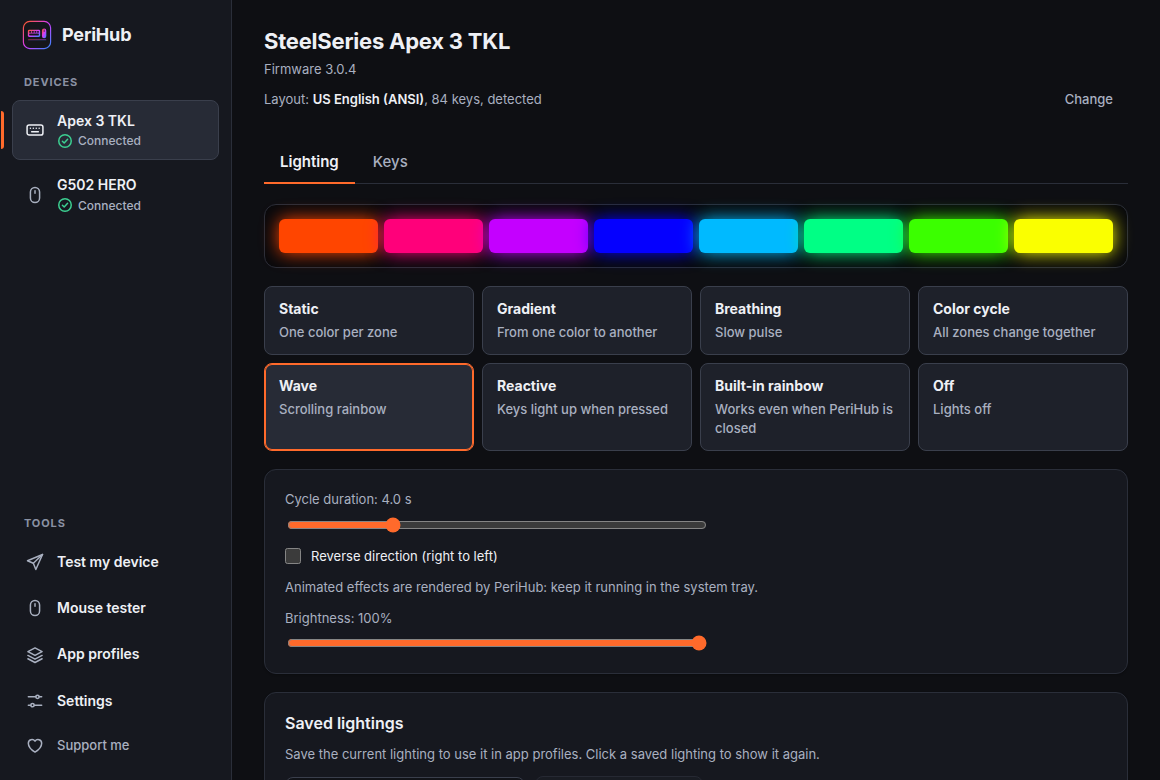
| Lighting | 8 zones: static, gradient, breathing, color cycle, wave, reactive (the zone of each key you press lights up), built-in rainbow, off | PC: PeriHub reapplies it when the keyboard is connected |
| Brightness | 0–100% in 17 steps, in sync with SteelSeries + F11/F12 | PC |
| Key remapping | Any key, on the normal layer and on the "SteelSeries key held" layer, drawn in the layout PeriHub detects (ANSI, ISO, JIS or ABNT2; 12 sets of legends) | Keyboard: works without PeriHub |
| Software macros | A key, such as SteelSeries + 1, starts a macro run by PeriHub | The key in the keyboard, the macro on the PC |
| Feature | Details | Saved in |
|---|---|---|
| Profiles | 5 onboard profiles: activate, enable or disable, restore factory settings | Mouse |
| DPI | Up to 5 levels from 100 to 25600, default and sniper level, live preview | Mouse |
| Polling rate | 125, 250, 500, 1000 Hz | Mouse |
| Buttons | 11 buttons plus the G-Shift layer: clicks, keys with modifiers, media keys, DPI and profile functions | Mouse |
| Lighting | Logo and DPI indicator: off, fixed color, breathing, color cycle, with live preview | Mouse |
| Macros | Recorded from the keyboard or built step by step: keys, clicks, media keys, scrolling, pauses | Mouse: works without PeriHub, on any PC |
| Software macros | What the mouse cannot do alone: repeat, type text, open a website or a program. Up to 8 | PC: PeriHub must be running |
| Feature | Details | Saved in |
|---|---|---|
| Profiles | 3 profiles: light colour (8 colours), report rate, 4 DPI levels with the default one, DPI shift | Mouse |
| Buttons | The wheel button and G4 to G9: clicks, keys with Ctrl, Shift, Alt or Win, DPI functions, next profile. The left and right buttons stay as they are | Mouse |
| Safety net | A backup of the three profiles before every save, every save read back, and Keep? after each one: without an answer the backup goes back after 15 seconds |
- App profiles: while a game or an app is in focus, PeriHub can switch the keyboard lighting and the mouse profile, and switch back afterwards. On Windows, and on Linux on Hyprland, KDE Plasma and GNOME (Wayland and X11; GNOME 45 or newer, through a small GNOME Shell extension that the App profiles page helps you install). PeriHub only reads the app's identifier (the executable name or window class), never window titles or contents.
- Backups: before every write to a device, PeriHub saves its memory, and Backups… puts it back.
- Updates in one click on Windows, signed, and only when you choose.
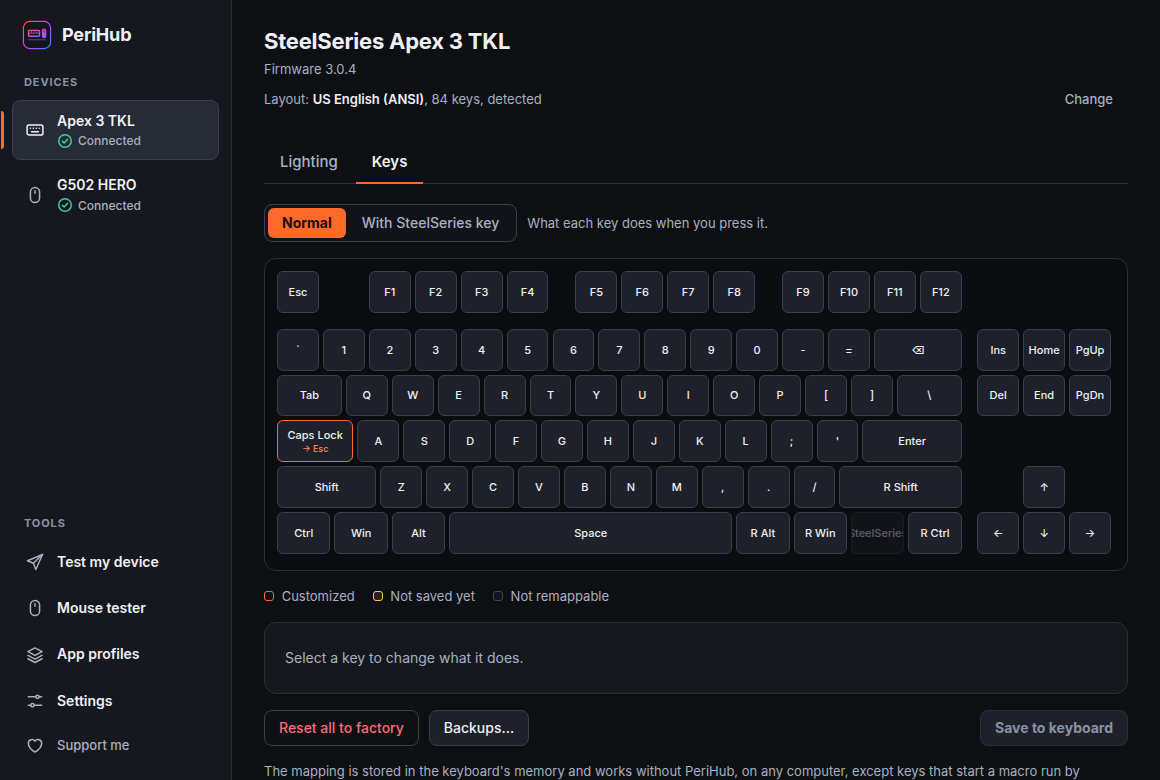 Key remapping on both layers of the Apex 3 TKL |
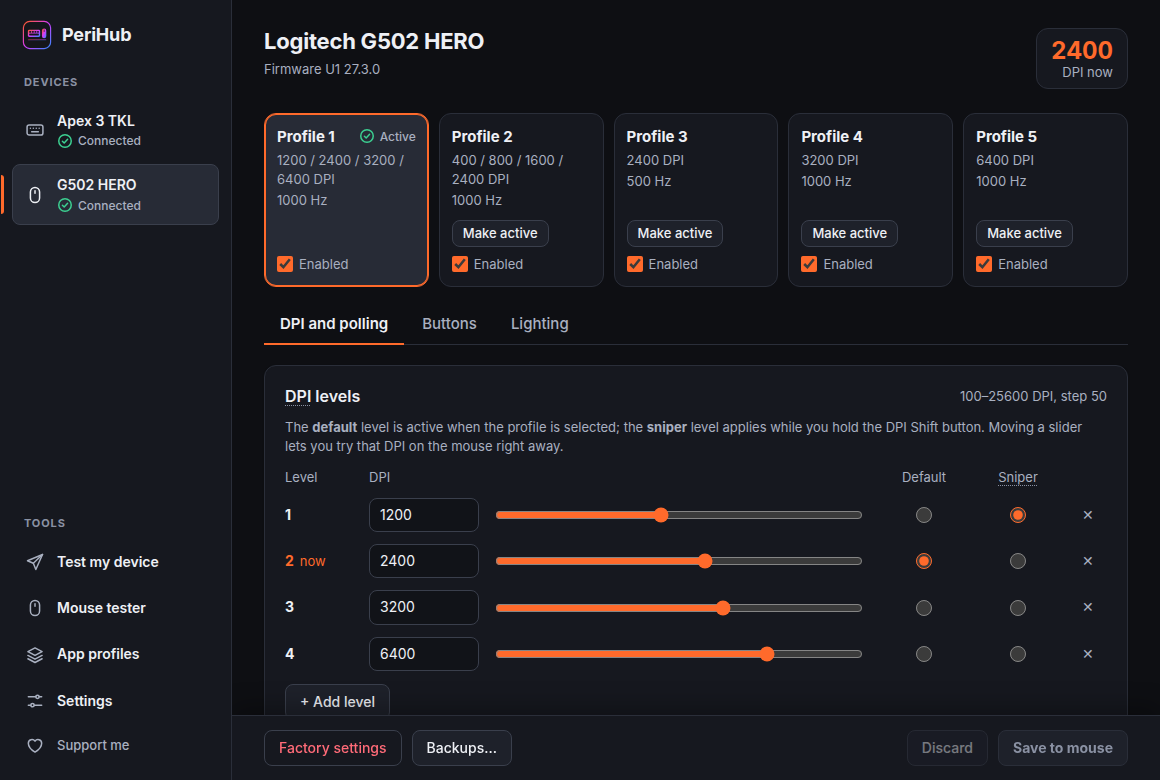 DPI and polling rate, previewed live on the mouse |
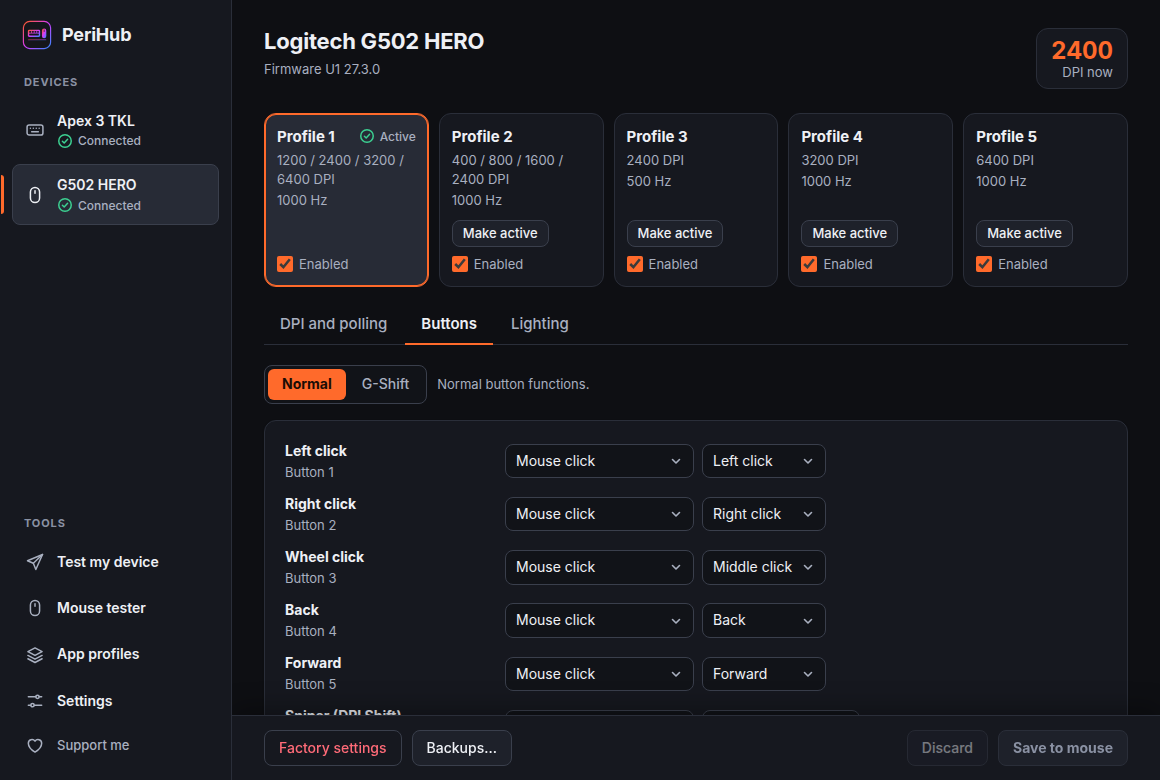 Buttons and G-Shift, saved in the mouse |
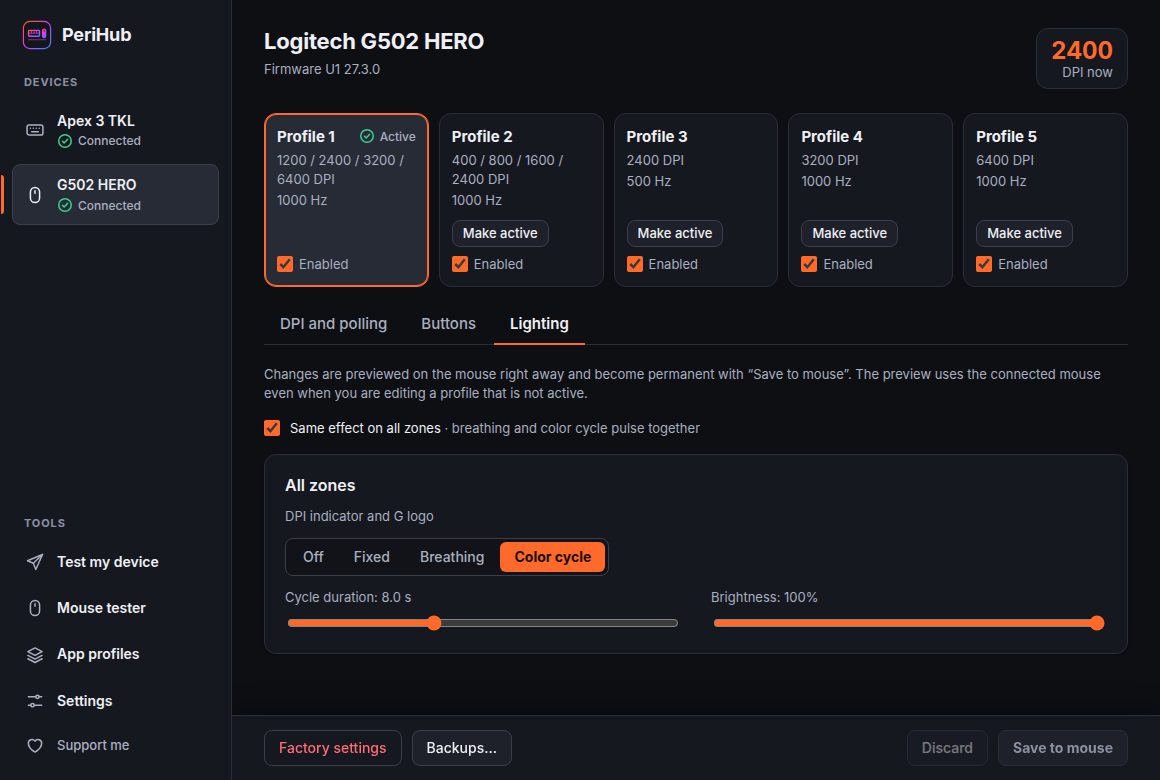 Lighting of each zone |
Some devices have not been tested yet. PeriHub reads them and changes nothing, unless you use an experimental feature on the device's page.
What decides how PeriHub saves a Logitech mouse's profiles is the format of its onboard memory, not the model: many models share one format, and the same model can change format with a firmware update. So PeriHub reads the format from the mouse every time it connects:
- A format tested on a real mouse (format 2 in 256-byte sectors, from the G502 HERO; format 3 in 255-byte sectors, from the G502 X Wireless): the mouse is supported, whatever the model.
- A format PeriHub can write but nobody has tried yet (format 2 or 3, in 255- or 256-byte sectors): the mouse page says so, and you can save at your own risk with the USB cable. Before your first save to that mouse PeriHub asks you to tick the No warranty box below. Each save is undone after 15 seconds unless you keep it.
- Any other format (4, 5 and newer): read-only.
- Through a receiver, as G HUB does: with a tested format, saving is experimental, because PeriHub has saved over the radio on one mouse so far, a G502 HERO Wireless on a POWERPLAY mat (issue #28). It asks for the No warranty box before the first save through the receiver, undoes each save after 15 seconds unless you keep it, and does not save below 15% battery. With any other format it only reads.
One test report is enough to make a format tested for every mouse that uses it: see Help test your device.
Caution
No warranty. Experimental features have never been tried on your device. PeriHub is provided "as is", without any warranty, as its license says. If you use one, you do so at your own risk: the author of PeriHub is not responsible for any damage, malfunction or loss. PeriHub asks you to confirm this before each one is turned on, and before the first save to a mouse whose memory format is untested.
| Logitech mice with an untested memory format | Corsair devices: Try experimental lighting… | |
|---|---|---|
| What you can change | Profiles: DPI, polling rate, buttons, lighting, macros | One colour on every LED or key, for this session |
| When it is offered | USB cable, and a memory format PeriHub can write (profile format 2 or 3, 255- or 256-byte sectors) | Always, except while iCUE, OpenRGB, ckb-next or OpenLinkHub runs |
| What stays off | Enabling or disabling profiles, creating the profile list of a mouse nothing was saved to, saving an untested format through a receiver | Everything else: DPI, polling rate, buttons, the device's memory |
| Safety net | Only values the mouse accepts; a backup before every save; every write read back | Only the commands lighting needs; nothing is saved in the device |
| If something looks wrong | Each save is undone after 15 seconds unless you keep it, also after PeriHub closed or the mouse was unplugged | The device gets its own settings back after 15 seconds unless you keep it, when you quit PeriHub, and as soon as anything fails |
| Turn it off | Nothing to turn off: just don't save | On the device page, or Turn off experimental lighting in the tray menu |
The other brands are supported from the published documentation of their protocols, not from a test on a real device. ASUS mice (libratbag) show how a change works; the others follow the same rules where they apply, and each one's differences are below. PeriHub reads them; their page can change the active profile's settings:
- Apply sends a change without saving it to the device's memory. It should last until the device is turned off, but that is not confirmed, so the page always shows a warning next to it.
- Save to memory also stores it in the device, after the No warranty box the first time.
- Either way PeriHub sends only the commands in its list for that device (never anything that touches firmware) and only values the device accepts. It saves a backup of the settings first and reads them back after, and the change is undone after 15 seconds unless you keep it, also after PeriHub closed or the device was unplugged. The undo of a Save to memory saves back the settings the device had when PeriHub connected.
- If anything the device answers does not look as documented, PeriHub changes nothing on it and the test report shows exactly what it answered.
What PeriHub reads and changes on each brand, and where its protocol comes from:
Razer mice
Razer mice are supported from facts found in OpenRazer, with no code copied. They store every change by themselves, so their page offers only Save to memory, after the No warranty box, with the same backup, read-back and 15-second undo: DPI, polling rate and the brightness of each light. Their lighting effect cannot be read back, so PeriHub never stores one: on 27 mice Send shows one colour, sent the way OpenRazer sends its custom frames, without saving it, with a warning that it cannot be checked or undone. Their receivers and docks are left out, since some can be shared with a keyboard: use the USB cable.
Glorious mice
Glorious mice are supported from the published documentation of their SinoWealth protocol (libratbag). Every change rewrites their settings in memory, so their page too offers only Save to memory, after the No warranty box, with the same backup, read-back and 15-second undo; PeriHub changes only the DPI of each slot and the polling rate, and writes everything else back as it read it, never on top of a reading that differs from the one taken when the mouse was connected. On Windows they are read-only for now: there the mouse does not say how long its settings are, and a write must. Only the ids that belong to Glorious are recognized: the generic SinoWealth ids are shared by other brands' mice, some with a different protocol.
Logitech G600
The Logitech G600 is supported from the documentation of its protocol in libratbag. It keeps three profiles in vendor reports of its own, not HID++, and writing a profile stores it, so its page too offers only Save to memory on the profile in use, after the No warranty box, with the same backup, read-back and 15-second undo. PeriHub changes the DPI of the slots that are on, the polling rate and the lighting, writes the buttons and everything else back as it read it, and never writes on top of a profile that changed since the mouse was connected.
Older Logitech mice: G9, G9x, G500, G500s, G700, G700s
The older Logitech G mice, G9, G9x, G500, G500s, G700 and G700s, lost their software when Logitech removed Logitech Gaming Software from its site on 31 October 2026. PeriHub reads them from the documentation of their HID++ 1.0 protocol in libratbag: the DPI in use, the polling rate, and what the profile in use stores (DPI levels, polling rate, buttons, its name). On the G500s and G700s it can change the DPI in use, with the same read-back and 15-second undo; according to libratbag the mouse forgets it when unplugged, which nobody has confirmed yet; the others are read-only, since the sources disagree on how their DPI is coded. PeriHub never writes their memory: their stored profiles and macros stay as they are. Only with the cable. The G400s is not supported: the only known way to configure it is a raw USB request PeriHub cannot send, and it reads nothing back.
Roccat Kone mice
The Roccat Kone Pure, Kone XTD and Kone EMP are read only, from libratbag: PeriHub shows the profile in use, its DPI levels and polling rate, and changes nothing, since the sources disagree on what a write needs.
Pulsar mice
Pulsar mice on their USB cable (Xlite, X2, X2H, X2A, Xlite v4, X3 and X3 LHD) are supported from pulsar-mouse-linux, a recent project built from USB captures. They store every change by themselves, so their page offers only Save to memory, after the No warranty box, with the same backup, read-back and 15-second undo. PeriHub changes the polling rate, debounce time, angle snapping, ripple control, motion sync and the DPI of each stage of the profile in use; it never switches or resets a profile, and leaves buttons, lighting and lift-off alone. Their wireless dongles are left out.
Pulsar CrazyLight and Lamzu Atlantis
The Pulsar X2 CrazyLight and X3 LHD CrazyLight on their cable speak another protocol, also from pulsar-mouse-linux, whose author confirmed reads and writes on both: the same Save to memory with backup, read-back and undo, and every value checked against the check byte the mouse stores beside it. The Lamzu Atlantis shares that protocol (lamzu-cfg) and is read only for now.
Cooler Master mice
The lighting of four Cooler Master mice (MM530, MM711, MM720, MM730) is supported from the USB captures of Cooler Master's own app that users attached to OpenRGB's device requests, with no code copied. Every change goes through the app's save sequence, so their page offers only Save to memory, after the No warranty box, with the same backup, read-back and 15-second undo: colour and brightness of the mode in use, and steady, breathing, colour cycle or off.
EVGA mice
The lighting of two EVGA mice is supported from facts in OpenRGB's EVGA drivers, with no code copied. On the X12 PeriHub turns each zone off or steady and changes its colour and brightness with Save to memory, after the No warranty box, with the same backup, read-back and 15-second undo; the X20 on its cable is read only. The Z15 and Z20 keyboards are left out.
Keyboards with QMK firmware (Vial, VIA)
Keyboards with QMK firmware are supported from facts found in the QMK and Vial sources, with no code copied. They have no USB ids of their own, so PeriHub finds them by the raw HID channel that VIA and Vial use, and lists them on the QMK keyboards page. Vial keyboards say so in their serial number and are read by themselves. Any other keyboard with that channel is read only after you turn it on as a VIA keyboard, since its firmware might give VIA's bytes another meaning. PeriHub shows the protocol versions, layers and macros, and the lighting: effect, speed, colour and brightness, with Apply and Save to memory as above. It changes the lighting only on Vial keyboards with VialRGB and on VIA firmware from 2023 on (protocol 12 or 13), where the protocol says exactly how; VIA effects have no names, so their page offers off and the effect in use. Keymaps, macros, the bootloader and the memory resets are never touched: use VIA or Vial for them, and close them while PeriHub reads the keyboard.
SteelSeries mice
SteelSeries mice are supported from rivalcfg, and PeriHub sends exactly the bytes rivalcfg's own tests expect. These mice cannot report their settings, so PeriHub cannot show, check or undo them: Send changes one setting until the mouse is unplugged or turned off, under a warning that is always on screen, and PeriHub never saves to their memory until someone has tested one. Unplugging the mouse brings back what it has saved.
If you own a device marked 🧪 or 👁:
- Install PeriHub and quit the official app (G HUB, Logitech Gaming Software, iCUE).
- Open the device's page in PeriHub and press Open test form. It opens a report on GitHub with what PeriHub read already filled in: no key presses, apps or log lines.
- Check that what PeriHub shows matches your device, and send it. You need a free GitHub account.
Once someone confirms a model, it becomes fully supported for everyone. For a Logitech mouse, the confirmation counts for its memory format, so for every other mouse that uses it too.
Get the file for your system from the releases page.
Verify a download (releases from the first one with build provenance on): gh attestation verify FILE -R hex-dump/perihub checks that GitHub Actions built the file from this repository. The release also has SHA256SUMS.txt (sha256sum -c --ignore-missing SHA256SUMS.txt), and .sig files that PeriHub's updater checks. See code signing.
- Download
PeriHub_…_x64-setup.exeand run it. - The installer is not code-signed yet (code signing policy). If SmartScreen blocks it, click More info → Run anyway.
- Quit SteelSeries GG, Logitech G HUB and Corsair iCUE, and turn off their autostart: two programs talking to the same device get in each other's way.
No drivers are needed. PeriHub tells you when a new version is out, in the tray menu and in Settings → Updates.
With Scoop: @Kissshot-2003 maintains a bucket for PeriHub. Update it with scoop update perihub.
scoop bucket add perihub-scoop https://github.com/Kissshot-2003/perihub-scoop
scoop install perihub-scoop/perihub| Distribution | File |
|---|---|
| Debian, Ubuntu | PeriHub_…_amd64.deb |
| Fedora, openSUSE | PeriHub-…-1.x86_64.rpm |
| Arch, CachyOS | the perihub-bin package, built from this repository (below) |
| Any, with Flatpak | PeriHub_…_x86_64.flatpak (below) |
| Any other | PeriHub_…_amd64.AppImage: chmod +x it and run it |
On Arch-based distributions, until perihub-bin is on the AUR (the aur branch holds the PKGBUILD of the latest release):
git clone --branch aur --single-branch https://github.com/hex-dump/perihub.git perihub-aur
cd perihub-aur
makepkg -siFlatpak: install the downloaded file for your user, with its name in place of X.Y.Z. PeriHub runs on the GNOME runtime, which Flatpak downloads from Flathub, offering to set Flathub up if it is not:
flatpak install --user PeriHub_X.Y.Z_x86_64.flatpakPeriHub is not on Flathub, so the Flatpak does not update by itself: install the next release's file the same way. Like the AppImage, it needs the udev rule below. On desktops without the Background portal, such as Hyprland, add flatpak run io.github.hex_dump.perihub --hidden to the desktop's own autostart (an exec-once line on Hyprland): PeriHub says so when you tick Start PeriHub when I log in in Settings. On GNOME, the Flatpak may not install the small extension app profiles need: the App profiles page shows the one command to run in a terminal instead, then log out and back in.
The .deb, .rpm and perihub-bin packages install a udev rule that lets PeriHub open the devices. With the AppImage or the Flatpak, if PeriHub shows "permission denied", install it by hand (this is the rule of release 0.9.3: if you have another version, change the version in the address), and again after an update that adds devices:
sudo curl -o /etc/udev/rules.d/70-perihub.rules \
  https://raw.githubusercontent.com/hex-dump/perihub/v0.9.3/packaging/linux/70-perihub.rules
sudo udevadm control --reload && sudo udevadm trigger
The rule opens only the interfaces that carry settings, and only for the user at the screen. The ones that report what you type and how you move the mouse stay closed.
Optional rules: reactive lighting and software macros
Reactive lighting reads key presses, and so does a key of the Apex 3 TKL that starts a software macro. This needs a second rule, 71-perihub-keys.rules. PeriHub offers to install it from Lighting → Reactive and from the Keys page, asking for your password, and can remove it from there.
[!WARNING] Linux cannot give this permission to PeriHub alone. With the rule installed, every program running under your user account can read everything you type on the Apex 3 TKL, passwords included, even while PeriHub is closed. Install it only if you want these features and trust all the software you run.
PeriHub itself reads key presses only while reactive lighting is on or a keyboard key starts a macro, and never stores, logs or sends what you type.
Linux puts the Unifying receivers in a mode where what you type on the keyboards paired with them comes through the same interface PeriHub needs, so the default rule leaves them closed. When PeriHub finds a Unifying receiver it cannot open, the mouse page explains this and offers to install 73-perihub-unifying.rules, asking for your password, and can remove it from there. If Solaar is installed, its own rule already opens the receiver.
[!WARNING] Linux cannot give this permission to PeriHub alone. With the rule installed, every program running under your user account can read everything you type on the keyboards paired with a Unifying receiver, passwords included, even while PeriHub is closed. Install it only if you want PeriHub to reach those devices and trust all the software you run.
PeriHub itself only reads the answers of the devices it asks, and drops everything else that arrives on that interface without storing, logging or sending it.
QMK keyboards have no USB ids PeriHub's rule could list, so each one needs a line of its own. When the system refuses PeriHub a QMK keyboard, the QMK keyboards page offers to add one to 73-perihub-qmk.rules, asking for your password, and can remove it from there. PeriHub first reads, in /sys, the descriptor of each of the keyboard's interfaces, and the line opens only the one that holds the raw HID channel and nothing else: what you type arrives on another interface, which stays closed. If Vial's own rule is installed, PeriHub can already read Vial keyboards.
Software macros type and click through a virtual keyboard and mouse (/dev/uinput). Many gaming systems already allow it, and PeriHub tells you so on the Buttons and Keys pages. Otherwise it offers to install 72-perihub-uinput.rules from there.
[!WARNING] With this rule, every program running under your user account can simulate a keyboard and a mouse, and type or click anything as if it were you. Install it only if you want software macros and trust all the software you run.
- Keyboard → Lighting: pick an effect. It applies at once and is remembered.
- Keyboard → Keys: click a key, choose its new function and press Save to keyboard. The layout under the keyboard's name is detected from the system; Change sets another one if it is wrong. With SteelSeries key changes what keys do while the SteelSeries key is held.
- Mouse: pick a profile at the top, then change DPI, buttons and lighting. Nothing is written until you press Save to mouse. DPI and lighting are previewed live; leaving the page brings the saved settings back.
- G-Shift: give "G-Shift" to a button. While you hold it, the other buttons do what the G-Shift tab says.
Closing the window does not quit PeriHub. It keeps running in the tray with much less memory, to animate the keyboard lighting and reapply it after a replug or a wake-up. To quit: Quit in the tray menu, or Settings → Quit PeriHub.
- Windows 11 hides new tray icons behind the ^ arrow. To keep PeriHub visible: Settings → Personalization → Taskbar → Other system tray icons → PeriHub.
- Autostart can be turned on in Settings. On Hyprland it needs
xdg-desktop-autostart.target(uwsm or systemd), orexec-once = /path/to/perihub --hiddenin your configuration. For the tray icon you need a bar with a tray, such as Waybar or Noctalia.
PeriHub never touches firmware. It uses the same settings commands as the official apps, with more safeguards:
- Only known commands. The code can send only commands that have been checked, and refuses the others before they reach the device. The command that restarts the Apex into its firmware updater cannot even be written. On Logitech mice only a short list of HID++ features is used, and a receiver's pairing commands are never sent. On Corsair devices only property reads, and with experimental lighting the commands lighting needs, can get through.
- Untested devices are only read, unless you use an experimental feature. A Logitech mouse whose memory format is untested is saved to only after the No warranty box, with the USB cable, and each save is undone unless you keep it.
- Every write is checked. Mouse profiles are changed on top of their original bytes and read back byte by byte. The keyboard's key mapping is tried in RAM first and saved only if the read-back matches.
- Backups before every write: in
~/.config/perihub/backups/on Linux (~/.var/app/io.github.hex_dump.perihub/config/perihub/backups/in the Flatpak) and%APPDATA%\perihub\backups\on Windows. Backups… puts one back, writing only what differs. - Factory profiles are never written: they are only read, to restore a profile.
- Your key presses stay on your PC. Reactive lighting and software macros read keys only while they need to, keep only which zone to light or which macro to start, and drop keys from other devices at once. Nothing you type is stored, logged or sent.
- No data leaves your PC. PeriHub works offline. The only connection: on Windows it asks GitHub for the latest version at start and once a day (you can turn this off), and installs an update only if you ask and its signature matches PeriHub's key.
More: how the release files are signed · reporting a security issue.
| PeriHub 0.8.2 on Windows | |
|---|---|
| Download | 4.6 MB installer |
| On disk | 19 MB |
| In the tray | 3 MB of memory, 0.08% of one CPU core |
| Window open | 39 MB of memory, 0.35% of one CPU core |
| Background services, account, ads, telemetry | none |
These numbers come from a clean Windows virtual machine with no devices connected. On a real Windows 11 PC with a keyboard and a mouse connected, PeriHub 0.8.2 used 4 MB of memory and 0.4 to 0.7% of one core in the tray.
PeriHub is written in Rust and draws its window with WebView2, the web engine of Windows, instead of shipping its own browser. The engine runs only while the window is open. An animated lighting effect, drawn by PeriHub frame by frame, adds about 0.6% of one core. How these numbers were measured: docs/development.md.
We do not publish numbers for G HUB or GG: we have not measured them on the same machine, and they support many more devices and features. To compare on your PC, run one app at a time and look at Task Manager → Processes. G HUB is a trademark of Logitech, SteelSeries GG of SteelSeries, iCUE of Corsair, Synapse of Razer; PeriHub is not affiliated with them.
Can I keep GG, G HUB or iCUE running?
No: quit them and turn off their autostart. G HUB, for example, takes control of the mouse when it starts and after every wake-up, so the mouse stops using its onboard profiles. PeriHub shows a warning while G HUB runs, and gives the mouse its profiles back when G HUB is closed.
Does this void my warranty?
PeriHub does not touch the firmware. It writes only settings (profiles, key mapping) that the official apps write too. Experimental features come with no warranty.
Why does the keyboard go back to the rainbow when PeriHub is closed?
The Apex 3 TKL does not store colors, with GG too. PeriHub reapplies them as soon as it sees the keyboard.
How do I undo a change?
Backups… on the mouse page or the keyboard's Keys page, then Restore on the newest backup. For factory settings: Keys → Reset all to factory on the keyboard, Factory settings on each mouse profile.
Something does not work: what should I attach to a bug report?
The log file: Settings → Problems → Open log folder. It records devices connecting, errors and updates, never your key presses or the apps you use.
Is PeriHub available in other languages?
The interface is in English. More languages are planned.
- Windows: tested on a real Windows 11 PC (lighting, key remapping, mouse profiles and macros, app profiles, tray, autostart, updates, software macros). Creating software macros has been tried on Linux only.
- Logitech G300: reading and saving were confirmed by one user, on Windows (issue #21). No G300 has been tried on Linux yet.
- Logitech mice through a LIGHTSPEED receiver: with a tested memory format PeriHub switches their profile and DPI level, and saving is experimental. A G903 HERO was read through a receiver on Linux (issue #22), and a G502 HERO Wireless on a POWERPLAY mat on Windows was read and saved to (issues #4 and #28): the only mouse saved to over the radio so far. Their buttons do not start software macros.
- Devices on a Logi Bolt or Unifying receiver, such as the MX Master 3S, are experimental: nobody has tried PeriHub on one yet (issue #17). Each one gets a page with what it can do, its battery and DPI, and a test report. Only the DPI can be changed, on devices without onboard memory: PeriHub sets it in the device's RAM, so the device forgets it when it is turned off or falls asleep, and PeriHub sets it again when it connects or wakes up (it checks every 10 seconds), while PeriHub is running. Other Logitech devices PeriHub does not know, also behind a LIGHTSPEED receiver, get a read-only page. Solaar and logiops may undo it: PeriHub says so when one of them runs. Bluetooth and the USB cable of these devices are not supported yet. On Linux the Unifying receivers need an optional rule, because the typing of the keyboards paired with them goes through the same interface.
- Corsair devices have not been tried on real hardware yet. With more than one device on the same receiver, only the first one is shown, and the Slipstream V2 receiver is not recognized.
- App profiles work on Windows, and on Linux on Hyprland, KDE Plasma and GNOME only. They switch lighting and mouse profiles, not key mappings.
- Software macros on Linux skip characters the keyboard layout cannot type. On Windows many games ignore typed text, but not keys.
- Not available yet: GameSense. Out of scope: SteelSeries Sonar and Moments, G HUB Lua scripts.
- Ideas and suggestions: Discussions → Ideas, where others can vote for them and add to them.
- Questions: Discussions → Q&A.
- Bugs: a bug report with your system, the device, what PeriHub showed and the log file.
- Test reports: Open test form on the device's page in the app, or the test report form.
- New devices: a device request with the model and USB ID.
- Code: the rules are in CONTRIBUTING.md; how to build, test and find your way around the code is in docs/development.md.
PeriHub is free. If it spared you an official app and you'd like to say thanks, you can buy me a coffee. It is entirely optional and unlocks nothing: it helps buy new devices to add. Testing PeriHub on your hardware helps just as much.
Where the protocols come from
- OpenRGB: the Apex 8-zone lighting protocol. No code was copied.
- libratbag (MIT): Logitech HID++ 2.0, onboard profiles, the list of Logitech mice and the G300's format.
- gorkemgun/apex-3-tkl (MIT): the Apex 3 TKL key mapping.
- ckb-next and OpenLinkHub: Corsair's protocol, described in our own words in docs/protocols/corsair-bragi.md. No code was copied.
- libratbag (MIT), and OpenRGB for each mouse's interface: the ASUS ROG and TUF mice and their protocol, in docs/protocols/asus-rog.md.
- OpenRazer: the Razer mice and their protocol, described in our own words in docs/protocols/razer-mice.md. No code was copied.
- libratbag (MIT): the Glorious mice and their SinoWealth protocol, in docs/protocols/sinowealth-glorious.md, the Logitech G600, in docs/protocols/logitech-g600.md, and the Roccat Kone mice, in docs/protocols/roccat-kone.md.
- pulsar-mouse-linux (MIT): the Pulsar mice and their Sonix protocol, in docs/protocols/pulsar-sonix.md, and with lamzu-cfg (MIT) the CrazyLight and Lamzu mice, in docs/protocols/nordic-mice.md, with what each USB interface carries from Pulsar-X3-Web-Config (MIT).
- rivalcfg (WTFPL): the SteelSeries mice, their commands and the reports its tests expect, in docs/protocols/steelseries-mice.md.
- The USB captures of Cooler Master's app attached to OpenRGB's device requests: the Cooler Master mice's lighting, described in our own words in docs/protocols/coolermaster-mm.md. No code was copied.
- OpenRGB's EVGA drivers: the EVGA X12 and X20 lighting, described in our own words in docs/protocols/evga-mice.md. No code was copied.
- QMK and Vial: the VIA and Vial protocols and how QMK keyboards present their raw HID channel, described in our own words in docs/protocols/qmk-via-vial.md. No code was copied.
The notices of the projects PeriHub takes code or data from are in THIRD-PARTY-NOTICES.md, which comes with every package.
PeriHub is released under the MIT license. It is not affiliated with SteelSeries, Logitech, Corsair, ASUS, Razer, Glorious, Roccat, Pulsar, Lamzu, Cooler Master or EVGA; product names belong to their owners.