
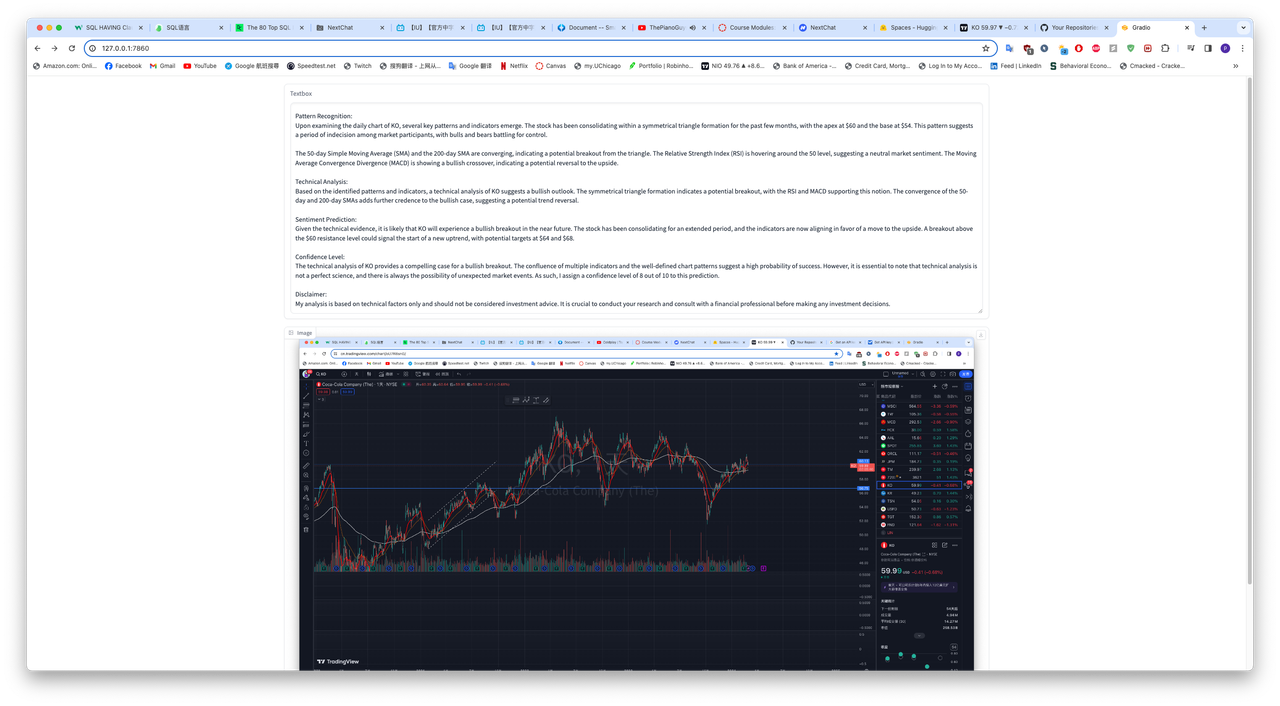


This project leverages Google's Generative AI API and Gradio to create an intuitive web interface for analyzing stock charts. Users can upload images of stock charts, and the application provides detailed analysis, including company overview, pattern recognition, technical analysis, and sentiment prediction. This tool is designed for traders, investors, and financial analysts looking to gain insights into potential future movements of stock prices based on historical chart patterns.
- Image Upload: Users can upload images of stock charts for analysis.
- Generative AI Analysis: Utilizes Google's Generative AI to interpret stock charts and provide detailed analysis.
- Intuitive Interface: Gradio-based web interface for easy interaction with the tool.
- Comprehensive Analysis: Offers insights including pattern recognition, technical analysis, and sentiment prediction.
Before you begin, ensure you have the following installed:
- Python 3.6 or later
- Pip package manager
Follow these steps to get your development environment set up:
- Clone the repository
git clone https://github.com/fuchenru/Stock-Chart-Analyzer.git- Install the required packages
pip install google
pip install gradio- Set up your Google Generative AI API key
Api_Key = "Your_Google_Generative_AI_API_Key_Here"To run the application:
python Stock Chart Analyzer.pyNavigate to the URL provided by Gradio in your terminal to access the web interface. Upload a stock chart image and receive an analysis.
- Google Generative AI - For generating content based on stock chart images.
- Gradio - For creating the web interface.
Contributions are what make the open-source community such an amazing place to learn, inspire, and create. Any contributions you make are greatly appreciated.
- Fork the Project
- Create your Feature Branch (
git checkout -b feature/AmazingFeature) - Commit your Changes (
git commit -m 'Add some AmazingFeature') - Push to the Branch (
git push origin feature/AmazingFeature) - Open a Pull Request
Distributed under the MIT License. See LICENSE for more information.
- The team at Google Cloud for providing the Generative AI API.
- The Gradio team for making it easy to build ML-powered apps.