

Go anywhere — a square, a village, a vineyard, a valley, a mountain ridge — and see what it is like to stand there. Drag two sliders, time of day and day of year, and real shadows move across the same 3D world Google Earth draws; switch on a layer and the ground shows which surfaces bake on a clear morning and stay warm on a clear night, how the air sits street by street, how the wind threads between the buildings. Hour by hour, season by season. No build step, no server: a folder of static files that runs on GitHub Pages.
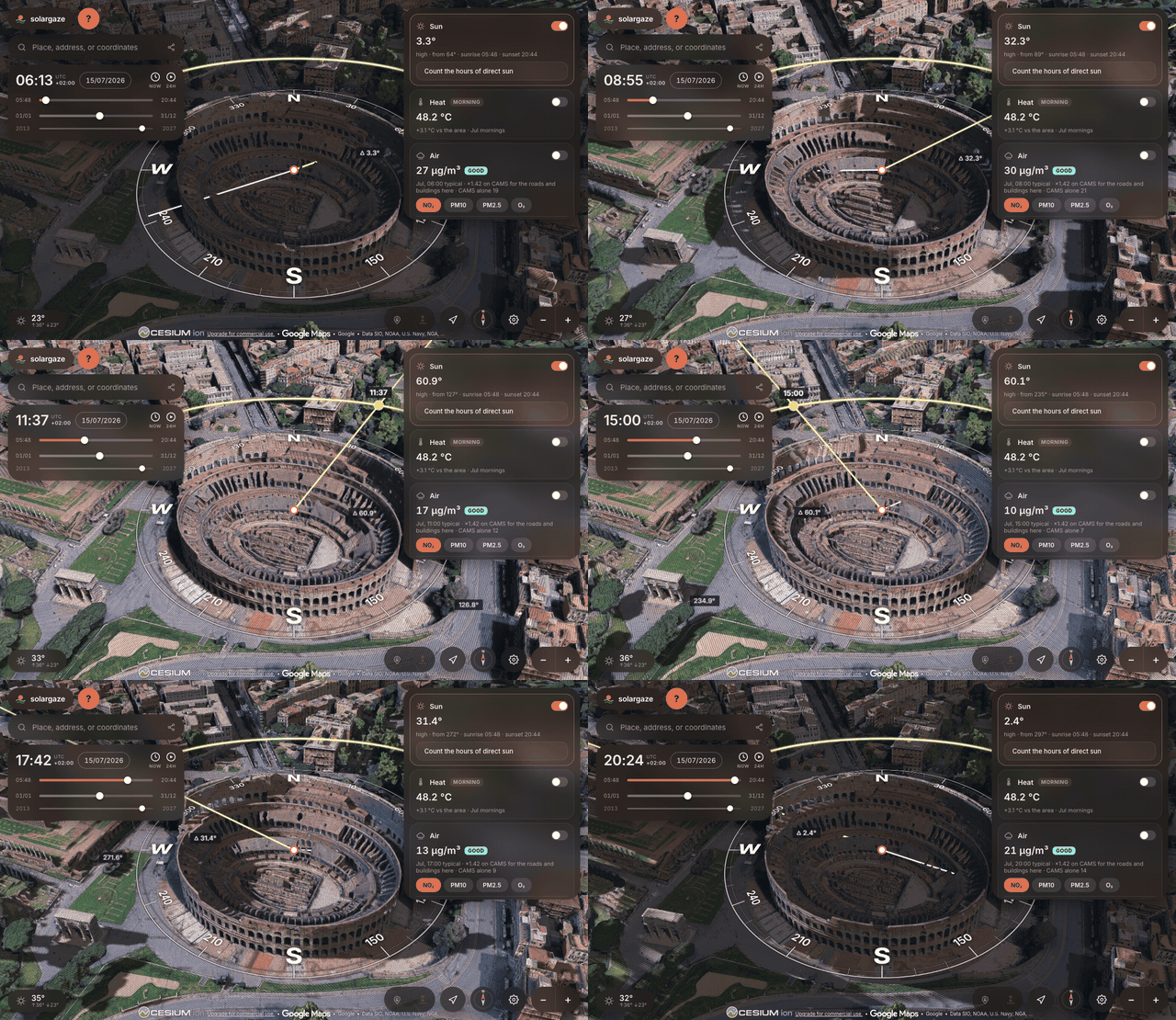
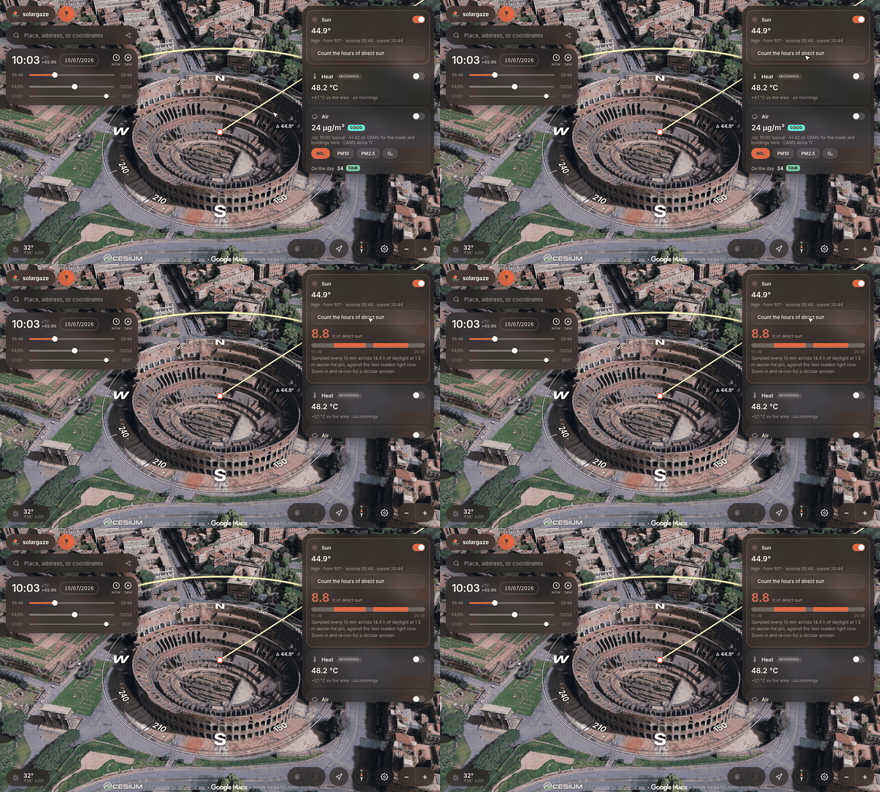
Sunrise to sunset over the Colosseum — try it live. The ring is a compass card lying on the ground, the glowing arc is the sun's track for that day, and the beam arrives from the sun's direction into the studied point.
- Google Photorealistic 3D Tiles as the world, via Cesium ion — real buildings, terrain and trees, shadows cast by the actual mesh.
- Two sliders: time of day (sunrise→sunset, or a full 24 h) and day of year, plus a date picker and a playback that sweeps the span in about half a minute.
- Sun path overlay: a graduated compass card on the ground, the day's arc, sunrise/sunset markers, live azimuth and elevation, and the shadow direction.
- Local wall clock at the place you are looking at, DST included.
- Sun-hours probe (ANALYZE tab): ray-casts against the loaded geometry to estimate hours of direct sun at the pin.
- Layers, by theme — switched on in the rail, read at the pin in the
ANALYZE tab, with their legend on the map — from products precomputed by
pipeline/over Europe and growing:- Heat: the surface temperature of roofs, streets, fields and rock by month, on a clear morning (Landsat, 90 m) and a clear night (ECOSTRESS from the Space Station, 70 m) — when a city gives back the day's heat; and the mornings of earlier decades back to 1984 (Landsat 5 and 7) on the year slider;
- Air: the five-year habit of NO₂, PM10, PM2.5 and ozone by month and hour, street by street at 50 m; before 2020, that month of that year since 2003 from the CAMS global reanalysis, in its 80 km blocks;
- Noise: road traffic as a day–evening–night level (Lden) at 10 m, modelled from the class of every OpenStreetMap road and screened by the buildings, calibrated on Berlin's official END noise map and checked on Hamburg's — within one 5 dB band on nine cells in ten;
- Pollen: grass, birch, alder, olive, mugwort and ragweed on the selected day, from the CAMS forecast or archive, each on its own bands;
- Light: how bright the night sky is overhead, in the magnitudes per square arcsecond a Sky Quality Meter reads, with its Bortle class and what is left of the Milky Way, year by year since 1992 on the year slider — each year's VIIRS night lights (NASA Black Marble; the older DMSP satellites before 2012, chained to VIIRS) spread by a glow kernel fitted on the World Atlas of Artificial Night Sky Brightness, within a factor of 1.5 of it on 94 cells in 100 where it was never fitted;
- Growth: what was built after the year on the slider, tinted over the 3D city of today — the JRC's Global Human Settlement Layer, the built-up share of every 90 m by five-year epoch from 1975 to 2020;
- Wind: the 10 m wind as drifting particles, threaded between the buildings where a tile carries them;
- and the selected day's weather and air, read at the pin.
- Shareable links that restore the exact view, date and time.
- Works on a phone: the panel becomes a bottom sheet, the camera answers to fingers, and the shadow and tile budgets start lower.
Out of scope: drawing, placing objects, editing the map.
The same four things the in-app guide walks through — press ? in the app to read it there, with the clips playing at full size.
The upper slider is the hour. Drag it and the sun walks its arc while every shadow in the mesh swings with it — the clock, the compass bearing and the elevation readout all follow. The ends of the slider are that day's sunrise and sunset, unless you ask for the full 24 hours in Settings.
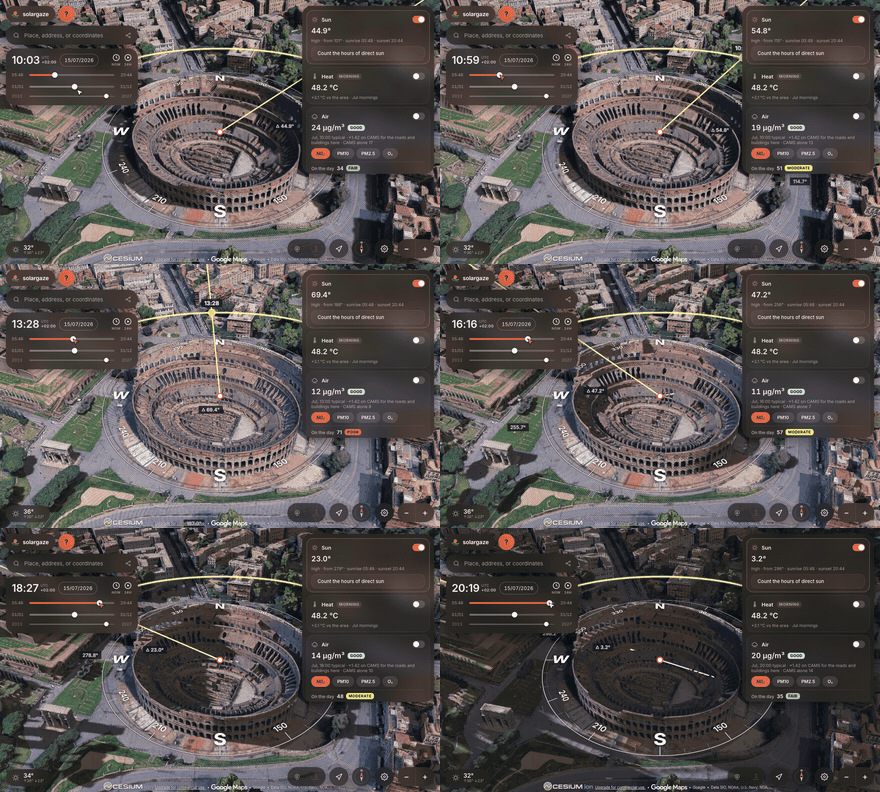
The lower slider is the day of the year, and it is the one that answers the questions worth asking. Hold the hour still and sweep it: the same balcony that takes full sun in June can sit in shadow all morning in December, because the sun rises further south and never climbs as high.
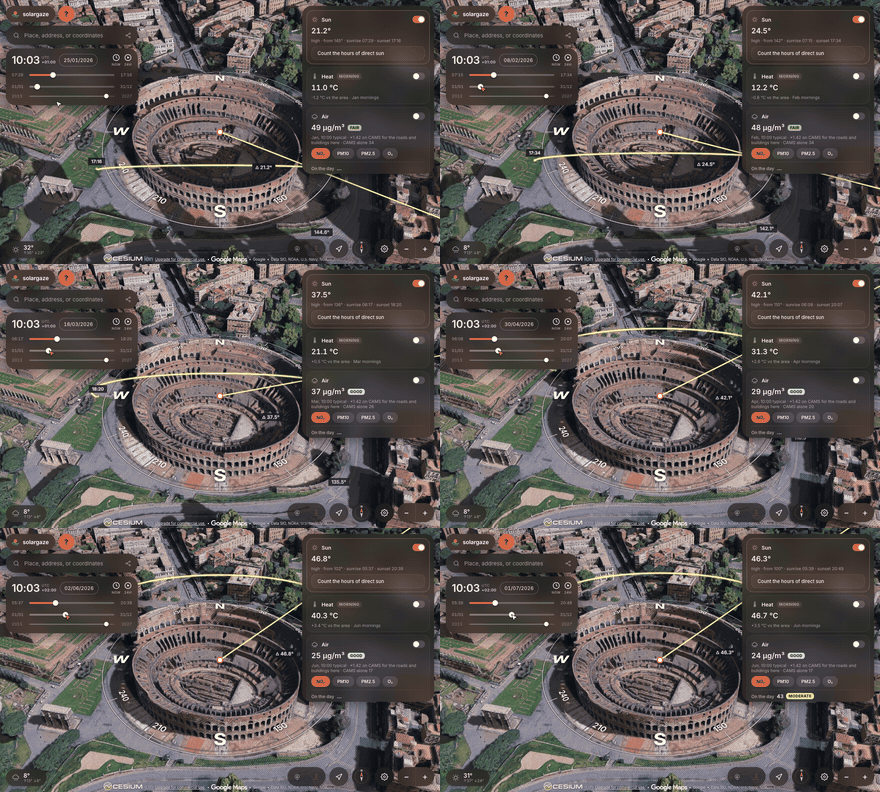
The studied point follows the middle of the view while the padlock is open, which is what you want while you are still looking around. Close the padlock and it stays put — and then you can pick it up and drop it exactly where you mean, on a doorway, a terrace, a particular window.
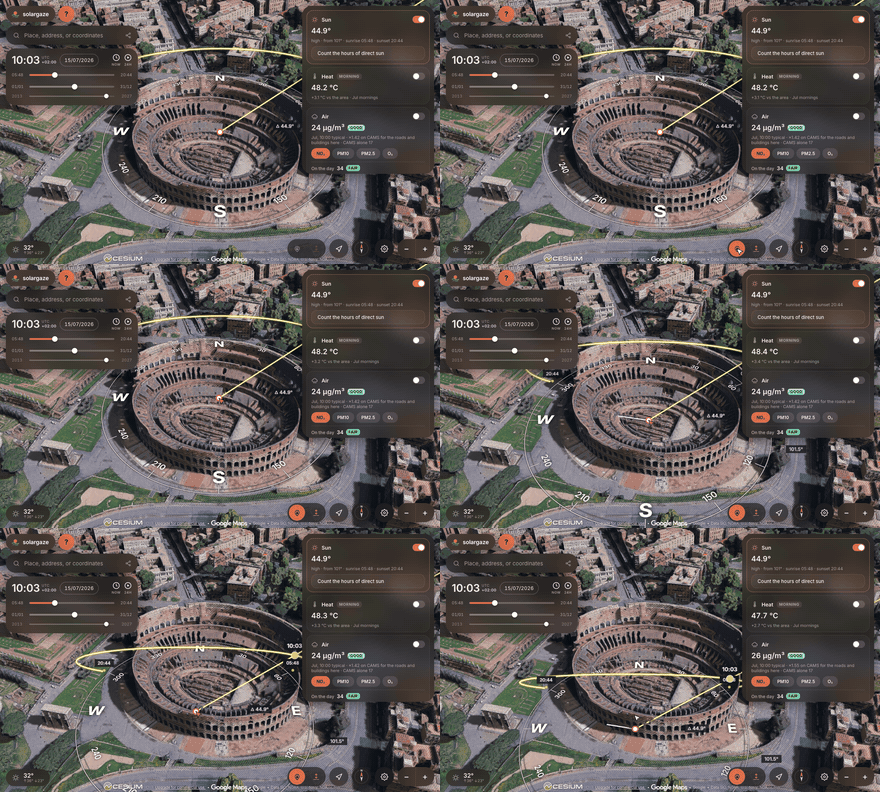
The ANALYZE tab ray-casts against the buildings actually around the point and counts the hours of direct sun it gets on the selected day, sampling every ten minutes. It can only test geometry that is currently loaded, so zoom in until the surroundings are sharp before you trust the number.
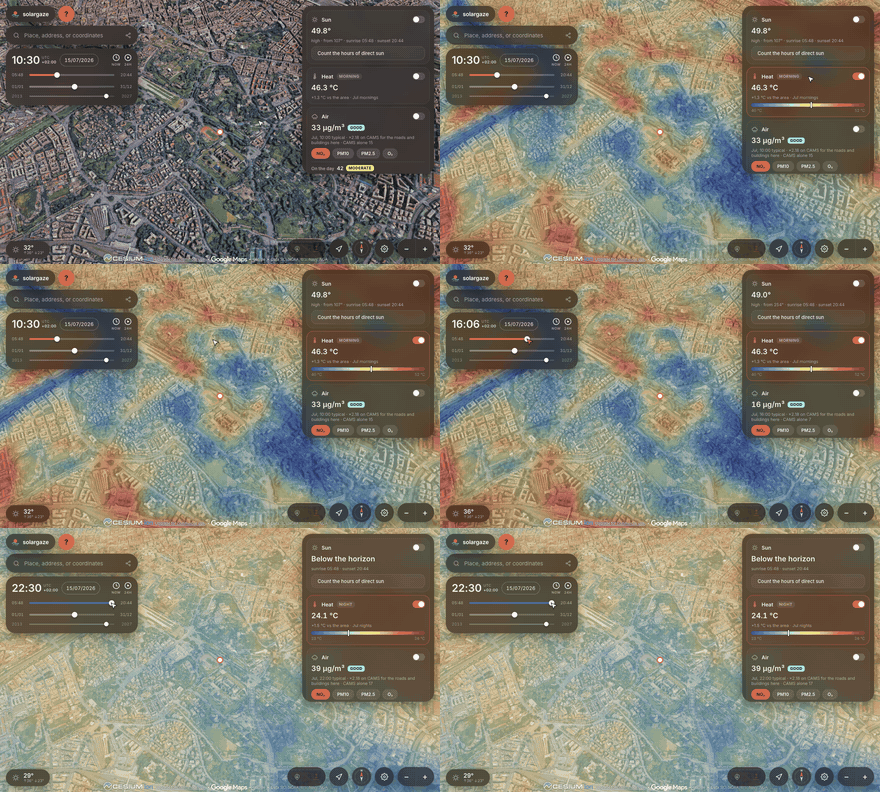
The map shows habits — what a place is like. Switch a layer on in the rail and its legend appears on the map, the point's value marked on it; the ANALYZE tab reads every layer at the pin, drawn or not. Heat is the temperature of the surface — roofs, streets, fields, rock — for the month on the date slider, coloured as an anomaly against the rest of the area, in two variants: the Morning, a per-pixel median of clear Landsat 8/9 scenes at about 10:30, and the Night, a median of clear ECOSTRESS passes between 21:00 and 05:00, when dense blocks stay warm and parks and fields cool. Air is the five-year CAMS habit for that month and hour, corrected street by street at 50 m by a land-use regression fitted to the EEA monitoring stations (NO₂ and PM10; ozone from NO₂ by titration; PM2.5 left as CAMS, where the model found nothing to add). Both are tints on the same ground, so one replaces the other. Wind is a cloud of particles with the model's 10 m wind; where the tile carries the building mask they drop to street level and thread between the buildings — a potential-flow model solved in a worker, channelling, shelter and corner gusts, no wakes.
What a given day was like is read rather than drawn: the weather chip gives
the temperature at the hour on the clock and the day's sky, from the forecast
or, back to 1940, the archive; Air on the day in ANALYZE gives the CAMS air
quality for the date and hour. Where no tile has been computed yet the map is
greyed rather than guessed.
See pipeline/README.md for what exists and how to
make more. Tiles and archived days are cached in the browser under a budget;
Settings shows the size and clears it.
Two honest limits, printed under the numbers. The models sit on grids of seven to eleven kilometres, so the gradient across a neighbourhood is interpolation between model cells, not measurement, and the wind is the regional wind rather than the flow between these particular buildings. And a day beyond the forecast horizon — about two weeks for weather, five days for air quality — is shown with the same date a year earlier, as a stand-in for the season, never as a prediction.
The map has focus by default; keys are ignored while you type in a field.
| Key | Does |
|---|---|
← → |
Time, ∓10 minutes (Shift for an hour) |
↑ ↓ |
Date, ∓1 day (Shift for 30) |
Space |
Start or stop the playback |
N |
Jump to the current local time at the pin |
The camera is on CesiumJS's own bindings, which are worth knowing because
Shift and Ctrl each turn a drag into something else. The app prints the
short version in a card in the bottom-right corner of the map.
| Mouse | Does |
|---|---|
drag |
Orbit around the point |
Shift+drag |
Look around from where you are |
Ctrl+drag, or middle+drag |
Tilt towards the horizon |
wheel, or right+drag |
Zoom |
drag the point |
Move it — once the padlock is closed |
On a phone or a tablet the same camera answers to fingers: one finger orbits, a pinch zooms, two fingers dragged up or down tilt, and twisted turn. The panel folds away behind its grab bar when you want the whole screen for the map, and the zoom buttons are gone because the pinch does their job.
Everything after # is written back to the address bar as you move, so the URL
is always a link to what you are looking at.
| Parameter | Means |
|---|---|
#ll=lat,lon |
The studied point |
#t=YYYY-MM-DDThh:mm |
Date and time, as the local wall clock there |
#cam=lat,lon,height |
Camera position, height in metres |
#hp=heading,pitch |
Camera heading and pitch, in degrees |
?ion=TOKEN |
Save a Cesium ion token, then scrub it from the URL |
?reset |
Forget everything this app stored, and reload |
Combine the hash ones with &. Malformed fields are ignored, not fatal.
SolarGaze will not open without a Cesium ion credential — the whole app is shadows cast by real geometry, and ion is the only route to it. A free account is all it takes: no Google Cloud project, no card on file. Three ways in, differing in whose quota gets spent.
Sign in with Cesium ion. Visitors approve once on Cesium's own page and the
tiles draw on their quota. OAuth 2.0 with PKCE — no client secret, no
backend. Register the app at ion → your username → Developer Settings → Add
Application, list every URL you serve from as a redirect URI, and put the
numeric client id in ION_CLIENT_ID in js/config.js.
Forking?
ION_CLIENT_IDships with the id of the fedepaj.github.io deployment, whose redirect URIs do not include yours. Replace it, or set it to''to hide the button and leave the paste-a-token route.
Paste a token. Sign up at ion, copy an
access token from the Access Tokens tab, paste it in. ?ion=TOKEN works too.
Ship a token. Set DEMO_ION_TOKEN in js/config.js and
visitors need nothing at all. Read the notes above that constant first: a token
in a static site is public, and every visitor's tiles are billed to you.
Settings → Reset, or ?reset, forgets the sign-in, any pasted token and
every preference.
npm run dev     # npx serve on http://localhost:5173
npm test        # node --test over the solar equations and the field maths
Any static server works — python3 -m http.server is fine. It must be http(s),
not file://, because the app is ES modules, and the browser needs WebGL.
CesiumJS comes from a CDN, pinned in index.html in three places
that move together. CESIUM_VERSION in js/config.js is a readable copy for
anything that reports it; editing it alone changes nothing.
# in js/config.js: point REPO_URL at your fork, replace ION_CLIENT_ID with your
# own registered application (or set it to ''), and set DEFAULTS to the place
# you want the app to open on
git commit -am "Point at my fork" && git push
In Settings → Pages, set Source to Deploy from a branch (main, root)
or to GitHub Actions and let
.github/workflows/pages.yml run. There is
nothing to build.
index.html            overlay markup
css/app.css           the whole visual design
docs/                 logo, the loop the connect screen plays, the five
                      clips the guide explains itself with, and the
                      screenshots the in-app ion walkthrough loads
test/                 node --test over solar.js and atmo/field.js
tools/record/         the recorder of the clips and GIFs (see below)
pipeline/             the offline scripts that fill data/tiles/ (Python)
data/tiles/           precomputed products per quarter-degree tile
manifest.webmanifest  so a phone can keep it on the home screen
js/
  solar.js            NOAA solar equations — pure, dependency-free, tested
  timezone.js         IANA zone for a lat/lon, DST-correct wall-clock maths
  state.js            single source of truth + a small pub/sub bus
  device.js           touch or mouse, phone or not; the budgets that follow
  scene.js            Cesium viewer, 3D tiles, shadow map, camera
  sunpath.js          the 3D overlay: compass card, day arc, readouts
  analyze.js          direct-sunlight-hours ray casting
  atmo.js             the engine: fetches what the enabled layers need and
                      hands each layer to its renderer
  atmo/
    layers.js         the themes (heat, air, wind) and what each kind of
                      data draws and says; a theme's variants come from
                      the catalog
    catalog.js        the pipeline's catalog of products (catalog.json),
                      with a built-in copy until it arrives
    sources.js        where the numbers come from: grid spacing, variables,
                      which endpoint serves which day
    field.js          the grid and its sampling, live and precomputed —
                      pure and tested
    tiles.js          reads data/tiles/ back into series, rasters, masks
    flow.js           the street-level wind, solved in flow.worker.js
    cache.js          Cache API with a ledger, a budget and an expiry
    scales.js         colour ramps and the EAQI bands
    openmeteo.js      one request per grid, cached
    drape.js          a scalar field painted onto the mesh (GroundPrimitive)
    wind.js           a vector field as drifting particles, and the vane
  ion-auth.js         Cesium ion sign-in (OAuth2 + PKCE, no backend)
  util.js             helpers with no home of their own
  app.js              bootstrap and wiring
  ui/                 timepanel, analyzepane, airpane, search, compass,
                      weather, usage meter, modals, toast, tooltip,
                      sunloader, offlinedemo, sheet (the phone layout)
Two sun calculations run side by side. CesiumJS derives the light direction
from clock.currentTime with its own ephemeris — that is what the shadow map
uses — while solar.js computes the numbers the interface prints. Feed the
clock the right UTC instant and both agree. Everything drawn is derived from
three inputs held in state.js: where the pin is, which day, what time; a
change to any of them recomputes once and the modules that care are notified.
window.solargaze exposes state, viewer, setLocation and setPref for
embedding or console work.
The animations on this page are not in this branch. GitHub strips <video> out
of Markdown and will not play .webm in its blob viewer, so the README needs
GIFs — but the app plays the much smaller WebM versions in docs/, and the
Pages workflow publishes everything committed here. So the GIFs live on the
orphan assets branch and
are linked by absolute URL, leaving both main and the deployed site without
them. All of them — the GIFs, the clips the guide plays and the connect
screen's loop — are recorded by tools/record/
frame by frame on the real mesh at the Colosseum, so a change to the
interface is a re-run rather than a screen capture.
The reasoning behind the less obvious choices lives next to the code that makes them, not here.
Sun geometry is good to well under a tenth of a degree, rise/set times to about
half a minute. The spot-check — Turin, 19 Sep 2026, elevation 42.65° and
azimuth 151.18° at 12:00 CEST, sunrise 07:12, sunset 19:33 — is asserted in
test/solar.test.mjs.
Rise and set use the standard 90.833° zenith, which allows for the sun's semidiameter and mean refraction. Elevation and azimuth readouts are geometric, matching the shadows. The ANALYZE probe samples every 10 minutes from a sensor 1.5 m above the pin and can only test tiles currently loaded, so zoom in before trusting it.
What limits the result is the mesh: Google's tiles are photogrammetry, so trees, awnings and thin structures are approximate and the lighting baked into the imagery is not removed. A very good study, not a survey.
In the order they earn their keep, with what each needs:
- Versioned module paths, so a deploy never mixes an old
state.jswith a newtimepanel.jsin a visitor's cache (an import map stamped at deploy). - Air quality at street scale: monitoring stations (ARPA via OpenAQ, Sensor.Community) folded into the CAMS tables as local corrections.
- Noise, rail and air: trains, trams and airports beside the roads, and a night level (Lnight).
- Green: Copernicus Tree Cover Density at 10 m, the same tile shape as the surface heat.
- Sun hours per pixel: what ANALYZE computes for a point and a day, precomputed for a tile and a month.
- Flood hazard: ISPRA's PGRA bands via WMS.
- The wind rose from the archive.
- An index at the point, combining the layers with weights of your own.
The precomputed products move from Open-Meteo to Copernicus in bulk
(pipeline/air_cams_bulk.py already does air quality from the ADS); the
This date mode and the weather badge stay on Open-Meteo, the only keyless
source a browser can query directly.
SolarGaze is free software under the GNU Affero General Public License, version 3 or any later version (AGPL-3.0-or-later) — see LICENSE. Copyright © 2026 SolarGaze contributors. If you run a modified copy for others to use, the licence asks that you offer them its source. The pieces it stands on are not yours to relicense:
- CesiumJS — Apache-2.0.
- Google Photorealistic 3D Tiles — governed by the
Google Maps Platform Terms.
Two obligations matter: the attributions Cesium renders at the bottom of the
map must stay visible, and while the tiles are displayed the search box
must use Google's geocoder. The app routes search through ion's
Google-backed geocoder with the mesh on screen, and Nominatim on the flat
basemap — see
js/ui/search.js. - Cesium ion — how the tiles and the geocoder are reached; usage follows your ion plan and Google's terms above.
- OpenStreetMap (fallback basemap) — ODbL, © OpenStreetMap contributors.
- Open-Meteo (weather badge, heat, air quality and wind) — CC-BY 4.0. Air quality is Copernicus Atmosphere Monitoring Service (CAMS) data, served by Open-Meteo or, for the precomputed tables, fetched in bulk from the Copernicus Atmosphere Data Store under its licence, which asks that the source be credited: "Generated using Copernicus Atmosphere Monitoring Service information".
- Landsat 8/9 surface temperature (USGS, public domain), read through Microsoft Planetary Computer's STAC catalogue by the pipeline.
- OpenStreetMap building footprints for the wind product — ODbL.
- tz-lookup — timezone boundary data, CC0.
Not affiliated with, or endorsed by, Google.