This extension is specifically build to be integrated into Stable Diffusion WebUI's ControlNet extension.
I really liked the original editor: it is a cool, practical tool for adjusting a pose without having to start over. Unfortunately, it no longer worked correctly end to end in my sd-webui-forge-classic 2.28.1 setup. Rather than leave such a useful tool behind, I migrated it and fixed the problems I found, with a little help from AI. I am sharing the result in the hope that it will be useful to other people in the community too.
The changes are concrete and deliberately limited to this compatibility work:
- OpenPose points on the top or left canvas edge are no longer mistaken for missing points;
- non-binary detector confidence values survive editing and export;
- the ControlNet iframe bridge validates the sender, origin, and message shape;
- pose data received through the FastAPI page is embedded as inert JSON rather than executable JavaScript;
- background images are fully loaded before their scale and lock state are applied;
- the compiled frontend updater uses timeouts, rejects unsafe ZIP paths, and
replaces
distatomically instead of modifying a live installation in place.
This is still an OpenPose editor, not a Krea 2 pose ControlNet model. It produces and edits pose JSON/previews for the ControlNet workflow; the final generation also requires a control model compatible with the checkpoint being used. The fork targets Forge Classic 2.28.1 and does not claim to make every WebUI, ControlNet model, or future Forge version compatible automatically.
Install this Forge-compatible branch with:
https://github.com/fabiencomte/sd-webui-openpose-editor.git
The compiled frontend is downloaded only from the matching release of this fork. It is never replaced with an upstream build that lacks these fixes.

ControlNet 1.1.216+
From ControlNet extension v1.1.411, users no longer need to install this extension locally, as ControlNet extension now uses the remote endpoint at https://huchenlei.github.io/sd-webui-openpose-editor/ if no local editor installation is detected. Local installation is still recommended if you have poor internet connection, or have hard time connecting to github.io domain.


On UI restart, the extension will try to download the compiled Vue app for the
exact checked-out version from this fork's GitHub release. Check whether
stable-diffusion-webui\extensions\sd-webui-openpose-editor\dist
exists and has content in it.
Some users in China have reported having issue downloading dist with the autoupdate script. In such situtations, the user has 2 following options to get dist manually:
Make sure you have nodeJS environment ready and follow Development section.
Run npm run build to compile the application.
You can download the compiled application(dist.zip) from the
release page.
Unzip the package in the repository root and make sure hte unziped directory is
named dist.
The openpose editor core is build with Vue3. The gradio extension script is
a thin wrapper that mounts the Vue3 Application on /openpose_editor_index.
The user can directly access the editor at localhost:7860/openpose_editor_index
or https://huchenlei.github.io/sd-webui-openpose-editor/
if desired, but the main entry point is invoking the editor in the ControlNet
extension. In ControlNet extension, select any openpose preprocessor, and hit
the run preprocessor button. A preprocessor result preview will be genereated.
Click Edit button at the bottom right corner of the generated image will bring
up the openpose editor in a modal. After the edit, clicking the
Send pose to ControlNet button will send back the pose to ControlNet.
Following demo shows the basic workflow:
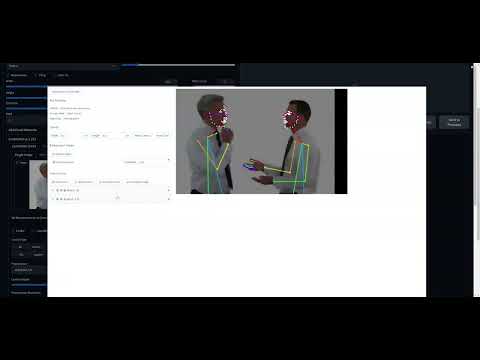
- Support for face/hand used in controlnet.
- The extension recognizes the face/hand objects in the controlnet preprocess results.
- The user can add face/hand if the preprocessor result misses them. It can
be done by either
- Add Default hand (Face is not supported as face has too many keypoints (70 keypoints), which makes adjust them manually really hard.)
- Add the object by uploading a pose JSON. The corresponding object of the first person will be used.
- Visibility toggle
- If a keypoint is not recognized by ControlNet preprocessor, it will have
(-1, -1)as coordinates. Such invalid keypoints will be set as invisible in the editor. - If the user sets a keypoint as invisible and send the pose back to controlnet, the limb segments that the keypoint connects will not be rendered. Effectively this is how you remove a limb segment in the editor.
- If a keypoint is not recognized by ControlNet preprocessor, it will have
- Group toggle
- If you don't want to accidentally select and modify the keypoint of an canvas object (hand/face/body). You can group them. The grouped object will act like it is a single object. You can scale, rotate, skew the group.
VSCode + Volar (and disable Vetur) + TypeScript Vue Plugin (Volar).
TypeScript cannot handle type information for .vue imports by default, so we replace the tsc CLI with vue-tsc for type checking. In editors, we need TypeScript Vue Plugin (Volar) to make the TypeScript language service aware of .vue types.
If the standalone TypeScript plugin doesn't feel fast enough to you, Volar has also implemented a Take Over Mode that is more performant. You can enable it by the following steps:
- Disable the built-in TypeScript Extension
- Run
Extensions: Show Built-in Extensionsfrom VSCode's command palette - Find
TypeScript and JavaScript Language Features, right click and selectDisable (Workspace)
- Run
- Reload the VSCode window by running
Developer: Reload Windowfrom the command palette.
See Vite Configuration Reference.
npm installnpm run devnpm run buildRun Unit Tests with Vitest
npm run test:unitLint with ESLint
npm run lint